Schedule Feeds Your Way With
Custom Refresh Interval For Product Feeds

Schedule feed updates by frequency, day, and start time to match your store’s workflow.

Flexible Scheduling

Day-Based Updates

Better
Timing

Performance Friendly

Per-Feed
Control

1000+ WordPress.org Reviews
WPBeginner Verified
WPBeginner Verified
Screenshot of a product feed setup showing Google Shopping as the selected channel, with a dropdown listing many sales channels.
FEATURED ON
CEO featured on business.com
Featured on LearnWoo

Set A Custom Refresh Interval That Fits Your Store

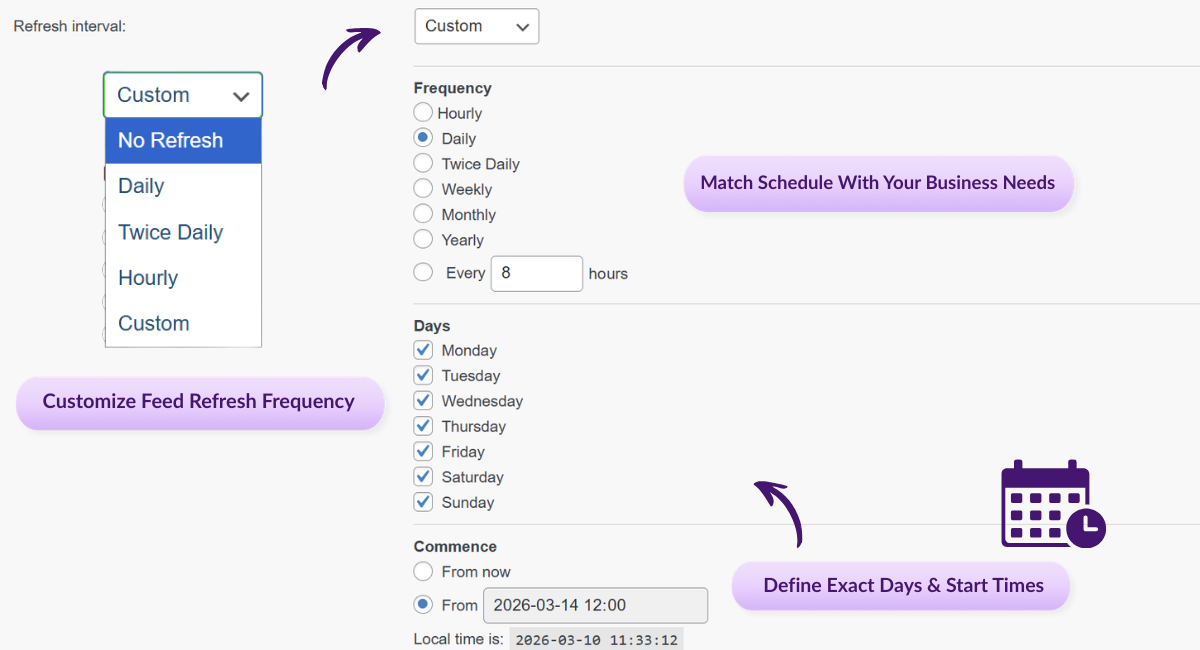
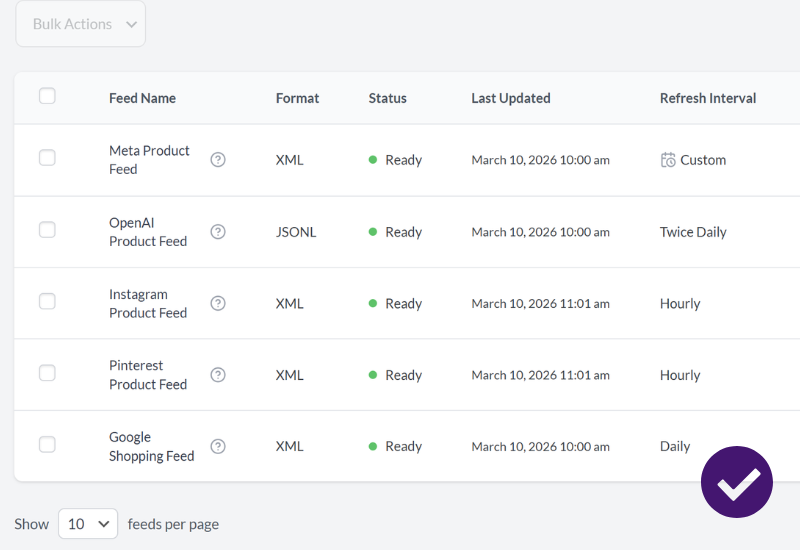
Custom refresh interval gives you more control over product feed scheduling, so you can update feeds when it makes the most sense for your store, your campaigns, and your server resources. Instead of relying only on standard timing options, you can choose the frequency, days, and exact start time for each feed.

Flexible Scheduling

Choose refresh timing that fits your business instead of being limited to basic presets. You can build schedules around how often your catalog actually changes.

Day-Based Control

Pick specific days of the week for feed updates, which is helpful for weekday-only operations, campaign timing, or reduced weekend processing.

Start Time Precision

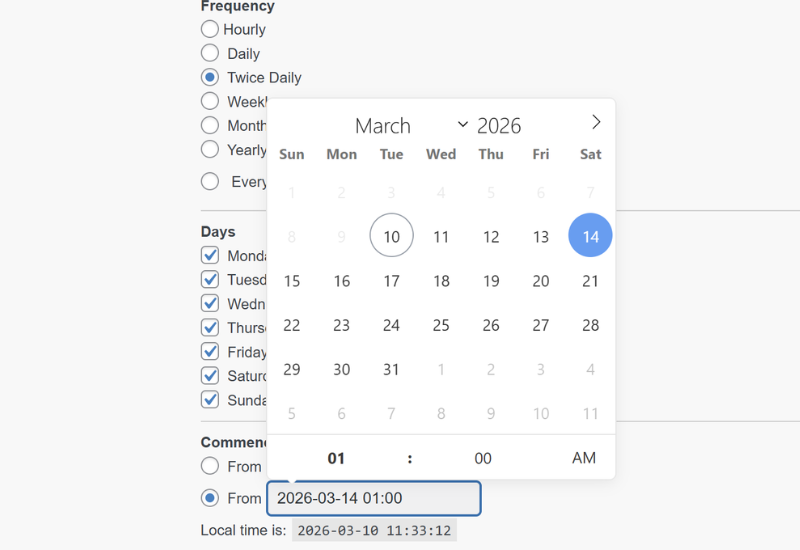
Set an exact time for the schedule to begin, such as early morning or late evening, so updates happen when you want them to.

Better Store Performance

Schedule refreshes during quieter hours to reduce pressure on your site during peak browsing and checkout times. Especially useful for larger catalogs or multiple feeds.

Marketing Alignment

Coordinate feed updates with flash sales, promotions, and campaign launches so pricing, stock, and product data are fresh before traffic spikes.

Feed-Specific Scheduling

Each feed can have its own schedule, making it easier to tailor update timing by platform, campaign, or client needs.

How It Works

🔨 Open Your Feed Settings
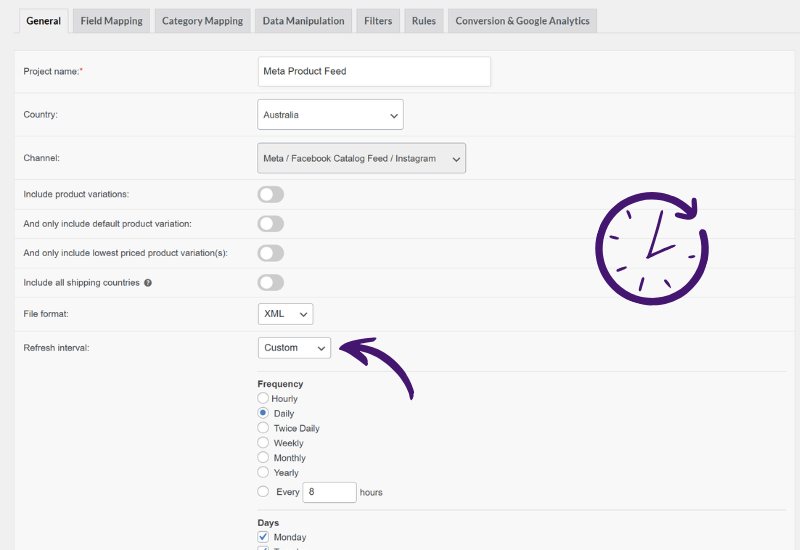
Create a new feed or edit an existing one, then go to the General tab where the Refresh Interval setting is located.
 
🧩 Select Custom
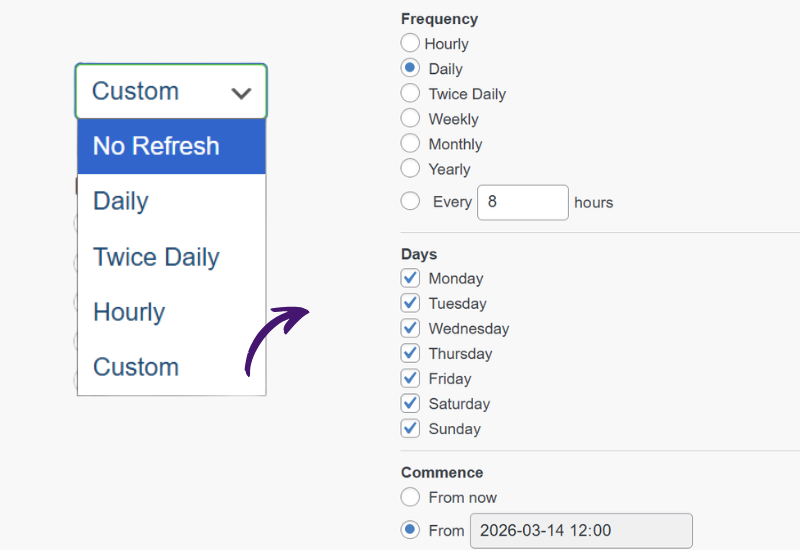
Choose Custom from the refresh interval dropdown to unlock advanced scheduling options for that feed.
 
⏱️ Configure Your Schedule
Set the refresh frequency, choose the days you want updates to run, and define the exact start time. This gives you much more control over your product feed schedule.
 
💾 Save And Let It Run
Save the feed, and AdTribes will follow the new schedule on the next scheduled refresh. You can later adjust the timing whenever your business needs change.
Feed Validator

Here's Why Store Owners ❤️ 
Custom Refresh Interval For Feeds

Compliant WooCommerce Product Feed

More Control Over Feed Timing

You decide when feeds refresh instead of working around rigid defaults. That makes it easier to match update timing to inventory changes, working hours, or campaign plans.

Better Performance Planning

Running feed updates during low-traffic periods can help reduce load during busy shopping hours. That means a smoother experience for your customers and more control for your team.

Create WooCommerce Product Feeds
Automatic product feed updates

Campaign Readiness

When promotions go live, your product data needs to be ready too. Custom scheduling helps you refresh feeds before marketing pushes so listings reflect the latest pricing and stock. 

Ideal For Multi-Feed Stores

Different feeds often need different timing. With per-feed scheduling, stores and agencies can tailor refresh patterns by platform, workflow, or client requirements.

Product Feed filters & rules

Other Powerful Features To Explore

Product Feed Elite is packed with tools to save you time and grow your sales. Here are more features worth exploring.

100s Of Templates

Quickly expand your reach and boost sales with ready-made templates for Google, Facebook, Bing, and 100s of other sales channels.

Unlimited Products & Feeds

Scale without limits by generating unlimited feeds for any number of products, whether you run a small shop or a large ecommerce store.

Currency & Language Switchers

Expand globally with accurate, fully optimized product listings by creating WooCommerce product feeds in multiple currencies and languages.

A cute panda wearing a vibrant, feathered headdress poses against a purple patterned background, radiating playful, festival vibes.

Automated Field Mapping

Save time and stay compliant by automatically matching your product attributes to each channel’s requirements.

Simplified Category Mapping

Boost visibility by mapping your store’s categories to each channel’s system, ensuring products are always placed where shoppers expect.

Shipping Classes & Zones Support

Keep shoppers confident with accurate shipping costs in your feeds, using data from WooCommerce zones, classes, and table rate plugins.

Structured Product Data Fixes

Automatically resolve structured data issues so your variable products stay active and approved on Google Shopping and other channels.

Product Variations Support

Showcase every product option by including variations like size, color, and material as individual listings in your feeds.

Advanced Filtering & Rules

Tailor your feeds to match your goals by filtering products and applying rules, so your listings stay optimized for every channel.

Product Data Manipulation

Fine-tune your feeds by replacing, adjusting, or adding custom values so your product data meets each channel’s exact requirements.

Extra Product Fields

Add essential identifiers like GTIN, MPN, and EAN along with extra attributes, so your products meet sales channel requirements.

Product Feed Previews

Quickly test your setup by generating preview versions of feeds, making it easy to catch errors and fine-tune before going live.

Google Analytics Support

Track what drives sales by adding UTM tags to your feeds, making it easy to measure each channel’s performance in Google Analytics.

Pixel & Remarketing Support

Use Meta/Facebook Pixel, Conversion API, and Google Dynamic Remarketing Pixel to capture conversions and optimize your ads.

Product Feed Statistics

See exactly how many products make it into each feed after every refresh, giving you instant insights into feed coverage and accuracy.

Feed Validation Tool

Scan your feeds for errors like missing attributes or invalid URLs so you can fix issues early and keep products compliant.

Official Plugin Integrations

Seamlessly connect with 20+ popular WooCommerce extensions, ensuring your feeds stay compatible with the tools you already use.

Frequently Asked Questions
Custom Refresh Intervals

Curious about how AdTribes’ Custom Refresh Interval works for product feeds? We’ve answered the most common questions to help you get started.

What is a custom refresh interval for product feeds?A custom refresh interval lets you control exactly when and how often a product feed updates. Instead of relying only on fixed timing options, you can choose the frequency, days, and start time that best fit your store.

How is this different from standard refresh intervals?Standard refresh intervals use preset timing like hourly, daily, or weekly. A custom refresh interval gives you more flexibility by letting you build schedules around specific business hours, weekdays, and campaign timing.

Can I choose specific days for feed updates?Yes. You can select which days of the week a feed should refresh, which is useful for weekday-only businesses, planned promotions, or reduced weekend processing

Can I set an exact start time for the schedule?Yes. AdTribes lets you choose the exact time the schedule should begin, such as 2:00 AM or 6:00 AM, so feed updates run when it’s most convenient for your store.

Can each feed have a different custom schedule?Yes. Each feed can be configured with its own custom refresh settings, which makes it easier to tailor update timing by platform, campaign, or client.

Is this feature available for new and existing feeds?Yes. You can set a custom refresh interval when creating a new feed or edit an existing feed and switch its refresh interval to Custom.


How often can I refresh a product feed?You can set your feeds to refresh as frequently as hourly, though it’s recommended to choose a schedule that balances freshness with server resources. For many stores, updating a few times a day or only on certain days may be more efficient.

Does this work with all feed types and channels?Yes. Custom refresh intervals work with all supported feed formats and channels.

What happens if I change the schedule later?You can edit the feed and update the custom schedule at any time. The new timing begins from the next scheduled refresh after you save the changes.

Is custom refresh interval available in the free version?No.  It's available in AdTribes Product Feed Elite, which is the paid version of AdTribes. 

Start Using Custom Refresh Interval Today

Schedule product feed updates around your business hours, marketing calendar, and store performance needs with more control and flexibility.

Complete Your Purchase
AdTribes WooCommerce Product Feed

The best WooCommerce product feed plugin

  • AdTribes Pty Ltd
    ABN: 40 675 636 816
Product