Create Richer Listings With
WooCommerce Extra Product Fields

Add GTIN, MPN, UPC, Brand, and more extra fields for richer, more compliant product feeds.

Custom
Fields

Better
Visibility

Brand
Support

Channel
Compliance

Add GTIN
& MPN

1000+ WordPress.org Reviews
WPBeginner Verified
WPBeginner Verified
Screenshot of a product feed setup showing Google Shopping as the selected channel, with a dropdown listing many sales channels.
FEATURED ON
CEO featured on business.com
Featured on LearnWoo

Easily Add Extra Product Fields To Product Feeds

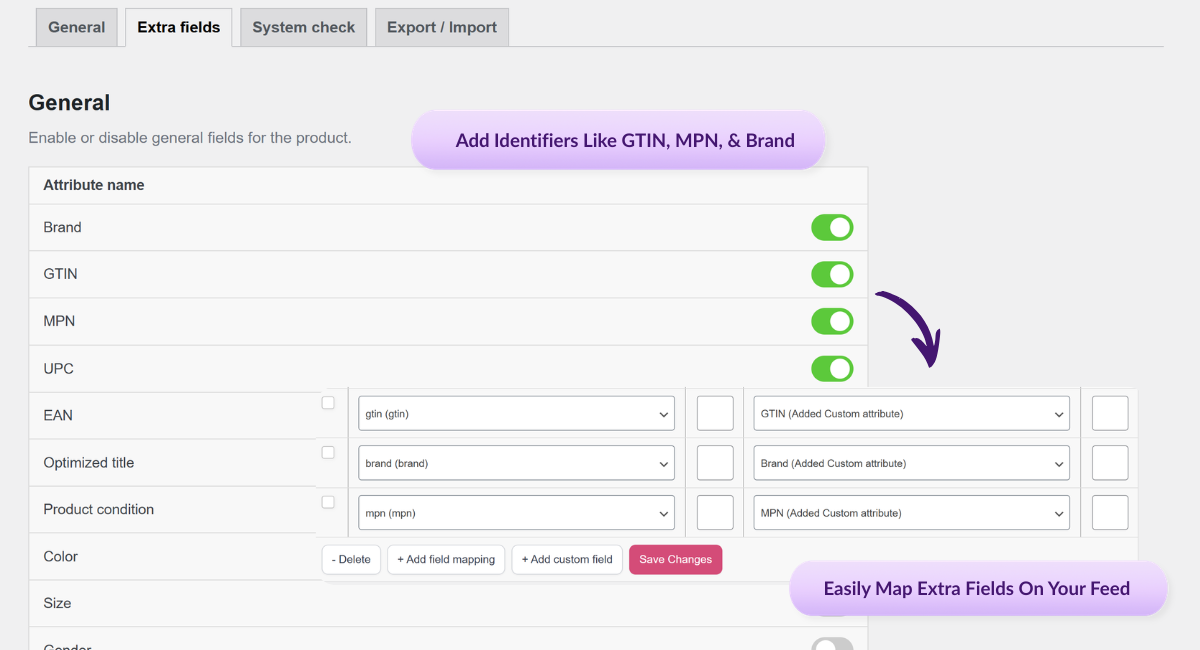
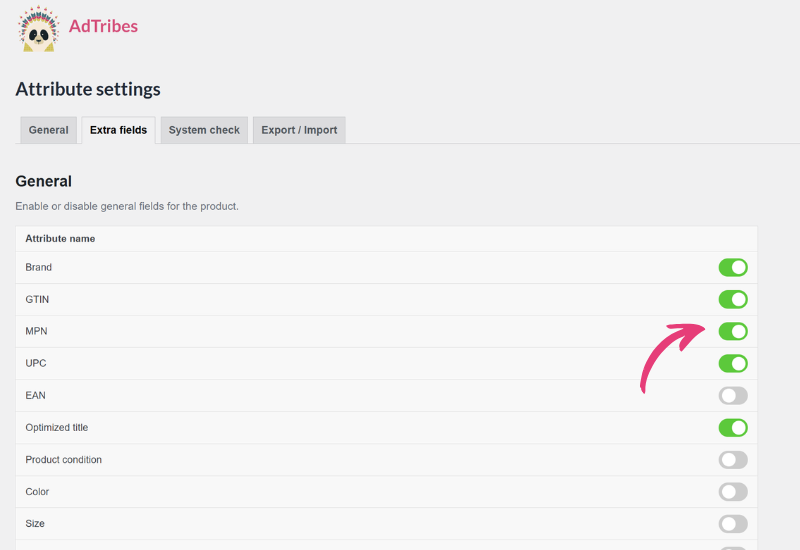
AdTribes lets you add WooCommerce extra product fields like Brand, GTIN, EAN, MPN, UPC, Optimized Titles, and more. Once enabled, these fields can be used on simple and variable products, then mapped into your feeds for the channels that need them. 

Key Identifiers

Add important identifiers like GTIN, MPN, UPC, EAN, and Brand so your listings carry the product data many sales channels expect. This helps your feeds look more complete and channel-ready.

Better Channel Compliance

Some channels require certain identifiers before they’ll fully accept or properly classify a product. Adding the right extra fields helps reduce missing-data issues and supports smoother approvals.

Improved Product Visibility

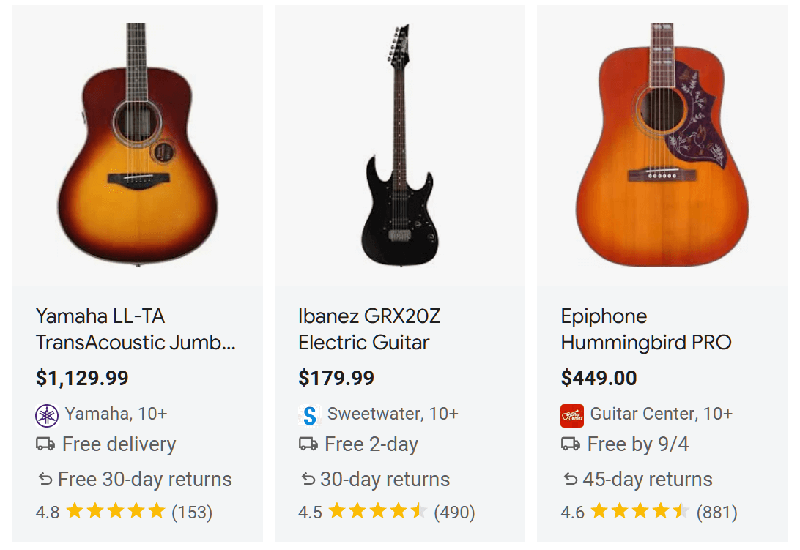
Extra product data helps platforms understand what you’re selling more accurately. That can improve categorization and discoverability. 

Works With Variable Products

Enabled extra fields appear on both simple and variable products, so you can capture the data you need across more complex catalogs without patchwork workarounds.

Flexible Custom Fields

When a channel needs extra information that isn’t already built into your product setup, AdTribes also provides custom fields you can add and map into the feed. That gives you more flexibility for channel-specific requirements.

Smarter Feed Mapping

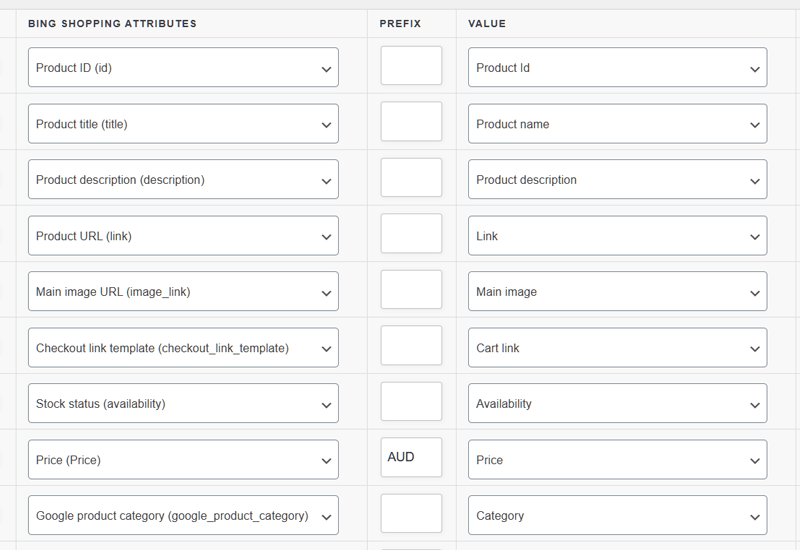
Once your extra fields are enabled, you can map them directly in the Field Mapping step using the matching feed attributes. That makes it easier to send the right data to the right channels without manual edits. 

How It Works

📝 Enable Extra Fields
Go to Product Feed Elite → Settings → Plugin settings and turn on the extra fields option. Then open the Extra Fields tab and enable the specific attributes you want to use.
 
➕ Add Values To Your Products
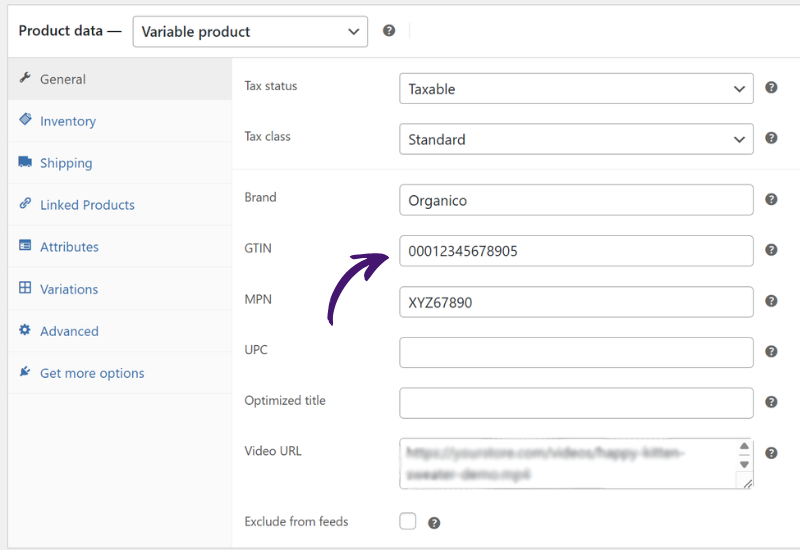
Once enabled, those fields appear on your product edit screens for simple and variable products. From there, you can fill in identifiers and other extra data directly inside WooCommerce.
 
✅ Map The Fields In Your Feed
In the Field Mapping step, match the channel attribute to the correct AdTribes value, such as Brand, GTIN, or MPN. 
 
🎨 Add Custom Fields If Needed
If a channel needs extra data that isn’t already listed, use + Add custom field, assign the attribute name, match it to the correct value, then finish your feed setup and generate the feed.
Feed Validator

Here's Why Store Owners ❤️ 
WooCommerce Extra Product Fields

Product Feed filters & rules

More Complete Listings

When your product feeds include identifiers and other useful attributes, listings become easier for channels to understand and process. That supports cleaner product data across platforms. 

Fewer Missing Attribute Issues

Extra fields help fill the gaps that default WooCommerce data often leaves behind. That makes it easier to meet channel requirements without relying on extra plugins or manual feed edits.

Compliant WooCommerce Product Feed
Automatic product feed updates

More Flexibility Per Channel

Not every sales channel needs the same data. With built-in extra fields plus custom fields, store owners can tailor feeds more precisely to what each channel expects.

Better Control Over Product Data

Instead of forcing one-size-fits-all product info into every feed, this feature gives you more control over what identifiers and attributes are sent. That helps stores manage data more confidently as they expand across channels.
Other Powerful Features To Explore

Product Feed Elite is packed with tools to save you time and grow your sales. Here are more features worth exploring.

100s Of Templates

Quickly expand your reach and boost sales with ready-made templates for Google, Facebook, Bing, and 100s of other sales channels.

Unlimited Products & Feeds

Scale without limits by generating unlimited feeds for any number of products, whether you run a small shop or a large ecommerce store.

Currency & Language Switchers

Expand globally with accurate, fully optimized product listings by creating WooCommerce product feeds in multiple currencies and languages.

Scheduled Feed Updates

Keep listings accurate with automatic feed updates whenever products change, on the schedule that works best for your store.

Automated Field Mapping

Save time and stay compliant by automatically matching your product attributes to each channel’s requirements.

Simplified Category Mapping

Boost visibility by mapping your store’s categories to each channel’s system, ensuring products are always placed where shoppers expect.

Shipping Classes & Zones Support

Keep shoppers confident with accurate shipping costs in your feeds, using data from WooCommerce zones, classes, and table rate plugins.

Structured Product Data Fixes

Automatically resolve structured data issues so your variable products stay active and approved on Google Shopping and other channels.

Product Variations Support

Showcase every product option by including variations like size, color, and material as individual listings in your feeds.

Advanced Filtering & Rules

Tailor your feeds to match your goals by filtering products and applying rules, so your listings stay optimized for every channel.

Product Data Manipulation

Fine-tune your feeds by replacing, adjusting, or adding custom values so your product data meets each channel’s exact requirements.

A cute panda wearing a vibrant, feathered headdress poses against a purple patterned background, radiating playful, festival vibes.

Product Feed Previews

Quickly test your setup by generating preview versions of feeds, making it easy to catch errors and fine-tune before going live.

Google Analytics Support

Track what drives sales by adding UTM tags to your feeds, making it easy to measure each channel’s performance in Google Analytics.

Pixel & Remarketing Support

Use Meta/Facebook Pixel, Conversion API, and Google Dynamic Remarketing Pixel to capture conversions and optimize your ads.

Product Feed Statistics

See exactly how many products make it into each feed after every refresh, giving you instant insights into feed coverage and accuracy.

Feed Validation Tool

Scan your feeds for errors like missing attributes or invalid URLs so you can fix issues early and keep products compliant.

Official Plugin Integrations

Seamlessly connect with 20+ popular WooCommerce extensions, ensuring your feeds stay compatible with the tools you already use.

Frequently Asked Questions
Extra Product Fields For Feeds

Curious about how WooCommerce extra product fields work for product feeds? We’ve answered the most common questions to help you get started.

What are WooCommerce extra product fields for product feeds? WooCommerce extra product fields are additional attributes you can add to products for feed purposes, such as GTIN, MPN, UPC, EAN, Brand, Product Condition, and more. They help you send richer product data to shopping channels and marketplaces.

Which extra product fields can I add with AdTribes?AdTribes supports extra fields including Brand, GTIN, EAN, MPN, UPC, Color, Size, Gender, Material, Pattern, Product Condition, Age Group, Installment fields, Unit Pricing fields, Optimized Title, and custom fields. The exact field you use depends on your channel and product needs.

Is this feature available in the free version?No. WooCommerce extra product fields are available in the Premium version, not the free version.

Do extra product fields work on simple and variable products?Yes. Once enabled, the extra fields appear on both simple and variable products, so you can manage identifier data across more product types.

How do I add GTIN, MPN, UPC, EAN, or Brand to my feed?Enable the fields in Product Feed Elite settings, fill in the values on your product edit screens, then map those values in the feed’s Field Mapping step. After that, generate or refresh the feed so the data is included.

Can I add custom fields if a channel needs extra data?Yes. AdTribes includes custom fields you can use when a required attribute isn’t already available in your setup. You can create the custom attribute, map it to the right value, and include it in the feed.

What if my products don’t have GTINs or other official identifiers?If your products don’t have official identifiers, don’t invent or copy values. Instead, use the identifier_exists attribute appropriately and only provide valid identifier data when it truly exists.

Do all sales channels require the same extra fields?No. Required identifiers vary by channel, which is why it helps to use feed templates and map the fields each channel expects.

Can extra product fields help reduce feed rejections?Yes. Adding the right identifiers and attributes can help you meet marketplace requirements more fully, which lowers the chance of missing-data issues and rejected listings.


Start Using WooCommerce Extra Product Fields Today

Add the identifiers and extra attributes your feeds need to improve visibility, support compliance, and send more complete product data across channels.

Complete Your Purchase
AdTribes WooCommerce Product Feed

The best WooCommerce product feed plugin

  • AdTribes Pty Ltd
    ABN: 40 675 636 816
Product