
Product Feed Elite + Curcy Currency Switcher

Create product feeds in specific currencies and target the countries you want to reach, ensuring your pricing displays accurately across different markets and platforms.
Product Feed Elite is fully integrated with Curcy Currency Switcher, allowing your web store to seamlessly support multiple currencies and cater to international customers.
When generating XML product feeds, you can specify the currency to be used, ensuring your feeds meet the requirements of different marketplaces or platforms.
To take full advantage of this integration, simply make sure that all desired currencies and their corresponding exchange rates are properly configured within Curcy Currency Switcher. This ensures accurate pricing and a consistent shopping experience for customers across all regions.
1- Go to Product Feed Elite > Settings, then enable the Curcy Currency Switcher support option.

2- In your General Feed Settings, you’ll see a new field called Aelia Currency. Select the desired currency for your feed. The available options will depend on your Aelia Currency Switcher configuration.
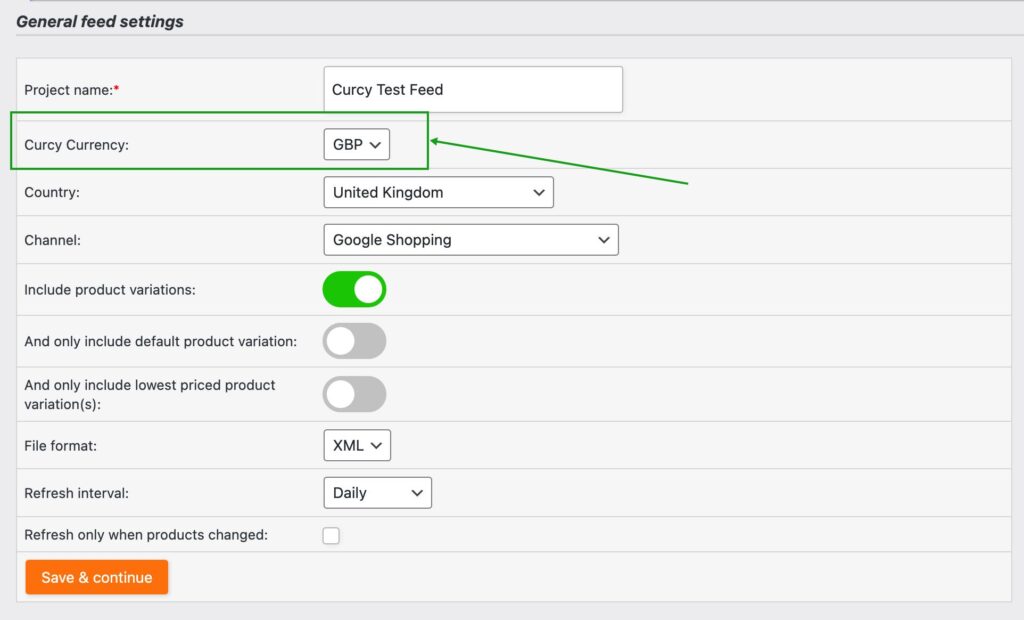
3- On the Field Mapping, ensure that the following suffix is added to the link attribute &wmc-currency=USD
Replace USD with the currency you selected—for example, use: &wmc-currency=GBP for Great British Pounds

Stop losing sales. Join 90,000+ store owners using Product Feed Pro for WooCommerce to reach more shoppers on Google, Facebook, and 100+ sales channels.






The best WooCommerce product feed plugin
