MonsterInsights Pro includes a dedicated Product Feed report that helps you measure how well your product feeds and shopping campaigns perform in your store. When you integrate Product Feed with MonsterInsights Pro, you’ll be able to see which feed-driven landing pages attract visitors, which products engage users, and how these visits convert.
This guide walks you through how the integration works and what data you’ll see inside MonsterInsights.
The integration is available between the free version of the Product Feed and the premium version of the MonsterInsights plugin.
How the Integration Works
Product Feed automatically sends product-level pageview and session data to Google Analytics. MonsterInsights Pro then pulls that data into your WordPress dashboard and displays it in the e-commerce reports.
Once the integration is active, MonsterInsights creates a new Product Feed section under Insights → Reports → eCommerce. This gives you a clear view of how users interact with the product URLs generated by your feed.
Where to Find the Report in MonsterInsights
- Log in to your WordPress dashboard.
- Go to Insights in the left-hand menu.
- Click the eCommerce dropdown.
- Select Product Feed.
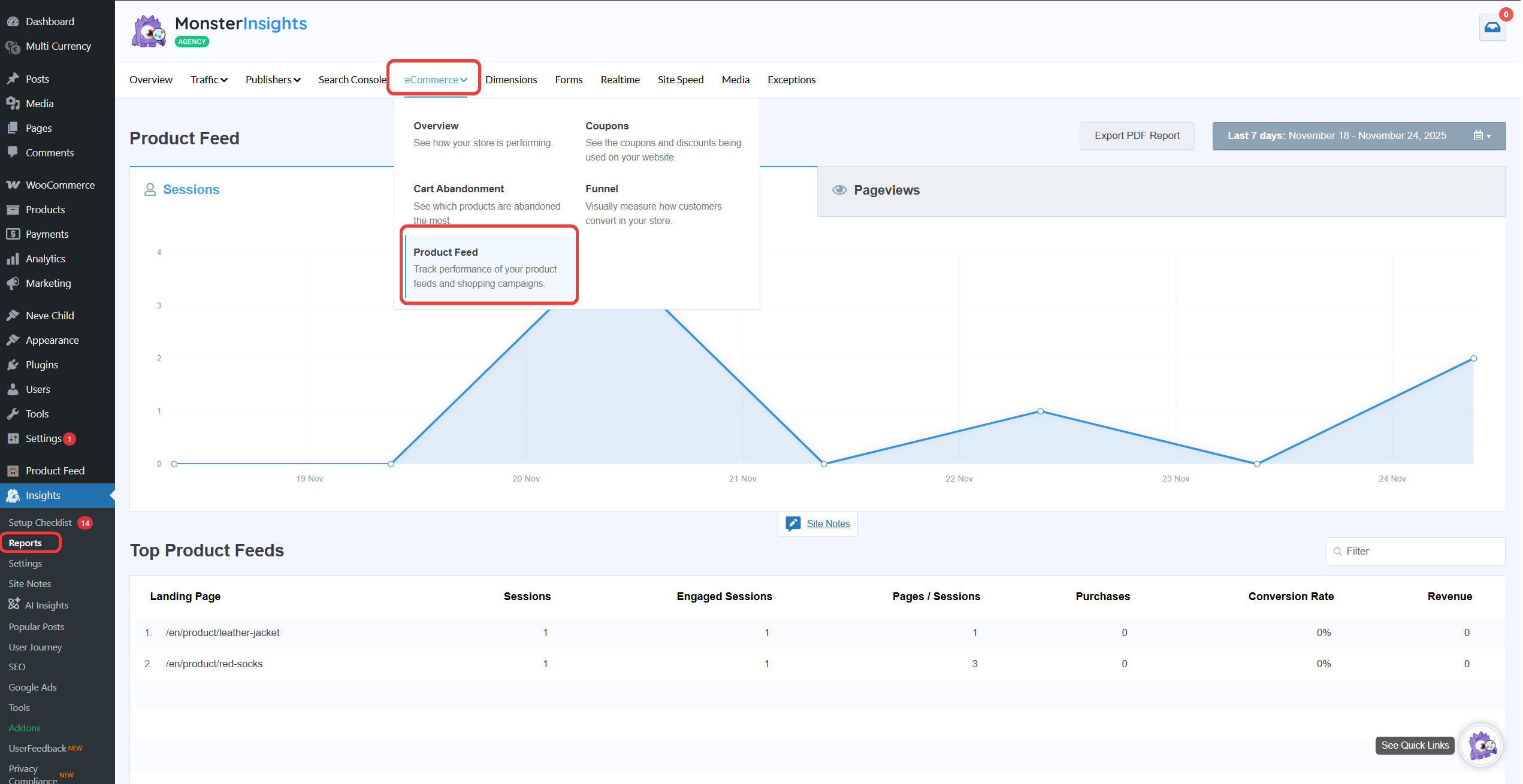
You’ll see a chart and table similar to the screenshot:
What the Product Feed Report Shows
1. Sessions and Pageviews
The line chart at the top of the report displays daily sessions from visitors who landed on your store through product feed URLs. This helps you track traffic trends from Google Shopping, Facebook Catalog, TikTok Shop, Pinterest, and other connected channels.
2. Top Product Feeds Table
This section highlights the landing pages (product URLs) that received the most traffic from your feed.
For each product URL, you’ll see:
- Sessions
How many visits came through the product feed link. - Engaged Sessions
Sessions that lasted long enough or included meaningful interactions. - Pages per Session
The number of pages visitors viewed on average. - Purchases
How many orders came from that product feed traffic. - Conversion Rate
The percentage of sessions that led to a purchase. - Revenue
Total revenue generated by those product feed-driven sessions.
This detailed breakdown helps you understand which products attract quality traffic and which listings may need optimization.
Why Use the Product Feed + MonsterInsights Integration
- See ecommerce performance without leaving WordPress
- Quickly identify top-performing feed products
- Measure how feed-driven traffic engages with your store
- Spot products with high traffic but low conversion
- Optimize your product titles, images, or pricing based on real data
- Improve ROI from Google Shopping and other feed-based ads
With MonsterInsights Pro, you get easy-to-understand analytics that help you make informed decisions about your feed strategy.
Troubleshooting Tips
If the Product Feed report doesn’t show data:
- Make sure MonsterInsights Pro is installed and connected to Google Analytics.
- Confirm that your product feed URLs are receiving traffic.
- Allow up to 24 hours for Google Analytics to process new data.
- Check that Enhanced eCommerce is enabled in MonsterInsights.
If you use caching or speed optimization plugins, clear your site cache after enabling the integration.
Need Further Assistance?
The integration part is handled entirely by MonsterInsights. If you run into any issues with the analytics report, their support team will be the best point of contact.
If you need help with anything related to Product Feed, feel free to reach out to us. Our team is always happy to assist. You can create a new ticket to get in touch.
Please note that ticket support is available only for Product Feed ELITE users.
If you’re using only the Product Feed Pro plugin, you can open a new topic in the WordPress.org support forum.