Reviewed by
Well-timed ecommerce product recommendations can help boost cart value and enhance the overall shopping experience. By suggesting relevant products throughout the buying journey, shoppers feel guided, understood, and more likely to complete their purchase with confidence. Save this guide, for we’ll help you get started with this strategy!
Below, we’ll break down what ecommerce product recommendations are and why they matter. We’ll also reveal actionable strategies you can start using today to offer better product recommendations and unlock more revenue for your WooCommerce store.
What Are Ecommerce Product Recommendations?
Ecommerce product recommendations are personalized product suggestions displayed to customers while they shop from your store. To ensure relevance, they’re often based on the customer’s browsing data, purchase history, or saved wishlist items. These suggestions typically appear in key areas of your store, such as the homepage, product pages, cart page, and even in email campaigns.
Product recommendations improve the overall shopping experience for customers by guiding them toward products that match their needs and interests. When done well, they reduce decision fatigue, encourage product discovery, and help boost conversions.
Why Are Ecommerce Product Recommendations Important?
Modern shoppers are bombarded with countless product choices every day. By showing them the right products at the right time, you create a more meaningful shopping experience and a smoother path to purchase.
According to industry insights, online shoppers who engaged with recommended products have a 70% higher conversion rate. A study by Invesp also found that 45% of ecommerce shoppers are more likely to shop on websites that offer personalized recommendations.
Here are just a few benefits of this strategy:
- Increases average order value: Suggesting complementary items encourages customers to add more to their cart.
- Boost conversion rates: Relevant product suggestions nudge customers to complete their purchase.
- Improves product visibility: Recommendations highlight products that might not have been discovered by the shopper through regular browsing.
- Enhances the customer experience: Personalized recommendations make shoppers feel understood, encouraging them to return and buy from your store again.
Effective Ecommerce Product Recommendation Strategies
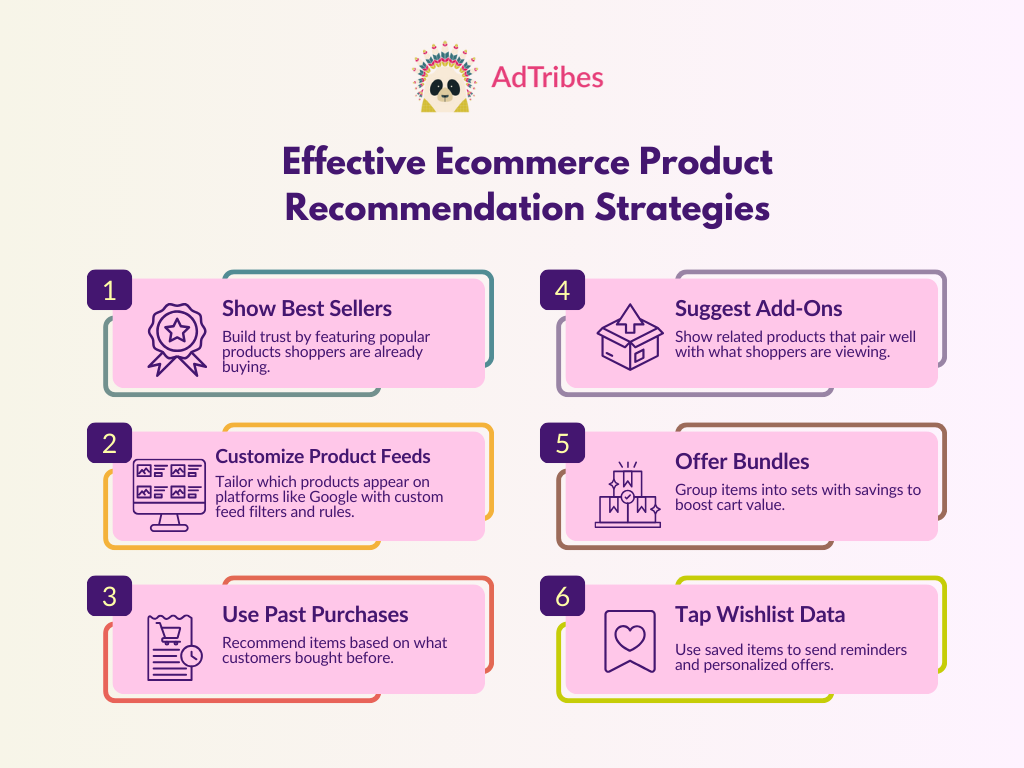
We’ve got you covered if you’re not sure where to start. Below, we list simple but effective ecommerce product recommendation strategies you can start implementing today:
1. Highlight best sellers for social proof
Showcasing best sellers prominently on your website is one of the simplest yet effective ways to recommend products. Because these items are already performing well, they act as social proof for shoppers. Shoppers may think: “If others are buying this, then it must be good!” It’s a great way to reduce hesitation, especially for new shoppers discovering your brand for the first time.
Most brands add a dedicated Best Seller tab or section on their homepage. Take a look at this example from The Body Shop: the brand groups its best-selling items into a dedicated tab, making it easy for shoppers to browse their most popular products at a glance.
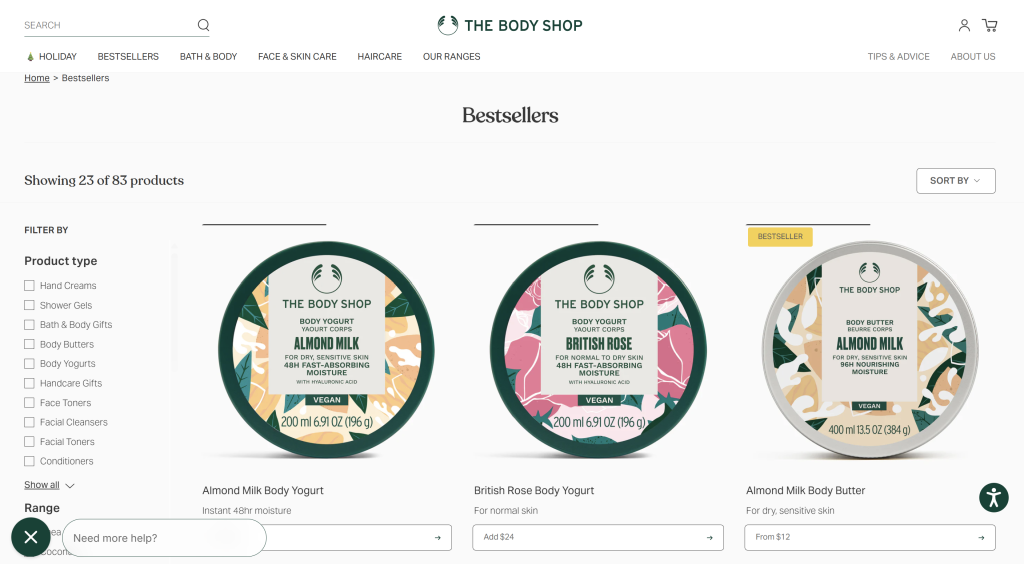
(click to zoom) (Image Source: The Body Shop)
You can also explore adding labels like “Most Popular” or “Customer Favorite” on your product pages. These visual cues give customers extra confidence to make that purchase, especially when they’re deciding between similar products.
2. Create product feeds for different sales channels
To boost product visibility, it’s important to showcase your products on sales platforms like Google Shopping, Meta, Pinterest, and TikTok. Each of these platforms has different formatting requirements, performance goals, and target audiences. With customized product feeds, you can tailor which products get shown and where, ensuring each platform promotes the most relevant items for browsing shoppers. This results in smarter, more relevant product recommendations.
Plugins like AdTribes allow you to create product feeds and set specific filters and rules to customize which products appear on the channels you’re selling to. WooCommerce store owners we’ve worked with use the plugin to:
- Create unlimited product feeds for different marketing channels
- Use advanced filters and rules to include or exclude products based on tags, categories, price, stock, or performance
- Automatically update your feeds on a schedule so your data is always fresh
- Add custom labels for trending items or high-converting products
Customizing your feeds for every channel powers better ecommerce product recommendations that guide shoppers confidently. You can choose to showcase best sellers, highlight product bundles, or exclude certain items, ensuring that what gets recommended is relevant and timely.
New to product feeds? Check out our complete guide here.
3. Personalize based on past purchases
You can learn a lot about your customers by looking at their order history. Their past purchases reflect their needs, preferences, and buying habits, making it easier to suggest products they’re most likely to love. It’s also a great way to let customers know you’re paying attention, which can go a long way in building trust.
Here are a few ways to implement this strategy in your store:
- On-site suggestions: Add a “You might also like” section on product pages based on their past purchases
- Post-purchase email: Send personalized product suggestions a few days after a completed order, tailored to what they bought
- Repeat orders: If you sell consumable products or those that need to be re-ordered regularly (such as vitamins, skincare, or pet supplies), consider sending reminders based on the customer’s purchase cycle
4. Recommend complementary products
Complementary products are items that naturally go well with what the shopper is already viewing or buying. For example, if your customer is buying a tumbler, you might recommend a bottle brush for cleaning or a matching thermal sleeve. These suggestions help customers get more value out of their purchase by completing a look or fulfilling a related need, which enhances the value of their overall purchase.
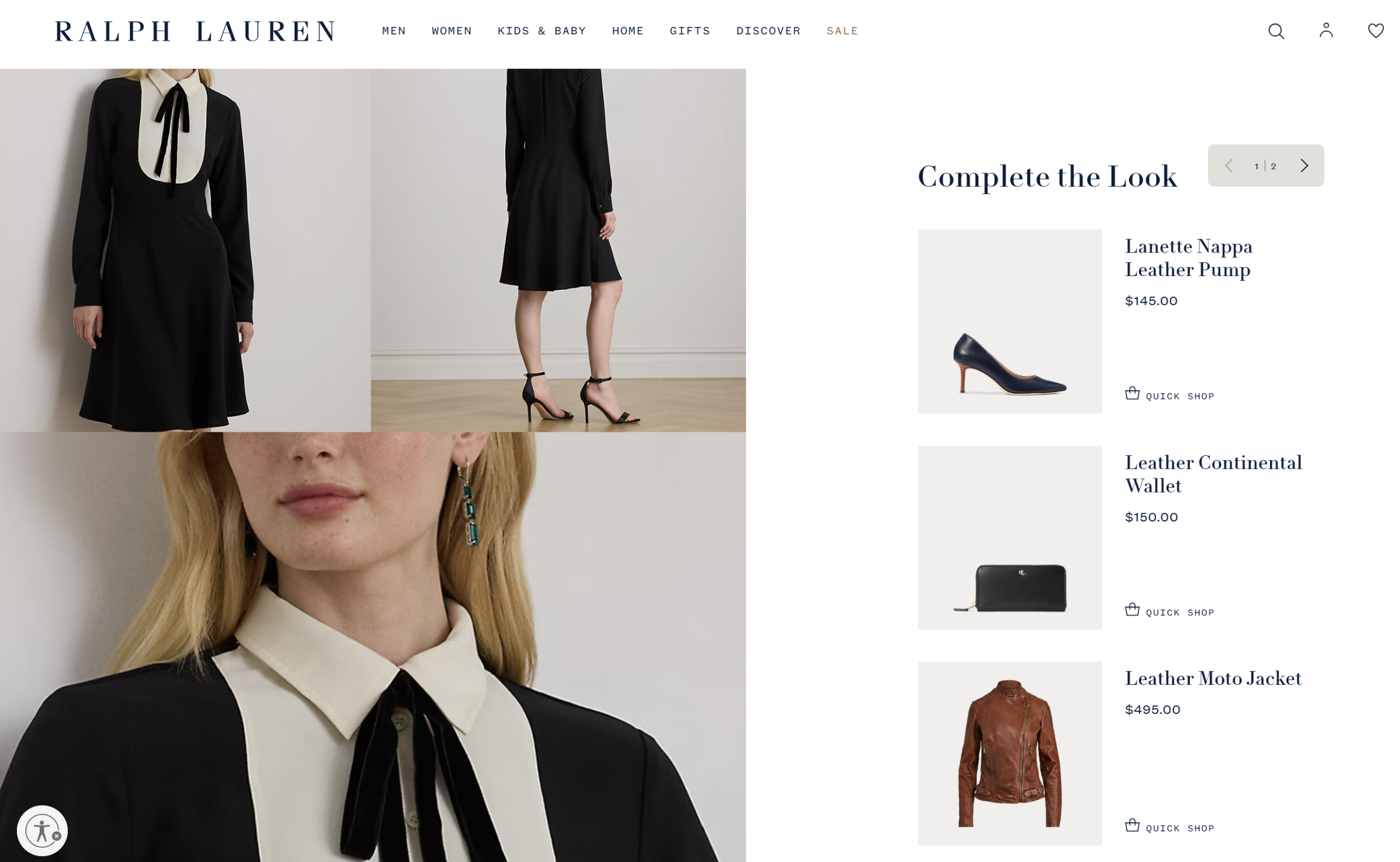
Some big fashion brands do this by showcasing matching items right on the cart or product pages. Take a look at this example from Ralph Lauren: the brand displays a “Complete the Look” section on the product page, suggesting shoes and accessories that pair with the featured dress. This makes it easier for customers to visualize the look and add to cart.
In WooCommerce, you can set related products (such as upsells and cross-sells) right within the default product settings. Upsells appear on the product page, while cross-sells appear on the cart page and are meant to encourage last-minute purchase add-ons.
5. Create bundles or “frequently bought together” sets
If you want to take the last strategy we’ve covered a step further, consider creating product bundles for items that naturally go well together. This simplifies decision-making for buyers and increases perceived value. It’s also a great way to increase average order value in your store.
To make the offer more enticing, consider offering a small incentive for customers. For example, you can highlight bundle savings (e.g., “Save 10% when you buy this set”) and show how much customers can save by opting for the bundle.
Here’s a great example from Sephora:
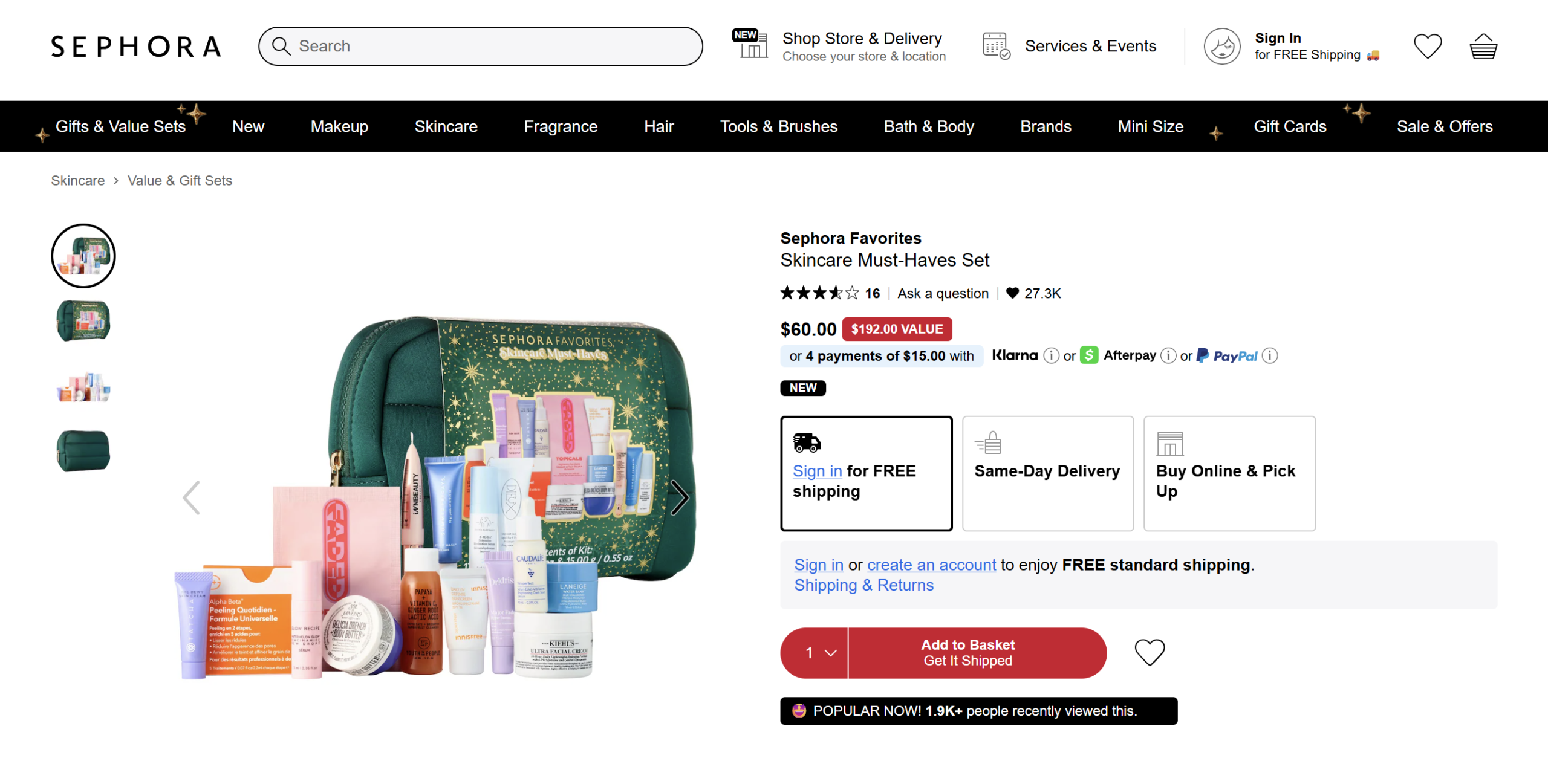
The brand offers a curated skincare set with clear savings: $60 for a $192 value. This makes it easier for shoppers to explore bestsellers while feeling like they’re getting an amazing deal.
🎯 POWER TIP: You can also set up Buy X Get Y discounts to encourage customers to add complementary products to their carts. Plugins like Advanced Coupons allow you to easily set these offers up in WooCommerce.
6. Use wishlist data for future recommendations
What’s in your shopper’s “wishlist” tells you exactly what they like and the products they might come back for later. Using these insights to tailor future product recommendations lets you create a more thoughtful and personalized shopping experience.
WooCommerce store owners can use plugins like SaveTo Wishlist to capture this valuable data. This plugin lets customers save the items they love, giving you clear insights into which products they’re most interested in.
Here are some ways you can tap into these insights:
- Remind customers about their saved items: Include saved wishlist items in cart-abandonment or re-engagement emails.
- Customize marketing campaigns: Use wishlist insights to segment your audience and send more personalized offers, product updates, or restock alerts.
- Recommend similar or complementary items: You can also use wishlist data to recommend alternatives and relevant products.
A great example is from Uniqlo:
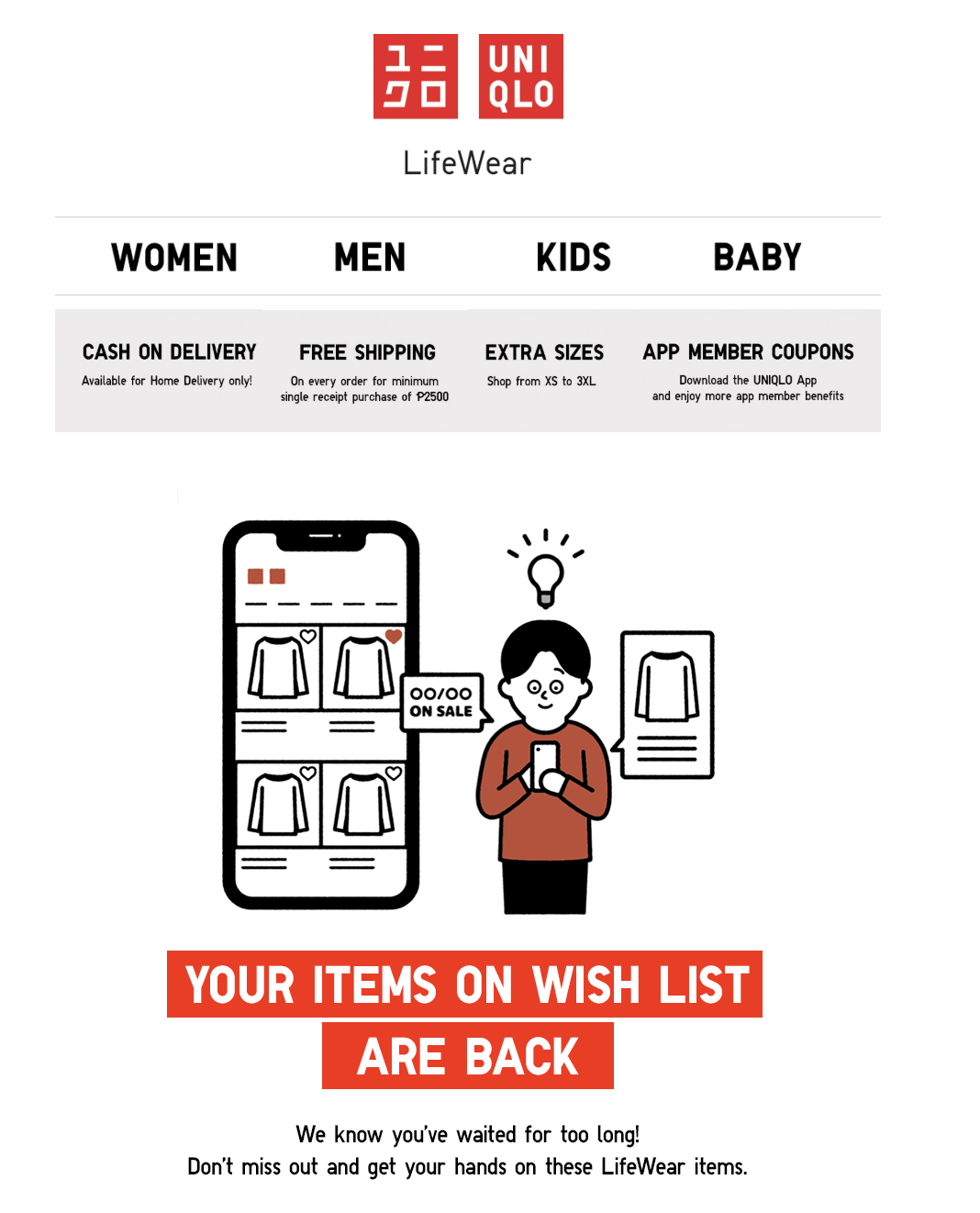
The fashion brand sends out regular email campaigns that inform shoppers when items on their wishlists are back in stock or on sale. This helps re-ignite interest, while also showing customers you’re paying attention to their preferences.
Frequently Asked Questions
What are ecommerce product recommendations and how do they work?
Ecommerce product recommendations are personalized suggestions displayed to customers based on their browsing data, purchase history, or wishlist items. They appear in key areas of the store to guide shoppers towards relevant products, improving their shopping experience and boosting sales.
Why are ecommerce product recommendations important for my online store?
They create a more meaningful shopping experience by showing the right products at the right time, increasing conversion rates, expanding product visibility, and making customers feel understood, which encourages them to return and shop again.
What are some effective strategies to implement ecommerce product recommendations?
You can highlight best sellers for social proof, create product feeds for different sales channels, personalize suggestions based on past purchases, recommend complementary products, create product bundles, and use wishlist data to inform future recommendations.
Wrapping Up
Smart and well-timed ecommerce product recommendations can help you enhance the shopping experience and encourage more purchases. In this guide, we explored six simple strategies to help you recommend products more effectively:
- Highlight best sellers for social proof
- Create product feeds for different sales channels
- Personalize suggestions based on past purchases
- Recommend complementary products
- Create bundles or “frequently bought together” sets
- Use wishlist data for future recommendations
If you’re looking for tools to help you power these efforts, AdTribes is a great place to start! This powerful plugin allows you to showcase your products on major sales platforms. Use filters, rules, and automatic syncing to ensure the right products appear in front of shoppers at the right time.
We hope this guide inspired new ideas to optimize your store! Let us know which strategy you’re most excited to try. 😊