
Product Feed Elite + Aelia Currency Switcher

Create product feeds in specific currencies and target the exact countries you want, ensuring your products display accurately across different markets.
The Product Feed Multi-Currency Addon connects AdTribes Product Feed Elite with Aelia Currency Switcher, so you can publish a product feed in each currency you sell in with accurate, converted prices. The addon is available on the Plus and Business plans.
With Aelia Currency Switcher, you can specify the exact currency your product feed should use—especially useful for platforms that require a fixed or country-specific currency format.
If you’ve set a custom multi-currency price directly in the product editor, that value will take priority. In this case, the product’s manual multi-currency price overrides the automatic conversion rate to ensure precise pricing in your feed.
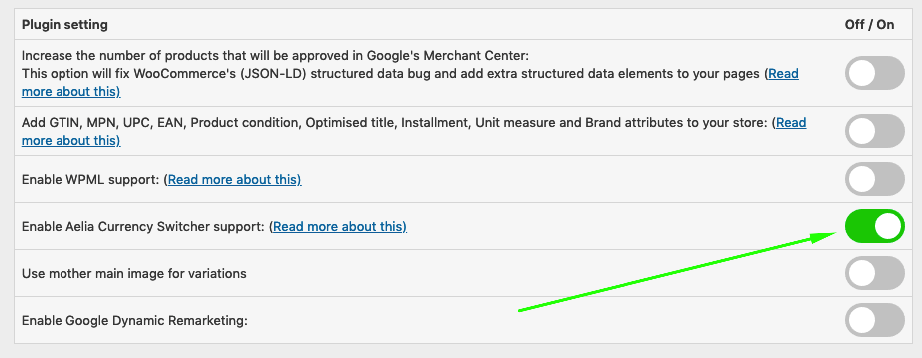
1- Go to Product Feed Elite > Settings, then enable the Aelia Currency Switcher support option.
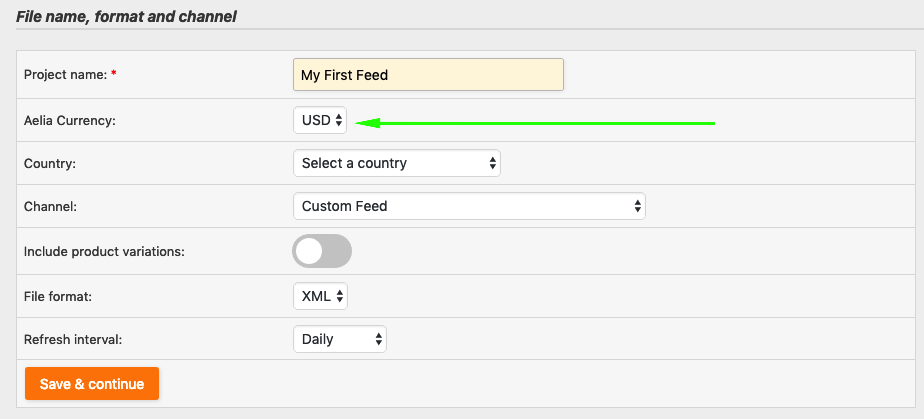
2- In your General Feed Settings, you’ll see a new field called Aelia Currency. Select the desired currency for your feed. The available options will depend on your Aelia Currency Switcher configuration.
3- On the Field Mapping, ensure that the following suffix is added to the link attribute ?aelia_cs_currency=USD.
Replace USD with the currency you selected—for example, use:?aelia_cs_currency=EUR for Euro

This is an important step, so the product link is pointing towards the appropriate URL with its appropriate currency.
Stop losing sales. Join 90,000+ store owners using Product Feed Pro for WooCommerce to reach more shoppers on Google, Facebook, and 250+ sales channels.





The best WooCommerce product feed plugin
