Product Feed Elite + Rank Math

Send Rank Math's SEO data straight into your product feeds

 Product Feed Pro and Elite plug directly into Rank Math, pulling your assigned primary product category automatically and, with Elite, mapping Rank Math's SEO title, description, and focus keyword straight into your Google Shopping, Meta, and Pinterest feeds.

Integration Limitations

Product Feed Elite is fully integrated with Rank Math. Both Product Feed Pro and Elite read Rank Math's assigned primary product category to build your feed's category path automatically. With Elite active, you can also map Rank Math's SEO title, description, focus keyword, SEO score, ContentAI score, and internal links processed value onto any feed attribute, including the title and description Google Shopping expects.

Rank Math's title and description templates expand automatically, including their %variable% tags, and fall back to the product's own title or description instead of shipping a blank field or a literal, unexpanded tag. The integration is read-only: it never writes back into Rank Math's data, and it doesn't pull Rank Math's schema markup or GTIN fields into your feed.

How To Enable ACF For Product Feed Elite

  1. Nothing to configure for the primary category. Once Rank Math is active, Product Feed Pro and Elite automatically pick up its assigned primary product category for every feed.
  2. To map Rank Math's SEO data (requires Elite), go to Product Feed Elite > your feed > Field Mapping.
  3. Under the custom attributes dropdown, choose the Rank Math attribute you want, such as Rank Math title, Rank Math description, or Rank Math focus keyword.
  4. Map it to the feed field you want it to fill, for example Title or Description for Google Shopping. [image of the Field Mapping tab with Rank Math title mapped to Title (Google) goes here]
  5. Save your mapping and regenerate the feed.

Missing ACF Mappable Fields?

If you cannot find your mappable fields, follow these steps:

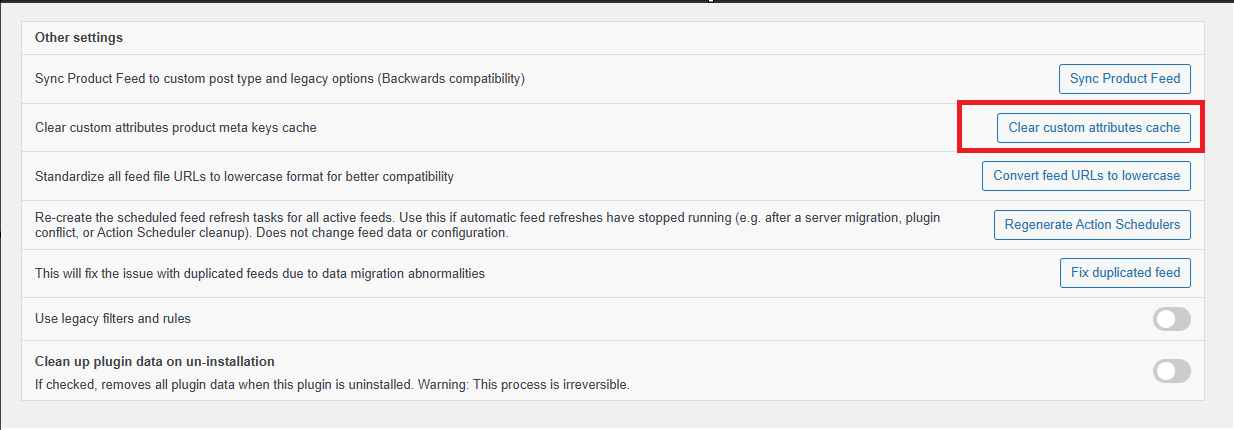
  1. Navigate to Product Feed > Settings.

  2. Click the Clear custom attributes cache button.

  3. Return to your feed configuration and search for your custom field again.
Sell More Online With WooCommerce Product Feeds

Stop losing sales. Join 90,000+ store owners using Product Feed Pro for WooCommerce to reach more shoppers on Google, Facebook, and 100+ sales channels.


WPBeginner Verified
CEO featured on business.com
Featured on LearnWoo

Frequently Asked Questions

What is a product feed?A product feed is a file that lists your online store’s products along with details like titles, prices, images, and stock levels. Platforms like Google Shopping, Facebook, and comparison sites use feeds to display your products to shoppers outside your website.

Why do I need product feeds for my WooCommerce store?Without WooCommerce product feeds, your products stay hidden on your site alone. With feeds, you can automatically showcase your products across search engines, social networks, and shopping platforms, helping you reach more customers and sell more.

How often are my WooCommerce product feeds updated?With AdTribes Product Feed Pro for WooCommerce, you can set any product feed to automatically sync with your store. This keeps your prices, stock, and product details accurate across all your chosen platforms, reducing ad rejections and preventing shoppers from seeing outdated information.

Do I need technical skills to set up WooCommerce product feeds?Not at all. AdTribes Product Feed Pro for WooCommerce makes product feeds simple with easy-to-use templates and automation. No coding or developer help required. Just connect, configure, and start getting your products seen.

Does AdTribes have a free version?Yes! AdTribes Product Feed Pro for WooCommerce is the free version and already includes many powerful features to help you get your WooCommerce products seen on top sales channels.

For advanced tools, you can upgrade to Product Feed Elite, which includes features like the Feed Validator. This tool automatically checks your feeds for errors, letting you fix issues before they affect your sales. It also integrates with popular language and currency switchers to optimize listings for shoppers across different regions, ensuring your products reach the right audience without problems.

What platforms can I showcase my products on with AdTribes product feeds?You can automatically get your WooCommerce products listed on Google Shopping, Facebook, Instagram, TikTok, Pinterest, Bing, and 100+ others.

How do I make sure my listings meet each platform’s requirements?Every platform has its own rules for product data, which can be tricky to manage manually. AdTribes Product Feed Pro for WooCommerce makes it simple with field mapping and category mapping, so your WooCommerce store’s attributes match perfectly with each platform’s requirements.

Can I control how my products appear on different platforms?Yes. AdTribes Product Feed Pro for WooCommerce gives you customizable filters and rules, so you can decide which products to include or exclude, adjust product details, and fine-tune how your listings show up on each channel.

How can I track the performance of my WooCommerce product feeds?AdTribes Product Feed Pro for WooCommerce integrates with Google Analytics, letting you monitor clicks, impressions, and conversions. You’ll know exactly how your WooCommerce product feeds are performing and where to optimize for more sales.

Can I use AdTribes with different languages and currencies?The free version of AdTribes, Product Feed Pro for WooCommerce, doesn't support multilingual or multi-currency capabilities.

However, the paid version, Product Feed Elite, integrates with popular multilingual and multi-currency switchers, allowing you to generate WooCommerce product feeds tailored to each region. This makes it easy to reach international shoppers in their local language and currency.

Get The Best Product Feed Plugin

Create wishlist functionality and grow your store quickly & easily.
Complete Your Purchase
AdTribes WooCommerce Product Feed

The best WooCommerce product feed plugin

  • AdTribes Pty Ltd
    ABN: 40 675 636 816
Product
Partner Sites
Rymera