Product Feed Elite + Curcy Currency Switcher

Verwenden Sie Curcy Currency Switcher & Konfigurieren Sie Produkt-Feed-Währungen

Erstellen Sie Produkt-Feeds in bestimmten Währungen und zielen Sie auf die Länder ab, die Sie erreichen möchten, um sicherzustellen, dass Ihre Preise in verschiedenen Märkten und Plattformen korrekt angezeigt werden.

Integrationsbeschränkungen

Product Feed Elite ist vollständig in Curcy Currency Switcher integriert, wodurch Ihr Webshop nahtlos mehrere Währungen unterstützt und internationale Kunden bedienen kann.

Beim Generieren von XML-Produkt-Feeds können Sie die zu verwendende Währung angeben, um sicherzustellen, dass Ihre Feeds den Anforderungen verschiedener Marktplätze oder Plattformen entsprechen.

Um diese Integration voll auszuschöpfen, stellen Sie einfach sicher, dass alle gewünschten Währungen und ihre entsprechenden Wechselkurse im Curcy Currency Switcher korrekt konfiguriert sind. Dies gewährleistet genaue Preise und ein konsistentes Einkaufserlebnis für Kunden in allen Regionen.

So aktivieren Sie die Integration

1- Gehen Sie zu Product Feed Elite > Einstellungen, dann aktivieren Sie die Option Curcy Currency Switcher-Unterstützung .

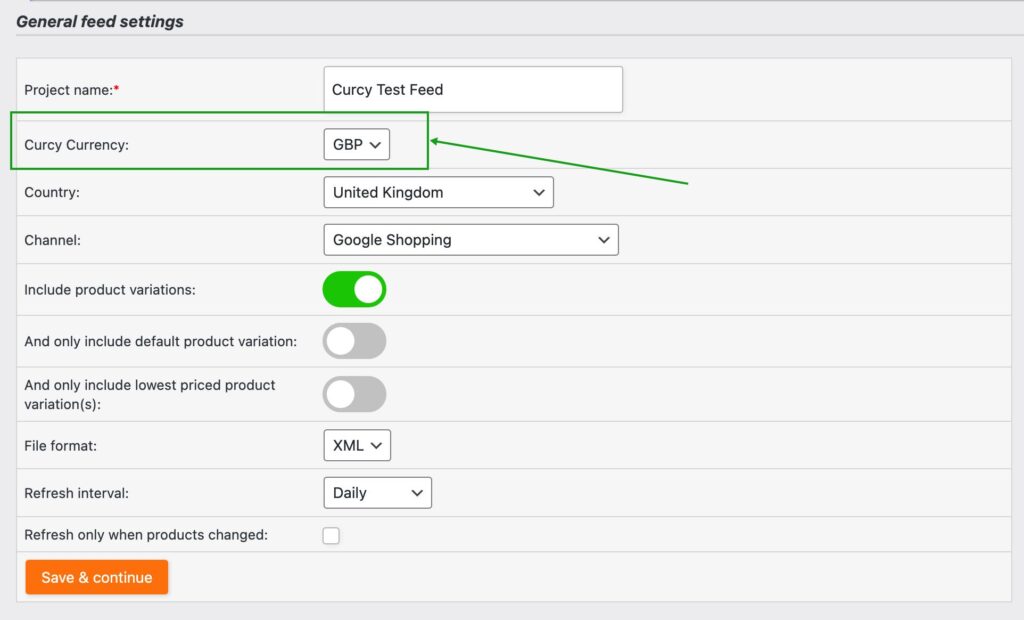
2- In Ihren Allgemeinen Feed-Einstellungen sehen Sie ein neues Feld namens Aelia-Währung. Wählen Sie die gewünschte Währung für Ihren Feed aus. Die verfügbaren Optionen hängen von Ihrer Aelia Currency Switcher-Konfiguration ab.
3- Stellen Sie auf der Feldzuordnung sicher, dass der folgende Suffix zum Link-Attribut hinzugefügt wird: &wmc-currency=USD
Ersetzen Sie USD durch die von Ihnen gewählte Währung – verwenden Sie zum Beispiel: &wmc-currency=GBP für Britische Pfund

Verkaufen Sie mehr online mit WooCommerce Produkt-Feeds

Hören Sie auf, Verkäufe zu verlieren. Schließen Sie sich über 90.000 Shop-Besitzern an, die Product Feed Pro für WooCommerce verwenden, um mehr Käufer auf Google, Facebook und über 100 weiteren Vertriebskanälen zu erreichen.

WPBeginner verifiziert
CEO vorgestellt auf business.com
Vorgestellt auf LearnWoo

Häufig gestellte Fragen

Was ist ein Produkt-Feed?A product feed is a file that lists your online store’s products along with details like titles, prices, images, and stock levels. Platforms like Google Shopping, Facebook, and comparison sites use feeds to display your products to shoppers outside your website.

Warum benötige ich Produkt-Feeds für meinen WooCommerce-Shop?Without WooCommerce product feeds, your products stay hidden on your site alone. With feeds, you can automatically showcase your products across search engines, social networks, and shopping platforms, helping you reach more customers and sell more.

Wie oft werden meine WooCommerce-Produkt-Feeds aktualisiert?With AdTribes Product Feed Pro for WooCommerce, you can set any product feed to automatically sync with your store. This keeps your prices, stock, and product details accurate across all your chosen platforms, reducing ad rejections and preventing shoppers from seeing outdated information.

Benötige ich technische Kenntnisse, um WooCommerce-Produkt-Feeds einzurichten?Not at all. AdTribes Product Feed Pro for WooCommerce makes product feeds simple with easy-to-use templates and automation. No coding or developer help required. Just connect, configure, and start getting your products seen.

Gibt es eine kostenlose Version von AdTribes?Yes! AdTribes Product Feed Pro for WooCommerce is the free version and already includes many powerful features to help you get your WooCommerce products seen on top sales channels.

For advanced tools, you can upgrade to Product Feed Elite, which includes features like the Feed Validator. This tool automatically checks your feeds for errors, letting you fix issues before they affect your sales. It also integrates with popular language and currency switchers to optimize listings for shoppers across different regions, ensuring your products reach the right audience without problems.

Auf welchen Plattformen kann ich meine Produkte mit AdTribes-Produkt-Feeds präsentieren?You can automatically get your WooCommerce products listed on Google Shopping, Facebook, Instagram, TikTok, Pinterest, Bing, and 100+ others.

Wie stelle ich sicher, dass meine Angebote die Anforderungen jeder Plattform erfüllen?Every platform has its own rules for product data, which can be tricky to manage manually. AdTribes Product Feed Pro for WooCommerce makes it simple with field mapping and category mapping, so your WooCommerce store’s attributes match perfectly with each platform’s requirements.

Kann ich steuern, wie meine Produkte auf verschiedenen Plattformen erscheinen?Yes. AdTribes Product Feed Pro for WooCommerce gives you customizable filters and rules, so you can decide which products to include or exclude, adjust product details, and fine-tune how your listings show up on each channel.

Wie kann ich die Leistung meiner WooCommerce-Produkt-Feeds verfolgen?AdTribes Product Feed Pro for WooCommerce integrates with Google Analytics, letting you monitor clicks, impressions, and conversions. You’ll know exactly how your WooCommerce product feeds are performing and where to optimize for more sales.

Kann ich AdTribes mit verschiedenen Sprachen und Währungen verwenden?The free version of AdTribes, Product Feed Pro for WooCommerce, doesn't support multilingual or multi-currency capabilities.

However, the paid version, Product Feed Elite, integrates with popular multilingual and multi-currency switchers, allowing you to generate WooCommerce product feeds tailored to each region. This makes it easy to reach international shoppers in their local language and currency.

Holen Sie sich das beste Produkt-Feed-Plugin

Create wishlist functionality and grow your store quickly & easily.
Complete Your Purchase
AdTribes WooCommerce Produkt-Feed

Das beste WooCommerce-Produkt-Feed-Plugin

  • AdTribes Pty Ltd
    ABN: 40 675 636 816