Reviewed by
Google Shopping vs Facebook Ads isn’t really one question. The two channels play different roles: Google Shopping is often a strong fit when shoppers are already looking for products like yours, while Meta can introduce products as people browse and discover. The better starting point depends on how customers find your products and where they are in the buying journey.
That difference also changes what you need to prepare. Google Shopping leans heavily on structured product data, while Meta gives you more flexibility around audience setup and creative. A Meta catalog becomes important when you use catalog-based ads.
Choosing a channel that doesn’t match how people discover your products can waste budget on less-qualified traffic. This guide walks through how each channel works, what affects cost, who they reach, and how to decide which one to test first.
Google Shopping Vs Facebook (Meta) Ads: The Short Answer
Neither channel is universally “better.” They match different buying moments, so the right choice depends on your products and your funnel stage.
- Choose Google Shopping first if buyers already search for what you sell (replacement parts, branded items, considered purchases). You’re capturing demand that already exists.
- Choose Facebook (Meta) Ads first if your products are visual, impulse-friendly, new to the market, or more likely to benefit from discovery than existing search demand.
- Consider running both when each channel has a clear job, such as using Meta for discovery and Google Shopping for active product searches.
- The shared foundation: Google Shopping needs accurate Merchant Center product data, while Meta catalog ads need a clean Meta catalog feed.
How Google Shopping Works
Google Shopping uses Merchant Center product data to create visual product ads and listings with details like image, title, price, and store name. Shopping ads can appear in Google Search and the Shopping tab, and Merchant Center product data can also power Shopping inventory in Performance Max campaigns.
The process starts with your store sending product data to Google Merchant Center. Google validates and classifies it, and eligible products can appear in free listings while paid Shopping ads are managed through Google Ads. Shopping ads use Merchant Center product data rather than keywords to match products to relevant searches, so feed quality plays a big role in relevance and eligibility.
When you build a Google Shopping feed in AdTribes, the template pre-maps core attributes such as id, title, price, and availability from WooCommerce, so much of the setup is checking field and category mapping rather than hand-writing values.
Identifiers like GTIN, MPN, and brand can be mapped from product attributes or custom fields when that data already exists, while AdTribes Product Feed Elite adds dedicated product fields for storing them. Because Shopping listings pull key details such as titles and images from the feed, those fields deserve careful review. Incorrect or low-quality product data can limit eligibility or cause display issues in Merchant Center.
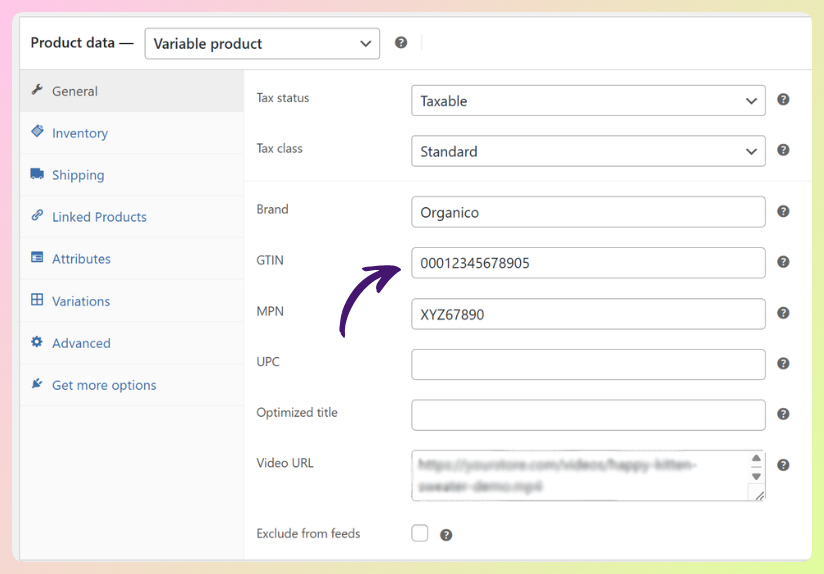
A WooCommerce feed plugin like AdTribes can generate a Google Shopping product feed from your catalog. Google handles product eligibility and serving, while paid Shopping campaigns are managed through Google Ads. AdTribes creates and syncs the feed data; it doesn’t manage your bids.
How Facebook (Meta) Ads Work
Facebook (Meta) Ads can reach people as they browse Facebook and Instagram through detailed targeting, custom and lookalike audiences, and Meta’s automated Advantage+ audience and delivery systems. Compared with Google Shopping’s search-heavy experience, Meta often plays a larger role in discovery, especially for visual products.
For catalog-based product ads, Meta uses a catalog. Advantage+ catalog ads (formerly dynamic ads) can pull items from that catalog and personalize which products are shown. The Meta Pixel and Conversions API (CAPI) can send website events back to Meta to support measurement, optimization, and retargeting.
On the Meta side, the catalog feed maps to Meta’s own field specification. The catalog itself can power catalog-based ads, while Pixel or CAPI events become especially useful when Meta needs to connect on-site actions with specific products for measurement, optimization, and retargeting. The catalog supplies the product data, while your campaign setup and creative determine how those products are shown. Clear product imagery matters here too, especially in a busy social feed.
AdTribes Product Feed Pro generates the Meta/Facebook Catalog feed and includes Facebook Pixel support in the free plugin. AdTribes Product Feed Elite adds server-side Conversions API (CAPI) tracking. Meta still handles ad delivery and optimization.
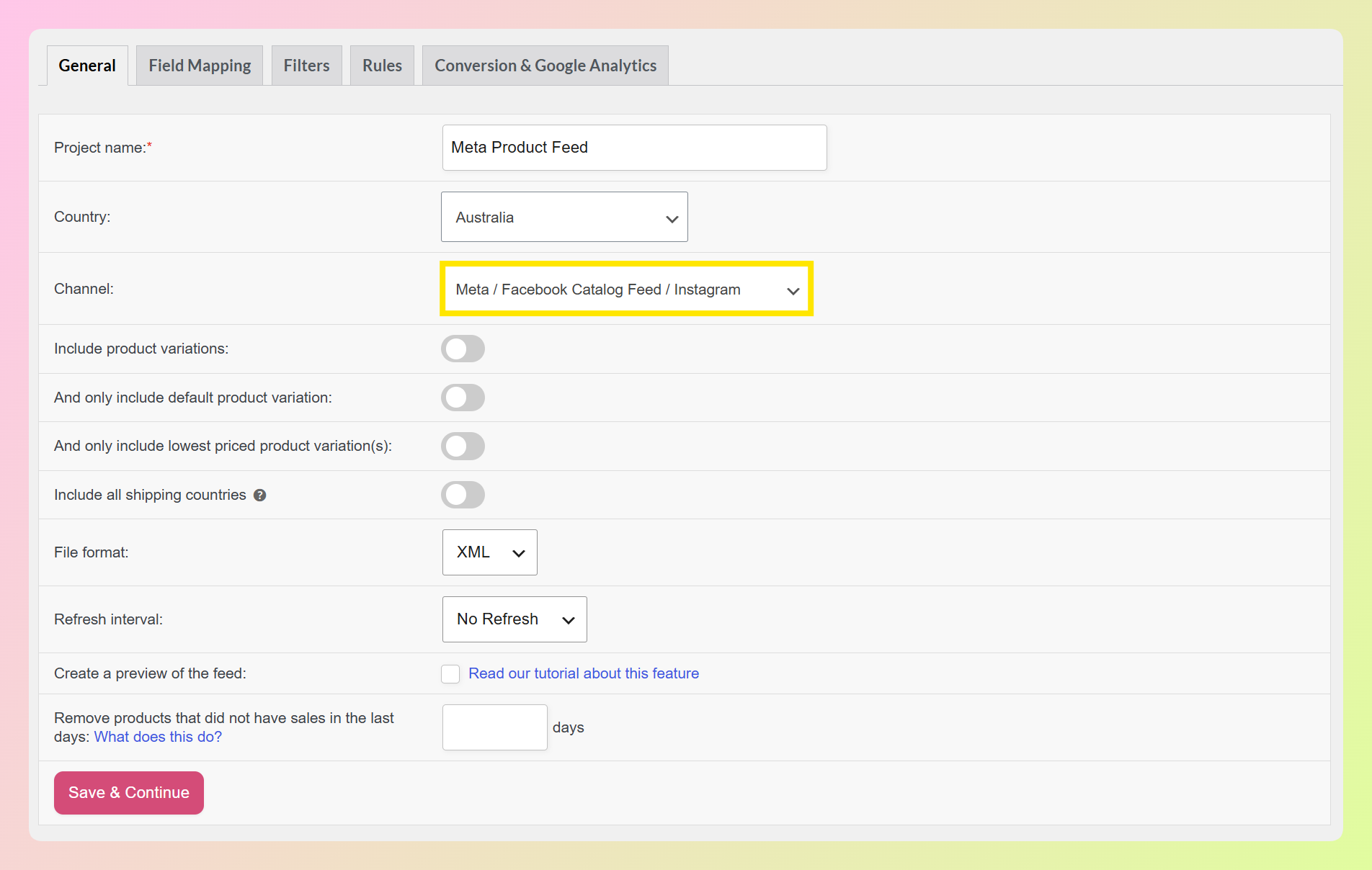
If you’re mapping fields, our guide to Facebook product feed specifications covers what each attribute expects.
Search Intent Vs Discovery: The Core Difference
The clearest difference is where each channel tends to meet the shopper. Google Shopping leans more heavily on existing search demand, while Meta is often stronger for discovery. Your product type can help you decide where to start.
Products people actively search for often fit Google Shopping well. Think replacement parts, branded goods, tools, and considered purchases where the buyer already knows the category. There’s demand in the search box, and Shopping can meet it.
Products that rely on visual discovery or are new to the market can be a stronger fit for Meta. Think novelty items, lifestyle and fashion pieces, impulse buys, and products that make more sense once shoppers see them. According to Statista, around 58% of US shoppers reported buying a product after seeing it on a social platform (2023), which reflects the kind of discovery behavior social ads can support.
If your catalog includes both types of products, it may be worth testing both channels rather than forcing everything through one.
Cost, CPC And ROAS: What To Expect
There isn’t a universal rule that Google Shopping costs more per click than Meta, or vice versa. CPC varies by industry, market, campaign type, audience, competition, and account setup.
More importantly, the clicks can represent different stages of the buying journey. Google Shopping often reaches people who are actively comparing products, while Meta can reach shoppers earlier during discovery or later through retargeting.
Compare the channels using business outcomes such as conversion value, customer acquisition cost, and return on ad spend, not CPC alone. Treat any published benchmark as context rather than a promise for your store.
Audience, Creative And Measurement Needs
Each channel needs a different mix of product data, audience signals, creative, and measurement.
Audience and targeting
Google Shopping relies heavily on Merchant Center product data to match eligible products with relevant searches. Meta offers detailed targeting, custom and lookalike audiences, and Advantage+ audience, while Pixel and CAPI events can provide additional conversion signals for measurement and optimization.
Creative
On Google Shopping, your feed supplies core listing details such as title, image, price, and attributes. On Meta, catalog-based ads can also pull product data automatically, while social-native creative such as video, lifestyle imagery, and carousels can add another layer.
Measurement
Google Shopping performance is measured through Merchant Center and Google Ads, depending on whether you’re looking at free listings or paid campaigns. Meta performance is measured in Ads Manager and can use Pixel and/or CAPI events for website measurement. Attribution settings differ between platforms, so compare trends and business outcomes rather than expecting identical numbers.
Before you compare channels: Make sure the product data feeding Google Shopping and any Meta catalog ads is accurate first. If titles, prices, availability, images, or identifiers are wrong, feed-related issues can affect both channels and make the comparison less useful.
When To Choose Each (And When To Run Both)
Start with Google Shopping if buyers already search for products like yours. That gives you a way to test demand among shoppers who are already comparing products instead of relying on discovery alone.
Start with Meta if your product is highly visual, new, or likely to benefit from discovery. Because those shoppers may be earlier in the buying journey, leave room for creative testing and campaign learning rather than judging the channel on immediate conversions alone.
Once your product data is solid, the channels can complement each other: Meta can introduce products to shoppers, while Google Shopping can reach people who later search or compare. On Google, review how your products are categorized and override Google’s automatic category only when the classification is inaccurate. On Meta, make sure required catalog fields and product images are valid so items remain eligible for catalog-based ads.
Where Product Feeds Fit Into Google Shopping And Meta Ads
Google Shopping requires product data in Merchant Center. Facebook (Meta) Ads do not always require a product feed, but catalog-based formats such as Advantage+ catalog ads rely on a Meta catalog. If you’re using both, clean product data is the shared foundation.
A product feed is the structured data file that tells a shopping or catalog platform what you sell: titles, prices, images, availability, identifiers, and categories. Incomplete or incorrect data can cause disapprovals, limited eligibility, or display issues. Product detail quality matters on the store itself, too: according to the Baymard Institute, 10% of the largest ecommerce sites fail to give products a consistently high level of detail in their product descriptions.
AdTribes Product Feed Pro is a free WooCommerce product feed plugin that generates the Google Shopping feed and the Meta/Facebook Catalog feed from the same catalog, with Facebook Pixel support built in (Conversions API support comes with AdTribes Product Feed Elite).
Both feeds can pull from the same WooCommerce catalog, so you don’t have to maintain separate source data for each channel by hand. AdTribes creates and syncs the feeds; it does not run your ads or manage your bids.
If you’re weighing your options, our roundup of the best WooCommerce product feed plugins compares the field.
Frequently Asked Questions
Is Google Shopping better than Facebook Ads for ecommerce?
Neither is universally better. Google Shopping is often a stronger fit when buyers already search for products like yours, while Facebook (Meta) Ads can be a stronger fit for visual or discovery-led products. Some stores use both when they want to cover active product searches and social discovery.
Can I run Google Shopping and Facebook Ads at the same time?
Yes. The channels can serve different parts of the buying journey: Meta can support discovery, while Google Shopping can reach shoppers who are actively searching or comparing products. If you use Meta catalog ads, keep the Meta catalog feed clean alongside your Google Merchant Center product data.
Do I need a product feed for both Google Shopping and Facebook Ads?
Google Shopping requires product data in Google Merchant Center. Facebook (Meta) Ads only need a catalog feed when you’re using catalog-based formats such as Advantage+ catalog ads; standard image or video campaigns can run without a product feed. A WooCommerce feed plugin can generate channel-specific feeds from the same catalog when you need them.
Which is cheaper, Google Shopping or Facebook (Meta) Ads?
There isn’t a reliable rule that one channel is always cheaper. CPC varies by campaign type, market, industry, audience, competition, and account setup. Judge the channels on conversion value, customer acquisition cost, and return on ad spend rather than click price alone.
What products work best on Google Shopping vs Facebook?
Searchable, commodity, and considered-purchase products (branded goods, replacement parts, tools) often fit Google Shopping well because buyers already look for them by name or category. Visual, impulse, and lifestyle products can fit Facebook (Meta) Ads well because social placements support discovery and visual creative. Many catalogs contain both types, which can make a two-channel strategy worth testing.
Does Facebook use the same product feed as Google Shopping?
Not the same file, but they can use the same source data. Google Shopping needs Merchant Center product data, while Meta catalog ads use a separate Meta-formatted feed. A feed plugin like AdTribes can generate both from one WooCommerce catalog, so you don’t have to maintain separate source data by hand.
Is Google Shopping part of Google Ads?
Google Shopping listings appear in both free and paid forms. Eligible products can appear in free listings without ad spend, while paid Shopping placements run through Google Ads, including Shopping inventory in Performance Max. You need valid Merchant Center product data either way, since Google uses that data to build and match product listings and ads.
Which Channel Should Your WooCommerce Store Start With?
If buyers already search for products like yours, Google Shopping can be a sensible first test. If your product relies more on discovery, Meta may be the better place to start. You can add the second channel later if it fits your goals, creative resources, and budget.
Whichever way you go on Google Shopping vs Facebook Ads, clean product data still matters. It affects whether Google can serve your product listings and whether Meta can use eligible items in catalog-based ads.
- Match the channel to intent: Google Shopping leans toward active product search, while Meta is often stronger for discovery.
- Compare more than CPC: look at conversion value, customer acquisition cost, and ROAS.
- Prepare the right inputs: strong product data for Google, plus audience signals and creative for Meta.
- Use both when it fits: the channels can cover different parts of the buying journey.
- Keep catalog data clean: accurate product data matters for Google Shopping and Meta catalog ads.
Ready to feed both channels from one WooCommerce catalog? Get AdTribes Product Feed Pro and generate your Google Shopping and Meta/Facebook feeds from the same source.