Reviewed by
There are dozens of WooCommerce product feed plugins available, and every one of them claims to be the best. If you’ve spent any time researching options, you’ve probably noticed that many comparison articles focus heavily on feature lists. That can make it hard to tell which features actually matter for your store.
The real problem isn’t a shortage of options. It’s that most store owners don’t have a clear framework for evaluating them. They end up picking a plugin based on a blog post or a star rating, only to discover three months later that it can’t handle their Google Merchant Center requirements or doesn’t support the channels they need.
This guide gives you a structured decision framework you can apply to any WooCommerce product feed plugin. If you’re trying to understand how to choose WooCommerce product feed plugin options without getting lost in feature lists, we’ll walk through what genuinely matters, how your store size changes what you should prioritize, and what questions to ask before you commit.
7 Features To Look For In A WooCommerce Product Feed Plugin
Not every feature on a plugin’s marketing page deserves your attention. These seven are the ones that help separate basic feed tools from options that can grow with your store.
1. Channel template support
The number of pre-built channel templates a plugin offers determines how quickly you can get your products listed on new platforms. A plugin with 100+ templates for channels like Google Shopping, Meta, TikTok, Pinterest, and Bing means you don’t have to manually configure feed specifications for each platform. You select a template, map your fields, and the plugin formats everything to match that channel’s requirements.
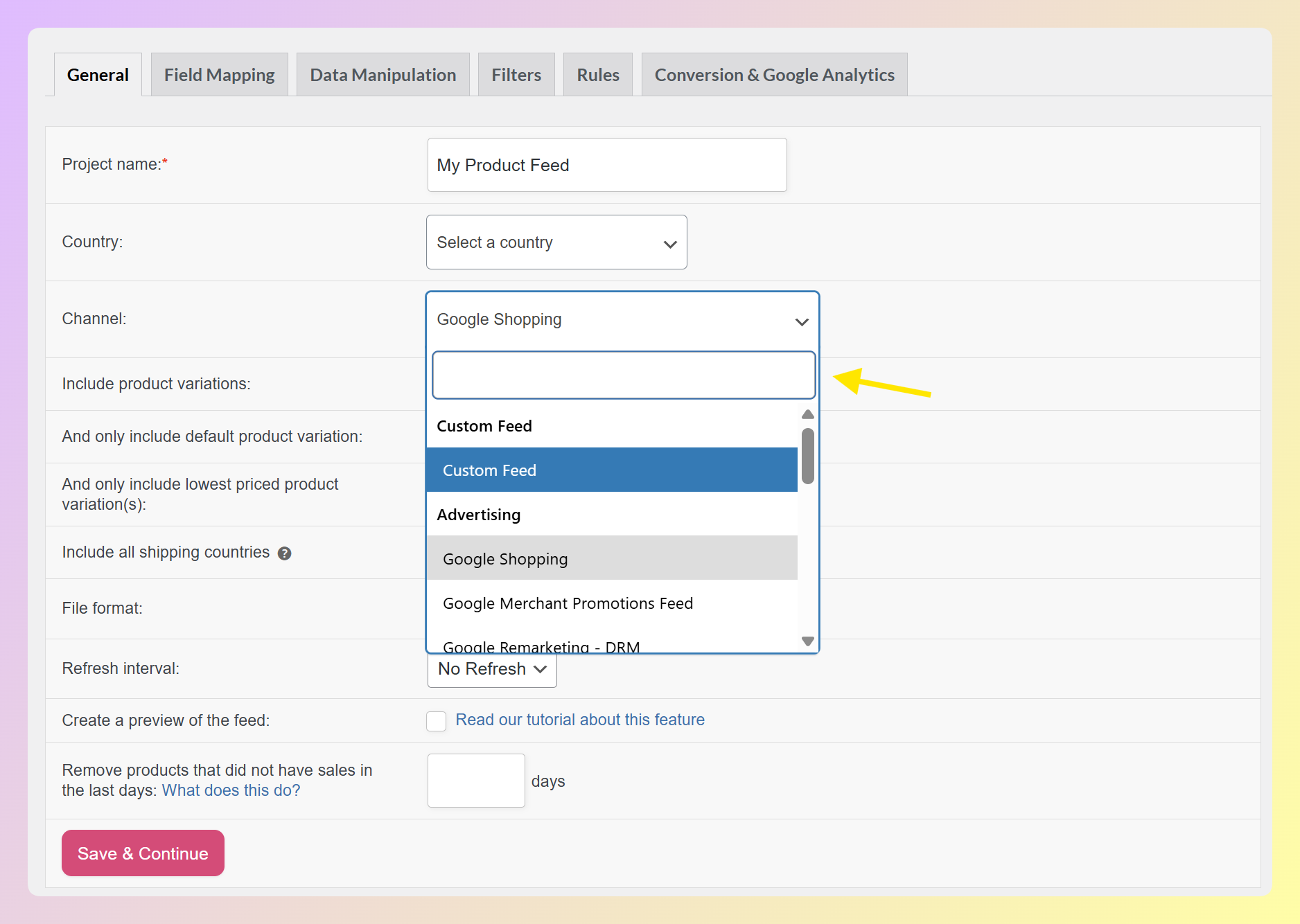
Without templates, you may need to read feed specification documents and build XML or CSV files by hand. That might be manageable for one channel, but it becomes harder as you expand to more platforms. This is one reason how to choose WooCommerce product feed plugin features matters: the right template support can save time every time you add a new channel.
2. Feed rules and customization
Feed rules let you modify product data before it’s sent to a channel. For example, you might want to add a missing brand name to product titles, adjust product descriptions for a specific marketplace, or standardize certain attributes before sending your feed.
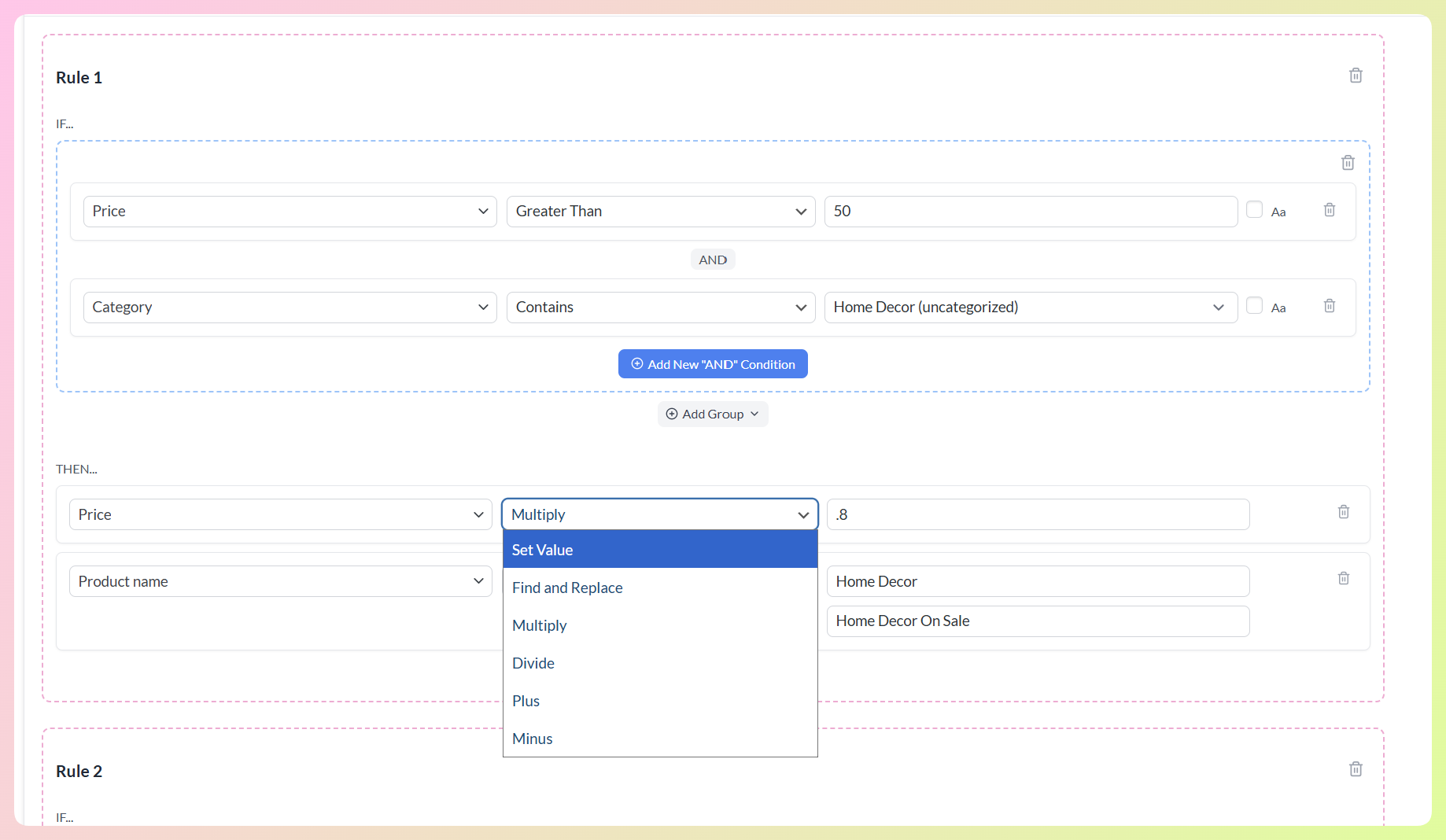
Practical tip: Many store owners start with basic field mapping, then realize they need more control once a channel flags missing identifiers, inconsistent pricing, or formatting issues. Feed rules can help you adjust product data at the feed level, so you don’t always have to edit every product manually in WooCommerce.
Look for a plugin that lets you create conditional rules (if/then logic), not just static field mapping. The difference matters as your catalog grows.
3. Product filtering
Product filtering controls which products appear in each feed. You should be able to include or exclude products based on category, tag, stock status, price range, or custom attributes. This is especially important if you sell on multiple channels with different policies. For instance, you might exclude out-of-stock items from your Google Shopping feed while keeping them visible on your own site.
A plugin that only offers basic category-level filtering will create problems as soon as you need more precision.
4. Feed validation
Feed errors can prevent products from showing correctly on Google Merchant Center and other platforms. For stores that rely heavily on feed-driven channels, a validator is worth looking for because it can help catch issues like missing attributes, formatting problems, or invalid URLs earlier in the process.
This is a feature many store owners don’t think about until they’re dealing with product data issues after submission. Google Merchant Center can flag issues such as missing identifiers, missing required attributes, and mismatched prices between your feed and website. A plugin with feed validation can help you catch common issues earlier, before they turn into a bigger troubleshooting task.
5. Multi-language and multi-currency support
If you sell internationally or run a multilingual WooCommerce store, your product feed plugin needs to generate separate feeds per language and currency. This means full compatibility with translation plugins like WPML, Polylang, or TranslatePress, plus support for currency switchers.
A plugin that can only generate feeds in your store’s default language limits your reach in international markets. Check whether multi-language support is included in the free tier or only available in paid plans, since this varies widely.
6. Scheduling control
How often your feed refreshes matters. If your inventory changes frequently, you need a plugin that lets you set custom refresh intervals, not just “daily” or “twice daily.” The best options let you refresh hourly, on specific days, or at custom intervals so your feed data stays accurate across all channels.
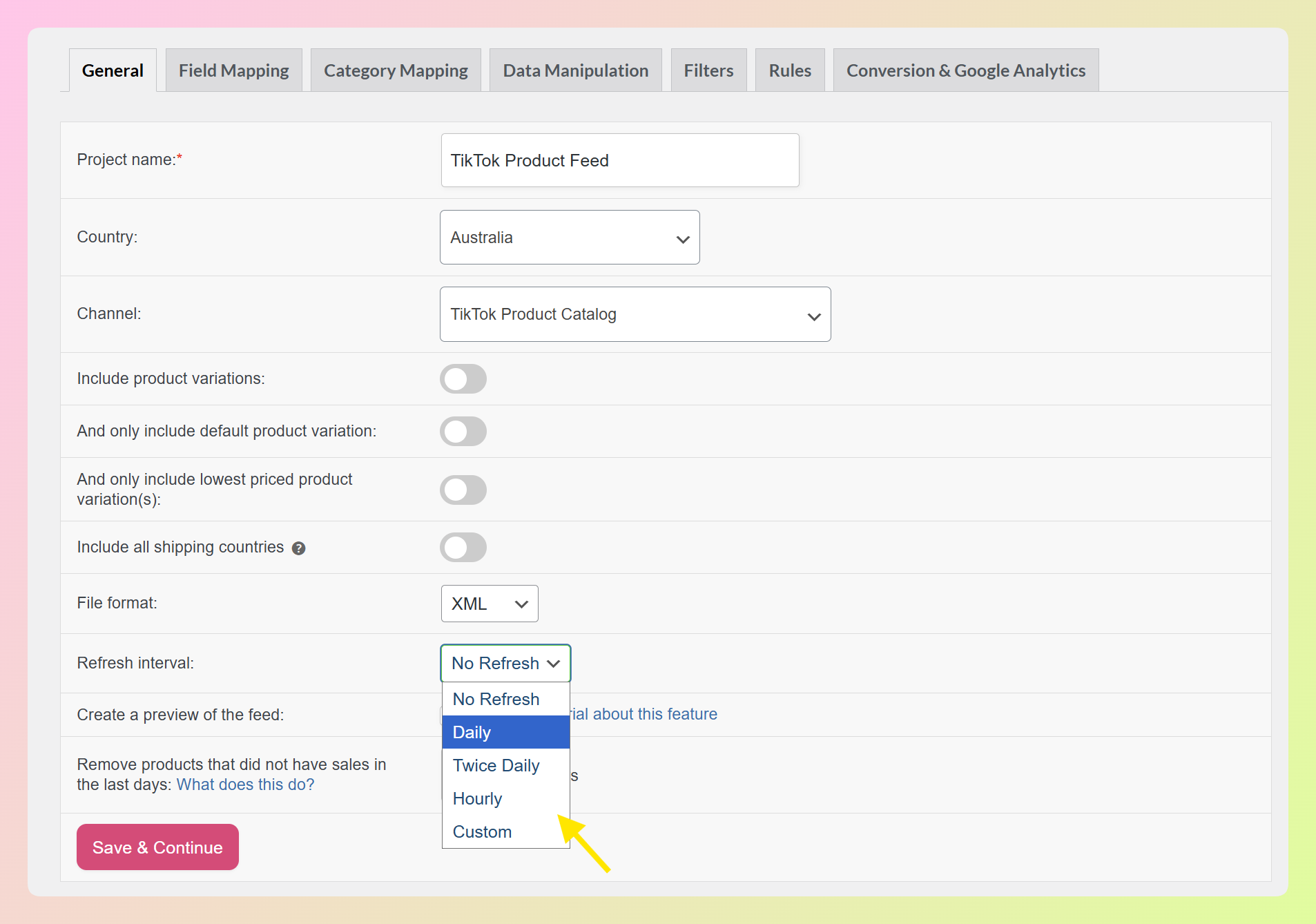
Stale feed data can lead to issues when prices or stock levels don’t match your live site. The more control you have over scheduling, the easier it is to keep your feed aligned with your catalog.
7. Pricing model and long-term cost
Feed plugins often use different pricing models, such as annual WordPress plugin licenses, monthly SaaS subscriptions, or usage-based plans. A monthly price can look affordable at first, but the annual cost may be much higher once you factor in products, feeds, channels, or team needs. Compare the full yearly cost before choosing a tool. If you’re weighing a plugin license against a SaaS platform like GoDataFeed, see our GoDataFeed alternative for WooCommerce breakdown.
Also check whether the plugin charges per SKU. Some tools limit how many products you can include in your feeds unless you upgrade. A plugin with no SKU limits means your costs stay predictable as your catalog grows.
How To Choose Based On Your Store Size
Your store size changes which features deserve the most weight. A practical way to answer how to choose WooCommerce product feed plugin features is to start with the complexity of your catalog, channels, and feed requirements.
Smaller stores with simpler catalogs:
- You likely need one or two channels (Google Shopping and maybe Meta)
- A generous free tier with unlimited products and solid channel templates is enough to start
- Don’t pay for features you won’t use yet, but make sure the plugin you choose has a clear upgrade path
- Feed rules may not feel urgent at first, but they become useful once you need to adjust product data for specific channels
Growing stores with expanding channel needs:
- You’re probably expanding to three or more channels, which means template variety matters
- Feed rules become critical for customizing listings per platform
- Product filtering lets you send different product sets to different channels
- Scheduling control keeps your data accurate across a larger catalog
- This is the stage where feed validation can help reduce manual troubleshooting
Larger or more complex stores:
- Multi-language and multi-currency support is likely a requirement if you sell internationally
- No SKU limits becomes much more important because per-product pricing can become expensive as your catalog grows
- Advanced scheduling (custom intervals, day-specific refreshes) keeps large feeds accurate
- Feed validation becomes more important because feed issues can affect many listings at once
- WooCommerce-native architecture can also matter because it reduces the need to sync product data through an external platform
As your store grows, managing feeds across multiple platforms from one plugin becomes more valuable. It helps you keep product data organized, adapt feeds for different channel requirements, and avoid rebuilding your setup every time you expand to a new sales channel.
Questions To Ask Before Choosing A Product Feed Plugin
Before you commit to any WooCommerce product feed plugin, run through this checklist. Think of it as a quick how to choose WooCommerce product feed plugin checklist you can use before installing or upgrading.
- How many channels do you need right now? If it’s just Google Shopping, many product feed plugins can cover the basics. If it’s three or more, template count and format support (XML, CSV, TSV, TXT) become more important.
- Do you need feed rules? If you plan to customize product titles, descriptions, or attributes per channel, you need conditional feed rules. Basic field mapping won’t cut it.
- Do you sell in multiple languages or currencies? If yes, confirm the plugin supports your specific translation and currency plugins. Not all integrations are equal.
- Is the plugin WooCommerce-native? A plugin built specifically for WooCommerce works directly with your WooCommerce product data. SaaS tools can still be useful, but they usually add an external sync layer to your feed workflow.
- What does the free tier actually include? Some “free” plugins limit you to 100 products or a single channel. Others give you the full toolset with no product limits. Read the fine print.
- What’s the real annual cost? Factor in whether it’s a monthly subscription, annual license, or per-SKU pricing. A tool that looks cheaper at first glance can cost two or three times more over a year.
Feature lists can look similar on a marketing page, so it helps to focus on how the plugin will actually fit your WooCommerce setup. Before committing, check whether it supports your required channels, lets you customize feed data, gives you enough refresh control, and has a clear upgrade path if your store becomes more complex.
What Makes A Free Product Feed Plugin Worth Starting With
A lot of WooCommerce product feed plugins offer a free version, but “free” doesn’t always mean useful. If part of your research is how to choose WooCommerce product feed plugin free tiers, look beyond the price and check what the free version actually lets you do.
- Unlimited products: If the free version caps you at 100 or 500 products, it’s a trial, not a free tier. A real free version lets you include your entire catalog.
- Channel templates included: You should get access to pre-built templates for major platforms like Google Shopping, Facebook, and Bing in the free version.
- Feed rules access: Even basic feed rules (renaming fields, appending text, excluding by attribute) should be available for free. Without them, you’ll hit a wall as soon as a channel rejects your feed format.
- No time limit: A 14-day free trial is not a free tier. Look for plugins you can use indefinitely at no cost and upgrade only when you need advanced features like multi-language support or feed validation.
AdTribes Product Feed Pro checks the core boxes for many WooCommerce stores. The free version includes unlimited products and feeds, 100+ channel templates, feed rules, product filtering, and scheduled refreshes with no time limit. You can use it for as long as it fits your store. When you’re ready for advanced features like Feed Validator, multi-language support, multi-currency support, or custom refresh intervals, Product Feed Elite gives you a clear upgrade path.
Frequently Asked Questions
How many channels should a product feed plugin support?
Look for a plugin with at least 100 pre-built channel templates. Even if you only need two or three channels now, your needs will grow. A plugin with a large template library, like one covering Google Shopping, Meta, TikTok, Pinterest, Bing, and regional marketplaces, saves you from switching tools later. AdTribes supports 100+ platforms with ready-to-use templates.
Do I need a paid plugin or is free enough?
It depends on your requirements. A strong free tier with unlimited products, channel templates, and feed rules can handle most small-to-mid-size stores. You’ll likely need a paid upgrade when you require multi-language feeds, advanced scheduling, or feed validation. Start free and upgrade based on actual needs, not marketing pressure.
What’s the difference between a WooCommerce-native plugin and a SaaS feed tool?
A WooCommerce-native plugin runs inside your WordPress installation and works directly with your WooCommerce product data. A SaaS feed tool usually syncs your product data to an external platform before generating or managing feeds. For many WooCommerce stores, a native plugin can feel simpler because there are fewer external sync steps to manage.
How often should my product feed refresh?
For many stores, a daily refresh is a practical starting point. If your inventory or pricing changes frequently, hourly or custom refresh options may be a better fit. Stale feeds can create issues when the data in your feed no longer matches your live site, so choose a plugin that lets you match refresh frequency to how often your catalog changes.
Start Building Better Product Feeds For Your WooCommerce Store
Choosing the right WooCommerce product feed plugin doesn’t have to be complicated. The best answer to how to choose WooCommerce product feed plugin options is to focus on the features your store will actually use, such as channel template support, feed rules, product filtering, flexible scheduling, a clear pricing model, and a free tier that gives you enough room to start.
Here’s a quick recap of what to do next:
- Identify which features matter most for your store size
- Run through the pre-purchase checklist
- Evaluate the free tier before committing to a paid plan
- Consider whether a WooCommerce-native plugin is the simpler fit for your setup
AdTribes Product Feed Pro covers the core criteria most WooCommerce stores need to start: 100+ channel templates, unlimited products and feeds, feed rules, product filtering, and scheduled refreshes. As your store grows, Product Feed Elite adds advanced tools like Feed Validator, custom refresh intervals, extra product fields, and multi-language or multi-currency integrations. Get AdTribes Product Feed Pro for free and see how it fits your store.