Product Feed Elite + Curcy Currency Switcher

Usa Curcy Currency Switcher e configura le valute del feed di prodotti

Crea feed di prodotti in valute specifiche e raggiungi i paesi che desideri, assicurando che i tuoi prezzi vengano visualizzati in modo accurato nei diversi mercati e piattaforme.

Limitazioni dell'integrazione

Product Feed Elite è completamente integrato con Curcy Currency Switcher, consentendo al tuo negozio online di supportare senza problemi più valute e di soddisfare i clienti internazionali.

Quando generi feed di prodotti XML, puoi specificare la valuta da utilizzare, assicurando che i tuoi feed soddisfino i requisiti dei diversi marketplace o piattaforme.

Per sfruttare appieno questa integrazione, assicurati semplicemente che tutte le valute desiderate e i relativi tassi di cambio siano configurati correttamente all'interno di Curcy Currency Switcher. Ciò garantisce prezzi accurati e un'esperienza di acquisto coerente per i clienti in tutte le regioni.

Come abilitare l'integrazione

1- Vai su Product Feed Elite > Impostazioni, quindi abilita l'opzione Supporto Curcy Currency Switcher .

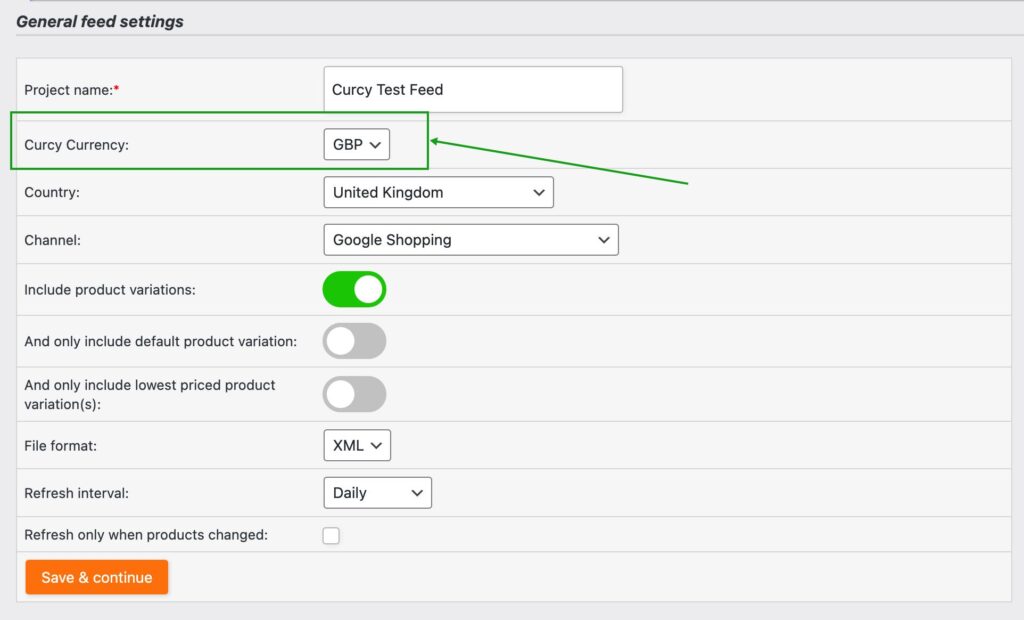
2- Nelle tue Impostazioni generali del feed, vedrai un nuovo campo chiamato Valuta Aelia. Seleziona la valuta desiderata per il tuo feed. Le opzioni disponibili dipenderanno dalla tua configurazione di Aelia Currency Switcher.

3- Sul Mappaggio dei campi, assicurati che il seguente suffisso venga aggiunto all'attributo link &wmc-currency=USD
Sostituisci USD con la valuta che hai selezionato, ad esempio usa: &wmc-currency=GBP per la Sterlina Britannica

Vendi di più online con i feed di prodotti WooCommerce

Smetti di perdere vendite. Unisciti a oltre 90.000 proprietari di negozi che utilizzano Product Feed Pro per WooCommerce per raggiungere più acquirenti su Google, Facebook e oltre 100 canali di vendita.

Verificato da WPBeginner
CEO presente su business.com
Presente su LearnWoo

Domande frequenti

Cos'è un feed di prodotti?A product feed is a file that lists your online store’s products along with details like titles, prices, images, and stock levels. Platforms like Google Shopping, Facebook, and comparison sites use feeds to display your products to shoppers outside your website.

Perché ho bisogno di feed di prodotti per il mio negozio WooCommerce?Without WooCommerce product feeds, your products stay hidden on your site alone. With feeds, you can automatically showcase your products across search engines, social networks, and shopping platforms, helping you reach more customers and sell more.

Ogni quanto vengono aggiornati i miei feed di prodotti WooCommerce?With AdTribes Product Feed Pro for WooCommerce, you can set any product feed to automatically sync with your store. This keeps your prices, stock, and product details accurate across all your chosen platforms, reducing ad rejections and preventing shoppers from seeing outdated information.

Ho bisogno di competenze tecniche per configurare i feed di prodotti WooCommerce?Not at all. AdTribes Product Feed Pro for WooCommerce makes product feeds simple with easy-to-use templates and automation. No coding or developer help required. Just connect, configure, and start getting your products seen.

AdTribes ha una versione gratuita?Yes! AdTribes Product Feed Pro for WooCommerce is the free version and already includes many powerful features to help you get your WooCommerce products seen on top sales channels.

For advanced tools, you can upgrade to Product Feed Elite, which includes features like the Feed Validator. This tool automatically checks your feeds for errors, letting you fix issues before they affect your sales. It also integrates with popular language and currency switchers to optimize listings for shoppers across different regions, ensuring your products reach the right audience without problems.

Su quali piattaforme posso mostrare i miei prodotti con i feed di prodotti AdTribes?You can automatically get your WooCommerce products listed on Google Shopping, Facebook, Instagram, TikTok, Pinterest, Bing, and 100+ others.

Come posso assicurarmi che le mie inserzioni soddisfino i requisiti di ciascuna piattaforma?Every platform has its own rules for product data, which can be tricky to manage manually. AdTribes Product Feed Pro for WooCommerce makes it simple with field mapping and category mapping, so your WooCommerce store’s attributes match perfectly with each platform’s requirements.

Posso controllare come appaiono i miei prodotti su diverse piattaforme?Yes. AdTribes Product Feed Pro for WooCommerce gives you customizable filters and rules, so you can decide which products to include or exclude, adjust product details, and fine-tune how your listings show up on each channel.

Come posso monitorare le prestazioni dei miei feed di prodotti WooCommerce?AdTribes Product Feed Pro for WooCommerce integrates with Google Analytics, letting you monitor clicks, impressions, and conversions. You’ll know exactly how your WooCommerce product feeds are performing and where to optimize for more sales.

Posso usare AdTribes con lingue e valute diverse?The free version of AdTribes, Product Feed Pro for WooCommerce, doesn't support multilingual or multi-currency capabilities.

However, the paid version, Product Feed Elite, integrates with popular multilingual and multi-currency switchers, allowing you to generate WooCommerce product feeds tailored to each region. This makes it easy to reach international shoppers in their local language and currency.

Ottieni il miglior plugin per i feed di prodotti

Create wishlist functionality and grow your store quickly & easily.
Complete Your Purchase
AdTribes WooCommerce Product Feed

Il miglior plugin per i feed di prodotti WooCommerce

  • AdTribes Pty Ltd
    ABN: 40 675 636 816