Reviewed by
Online customer experience directly impacts whether shoppers stay, browse, and purchase from your store. If you want to build customer trust and boost conversions, it’s crucial to deliver a smooth online shopping experience that meets customer expectations at every touchpoint.
We’re here to help you get started!
In this guide, we’ll break down what online customer experience means and list practical strategies you can use today to improve it. This is the first step to building a storefront that keeps customers coming back. Let’s explore them below.
What Is Online Customer Experience?
Online customer experience encompasses every interaction shoppers have with your brand online. This can be anything from browsing your homepage and viewing your product listings to checking out and reaching out to your support team. To succeed in ecommerce today, it’s crucial to create a consistent and positive online experience that guides customers effortlessly from discovery to checkout.
Here are just a few key aspects that shape a good online customer experience:
- Ease of navigation: How quickly can users find what they’re looking for?
- Website performance: Does your website load fast and look great on mobile?
- Product clarity: Are your descriptions, images, and prices clear and accurate?
- Support accessibility: Can shoppers get help when they need it?
- Checkout process: Is it simple, secure, and seamless?
- Post-purchase: Do you offer updates, follow-ups, or support after the sale?
According to an industry report, 73% of customers will abandon a brand after just one bad experience. Each of these aspects contributes to this decision. By building a better online customer experience, you can set your WooCommerce store apart, build trust from the beginning, and encourage shoppers to come back.
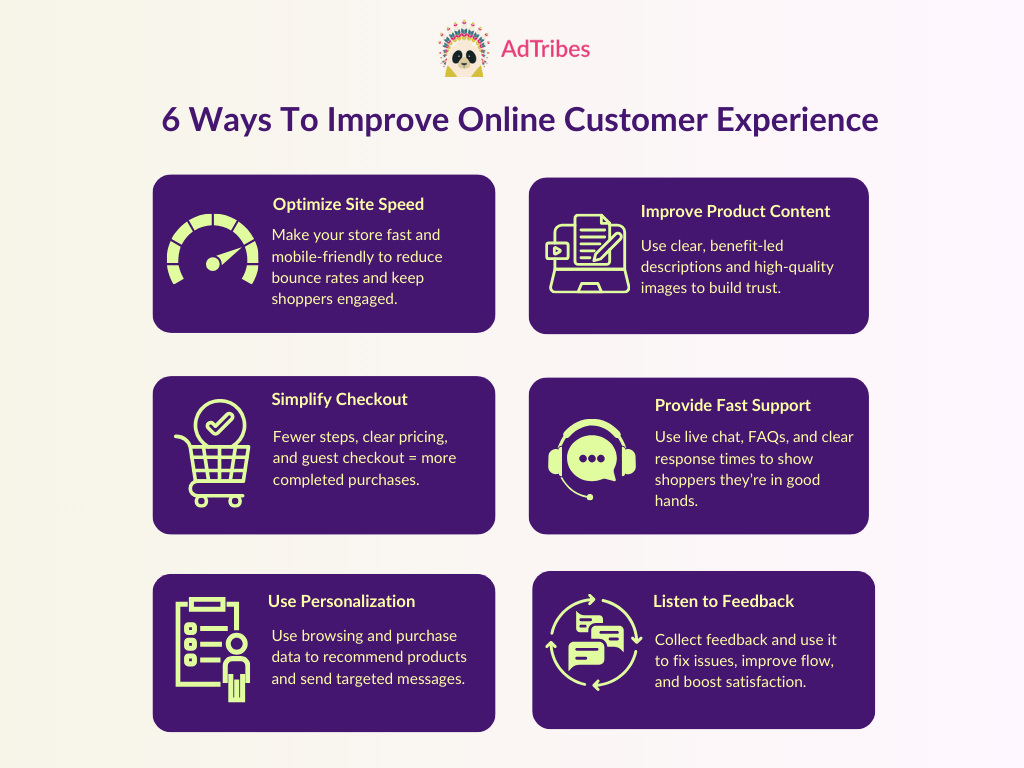
6 Effective Strategies To Improve Online Customer Experience
If you’re not sure where to begin, start with this list! Below, we’ve outlined doable strategies you can start implementing today to create a smoother online shopping experience for your customers.
1. Optimize your website’s load speed and mobile responsiveness
Shoppers are more likely to bounce and leave your website if it takes too long to load. In fact, studies have shown that even a 1-second delay in page load time can impact conversions by up to 20%. That’s a lot of missed opportunities for ecommerce store owners, especially during high-traffic seasons like Black Friday.
It’s also important to make your website mobile-responsive as more customers browse and buy from their phones. According to data from Statista, smartphones accounted for nearly 80% of retail website visits in 2025, generating the majority (68%) of online orders. Make sure to test your store’s design on different screen sizes to check if key elements like buttons, menus, and checkout fields are easy to interact with.
Here are some quick tips to optimize both speed and mobile responsiveness for your WooCommerce store:
- Compress and resize product images without sacrificing quality
- Use a lightweight, responsive theme built for WooCommerce
- Limit unnecessary plugins and keep your site updated
- Enable caching and use a reliable hosting provider
- Make buttons, forms, and navigation easy to use on smaller screens
🎯 POWER TIP: You can use a free tool like Google PageSpeed Insights to assess your website’s performance and get suggestions to optimize your website’s load speed.
2. Create a smooth checkout process
The average online cart abandonment rate is at a whopping 70%. Often, shoppers abandon their purchase when the checkout process is confusing or too long. By creating a frictionless checkout experience, you can keep shoppers engaged and prevent them from dropping off.
One of the easiest strategies to reduce friction is offering guest checkout. Letting customers check out as guests speeds up the process, especially for first-time buyers who simply want to place an order quickly. Likewise, it’s important to:
- Minimize steps and required fields
- Display shipping fees, taxes, and discounts upfront to avoid surprises
- Offer multiple payment options (credit cards, digital wallets, BNPL)
- Use autofill and validation to help customers complete forms quickly
- Make your checkout fully mobile-friendly with large buttons and simple layouts
These small tweaks that make checkout easier can have a big impact on your conversions.
3. Personalize the shopping experience
Personalization happens when you tailor your store’s content, offers, and interactions based on a shopper’s preferences and behavior. It’s a powerful way to enhance the online customer experience and connect with your customers. According to industry insights, 80% of shoppers are more likely to buy when brands offer personalized experiences.
It doesn’t have to be overly complicated. For WooCommerce stores, personalization could be as simple as recommending related products to customers or sending targeted emails based on their likes or past purchases. Here are some other ideas to incorporate personalization into your store:
- Show personalized product recommendations based on browsing or purchase history
- Send targeted follow-up emails, such as “You might also like…” or cart abandonment emails
- Display recently viewed products to help returning customers pick up where they left off
- Offer coupons or rewards based on purchase frequency or order value
- Grant loyalty points or discounts based on customer behavior or milestones
🎯POWER TIP: You can use plugins like SaveTo Wishlist (Free) to let shoppers save products they love. This gives you valuable insights you can use to personalize future emails, promotions, and product suggestions.
4. Use clear product descriptions and high-quality images
When shopping online, customers rely on your product descriptions to understand your product and determine whether it’s the right fit for them. In fact, 87% of online shoppers today consider product descriptions to be crucial when making a purchase. Low-quality listings can lead to buyer hesitation, confusion, or even lost sales.
On the flip side, clear and compelling product content can build trust and encourage customers to complete their orders. Here are some quick tips to improve your product listings:
- Use high-resolution images that showcase the product from multiple angles
- Write clear, benefit-driven product descriptions that highlight key features and uses
- Break up text with bullet points, headings, and easy-to-read formatting
- Mention sizing, dimensions, materials, or other relevant specs to avoid confusion
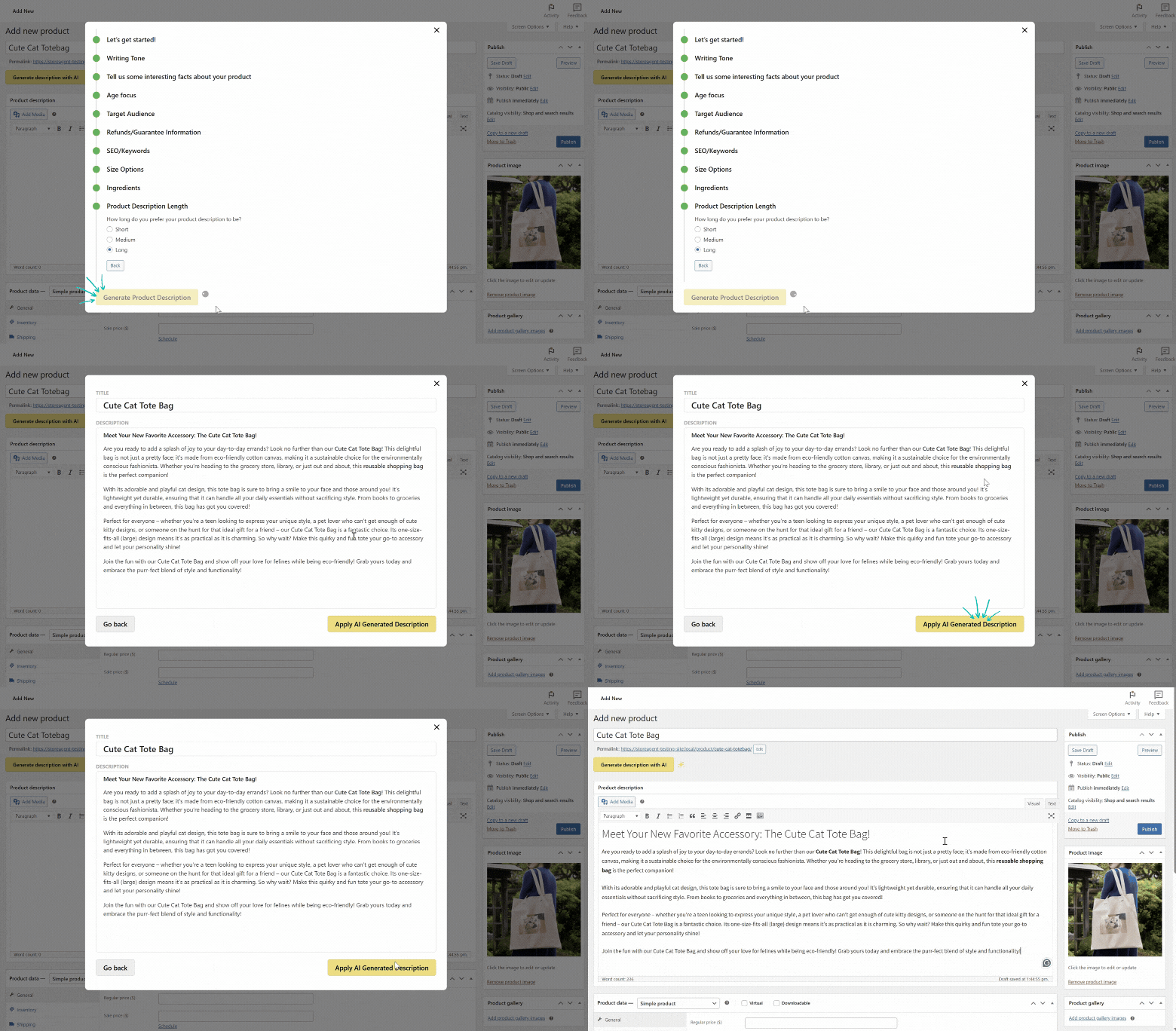
We know this can be quite tricky if you’re managing a large product catalog. This is where using tools like StoreAgent can help. With this plugin, you can automatically generate product content and save hours of work.
At AdTribes, we use StoreAgent’s AI Content tools to create high-quality product descriptions for WooCommerce stores. In just a few clicks, you can create on-brand, SEO-optimized product content that speaks to your target shoppers.
5. Offer fast and reliable support
To create a satisfying online customer experience, it’s important to make sure your shoppers feel heard and supported. Questions come up, and how quickly and effectively your store responds impacts both customer trust and conversion rates.
Here are some ways to make your support faster and more reliable:
- Use AI chatbots like StoreAgent to handle common inquiries instantly
- Set up a helpful FAQ page to empower self-service
- Offer multiple support channels such as email, chat, and social accounts
- Be transparent with response times, especially if you’re a small team
6. Use feedback to guide improvements
If you really want to understand how shoppers feel about your store and improve their overall experience, ask for feedback. Feedback gives you valuable insights into what’s working and what needs to be improved. You can collect them in different ways, including:
- Sending post-purchase surveys asking about their experience
- Adding feedback forms to your website
- Reading product reviews and support messages for common pain points
- Monitoring social media mentions and tags to spot unfiltered feedback
And the most important thing? Take action on the feedback you’ve collected. Use the data you’ve gathered to tweak your checkout process, improve product pages, adjust your site navigation, or clarify your store policies. By letting customers know you’re listening, you build trust and stronger customer relationships.
How Product Feeds Enhance the Online Shopping Experience
Product feeds allow you to showcase your products across platforms like Google Shopping, Facebook, Pinterest, TikTok, and more. These are the channels where shoppers are already searching, comparing, and discovering products even before they land on your website.
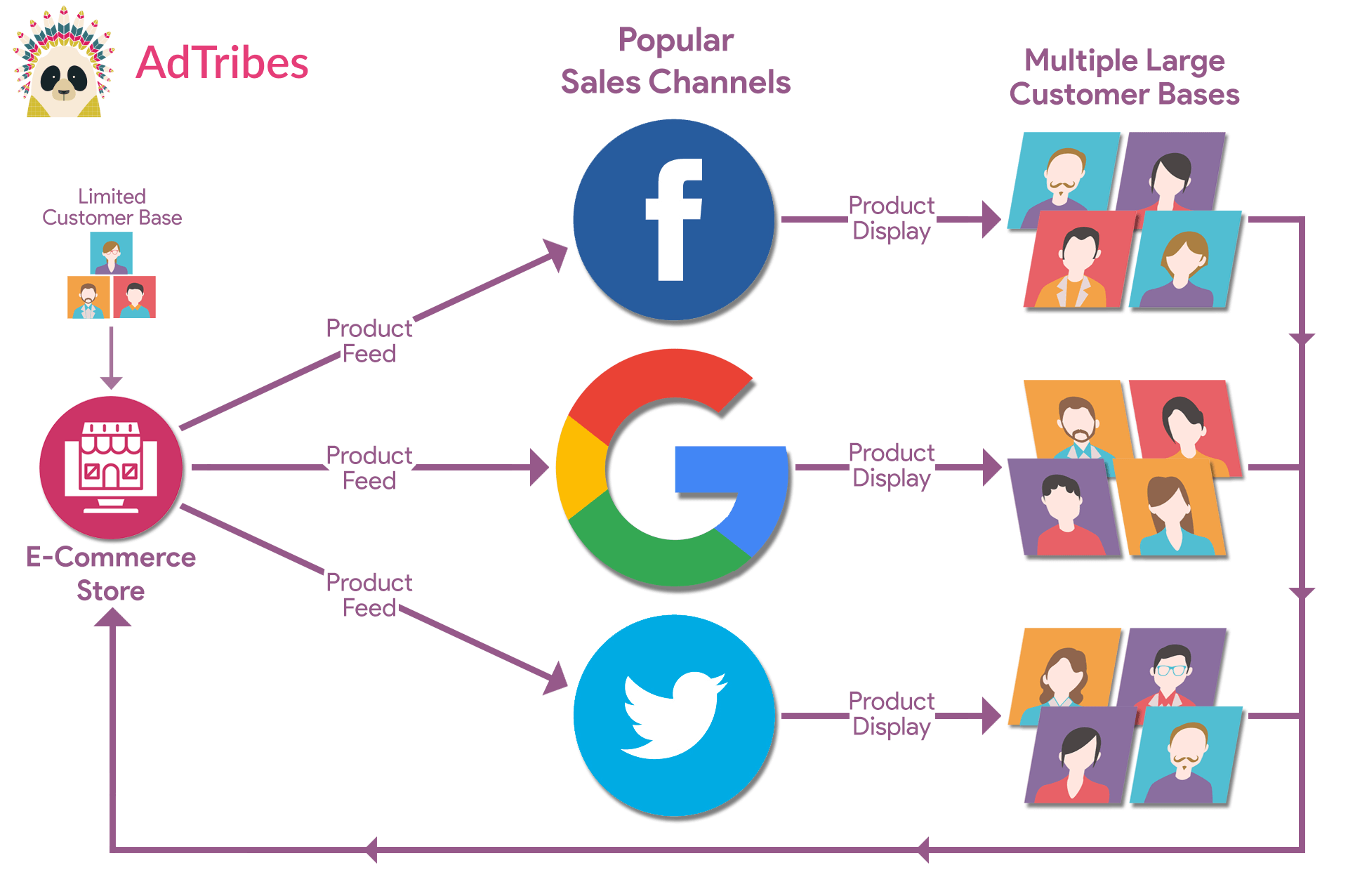
How your products show up in this crucial stage of the purchase journey directly impacts whether shoppers click and convert.
Product feeds can enhance the online customer experience by:
- Reaching shoppers where they already are, whether that’s search engines, social platforms, or marketplaces
- Keeping product info consistent, with synced titles, prices, images, and availability
- Building trust by ensuring customers see accurate, up-to-date details across all touchpoints
- Driving higher-intent traffic straight to your product pages
With plugins like AdTribes, it’s super easy to create tailored and optimized product feeds for major shopping and ad platforms. This plugin offers pre-built templates, custom feed scheduling options, and advanced filtering to control which products appear in your target sales channels. It’s a powerful way to expand your reach and get discovered early in the buying journey.
If you’re new to product feeds, check out our detailed guide here. 👉
Frequently Asked Questions
How is the online customer experience different from in-store shopping?
In-store shopping allows customers to physically see and touch products, and also ask questions to sales associates in real time. This differs from the online customer experience, where shoppers mostly rely on product pages and support tools to guide their decision-making. To build customer trust in online shopping, it’s important to optimize your website’s load speed, simplify checkout, provide clear product descriptions, and offer accessible support.
What tools can help improve the online customer experience?
AI tools like StoreAgent can help improve customer response times through AI live chat and also help you craft compelling product content that can guide shoppers. Plugins like AdTribes make it easy to create consistent product feeds across platforms like Google Shopping or Meta, so high-intent buyers can discover your products early in their journey. You can also use tools like Google Analytics to gain insights into user behavior, so you can improve your website based on real data.
What are common ways to measure online customer experience?
Some common metrics include Customer Satisfaction Scores (CSAT), which asks how satisfied customers are with their shopping experience, and Net Promoter Scores (NPS), which measures how likely customers are to recommend your store to others. Other important metrics to monitor include bounce rates, cart abandonment rates, and support response times. It’s also important to gather qualitative feedback from reviews, support tickets, and post-purchase surveys. These metrics offer valuable insights into customer expectations and help guide improvements in your store.
Wrapping Up
Learning how to improve the online customer experience is a must if you’re an ecommerce store owner. This is key to building trust, increasing conversions, and encouraging customers to keep coming back. In this guide, we revealed six practical ways on how you can get started today:
- Optimizing your website’s speed and mobile responsiveness
- Creating a smooth checkout process
- Personalizing the shopping experience
- Using clear product descriptions and high-quality images
- Offering fast and reliable support
- Using feedback to guide improvements
Plus, don’t forget how product feeds can help! With tools like AdTribes, you can reach more shoppers on platforms like Google Shopping and Facebook with accurate, up-to-date listings, helping you get discovered early on in their shopping journey.
Small tweaks make a big difference. We hope this guide helped you out! 😊