Reviewed by
AdTribes Product Feed Pro now supports the WordPress Abilities API, giving compatible AI assistants a structured way to work with your WooCommerce product feeds. Once your site is connected through an MCP adapter, an assistant can list and review feeds, check a feed’s configuration against the required fields for its channel, create or update feeds, and regenerate them when needed.
The free plugin registers all 13 abilities. If the WordPress Abilities API is new to you, we’ll start with how it works, then walk through what it adds to your product feed workflow.
How The WordPress Abilities API Works
The WordPress Abilities API arrived in WordPress 6.9. It gives plugins a standard way to register the actions they can perform, along with the information and permissions each action requires.
Each ability explains what it does, what input it needs, what it returns, and who can use it. This shared structure helps compatible tools understand the available actions before running them.
How this connects to AI assistants
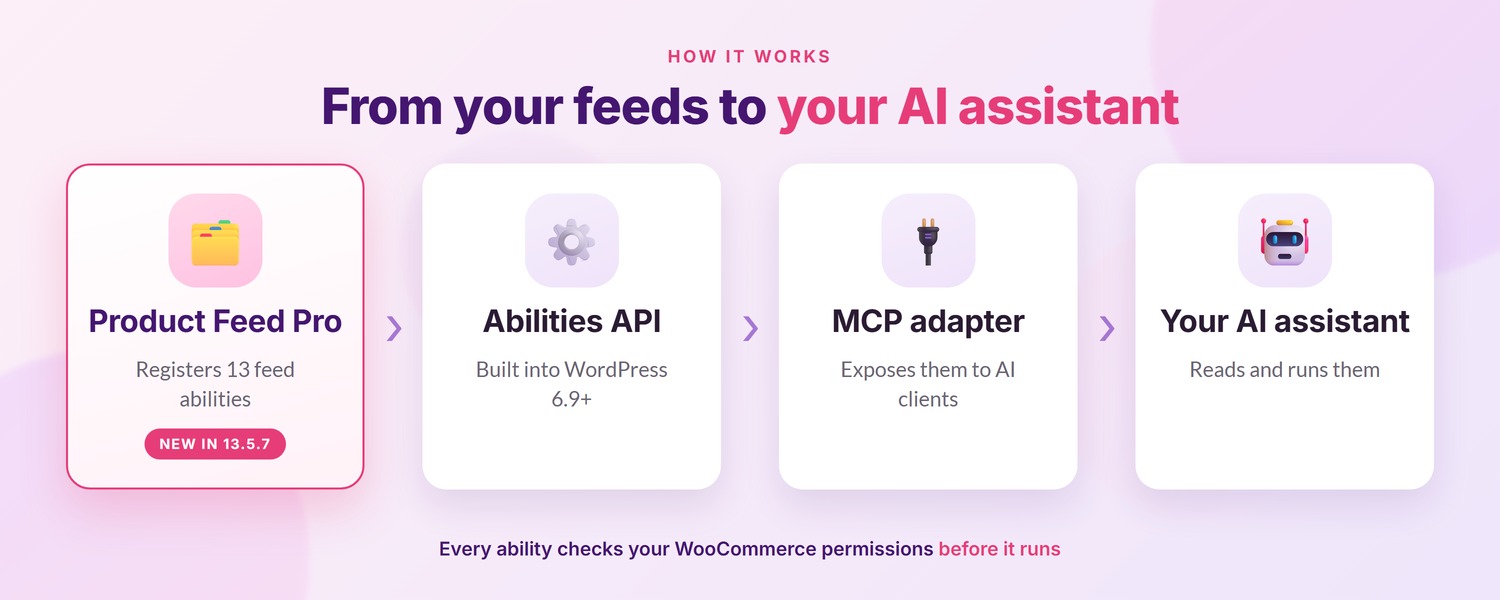
To make these abilities available to an AI assistant, your site needs a separate MCP adapter. The WordPress MCP Adapter can connect registered WordPress abilities with compatible AI clients. StoreAgent’s WooCommerce MCP server is another option: it is free on every StoreAgent plan and can run these feed abilities once you allow them.
Once that connection is set up, the assistant can discover and use the Product Feed Pro abilities that your WordPress account has permission to access.
What Compatible AI Assistants Can Do With Your Feeds
AdTribes Product Feed Pro registers 13 abilities that cover a practical range of product feed tasks:
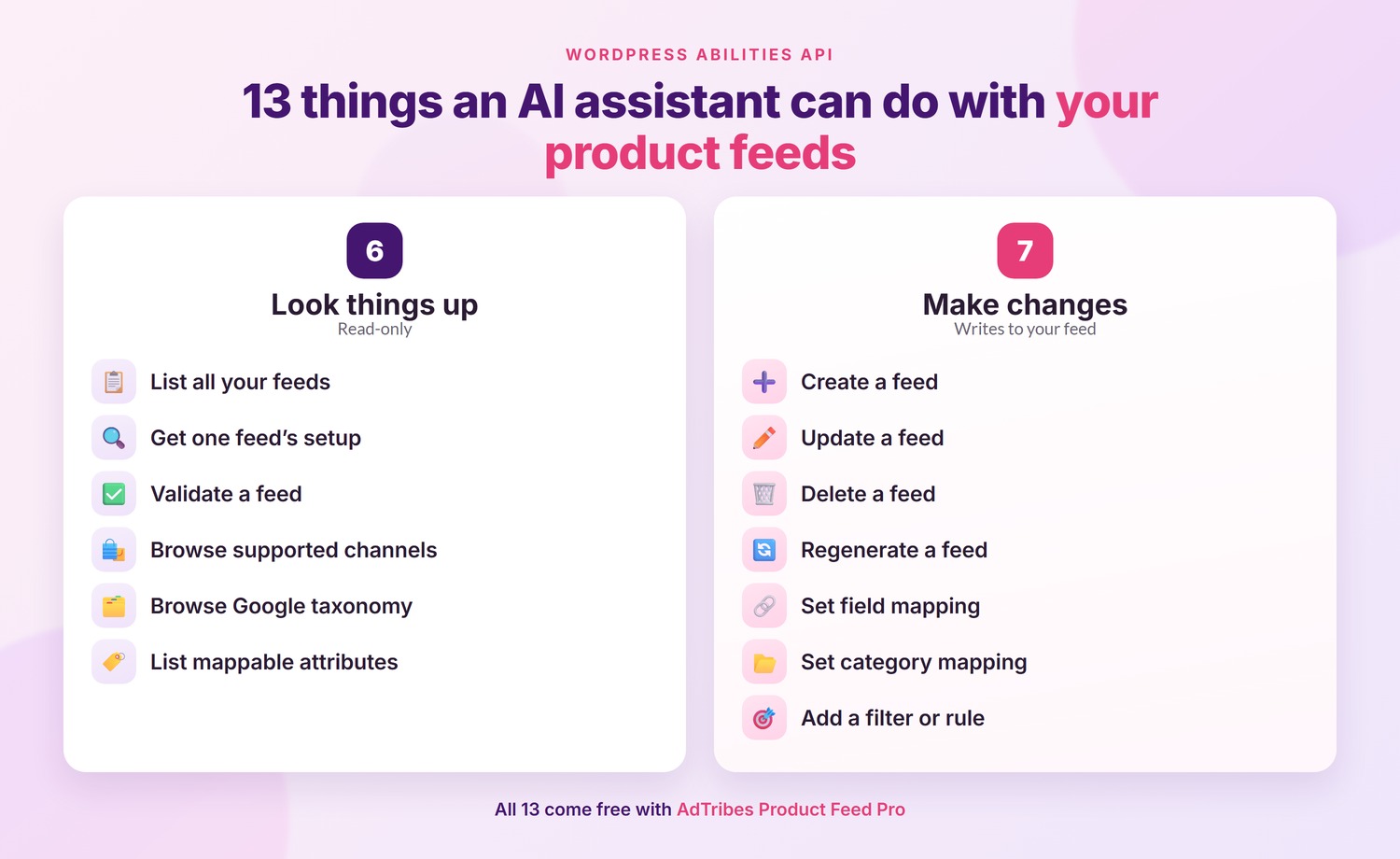
- Look at your feeds. Get a list of every feed with its channel, country, status, when it last generated, how many products it contains, and its file URL. You can also pull one feed’s full setup.
- Create and change feeds. Build a new feed, update an existing one, or remove one you no longer need.
- Set up how your data maps. Configure field mapping and category mapping for a feed.
- Target products. Add a filter or a rule to a feed.
- Run and check. Regenerate a feed on demand, and check a feed’s configuration against the required fields for its channel.
- Look things up. Browse the supported channels and where each is available, the full Google product taxonomy, and every attribute you can map.
One of the read-only abilities checks a feed’s configuration against its channel’s required fields and reports anything missing, so a connected assistant can surface that without changing the feed itself.
Six of the 13 are read-only, meaning they look at your data without touching it. The other seven are the ones that make changes.
WordPress Abilities API support does not add any new screens to your dashboard. The abilities are registered in the background, so your usual Product Feed Pro workflow stays the same unless you connect a compatible AI assistant.
💡 GOOD TO KNOW: All 13 abilities require permission to manage WooCommerce, including the six read-only abilities. The seven abilities that make changes use the same underlying WordPress and WooCommerce actions as the equivalent dashboard workflow, helping existing hooks and integrations continue to work as expected. They are also marked as change-making actions so compatible AI clients can ask for confirmation before running them. Developers can disable all 13 abilities with a constant or filter.
What You Need To Get Started
- AdTribes Product Feed Pro 13.5.7 or later. This is the free plugin, so there’s nothing to buy.
- WordPress 6.9 or newer, since that’s where the Abilities API is built in. On an older version the abilities simply aren’t registered, and nothing else about the plugin changes.
- WooCommerce installed and active, since Product Feed Pro works with your WooCommerce catalog.
- A separate MCP adapter, such as the WordPress MCP Adapter, to connect the registered abilities with a compatible AI client.
- An account that can manage WooCommerce, since that’s the permission every ability checks for.
If you already use AdTribes Product Feed Pro, update to version 13.5.7 or later. The plugin registers its abilities automatically when the WordPress Abilities API is available on your site.
Also New: Adaptive Batch Sizing For Feed Generation
Feed generation can now adjust its batch size automatically. Product Feed Pro already lets you set a batch size manually, but adaptive sizing removes the need to choose and revisit that number when your catalog or hosting environment changes. It uses the available execution time and memory to choose a suitable batch size for the feed.
On a feed’s first run, the plugin begins with a conservative batch size and adjusts from there. It can continue refining the size on later runs as server conditions change.
Adaptive batch sizing is enabled by default unless you have set a batch size manually in the plugin’s settings. That setting applies across your feeds, so an existing manual value is still respected everywhere, and developers can turn the adaptive behavior off with a filter.
Frequently Asked Questions
Do I need Product Feed Elite for the WordPress Abilities API support?
No. AdTribes Product Feed Pro registers all 13 WordPress abilities starting with version 13.5.7. To use them through an AI assistant, you’ll also need WordPress 6.9 or newer, a separate MCP adapter, and a compatible AI client.
Which WordPress version do I need?
WordPress 6.9 or newer. On an older WordPress version, Product Feed Pro does not register the abilities, while the rest of the plugin continues to work normally.
Can an AI assistant change my feeds without asking me first?
That depends on the AI client you connect. Product Feed Pro marks the seven abilities that change data so compatible clients can request confirmation before running them. The other six are read-only and cannot alter your feeds.
Who is allowed to use these abilities?
Only signed-in WordPress users with permission to manage WooCommerce can access them. Accounts without that permission cannot run any of the 13 abilities, including the read-only ones.
Can I turn the abilities off?
Yes. Developers can use a constant or filter to stop Product Feed Pro from registering the abilities. If you do not connect an AI assistant, the ability registrations do not add any screens or change your usual Product Feed Pro workflow.
Do I need to change my batch size setting?
No. Product Feed Pro continues to respect a manual batch size. If you have not set one, adaptive batch sizing works automatically. You only need to change the setting if you want adaptive sizing to replace an existing manual value.
Wrapping Up
AdTribes Product Feed Pro 13.5.7 registers 13 product feed abilities for compatible AI tools and adds adaptive batch sizing to feed generation. The abilities become available through an MCP adapter and remain protected by WooCommerce permissions. Adaptive sizing works automatically when no manual batch size is set.
Here’s what we covered:
- How the WordPress Abilities API works
- What compatible AI assistants can do with your feeds
- What you need to get started
- How adaptive batch sizing works
Update to AdTribes Product Feed Pro 13.5.7 or later to add both improvements to your store. You can keep your existing manual batch setting or let the plugin size batches automatically, then connect your site to a compatible AI client through an MCP adapter whenever you’re ready.
Do you have any questions about this update? Let us know in the comments. Happy to help!