Reviewed by
A WooCommerce store can look perfectly fine while its product feed tells Google Shopping a different story. Missing identifiers, outdated prices, and broken image URLs can affect product visibility even when the product pages look right. That’s why checking the feed itself matters.
A product feed audit is a repeatable check of the product information you send to sales channels, from titles and identifiers to prices, images, and URLs. It helps you catch missing, outdated, or incorrectly formatted data before it affects your listings.
Use the checklist below to review your current feed, spot common problems, and see where AdTribes can help you fix them.
What A Product Feed Audit Actually Checks
Check both your WooCommerce source data and the generated feed. A product field can look correct in your store but be missing, mapped incorrectly, or formatted differently in the file a channel receives.
Here are the dimensions worth checking every time:
- Identifiers: GTIN, MPN, and brand. Missing identifiers can limit visibility where they’re expected, while incorrect values can trigger errors.
- Titles and descriptions: clear, specific, and not keyword-stuffed. Clear titles help channels understand your products and match them to relevant searches.
- Price and availability: feed values should match your live store. Conflicting values can lead to disapprovals.
- Images: live URLs, correct resolution, no placeholders. A broken image URL can lead to an item disapproval.
- Category and taxonomy mapping: check submitted category values against each channel’s taxonomy, where applicable.
- Required-attribute completeness: check the fields each channel requires; missing values can lead to errors or disapprovals.
For more tips on titles, categories, and identifiers, see our guide to Google Shopping feed optimization.
Common WooCommerce Feed Data Problems
Start by looking for these common problems in your WooCommerce feed:
- Missing or invalid identifiers: missing values can limit visibility when a channel expects them, while incorrect identifiers can cause errors or disapprovals.
- Weak product titles: vague or keyword-stuffed titles can make it harder for channels and shoppers to understand what you’re selling.
- Price and availability mismatches: the feed shows a price or stock status that differs from the live store, which can lead to item disapprovals.
- Broken or low-quality images: 404 image URLs, placeholder images, or links pointing to files that have moved.
- Incorrect category values: products may be classified inaccurately, or the channel may reject invalid values.
- Variation data mismatches: a variation’s price or availability in the product page’s structured data may differ from its feed value, which can lead to disapprovals.
Quick check: Product URL changes and image moves can cause different feed problems. After a permalink update or site migration, test the product and image links in your generated feed. Refresh the feed if its product links are outdated, and fix any broken image destinations at the source.
How To Audit Your WooCommerce Product Feed (Step By Step)
Use these steps for routine checks, especially after changing your catalog or feed settings.
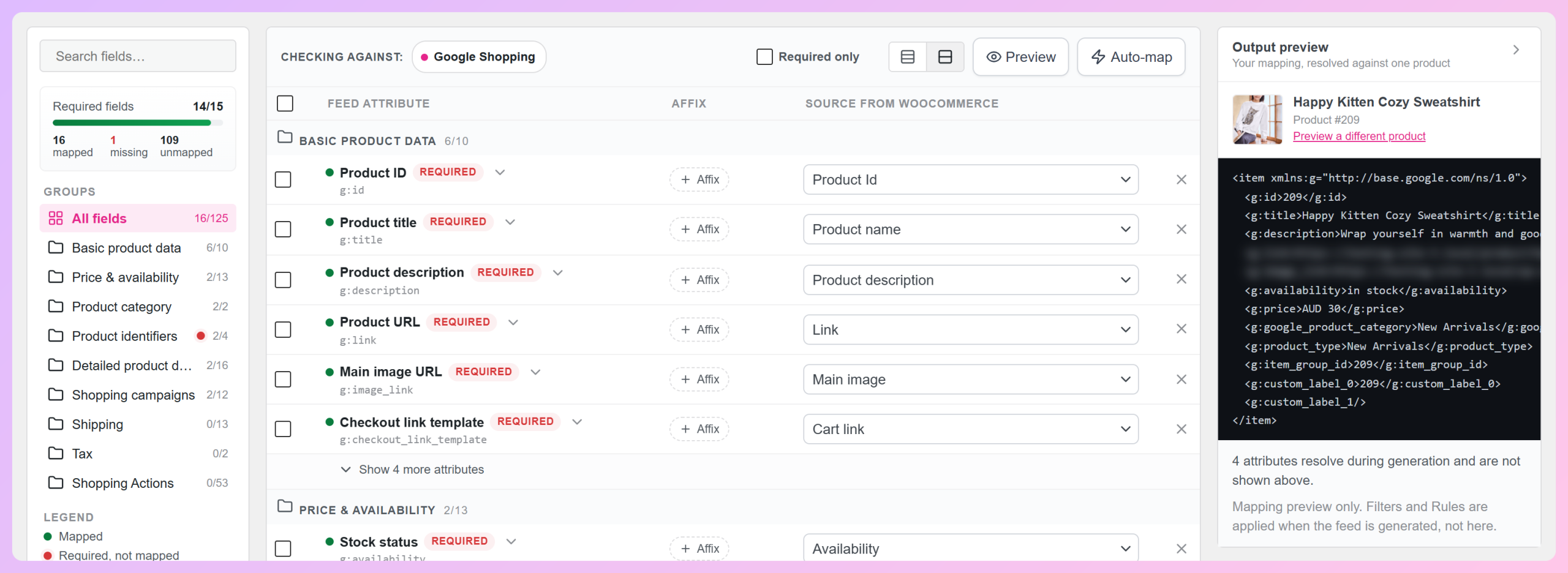
- Open and preview your current feed. Check a sample of items in your generated feed URL. In AdTribes, the Output preview on the Field Mapping tab shows mapped values for one product, but Filters and Rules only take effect in the generated feed.
- Check identifier coverage. Identify missing or invalid GTIN, MPN, and brand values where the channel expects them. Don’t invent identifiers for products that don’t have them.
- Spot-check titles. Compare a sample of titles against how buyers actually search. Watch for vague or stuffed titles.
- Verify price and availability. Cross-check a sample against the live store so the feed matches reality.
- Test product and image URLs. Open a sample in a browser to catch 404s and unexpected redirects, especially after permalink changes, site migrations, or media moves.
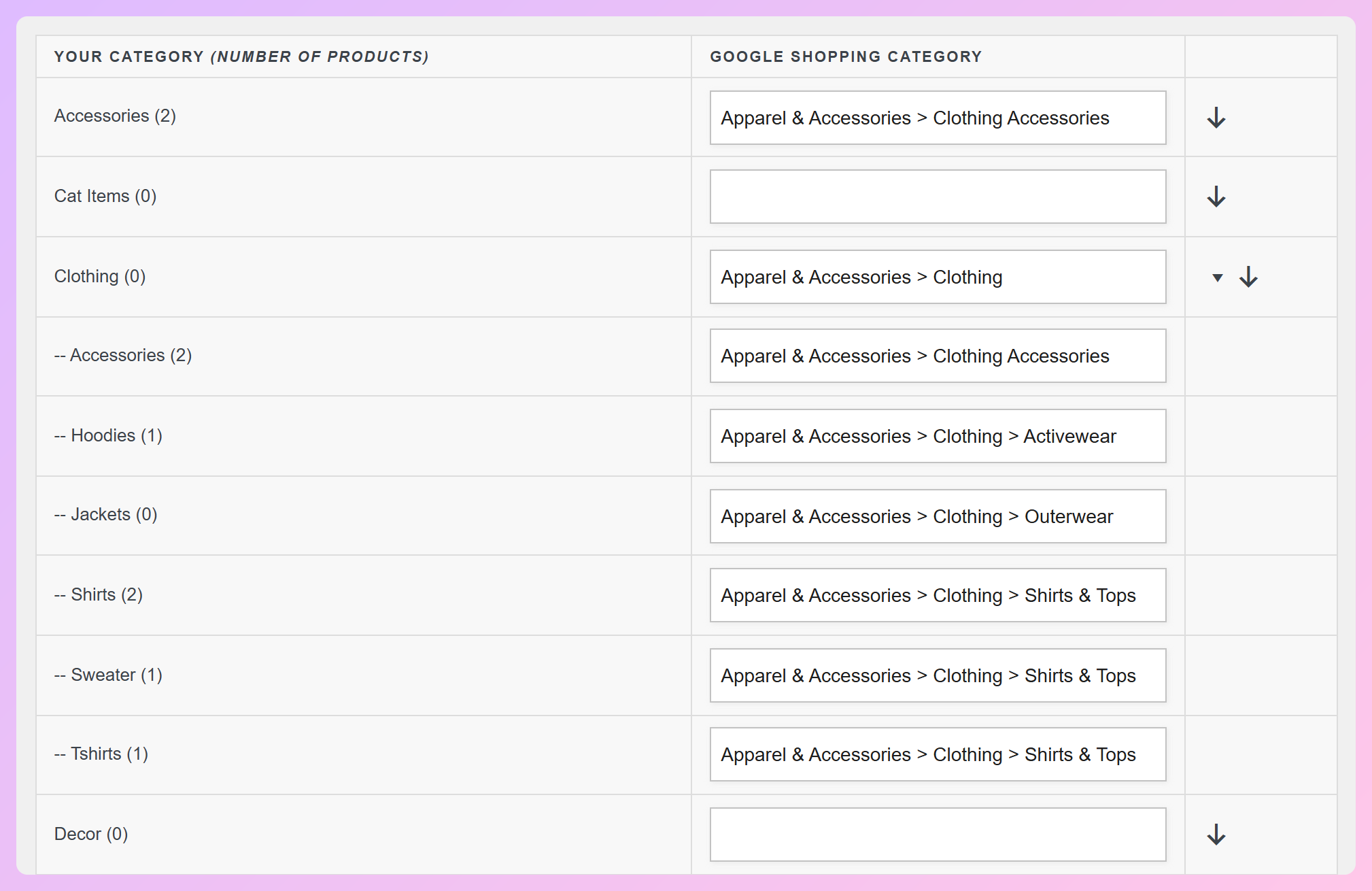
- Review category mapping. If you submit Google product categories, check that they match Google’s taxonomy. Google can assign categories automatically when none are provided, while other channels may have different requirements.
- Cross-check channel issues. Review the Needs attention tab in Google Merchant Center and any issues reported by Meta’s catalog tools. These can reveal problems a manual spot-check missed.
Broken product and image links are easy to miss if you only check the data in WooCommerce. Testing URLs directly from the generated feed helps catch them early. If an item is disapproved, our walkthrough on how to fix disapproved products in Google Merchant Center covers common issues and what to do next.
How AdTribes Helps You Fix Feed Data Issues
AdTribes Product Feed Pro is a free WooCommerce plugin with 250+ ready-made feed templates for channels such as Google Shopping and Meta. It also includes mapping, rules, and filters, so you can correct many feed-data issues without editing every product individually.
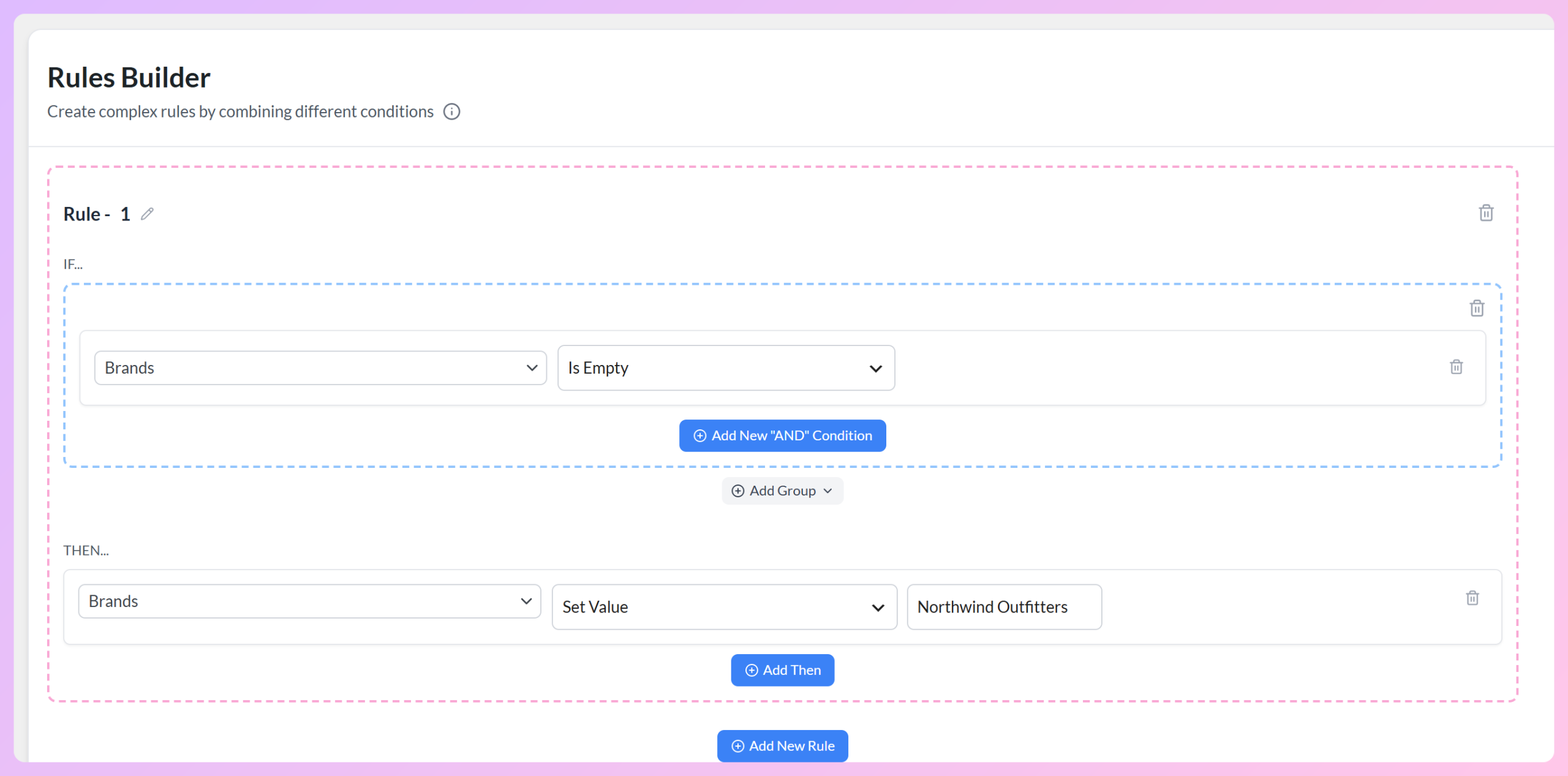
- Feed rules and filters: update feed values with IF/THEN logic (for example, filling in a confirmed brand for matching products with an empty brand field), clean up titles, or adjust values across many products at once. Filters also exclude problem items.
- Field and category mapping: map WooCommerce fields to channel attributes, and provide category values from the channel’s taxonomy where required or useful.
- Output preview: check mapped values for one real product as you work. To verify changes made by Filters and Rules, inspect the generated feed.
- Extra fields for GTIN, MPN, and Brand in Elite: the free plugin maps identifiers from data you already keep in a custom field or product attribute. AdTribes Product Feed Elite adds product-editor fields to store them when WooCommerce doesn’t.
- Structured data fix for variable products in Elite: helps correct certain price and availability mismatches in product-page structured data that could otherwise conflict with feed values.
These free tools can help you correct feed issues, but it’s still worth checking the product details in WooCommerce. In 2021, Baymard Institute found that 10% of major ecommerce sites didn’t provide consistently detailed product descriptions. Feed mapping can organize the information you have, but it can’t replace product details that are missing at the source.
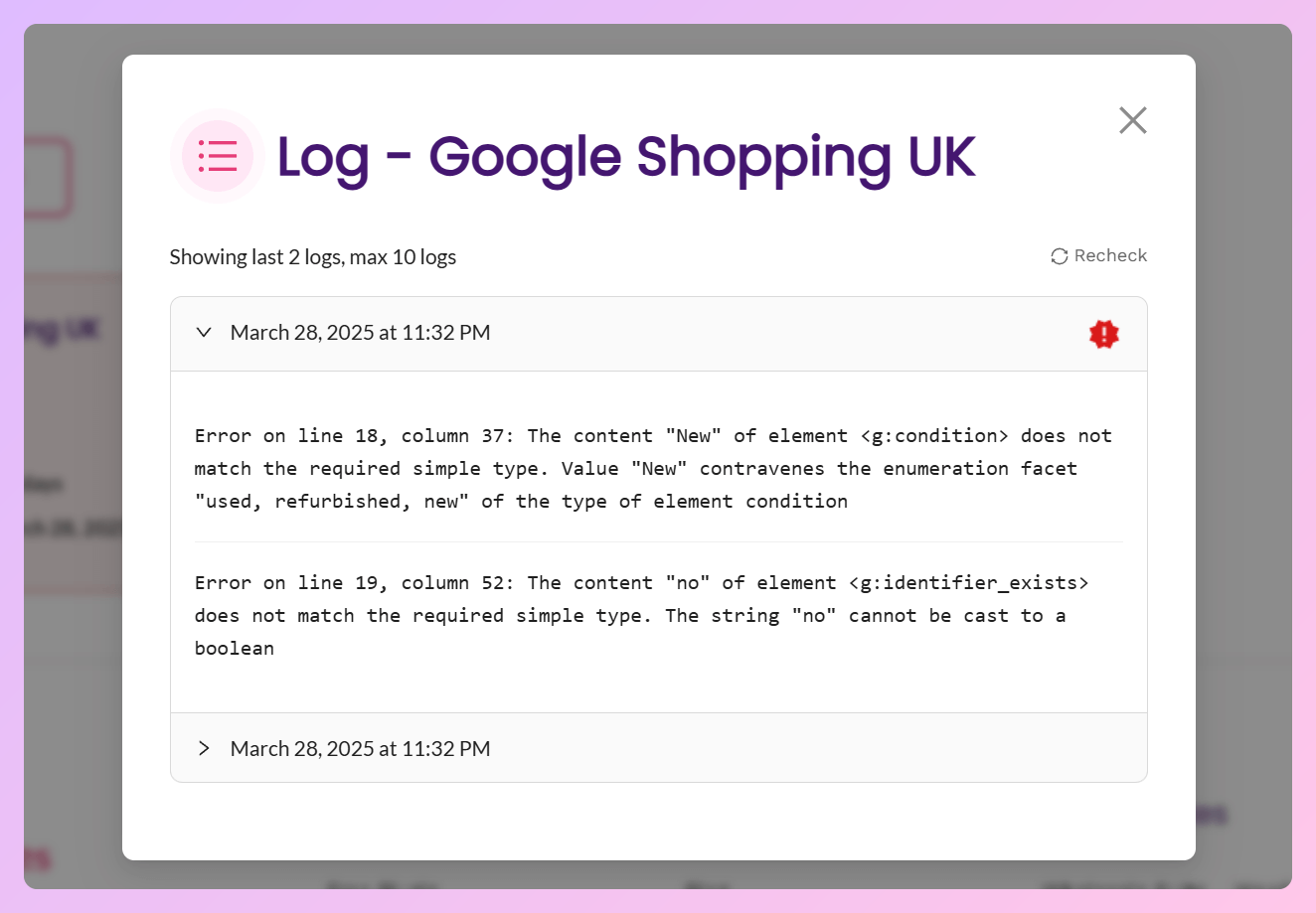
For ongoing checks, the Plus and Business plans of Product Feed Elite include access to the Feed Validator in your AdTribes account. It checks Google Shopping, Google Product Review, Facebook, and OpenAI product feed URLs daily, weekly, or monthly, with detailed error logs and email alerts. It identifies issues but doesn’t fix them automatically.
Depending on the error, you may need to update your product data, adjust feed settings, or repair a broken URL before running the check again.
Common feed problems and how to address them with AdTribes:
| Feed data issue | What it causes | Fix in AdTribes |
|---|---|---|
| Missing brand / GTIN | Limited performance, weak matching | Set a confirmed brand with a feed rule where appropriate; map real GTIN/MPN values (or store them in Elite’s extra fields) |
| Weak product titles | Less relevant matching or fewer clicks | Feed rules to clean up titles |
| Price / availability mismatch | Item disapprovals or misleading listings | Check source prices and stock, correct field mapping, and refresh the feed |
| Broken image / product URLs | Item-level disapprovals | Repair broken links at the source and regenerate the feed; exclude affected products until fixed |
| Incorrect category values | Misclassification or channel errors | Review category mapping against the channel’s taxonomy, where applicable |
| Variation data mismatches | Possible item disapprovals | Elite’s structured data fix when the issue comes from product-page markup |
Feed errors can hurt performance in different ways. Disapproved products may stop appearing in affected listings, while incorrect prices or stock information can send shoppers to pages that don’t match what they expected. Catching those issues early protects the time and budget you’ve put into your campaigns.
Frequently Asked Questions
What is a product feed audit?
A product feed audit is a structured review of your product data (identifiers, titles, price, availability, images, and category mapping) against each channel’s requirements. The goal is to catch missing or incorrect identifiers, broken image URLs, and price mismatches before they limit visibility or lead to disapprovals. It’s a repeatable checklist, not a one-time task.
How often should I audit my WooCommerce product feed?
Audit on a schedule, because product data changes. For a fairly stable catalog, a monthly product feed audit can be a useful starting point. Check more often if prices or stock change frequently, and after major catalog, URL, or site changes.
What causes product feed disapprovals in Google Merchant Center?
Common product-data causes of disapproval include missing required attributes, incorrect identifiers (like a wrong GTIN), price or availability mismatches between the feed and store, and broken image or product URLs. The fix is to identify the exact error in Merchant Center, correct the source data in your feed or WooCommerce, and request a review where needed.
How do I fix missing GTIN or brand in my product feed?
Map genuine GTIN, MPN, and brand values from the custom fields or product attributes where you already store them in WooCommerce. If products share the same confirmed brand, you can use a feed rule to fill blank brand fields in bulk. Don’t make up GTINs or MPNs. The free AdTribes Product Feed Pro supports mapping and feed rules, while Product Feed Elite adds dedicated GTIN, MPN, and Brand fields to the product editor.
Does AdTribes have a feed validator?
Yes. The Feed Validator is available on AdTribes Product Feed Elite Plus and Business plans. It checks Google Shopping, Google Product Review, Facebook, and OpenAI product feeds on a schedule, returns detailed error logs, and sends email alerts. With the free AdTribes Product Feed Pro, you can preview mapped fields, use rules and mapping to correct issues, and inspect the generated feed to confirm your changes. The validator flags problems; you correct the affected data or feed settings and check again.
Keep Your WooCommerce Feed Audit-Ready
A product feed audit works best as part of regular store maintenance. Review your feed on a schedule, and check it again after changes to pricing, inventory, or your website. That way, you can catch outdated data before it becomes a bigger problem.
- Know what to check: identifiers, titles, price, images, categories.
- Watch for the usual culprits: missing brands, broken URLs, price mismatches.
- Run the checklist: preview, verify, and test URLs.
- Fix in bulk: use feed rules and mapping, then check the generated feed.
Want an easier way to correct and check your product feeds? Get started with AdTribes Product Feed to explore the available tools. You can also compare options in our guide to the best WooCommerce product feed plugins.