

Home » Integrations » Product Data & Themes » Advanced Custom Fields
Product Data & Themes

Advanced Custom Fields

Pull ACF Fields Straight Into Your Product Feeds

WP Engine (opens in a new tab)Developer · builds and supports this plugin

How it works with AdTribes

Already managing extra product images with Advanced Custom Fields? Product Feed PRO/Elite reads that field automatically and turns it into a ready-to-use image URL for Google Shopping, Meta, and Pinterest. Just map the field to a custom feed attribute, and PRO/Elite handles the rest.

Integration Limitations

Product Feed Elite fully integrates with Advanced Custom Fields (ACF), allowing the plugin to directly pull your custom field values.

How To Enable ACF For Product Feed Elite

Product Feed Elite automatically detects your created ACF fields. To ensure they display properly:

  • Map the fields correctly within your Product Feed configuration.
  • Verify that the product itself contains the required data set.
  • Note: If data is missing for a product, the attribute will not be included in your XML file.
Advanced Custom Fields and AdTribes Product Feed: screenshot 1

Missing ACF Mappable Fields?

If you cannot find your mappable fields, follow these steps:
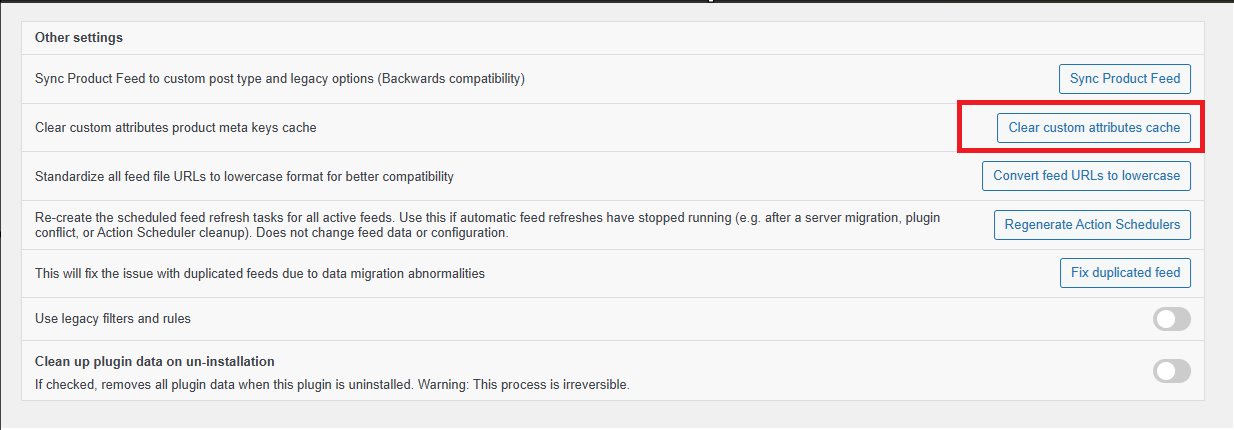
  1. Navigate to Product Feed > Settings.
  2. Click the Clear custom attributes cache button.
  3. Return to your feed configuration and search for your custom field again.
Advanced Custom Fields and AdTribes Product Feed: screenshot 2

Support

Support

Support is provided by the developers of the plugins. Please contact them directly as we are unable to support them.

Have you developed a plugin that works with AdTribes?

Tell us about your integration with Product Feed Pro or Elite and get it listed.

Tell us about your plugin
Complete Your Purchase
AdTribes WooCommerce Product Feed

The best WooCommerce product feed plugin

  • AdTribes Pty Ltd
    ABN: 40 675 636 816
Product
Partner Sites
Rymera