Reviewed by
If you manage a WooCommerce store with more than a few dozen products, you already know the pain of writing product titles and descriptions that actually perform in Google Shopping. Multiply that by hundreds or thousands of SKUs, and the task becomes almost impossible to do well by hand.
AI tools like ChatGPT and Google Gemini have changed this. They can generate keyword-rich titles, rewrite thin product descriptions, and even suggest the right Google product categories for your catalog. But AI alone does not get your products into Google Merchant Center. You still need a feed management plugin to structure, format, and deliver that data.
This guide walks through five practical ways to use AI product feed optimization alongside AdTribes Product Feed Pro to improve your WooCommerce feed quality without editing every product by hand.
How AI Fits Into The Google Shopping Feed Workflow
AI tools and feed management plugins solve different problems. AI generates and improves product content. A feed plugin like AdTribes Product Feed Pro structures that content into a format Google Merchant Center accepts and delivers it on schedule.
Think of it this way: AI is the copywriter, and AdTribes Product Feed Pro is the logistics system. ChatGPT can write you a better product title, but it cannot create a compliant XML feed, map WooCommerce fields to Google Shopping attributes, or schedule automatic feed refreshes. Similarly, AdTribes Product Feed Pro can deliver a perfectly structured feed, but the quality of what it delivers depends on the product data you give it.
The winning workflow looks like this:
- Use AI to generate or improve product content (titles, descriptions, category suggestions)
- Apply that content to your WooCommerce products or feed rules
- Let AdTribes Product Feed Pro format everything to spec so your feed is ready to submit or refresh in Google Merchant Center
This combination gives you both content quality and technical accuracy. One without the other leaves gaps that hurt your Shopping performance. If you’re running a multi-vendor marketplace, feed content is just one piece of the puzzle. Our guide to AI marketplace management covers nine other ways AI can automate moderation, pricing, and support across your whole catalog.
5 Ways To Use AI Tools To Improve Your WooCommerce Feed
These are practical approaches you can start using today. Each one targets a specific feed quality problem that AI can help make easier to manage.
Generate better product titles
Your product title is one of the most important fields in your Google Shopping feed. It helps Google understand what you sell and can influence whether shoppers click on your listing. Many WooCommerce stores default to titles that are too short, too generic, or missing key attributes like color, size, or material.
AI tools can help rewrite titles so they include useful product details in a clearer, more structured way. Here is an example prompt you can use:
“Rewrite this product title for Google Shopping. Include the brand name, product type, key material, color, and size if applicable. Keep it under 150 characters. Current title: Blue Running Shoes”
A good AI response might return: “Nike Air Zoom Pegasus 40 Men’s Running Shoes – Blue/White – Size 10 – Breathable Mesh Upper”
That title includes useful details like brand, product type, color, size, and material, which can help Google understand the product more clearly. To apply this at scale, review your AI-generated titles first, then store the approved values in WooCommerce product fields, attributes, or custom fields that AdTribes Product Feed Pro can map into your feed.
Write keyword-rich descriptions
Product descriptions in your Google Shopping feed affect both relevance scoring and how Google matches your products to search queries. The problem is that most WooCommerce stores either have no descriptions, one-sentence descriptions, or manufacturer copy shared by dozens of competitors.
AI can rewrite descriptions that are unique, keyword-rich, and specific to each product. Use a prompt like:
“Write a 150-word product description for Google Shopping. Include these keywords naturally: [primary keyword], [secondary keyword]. Focus on who this product is for and what problem it solves. Product: [name and basic details]”
Run this across your catalog in batches. Group similar products together so you can use one prompt template per product category, then adjust the outputs for individual items. If you want a more WooCommerce-focused workflow, you can also use a product content tool like StoreAgent’s WooCommerce product description generator to generate SEO-friendly product descriptions from your existing product details before mapping the final copy into your feed.
Practical Tip: One common mistake is spending time on product titles while leaving descriptions thin, duplicated, or incomplete. A stronger description gives Google more product context and can help your listings match more relevant long-tail searches that the title alone may not cover.
Automate category mapping
Google Product Category is optional for many products, but accurate category mapping can still improve feed quality and help Google understand where each product belongs. For certain product types or situations, incorrect or missing category data can also contribute to Merchant Center issues, so it is still worth reviewing carefully.
AI tools are surprisingly good at this task. You can paste a list of your product names and ask the AI to suggest the most specific Google Product Category for each one.
“For each product below, suggest the most specific Google Product Category from Google’s official taxonomy. Return the full category path. Products: [list]”
Review the suggestions before applying them. AI occasionally picks a parent category when a more specific child category exists. Once you have verified the mappings, use AdTribes Product Feed Pro’s category mapping feature to assign them across your feed.
Identify missing attributes
Google Shopping feeds perform better when they include optional attributes like color, material, size, age group, and gender. Many WooCommerce stores leave these fields empty because filling them in manually takes too long.
AI can help review exported product data and identify which attributes may be missing, then suggest possible values based on the product name and description. For example:
“Review this product data and identify any missing Google Shopping attributes. Suggest values for: color, material, size_type, size_system, age_group, gender. Product: [name, description, existing attributes]”
This is especially useful for stores with large catalogs where manual auditing is not practical. Generate the missing attribute values with AI, validate them, and apply them through AdTribes Product Feed Pro’s attribute mapping.
A/B test feed content
One of the less obvious uses of AI is generating multiple versions of titles and descriptions so you can test which performs better. Instead of asking AI for one title, ask for three variations with different keyword orders, attribute emphasis, or phrasing.
Run version A for a defined testing period, then compare it with another version using the performance data available in Google Ads. AI makes it easier to generate controlled title and description variations, especially when you are working with a larger catalog.
Track these metrics in Google Ads for each variation:
- Click-through rate (CTR): Higher CTR typically means the title is more relevant to search queries
- Conversion rate: A title that gets clicks but no conversions may be attracting the wrong audience
- Impression share: Better titles can increase the queries your products match
How To Apply AI-Generated Content With AdTribes Product Feed Pro
You do not always need to edit every WooCommerce product manually to apply AI product feed optimization. AdTribes Product Feed Pro includes field mapping and feed rules that can help you adjust feed output without changing your original store data. The exact setup depends on where your AI-reviewed content lives.
For example, if you store improved titles, descriptions, or attributes in WooCommerce product fields, product attributes, or custom fields, you can map those fields into your Google Shopping feed. For broader changes, you can use rules to set, find-and-replace, or recalculate feed values based on conditions like product category, stock status, price range, or other available product data.
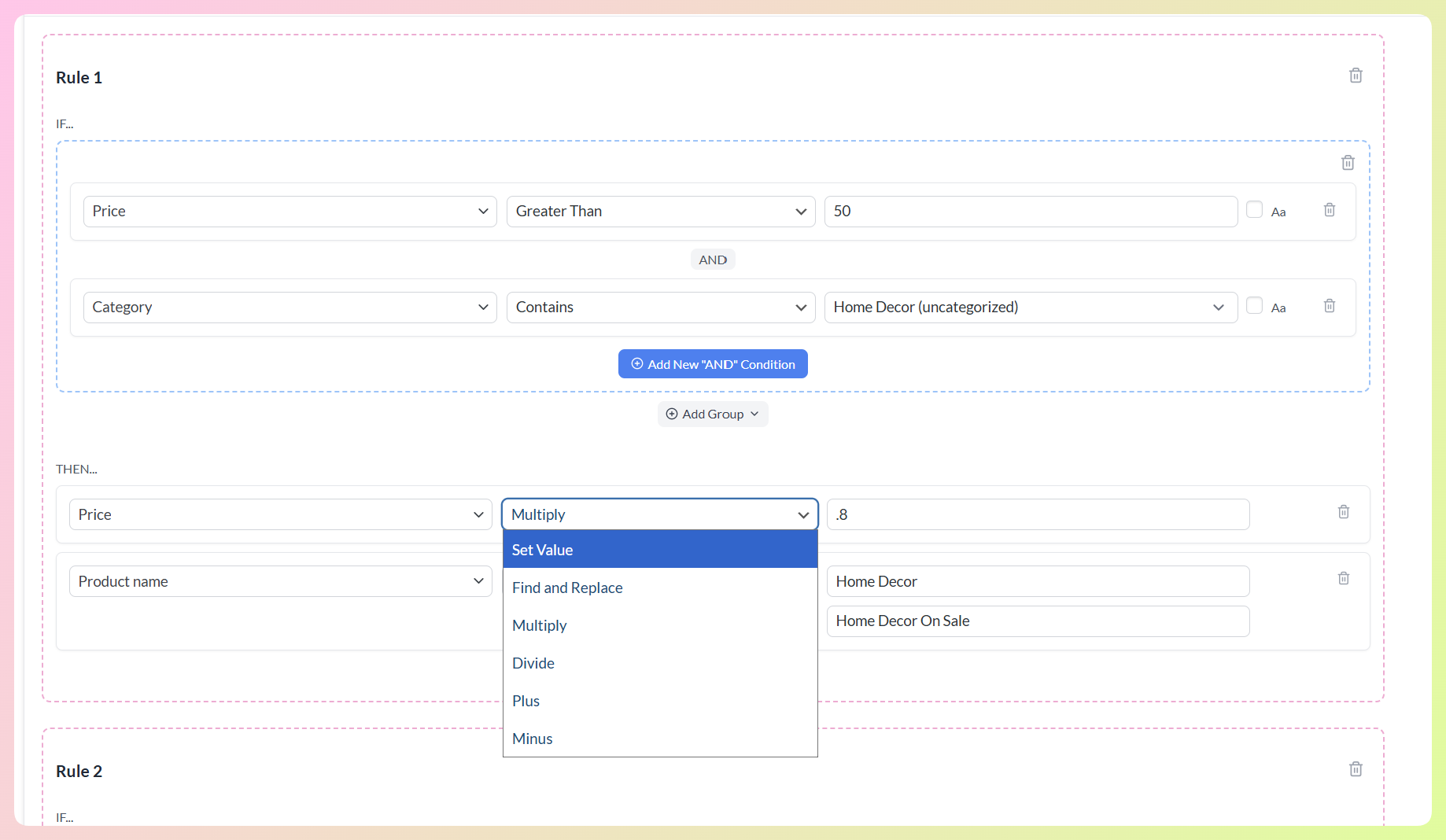
Here is a practical workflow:
- Generate and review content with AI. Use ChatGPT, Gemini, or another AI tool to draft improved titles, descriptions, category suggestions, or attribute values. Review the output before adding it to your feed.
- Add the approved data to WooCommerce. Store the final values in the right product field, attribute, or custom field so AdTribes Product Feed Pro can use them in the feed.
- Map the right fields. Open your Google Shopping feed and use field mapping to match your WooCommerce data to the correct Google Shopping attributes.
- Use rules where they fit. Create feed rules to set, find-and-replace, or recalculate values based on conditions, such as product category or existing attributes.
- Review and regenerate the feed. Check the output before submitting or refreshing the feed in Google Merchant Center.
This approach keeps your store’s frontend product content separate from your Google Shopping feed strategy. Your live product pages can stay customer-friendly, while your feed data can be optimized for search visibility, product matching, and channel requirements.
📝 One important note: Google Merchant Center explicitly requires you to label AI-generated content. Instead of mapping AI-written text to the standard title and description attributes, you must map it to the structured_title and structured_description attributes and set the digital_source_type to trained_algorithmic_media. Always check Google’s current product data guidance to ensure your feed complies, accurately describes the product, and avoids promotional language.
AdTribes’ OpenAI Product Feed Feature
AdTribes Product Feed Pro also supports OpenAI product feeds, helping WooCommerce stores create a structured product catalog that OpenAI’s commerce tools and AI-powered shopping experiences can read. For a fuller checklist, see our guide on getting your store ready for AI shopping agents.
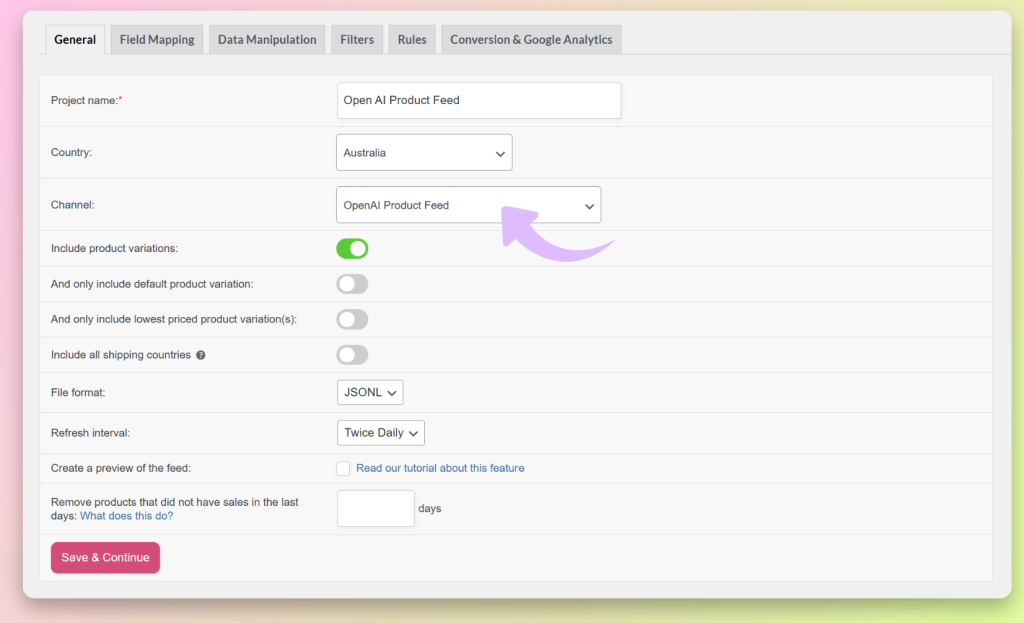
Instead of using an OpenAI API key to generate product copy inside your Google Shopping feed, the OpenAI product feed workflow helps you export your existing product catalog in a supported machine-readable format, such as JSONL, CSV, or TSV. From there, store owners can submit the feed through OpenAI’s merchant tools once they have the required OpenAI commerce access.
This makes it a helpful addition to the broader AI visibility workflow. You can use AI tools separately to improve product titles, descriptions, and attributes for Google Shopping, then use AdTribes Product Feed Pro to structure those products for Google Shopping, OpenAI product discovery, and other supported channels.
What AI Cannot Do For Your Product Feed
AI is a strong content generation tool, but it has real limitations when it comes to product feed management. Being honest about these limitations helps you avoid costly mistakes.
Pricing and inventory accuracy. AI cannot verify that your prices are correct or that your inventory counts are current. Price or availability mismatches between your feed and landing pages can lead to Merchant Center errors, disapprovals, or limited visibility. This data should come from your WooCommerce store data and stay updated through scheduled feed refreshes.
Valid GTINs and product identifiers. Global Trade Item Numbers, MPNs, and brand identifiers must be accurate and verifiable. AI might generate plausible-looking GTINs, but fabricated identifiers will get your products disapproved. Always source these from your suppliers or manufacturer documentation.
Image validation. Google Shopping has strict image requirements including minimum resolution, no watermarks, no promotional overlays, and a white or transparent background for apparel. AI cannot evaluate whether your product images meet these specifications, and AI-generated product images are not a substitute for real product photography.
Policy compliance. Google Merchant Center policies change regularly. AI models are trained on historical data and may not reflect the latest policy updates. Always verify feed compliance against Google’s current documentation.
Scheduled product data updates. AI generates content at a point in time. It does not monitor your store for price changes, stock updates, or new product additions. AdTribes Product Feed Pro helps by generating feeds from your WooCommerce product data and refreshing them on the schedule you configure, while Product Feed Elite adds more advanced refresh interval control.
Frequently Asked Questions
Will AI-generated content get my products disapproved?
AI-generated content is not automatically a problem, but it still needs to be accurate, product-specific, and formatted according to Google Merchant Center requirements. Before adding AI-written titles or descriptions to your feed, review them for accuracy, remove promotional wording, and check Google’s current guidance for content created with generative AI.
How often should I refresh AI-generated feed content?
Review and update your AI-generated titles and descriptions quarterly, or whenever you notice changes in click-through rates or impression volume. Product catalogs, search trends, and Google’s matching algorithms all shift over time. AdTribes Product Feed Pro makes it easy to swap in updated content through feed rules without editing your products directly.
Can I use AI for Google Shopping feeds in languages other than English?
Yes. Most major AI tools support multiple languages and can generate product titles and descriptions in your target market’s language. Be sure to have a native speaker review the output, since AI translations can sometimes sound unnatural or miss regional product terminology. AdTribes Product Feed Pro supports feeds for multiple countries and languages.
Does AdTribes Product Feed Pro’s OpenAI product feed feature write product copy for me?
No. The OpenAI product feed feature is for creating a structured product feed that can be submitted to OpenAI’s merchant tools. It does not replace ChatGPT or Gemini as a copywriting tool for rewriting Google Shopping titles and descriptions. You can still use those AI tools separately, then use AdTribes Product Feed Pro to manage the feed data you send to Google Shopping and other supported channels.
Start Improving Your Google Shopping Feed With AI
AI tools have made it more practical to improve product feed content at scale, even without a dedicated copywriting team. When you combine AI-generated content with a feed management plugin like AdTribes Product Feed Pro, you can improve your product data while keeping your Google Shopping feed structured and easier to manage.
Here is what to focus on:
- Generate better product titles with AI prompts that include brand, attributes, and keywords
- Write keyword-rich descriptions to improve query matching and long-tail coverage
- Automate category mapping to ensure every product uses the most specific Google category
- Apply content through feed rules to keep your WooCommerce data clean while optimizing your feed
- Know AI’s limitations so you rely on real data for pricing, inventory, and identifiers
Ready to put AI-powered feed optimization into practice? Get AdTribes Product Feed Pro for free and start building better Google Shopping feeds for your WooCommerce store today.