

 Reviewed by
AdTribes Product Feed Pro supports the WordPress Abilities API, giving AI assistants like Claude and ChatGPT a structured way to work with your WooCommerce product feeds. Once your store is connected through the free StoreAgent plugin, an assistant can list and review feeds, check a feed’s configuration against the required fields for its channel, create, clone or update feeds, set refresh schedules, and regenerate them when needed.
The free plugin registers 25 abilities and includes an AI / MCP settings tab that connects them to your AI assistant through StoreAgent. If the WordPress Abilities API is new to you, we’ll start with how it works, then walk through what it adds to your product feed workflow.
How The WordPress Abilities API Works
The WordPress Abilities API arrived in WordPress 6.9. It gives plugins a standard way to register the actions they can perform, along with the information and permissions each action requires.
Each ability explains what it does, what input it needs, what it returns, and who can use it. This shared structure helps compatible tools understand the available actions before running them.
How this connects to AI assistants
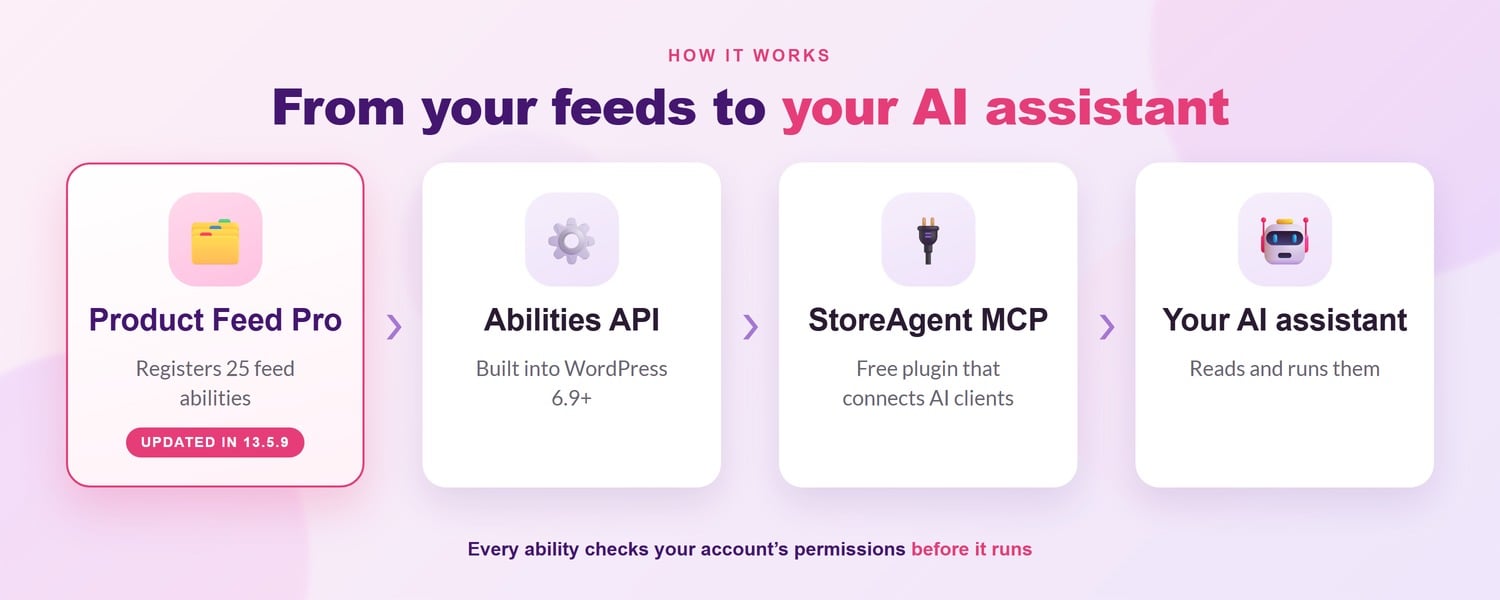
To make these abilities available to an AI assistant, your site needs an MCP server. The easiest route is StoreAgent’s WooCommerce MCP server. It’s included on every StoreAgent plan, including the free one, and it serves the Product Feed Pro abilities to Claude, ChatGPT, Cursor and any other MCP client. Developers can also connect them with the WordPress MCP Adapter.
Once that connection is set up, the assistant can discover and use the Product Feed Pro abilities that your WordPress account has permission to access.
What Compatible AI Assistants Can Do With Your Feeds
AdTribes Product Feed Pro registers 25 abilities that cover a practical range of product feed tasks:
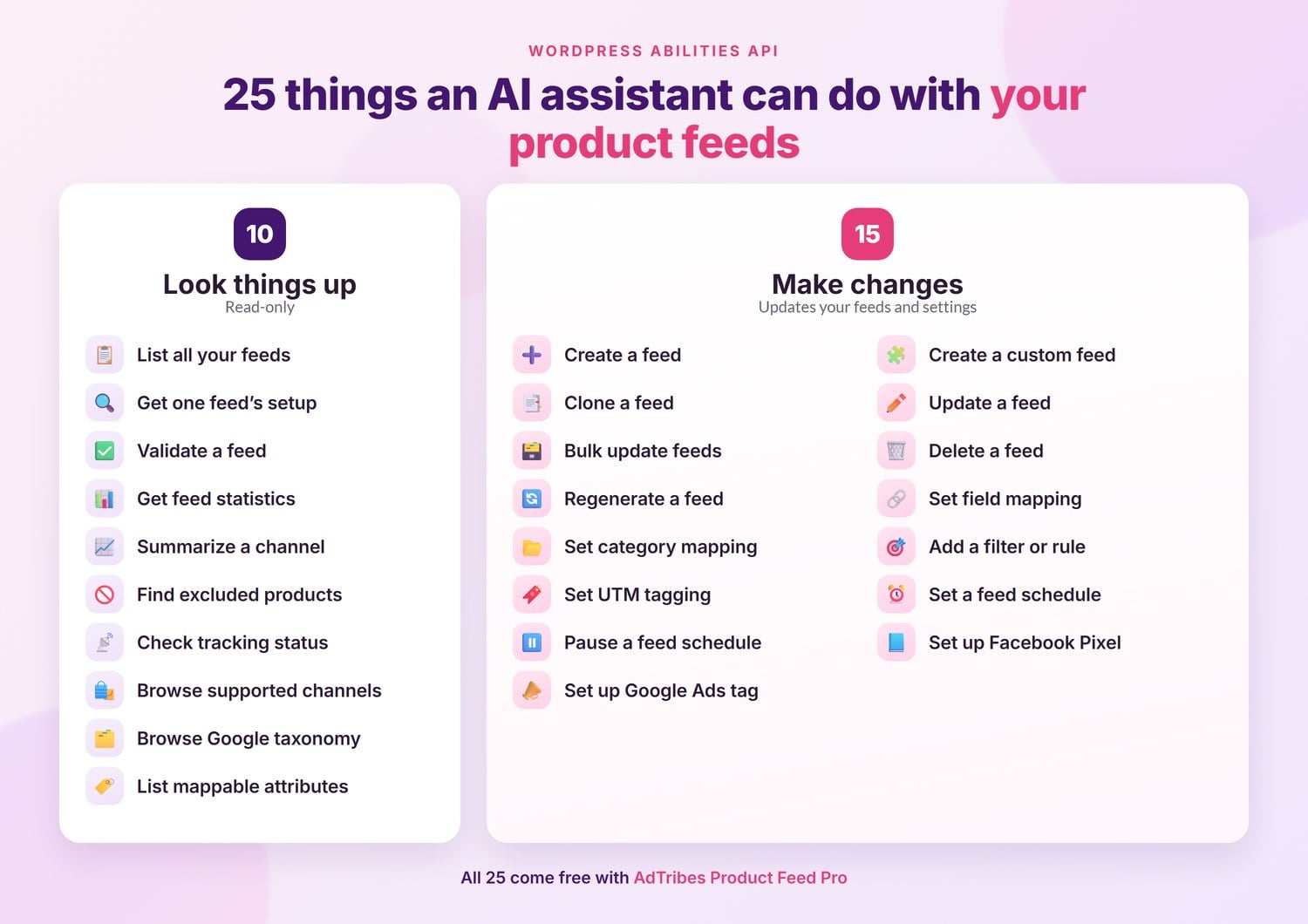
- Look at your feeds. Get a list of every feed with its channel, country, status, when it last generated, how many products it contains, and its file URL. You can also pull one feed’s full setup and statistics, or a summary of every feed on one channel.
- Create and change feeds. Build a new feed or a custom feed with your own output fields, clone a feed for another country or channel, update one feed or several at once, or remove one you no longer need.
- Set up how your data maps. Configure field mapping and category mapping for a feed.
- Target products. Add a filter or a rule to a feed.
- Run and check. Regenerate a feed on demand, check a feed’s configuration against the required fields for its channel, and see which products a feed leaves out.
- Schedule refreshes. Set a feed to refresh hourly, twice daily or daily, or pause its schedule without deleting the feed. Custom intervals, like every 4 hours, need Product Feed Elite.
- Track your campaigns. Add UTM parameters to a feed’s product links, check whether your Facebook Pixel, Facebook Conversion API and Google Ads remarketing tag are set up, and configure the Pixel or Google Ads tag.
- Look things up. Browse the supported channels and where each is available, the full Google product taxonomy, and every attribute you can map.
One of the read-only abilities checks a feed’s configuration against its channel’s required fields and reports anything missing, so a connected assistant can surface that without changing the feed itself.
Ten of the 25 are read-only, meaning they look at your data without touching it. The other 15 are the ones that make changes.
The abilities are registered in the background, so your usual Product Feed Pro workflow stays the same unless you connect an AI assistant. When you’re ready to connect one, the new AI / MCP tab handles the setup.
💡 GOOD TO KNOW: Feed abilities need the Shop Manager role or higher, including the read-only ones, and changing the Facebook Pixel or Google Ads tag needs an Administrator. The 15 abilities that make changes use the same underlying WordPress and WooCommerce actions as the equivalent dashboard workflow, helping existing hooks and integrations continue to work as expected. They are also marked as change-making actions so compatible AI clients can ask for confirmation before running them. Developers can disable all 25 abilities with a constant or filter.
New: Connect Your AI Assistant From The AI / MCP Tab
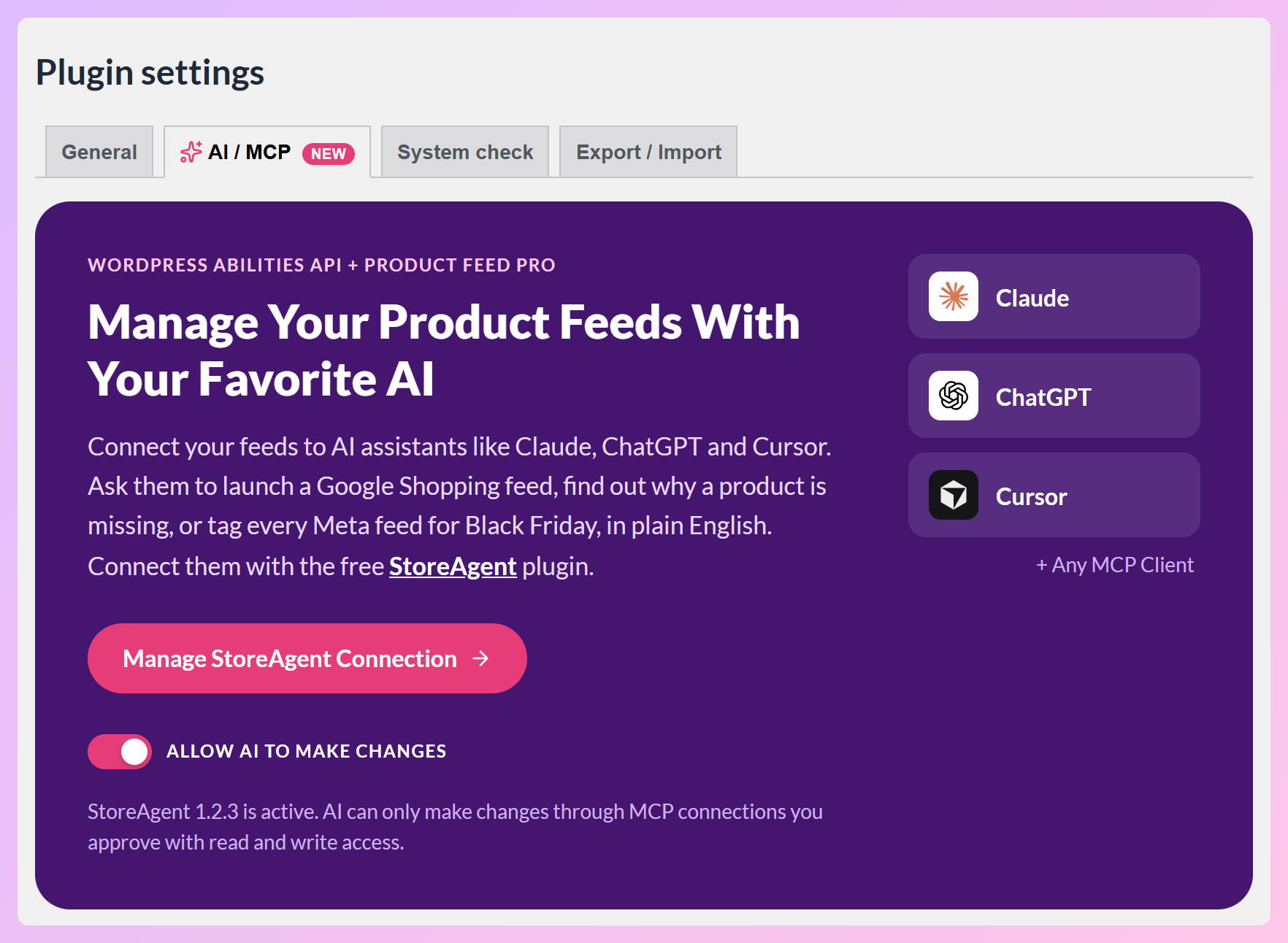
Product Feed Pro 13.5.9 adds an AI / MCP tab under Product Feed > Settings. It brings your AI setup into one place: connecting StoreAgent, choosing whether AI can make changes, example prompts to try, and your store’s MCP endpoint.
Connecting StoreAgent
StoreAgent is a free WooCommerce plugin on WordPress.org, and the tab has an Install StoreAgent Free button to add it. From there, you connect your StoreAgent account, turn on MCP in StoreAgent’s settings, and paste your store’s MCP endpoint into your AI assistant. The endpoint sits at the bottom of the AI / MCP tab with a Copy button, and it works with Claude, ChatGPT, Cursor or any other MCP client.
Choosing whether AI can make changes
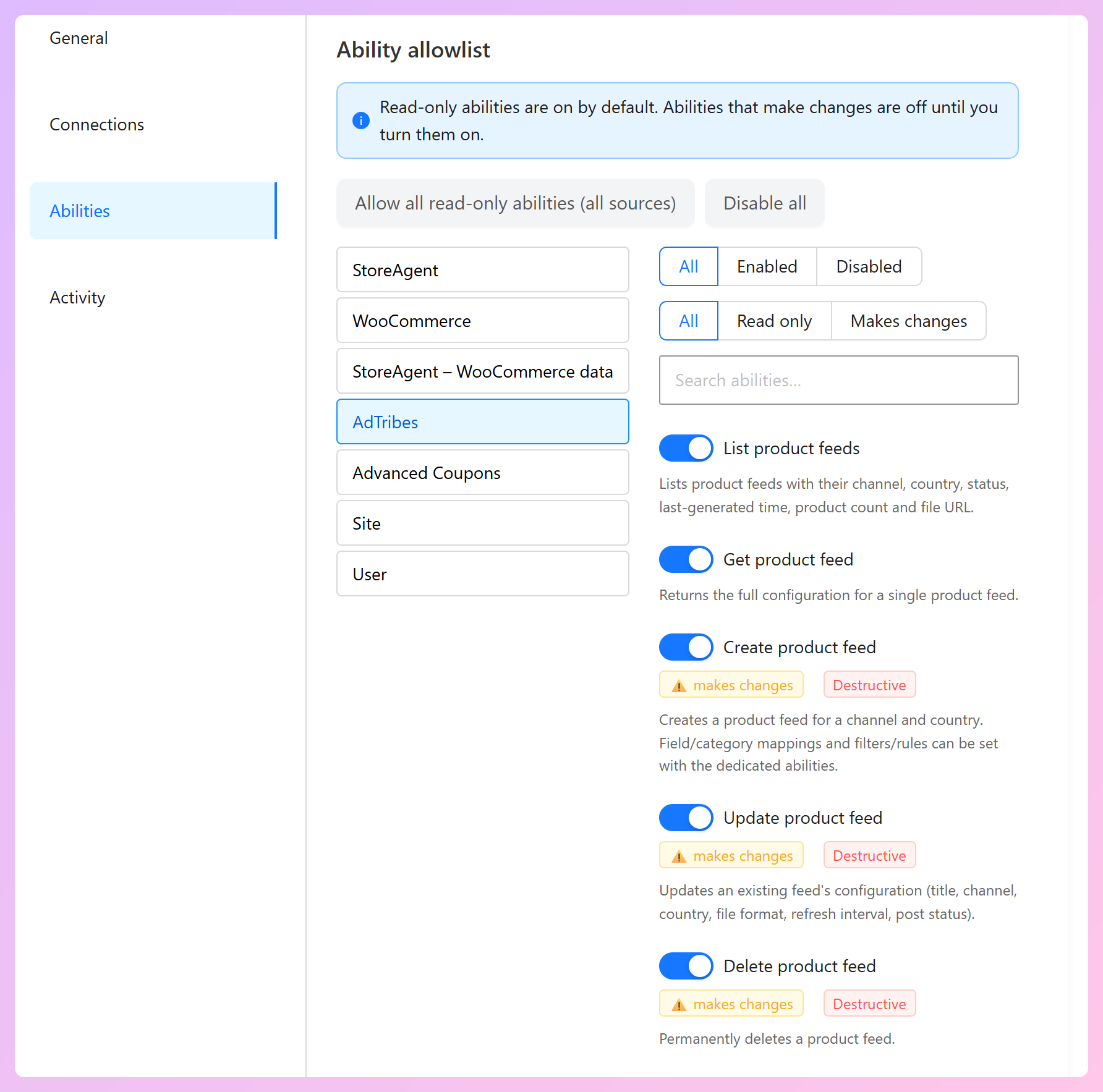
Read-only abilities are on by default, so a connected assistant can look at your feeds right away. Abilities that make changes stay off until you allow them. The Allow AI to make changes switch turns every Product Feed Pro ability that makes changes on or off in StoreAgent at once, and AI can only make those changes through MCP connections you approve with read and write access.
Prefer to choose them one by one? StoreAgent’s ability allowlist, under StoreAgent > Settings > MCP > Abilities, lists every AdTribes ability with its own switch.
Trying the example prompts
The Try It: Feed Jobs AI Can Handle For You section gives you 10 ready-made prompts to copy into your AI assistant, grouped into Launch, Fix, Optimise, Campaigns and Report. Each one lists the abilities it uses, for example:
- “Clone my US Google Shopping feed for Canada and the UK, then regenerate both.”
- “Why isn’t the Blue Linen Shirt showing up in my Meta catalog feed?”
- “Add utm_campaign=black-friday to every Meta and TikTok feed so I can track the sale in Analytics.”
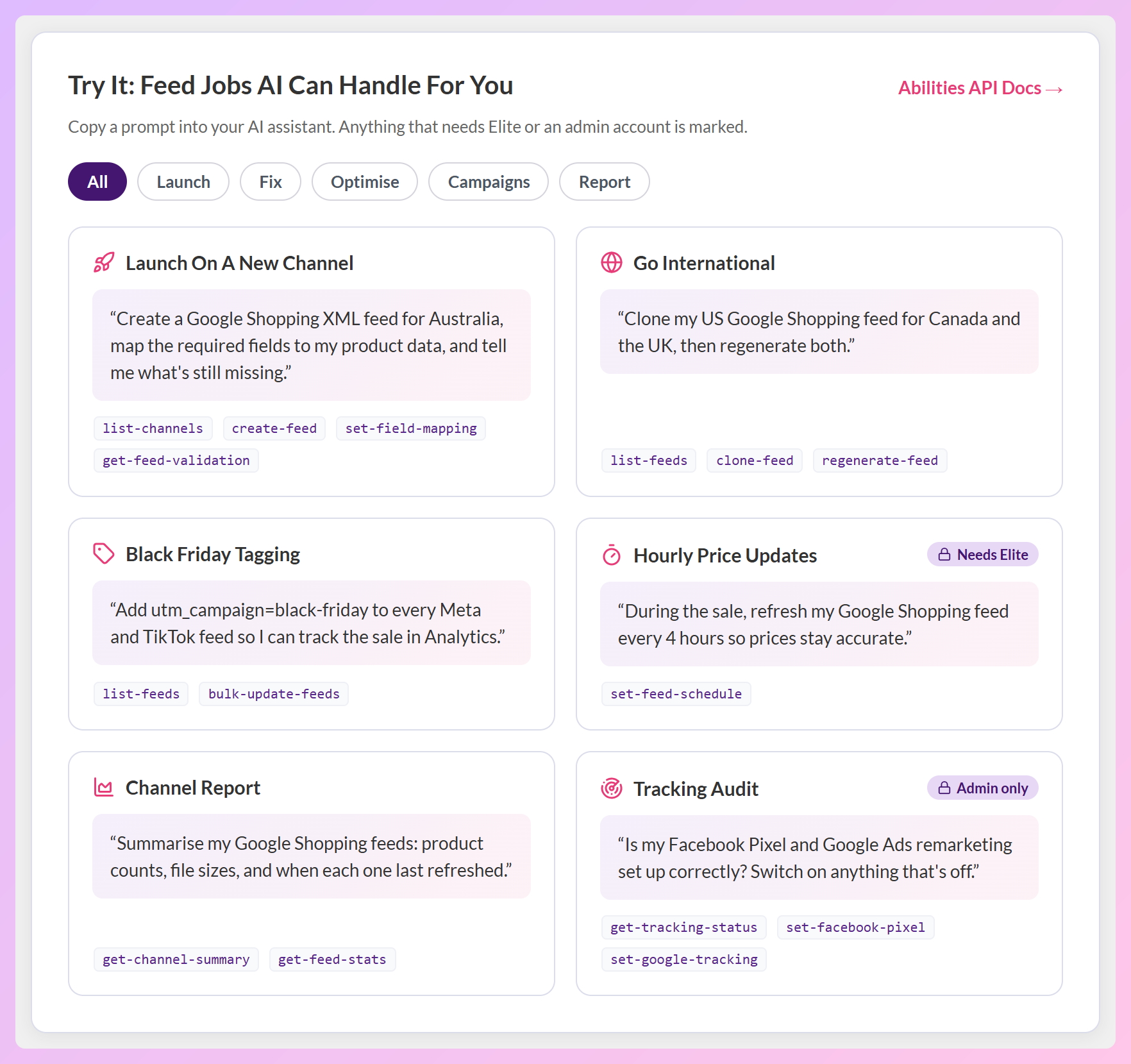
Prompts that need Product Feed Elite or an Administrator account carry a lock label, like Hourly Price Updates (custom refresh intervals) and Tracking Audit (Facebook Pixel and Google Ads settings).
What You Need To Get Started
- AdTribes Product Feed Pro 13.5.9 or later for all 25 abilities and the AI / MCP tab. This is the free plugin, so there’s nothing to buy.
- WordPress 6.9 or newer, since that’s where the Abilities API is built in. On an older version the abilities simply aren’t registered, and nothing else about the plugin changes.
- WooCommerce installed and active, since Product Feed Pro works with your WooCommerce catalog.
- An MCP server, such as StoreAgent’s free WooCommerce MCP server (StoreAgent 1.1.9 or later), to connect the abilities with your AI assistant. Developers can use the WordPress MCP Adapter instead.
- An account with the Shop Manager role or higher, since that’s what the feed abilities check for. Changing the Facebook Pixel or Google Ads tag needs an Administrator.
If you already use AdTribes Product Feed Pro, update to version 13.5.9 or later. The plugin registers its abilities automatically when the WordPress Abilities API is available on your site, and the AI / MCP tab walks you through the StoreAgent connection.
Also New: Adaptive Batch Sizing For Feed Generation
Feed generation can now adjust its batch size automatically. Product Feed Pro already lets you set a batch size manually, but adaptive sizing removes the need to choose and revisit that number when your catalog or hosting environment changes. It uses the available execution time and memory to choose a suitable batch size for the feed.
On a feed’s first run, the plugin begins with a conservative batch size and adjusts from there. It can continue refining the size on later runs as server conditions change.
Adaptive batch sizing is enabled by default unless you have set a batch size manually in the plugin’s settings. That setting applies across your feeds, so an existing manual value is still respected everywhere, and developers can turn the adaptive behavior off with a filter.
Frequently Asked Questions
Do I need Product Feed Elite for the WordPress Abilities API support?
No. AdTribes Product Feed Pro registers all 25 WordPress abilities for free. The only part that needs Product Feed Elite is a custom refresh interval, like every 4 hours. To use the abilities through an AI assistant, you’ll also need WordPress 6.9 or newer and an MCP server like StoreAgent.
Do I need StoreAgent to use these abilities?
No, but it’s the easiest route. StoreAgent is free on WordPress.org, and its WooCommerce MCP server is included on every StoreAgent plan, including the free one. The AI / MCP tab helps you install it and shows your store’s MCP endpoint. Developers can connect the abilities with the WordPress MCP Adapter instead.
Which WordPress version do I need?
WordPress 6.9 or newer. On an older WordPress version, Product Feed Pro does not register the abilities, while the rest of the plugin continues to work normally.
Can an AI assistant change my feeds without asking me first?
Not unless you allow it. With StoreAgent, abilities that make changes stay off until you turn on Allow AI to make changes on the AI / MCP tab or switch them on in StoreAgent’s ability allowlist. Product Feed Pro also marks the 15 abilities that change data so compatible AI clients can ask for confirmation before running them. The other 10 are read-only and cannot alter your feeds.
Who is allowed to use these abilities?
Only signed-in WordPress users with the Shop Manager role or higher can use them, including the read-only ones. Changing the Facebook Pixel or Google Ads tag needs an Administrator.
Can I turn the abilities off?
Yes. Turn off Allow AI to make changes on the AI / MCP tab to block every ability that makes changes in StoreAgent. Developers can also use a constant or filter to stop Product Feed Pro from registering the abilities at all. If you don’t connect an AI assistant, nothing changes in your usual Product Feed Pro workflow.
Do I need to change my batch size setting?
No. Product Feed Pro continues to respect a manual batch size. If you have not set one, adaptive batch sizing works automatically. You only need to change the setting if you want adaptive sizing to replace an existing manual value.
Wrapping Up
AdTribes Product Feed Pro gives AI assistants 25 product feed abilities, an AI / MCP tab to connect them through StoreAgent, and adaptive batch sizing for feed generation. The abilities stay protected by your WordPress user roles, and adaptive sizing works automatically when no manual batch size is set.
Here’s what we covered:
- How the WordPress Abilities API works
- What compatible AI assistants can do with your feeds
- How to connect your AI assistant from the AI / MCP tab
- What you need to get started
- How adaptive batch sizing works
Update to AdTribes Product Feed Pro 13.5.9 or later to add these improvements to your store. You can keep your existing manual batch setting or let the plugin size batches automatically. Then open the AI / MCP tab, install StoreAgent for free, and connect your favorite AI assistant whenever you’re ready.
Do you have any questions about this update? Let us know in the comments. Happy to help!