
 Reviewed by

Big news for stores that advertise on Facebook and Instagram! AdTribes Product Feed Elite 5.1.2 now creates Facebook Product Sets from your WooCommerce product categories. Each category with published products becomes its own product set in your Meta catalog, and AdTribes keeps them in sync for you.
Want to advertise just your hoodies or a category of new arrivals? You can use those categories in your Meta ads without building each product set by hand in Commerce Manager. AdTribes also updates the sets as you manage your categories and products in WooCommerce.
Here’s how Facebook product sets work, how to switch them on, and what to expect when your categories change.
What Are Facebook Product Sets?
A Facebook product set is a group of products inside your Meta catalog. Instead of pointing an ad at every product you sell, you point it at one set, like a single category or a seasonal range.
Catalogs vs product sets
Your catalog is the full list of products Meta knows about. If you use AdTribes, that list usually comes from your Facebook product feed. If you don’t have a catalog yet, start with our guide to setting up your first Facebook catalog.
A product set is a smaller group within your catalog. With this feature, AdTribes uses product IDs from your WooCommerce categories to build each set. You can have multiple sets in one catalog, and the same product can belong to more than one.
Where product sets show up
You can use product sets to choose which catalog items to promote in Facebook and Instagram ads. Meta now calls this type of advertising ads with product media (previously Advantage+ catalog ads). When setting up your ad, choose a product set to focus on a particular group of products rather than the full catalog.
For example, if you’re promoting jackets, a product set lets you focus on jackets instead of the rest of your catalog. When your next campaign focuses on another category, you can choose its set instead.
How To Create Facebook Product Sets In 3 Steps
Before you start, make sure you have AdTribes Product Feed Elite, a Meta catalog connected to your AdTribes Facebook feed, and that catalog’s ID and access token. Need to set up the feed first? Our guide on how to set up a Facebook product feed covers it.
Step 1: Get your catalog ID and access token
Your catalog ID is the long number Meta gives your catalog. You’ll find it in Commerce Manager when you open that catalog. Make sure it’s the same catalog your AdTribes feed sends products to.
Next, get an access token that has permission to manage the catalog. It needs catalog_management access, as described in Meta’s permissions reference. Follow Meta’s current instructions to generate a token for the business that owns your catalog.
Step 2: Turn on product sets in AdTribes
Go to Product Feed → Settings and stay on the General tab. Just below the Facebook Pixel and Conversion API settings, switch on Create Facebook Product Sets from product categories.
Two fields appear. Paste your catalog ID into Insert your Facebook catalog ID and click Save. Then paste your token into the access token box below it and click its own Save button.
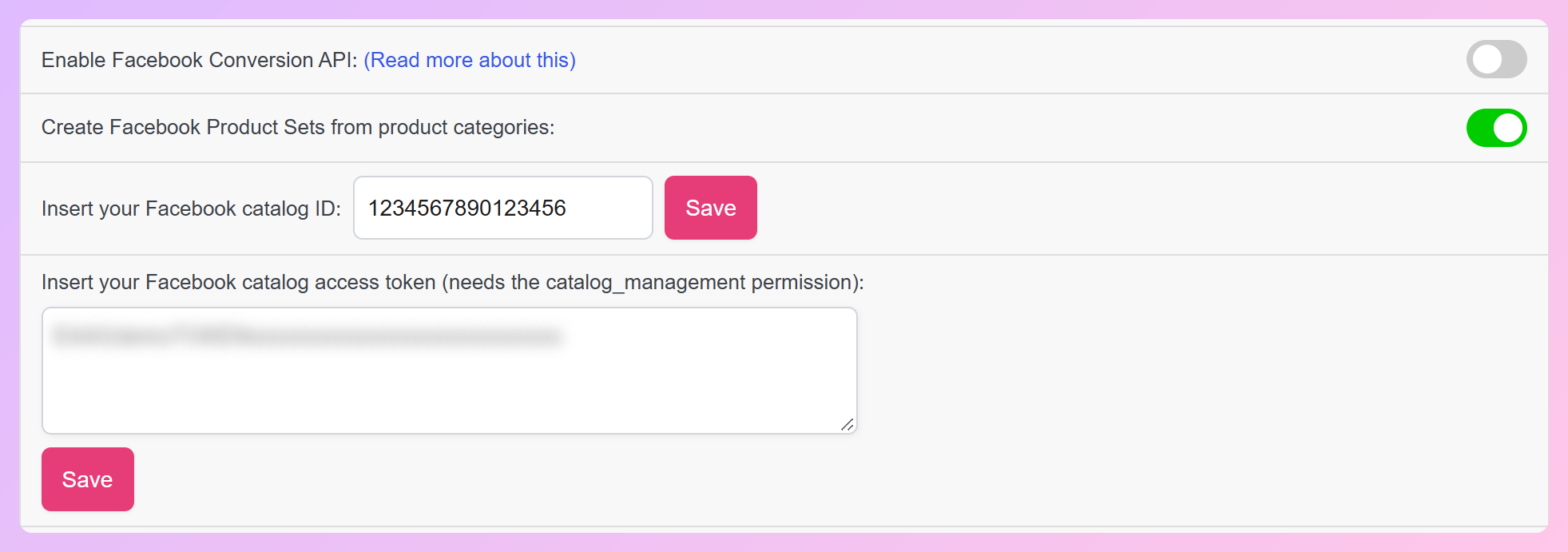
Once both are saved, AdTribes schedules a daily sync. Each category with published products gets a set named after that category.
Step 3: Click Sync now and check the status
You don’t have to wait for the daily sync. A Facebook Product Sets panel appears under the settings, so click Sync now. The sync runs in the background, and the panel tells you so: “The sync is queued. It runs in the background. Reload this page to see the result.”
Once the background sync has finished, reload the page to see the last sync time and number of product sets synced.

Next, check your catalog in Commerce Manager to confirm the new sets appear. If the sync hits an error, such as an expired token, AdTribes shows a message in a red box to help you troubleshoot.
How Your Facebook Product Sets Stay In Sync
You set it up once, and AdTribes keeps your sets matched to your categories from then on. Here’s how categories turn into sets, and when each kind of change reaches Meta.
How categories become product sets
AdTribes creates a set for each category with published products, using the same category name. Here’s how it handles your products:
- Only categories with products: Every category with published products gets a set. Empty categories are skipped.
- Parents include their subcategories: A parent category’s set holds its subcategories’ products too. So “Clothing” also picks up everything in “Shirts” and “Hoodies.”
- Variations come along: A variable product goes in with all of its variations.
- Drafts stay out: Products that aren’t published yet aren’t added to any set.
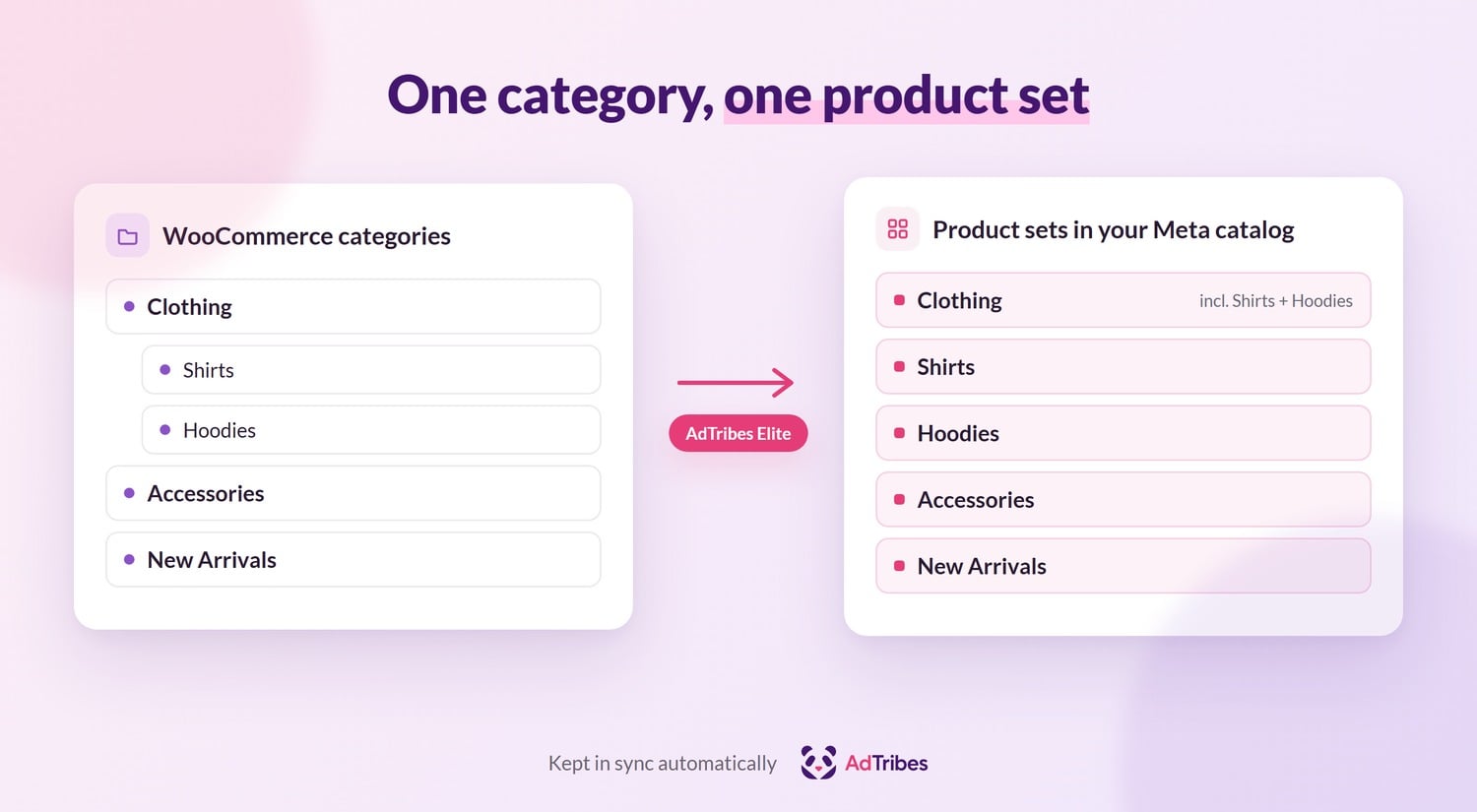
AdTribes matches set items to your Facebook catalog using the product IDs in your feed. The default id mapping uses WooCommerce product IDs, so check that mapping if you’ve customized your feed.
When your product sets update
Some changes reach your catalog right away, and others wait for the next daily sync. Here’s which is which:
| When you… | What happens to the set | When |
|---|---|---|
| Add a category and put products in it | A new set is created | Next daily sync, or click Sync now |
| Rename a category | The set gets the new name | Right away, in the background |
| Delete a category | Its set is removed from your catalog | Right away, in the background |
| Add, remove, or move products | The set’s products update | Next daily sync, or click Sync now |
| Empty a category | Its set is removed | Next daily sync, or click Sync now |
| Delete a set in Commerce Manager by mistake | It’s created again | Next Sync now, or the weekly full sync |
The daily sync sends only the sets that changed. Once a week, AdTribes runs a full sync of the product sets it manages.
Ways To Use Category Product Sets
Category sets let you run focused Meta ads without picking products one by one. Here are three ideas to start with.
Run a sale for one category
Planning a holiday sale on outerwear or a clearance on last season’s tees? Use that category’s set to focus your catalog ad on those items. Just make sure the products in the set match the sale you’re promoting.
Promote your new arrivals
If you keep a “New Arrivals” category, AdTribes updates its set as you add and remove products. That lets you keep your ad focused on the items currently in that category without editing the set in Commerce Manager.
Match ads to what people browsed
Catalog ads can show shoppers products related to what they viewed on your site. A category set lets you focus those ads on a relevant range, such as hoodies. Retargeting commonly uses the Meta Pixel or Conversions API to connect browsing activity to catalog items, and AdTribes has settings for both on the same tab.
If you’ve been weighing up your options for running Facebook ads from WooCommerce, our Facebook for WooCommerce alternative guide compares the two approaches.
Tips For Clean Product Sets
These tips help your sets match your catalog from day one. They also double as a checklist if a set looks off.
- Keep the id field on the product ID: Sets match products by ID, so leave your Facebook feed’s id field mapped to the product ID (that’s how it’s set by default). Our guide on field mapping shows where to check.
- Include variations in your feed: Sets list each variation, so turn on variations in your Facebook feed. That way, your variable products fill their sets.
- Give categories unique names: Sets use your category names. Two categories called “Accessories” become two sets called “Accessories,” which is hard to tell apart in Ads Manager.
- Replace an expired token: If the panel shows a token error, create a new token with the catalog_management permission, save it, and click Sync now.
Frequently Asked Questions
Do Facebook Product Sets need AdTribes Product Feed Elite?
Yes. Creating Facebook Product Sets from your categories is an AdTribes Product Feed Elite feature, starting with version 5.1.2. You’ll find it under Product Feed → Settings, on the General tab.
How often do Facebook product sets sync?
Once a day, with only changed sets sent during the daily sync. Renaming or deleting a category queues an update in the background, and AdTribes runs a full sync each week. You can also click Sync now whenever you need to.
Do subcategories get their own product sets?
Yes. Every category with published products gets its own set, including subcategories. The parent category’s set also includes its subcategories’ products, so you can advertise the whole range or just one part of it.
Will AdTribes change product sets I made by hand?
No. AdTribes only updates and removes the product sets it created itself. Any sets you built by hand in Commerce Manager stay as they are.
What do I need to create Facebook product sets?
You need AdTribes Product Feed Elite, a Meta catalog that uses your AdTribes Facebook feed as a data source, your catalog ID, and an access token with the catalog_management permission.
Wrapping Up
Your WooCommerce categories already sort your products the way you think about them. Facebook Product Sets simply carry that same structure over to your Meta catalog, so your ads can follow it too.
Here’s what to do next:
- Turn on Facebook Product Sets and run your first sync.
- Check the tips so every set fills up with the right products.
- Pick one category and build your next Meta ad around its set.
There’s more to explore in our recent AdTribes updates, including feed conversion tracking, feed migration from CTX Feed and RexFeed, and new Google conversational attributes. Look for their walkthroughs on the blog.
Ready to stop building sets by hand? Get AdTribes Product Feed Elite and let it create your Facebook product sets for you.