Reviewed by
AdTribes Product Feed Pro can turn your WooCommerce catalog into an Amazon flat-file inventory loader, the tab-separated file Amazon Seller Central accepts for bulk uploads. You map your WooCommerce fields to Amazon’s columns once, download the file, and upload it in Seller Central. It uses Amazon’s generic template, so if your category needs its own template (clothing or books, for example), check the columns against that template before you upload.
Building that file by hand means working through Amazon’s inventory template and matching every field yourself. With the Amazon channel in the free AdTribes Product Feed Pro plugin, you map once and regenerate the file whenever your catalog changes.
If you’ve been looking for a practical way to connect WooCommerce to Amazon, the Amazon channel gives you a much easier starting point. Here’s what it does, why it matters, and how to set up your feed step by step.
What Is A WooCommerce Amazon Product Feed?
A WooCommerce Amazon product feed is a file that lists your WooCommerce products in a format Amazon Seller Central can process. Because Amazon uses that file to add or update listing data, your product details need to line up with the right inventory file fields.
Amazon’s inventory file workflow uses tab-delimited files, so TSV is the format we recommend for this channel in AdTribes Product Feed Pro. The plugin can also output TXT and CSV if your workflow calls for a different file type.
How the Amazon product feed works
AdTribes Product Feed Pro takes your WooCommerce product data, maps it to Amazon’s fields, and builds the feed file for you. From there, you download the file and upload it to Amazon Seller Central whenever you’re ready.
This file-based approach keeps you in control: you choose which products go to Amazon and when, while WooCommerce stays the main place where you manage your product data.
New to selling on Amazon? Our guide on how to sell on Amazon from WooCommerce covers how Amazon listings work and your options for getting started. For a quick look at everything the Amazon channel includes, see the Amazon product feed page.
Why Sell On Amazon From Your WooCommerce Store?
Selling on Amazon isn’t just about being on one more website. It’s about putting your products in front of shoppers who already have their wallets out, and doing it without building that audience from scratch.
Here’s why Amazon is worth adding to your channels.

Put your products where people are ready to buy
When someone’s browsing Amazon, they’re usually there to shop, not just to look. That buyer-ready intent is exactly what makes the marketplace so valuable for your store. According to Marketplace Pulse, third-party sellers accounted for around 60% of paid units sold on Amazon in early 2026. Getting your WooCommerce catalog into that mix means showing up in a marketplace where independent sellers already play a major role.
Reach a massive built-in audience
Building a large audience on your own takes time. Amazon gives you another way to put your products in front of shoppers who already use the marketplace regularly. According to Statista, Amazon Prime alone has more than 200 million members worldwide. That makes Amazon a channel worth considering if you want to expand beyond your WooCommerce store.
Meet shoppers where their search begins
These days, a lot of product research doesn’t start on Google. It starts on Amazon. According to Search Engine Land, around half of US shoppers begin their product search on Amazon rather than a search engine. If your products aren’t listed there, you may miss shoppers who are already comparing options inside the marketplace. Feeding your catalog to Amazon helps you show up earlier in that buying journey.
How To Create A WooCommerce Amazon Product Feed With AdTribes (Step-by-Step)
Setting up your Amazon feed follows the same flow as any other channel in AdTribes Product Feed Pro. Here’s how to do it.
Step 1: Create a new product feed
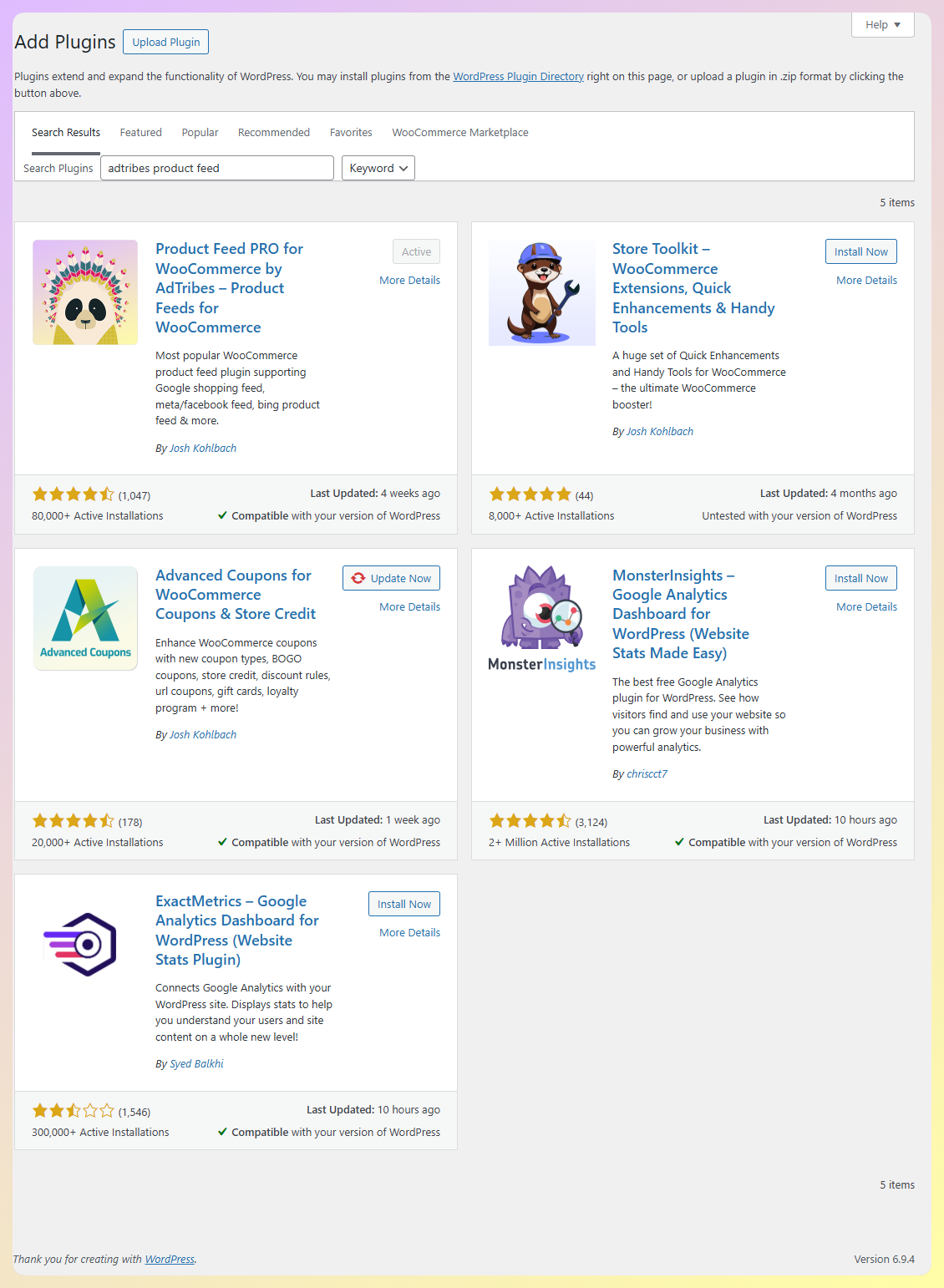
In your WordPress dashboard, open AdTribes Product Feed Pro and start a new feed. If you don’t have the plugin yet, you can get AdTribes Product Feed Pro for free and install it like any other WordPress plugin.
Step 2: Select Amazon as your channel
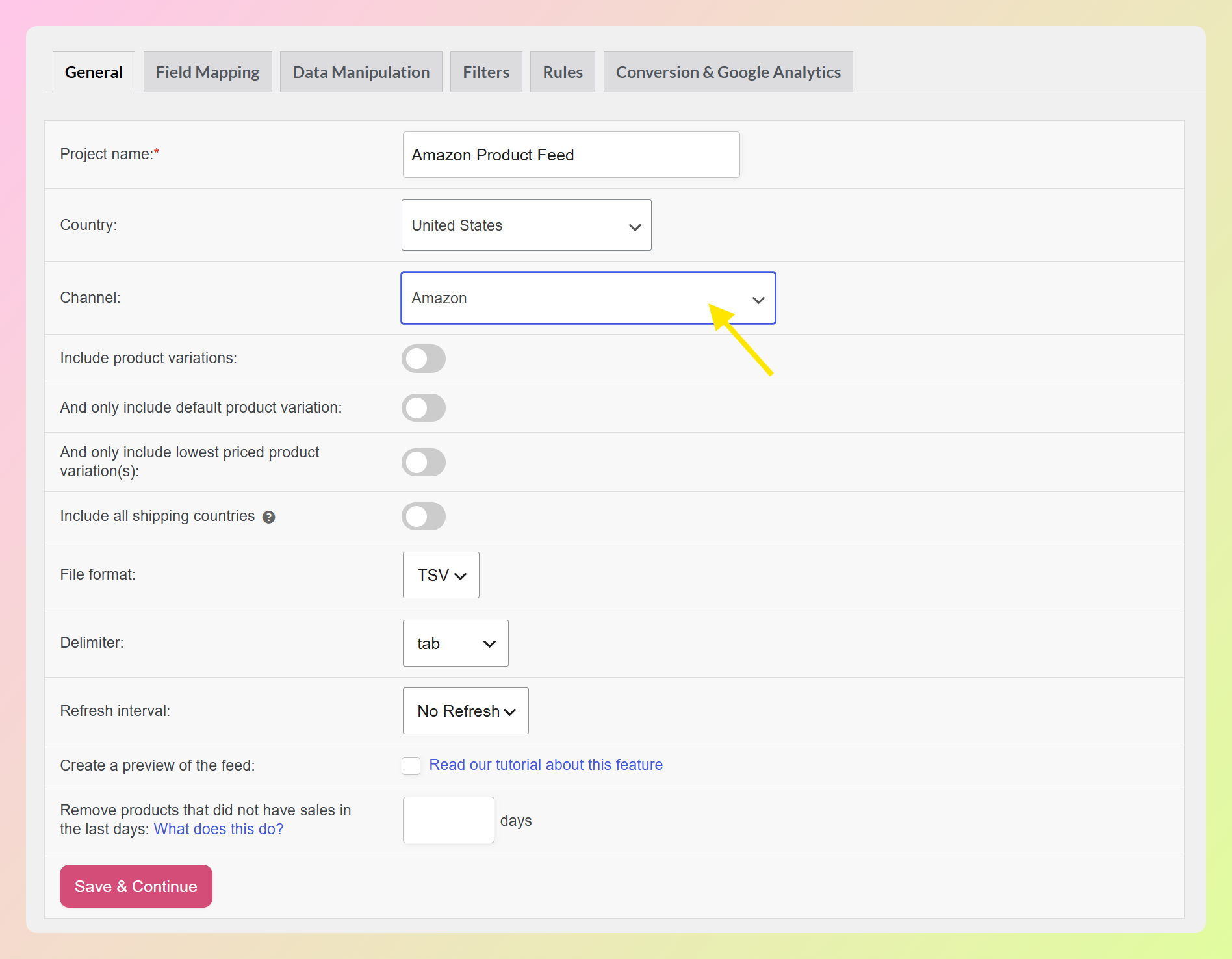
Choose your country, then pick Amazon from the channel list. Set your file format to TSV, which keeps the feed aligned with Amazon’s tab-delimited inventory file workflow.
Step 3: Configure your field mapping
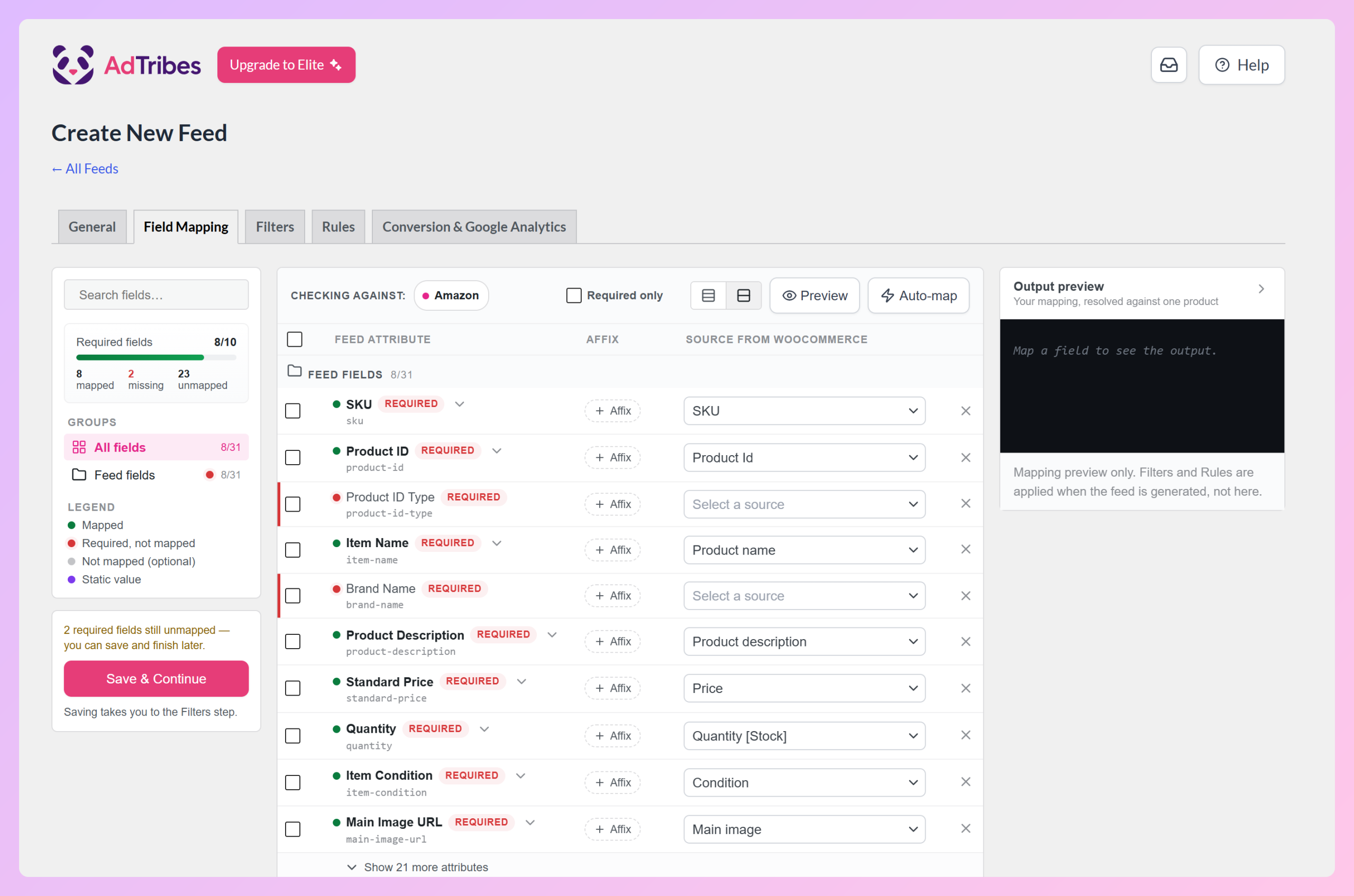
This is where you match your WooCommerce product data to Amazon’s fields. AdTribes Product Feed Pro gives you a starting set of mappings for common Amazon fields, and you can adjust them based on how your store is set up. The Required fields counter shows anything still missing. On a new Amazon feed, Product ID Type and Brand Name usually start unmapped: map Brand Name to your Brands field, and set Product ID Type to match your identifiers (for example, a static value of UPC or EAN). The main Amazon fields include:
- Seller SKU: Your unique identifier for each product.
- Product ID and product ID type: An ASIN, UPC, EAN, or GTIN that identifies the product to Amazon.
- Item name, brand, and manufacturer: Your product title and brand details.
- Product description and bullet points: Your main description plus up to five short selling points.
- Standard price, quantity, and currency: Your price, available stock, and currency.
- Item condition: Defaults to New.
- Images: A main image plus additional product images.
Step 4: Add filters and rules (optional)
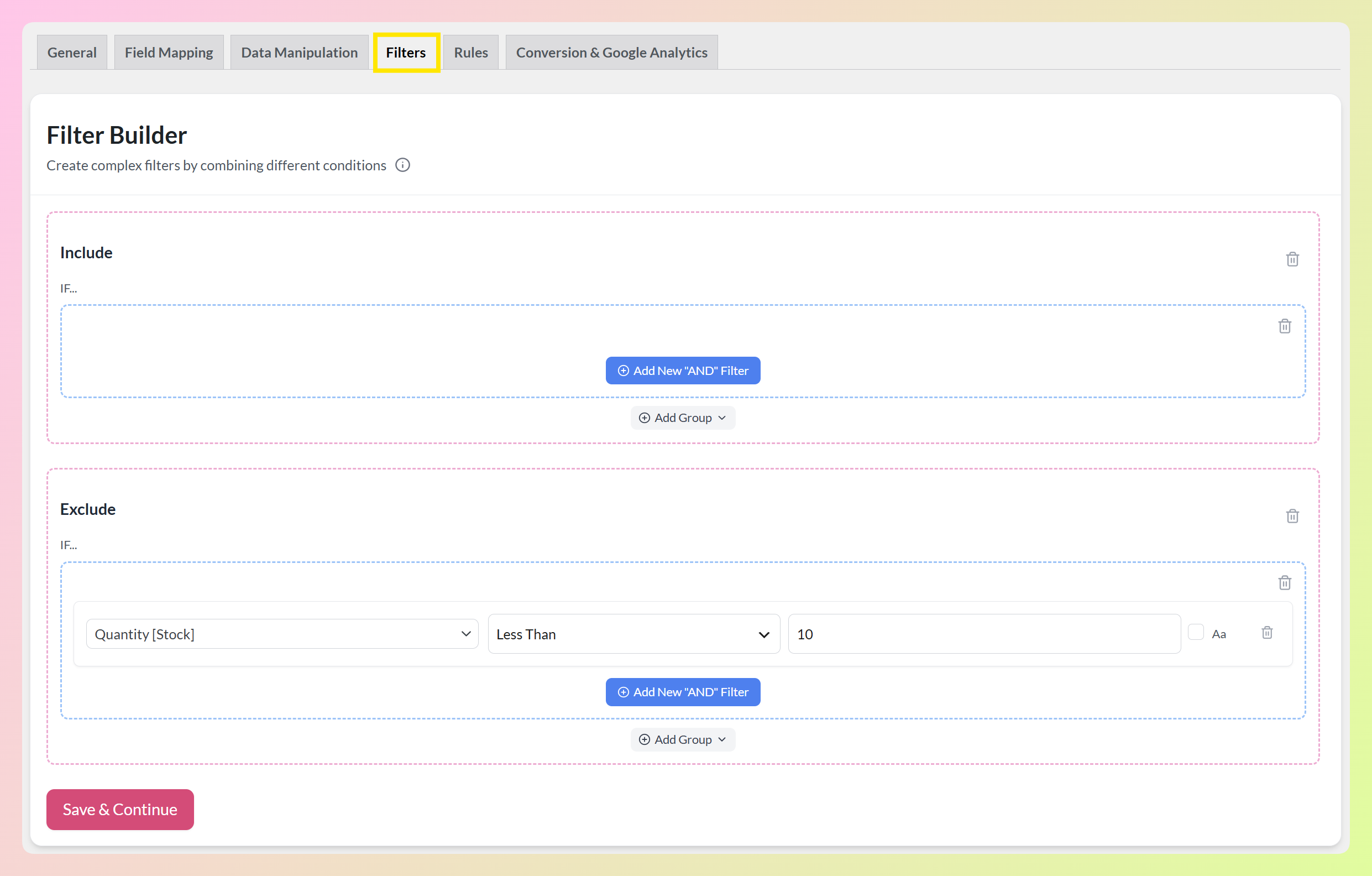
If you only want certain products in your Amazon feed, you can use filters to include or exclude them. Rules let you adjust product data before the feed is generated, such as updating a title format or setting a default value for a missing field. In the example below, we have set an exclude filter to leave out products with a stock quantity below 10. This step is optional, so you can skip it if your standard feed setup already works for Amazon.
Step 5: Generate your feed and upload to Amazon
Generate the feed, then download the file. Head to Amazon Seller Central and upload it through the inventory file upload tool.
One thing to keep in mind: Amazon’s required fields can differ by product category or product type. Clothing may need different details than electronics, for example. AdTribes Product Feed Pro gives you a solid general starting point, so it’s worth checking the inventory template for your specific category in Seller Central and mapping any required fields your products need.
Frequently Asked Questions
Is the Amazon feed free in AdTribes?
Yes. The Amazon channel is built into AdTribes Product Feed Pro, which is free. You can create, map, and generate your Amazon feed without a paid plan. AdTribes Product Feed Elite adds extra feed-management features, such as custom refresh intervals, if you need more flexibility later.
How does my feed get to Amazon?
You upload it. AdTribes Product Feed Pro generates a structured feed file, and you add it to Amazon through Seller Central’s inventory upload tool. That gives you control over what you send and when, and you can regenerate the file when your WooCommerce product data changes.
What file format does Amazon need?
Amazon’s inventory file workflow uses tab-delimited files, so TSV is the recommended format for this channel in AdTribes Product Feed Pro. The plugin can also generate TXT and CSV versions if your workflow calls for a different file type.
Do I still manage my products in WooCommerce?
Yes. WooCommerce stays your main source of product data. You manage your products there as usual, then use AdTribes Product Feed Pro to turn that data into an Amazon feed file when you’re ready to upload.
What if my product category has special requirements?
Amazon’s required fields vary by category and product type. The Amazon channel helps you map common Amazon fields, which gives you a strong starting point. For category-specific needs, check the inventory template for your category in Seller Central and map any additional required fields accordingly.
Wrapping Up
Getting your WooCommerce products onto Amazon used to mean spending extra time in spreadsheets and Amazon’s inventory template. With the Amazon channel in AdTribes Product Feed Pro, you can map your data, generate the file, and upload it to Seller Central without the manual grind.
Here’s how to get started:
- Install AdTribes Product Feed Pro for free and create a new feed
- Select Amazon as your channel and set the format to TSV
- Map your WooCommerce fields, then generate and upload your feed to Seller Central
Ready to bring your WooCommerce products to Amazon? Create your WooCommerce Amazon product feed with AdTribes Product Feed Pro and give your catalog another path to reach shoppers.
Want to see every channel AdTribes supports? Take a look at the full list of supported platforms.