Reviewed by
The most common question WooCommerce store owners ask before launching Google Shopping is “how much will it cost?” The honest answer is that it depends on your product category, competition, campaign setup, and feed quality, but this guide gives you practical planning benchmarks so you can build a budget with more confidence.
Google Shopping does not charge a flat fee or a monthly subscription for running ads. You generally pay when someone clicks, and the cost of each click varies based on the auction, your bids, and the competition around your products. Your budget helps control how much you spend, while your product feed quality can influence how well Google understands and matches your listings.
Let’s break down how the pricing works, what affects Google Shopping ads cost, and how to set a realistic budget for your WooCommerce store.
How Google Shopping Pricing Works
Google Shopping uses a cost-per-click (CPC) model. In other words, you pay when someone clicks your product listing, not simply when it appears in search results.
Your exact Google Shopping ads cost depends on the auction happening at the moment a shopper searches. Google may consider factors like your bid strategy, product data, ad quality, competition, and the context of the shopper’s search when deciding which products are eligible to show and how much a click may cost.
If you use manual CPC bidding, you can set a maximum CPC bid, which is the most you are generally willing to pay for one click. In many cases, your actual CPC may be lower than your max bid. If you use automated bidding or Performance Max, Google adjusts bids based on your campaign goals and available budget.
Your actual costs are usually shaped by these factors:
- Your bid strategy and budget – how much you are willing to spend and how Google is allowed to optimize that spend
- Product feed quality – how complete, accurate, and relevant your product data is
- Competition – how many advertisers are bidding for similar products and shoppers
This is why two WooCommerce stores selling similar products can end up with different CPCs. A cleaner, more relevant product feed can help Google understand your products better, which may reduce wasted spend and improve the quality of traffic your campaigns attract.
Average Google Shopping CPCs By Product Category
Google Shopping CPCs vary by product category, market, season, competition level, campaign setup, and product price. Public benchmarks can help you plan, but they should be treated as starting points rather than fixed costs. If you’re also weighing Facebook Ads against Google Shopping for cost and fit, see our Google Shopping vs Facebook Ads comparison.
Third-party Google Shopping benchmark reports often place average Shopping CPCs in the lower-dollar range, with lower-competition categories sometimes landing around the $0.30 range and more competitive categories reaching around $1.00 or more per click. Higher-value or more competitive categories, such as computers and technology, office products, and health and beauty, may trend higher, while less competitive categories can be lower.
For WooCommerce stores, the smarter way to use these numbers is to compare CPC against your own margins. A $0.60 click may be expensive for a low-margin product, but profitable for a higher-value product with strong conversion rates or repeat purchase potential.
Always evaluate Google Shopping ads cost alongside margin, average order value, conversion rate, and return on ad spend. The goal is not simply to get cheaper clicks. It is to pay for clicks that have a realistic chance of turning into profitable orders. Our guide to measuring product feed ROI in WooCommerce covers the metrics and tracking setup that show whether those clicks turn into profit.
How Much Should A WooCommerce Store Budget For Google Shopping?
Your ideal Google Shopping budget depends on your margins, product price, conversion rate, and how much data you need before making decisions. These budget tiers can help you plan a realistic starting point.
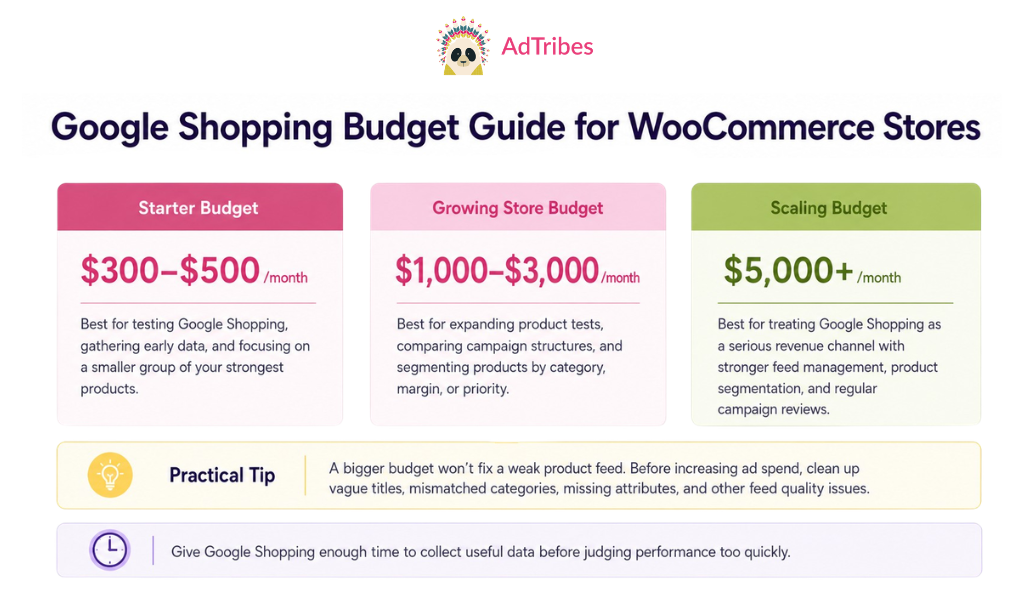
Starter budget: $300 to $500 per month
This can be enough to test Google Shopping and start gathering early data, especially if you focus on a smaller group of products. At this stage, the goal is to learn which products get impressions, which ones earn clicks, and whether the traffic has conversion potential.
Focus your starter budget on a smaller group of your strongest products rather than your entire catalog. This keeps your spend concentrated on products with a better chance of converting and gives you cleaner data to work from.
Growing store budget: $1,000 to $3,000 per month
Once you have early data and a clearer view of your margins, this range gives you more room to test additional products, compare campaign structures, and adjust bidding based on product performance.
At this level, it often becomes easier to segment campaigns by product category, margin, or priority. This is also where custom labels can become useful because they help you group products in ways that match your business goals.
Scaling budget: $5,000+ per month
At this level, Google Shopping may become a more serious revenue channel for your store. You will likely need stronger feed management, clearer product segmentation, and regular campaign reviews so your budget is focused on products that can support profitable growth.
Practical tip: A bigger budget will not fix a weak product feed. If your titles are vague, categories are mismatched, or important product attributes are missing, your campaigns may attract less relevant clicks. Clean up your feed first so your budget has a stronger foundation to work from.
Across all budget levels, avoid judging performance too quickly. Google Shopping needs enough time to collect useful data, and your first few weeks are often about learning which products, feeds, and campaign settings deserve more investment.
How Feed Quality Affects Your Google Shopping Costs
Your product feed quality can affect how well Google understands, approves, and matches your products to relevant searches. This is one of the most important cost-control areas WooCommerce store owners can influence before increasing ad spend.
A complete, accurate, and well-structured feed gives Google clearer product data to work with. Missing fields, vague titles, poor images, or incorrect categories can make it harder for your products to appear for the right shoppers.
Better titles help Google match your products to the right searches. A title like “Nike Air Max 270 Men’s Running Shoes Black Size 10” gives Google clearer signals about the product than a vague title like “Running Shoes.” Clearer titles can improve relevance, reduce wasted clicks, and help your products compete in more appropriate searches.
Complete product data can improve matching opportunities. Products with accurate brand names, GTINs where applicable, color, size, material, and other relevant attributes give Google more context. That can make your products easier to match with the searches shoppers are already making.
Proper category mapping prevents wasted spend. If your feed maps a jacket to “Sporting Goods” when it should be in “Apparel & Accessories > Outerwear > Jackets,” it may show up for the wrong searches. You pay for clicks from people who wanted sports equipment, not a winter coat.
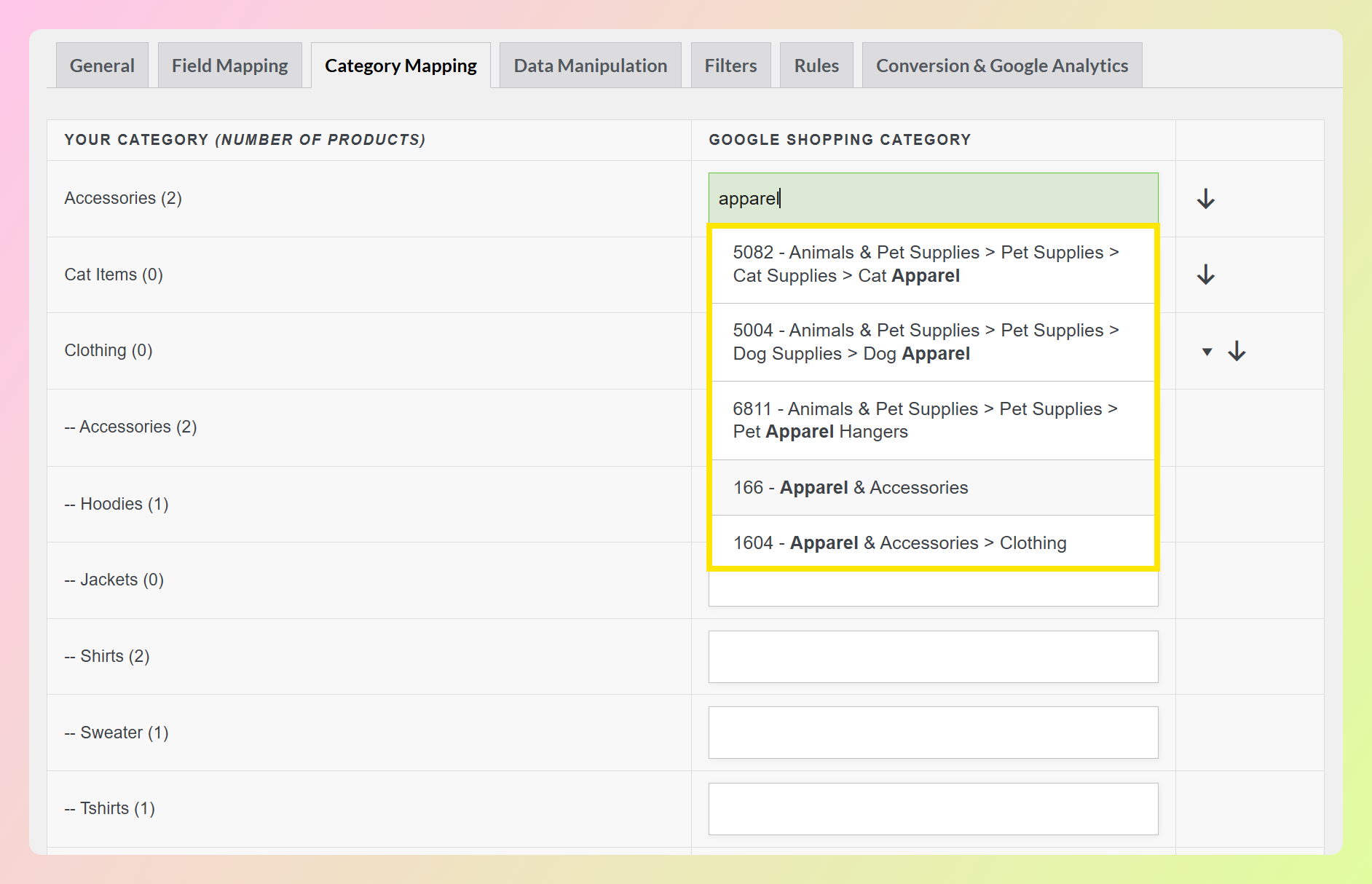
For WooCommerce stores, feed optimization is one of the highest-leverage improvements to make before scaling ad spend. A stronger feed gives Google clearer product information to work with, while a poorly structured feed can make even a larger budget less efficient.
For a walkthrough on getting your WooCommerce products into Google Shopping ads, our guide covers the full setup process. If you are comparing campaign types, our breakdown of Performance Max vs Standard Shopping campaigns helps you choose the right structure.
Free vs. Paid: Google Shopping Free Listings As A Starting Point
Google offers free product listings alongside paid Shopping ads. Eligible free listings can appear across Google surfaces without a cost per click, making them a useful starting point for stores that want product visibility before committing to paid campaigns.
For WooCommerce stores that are not ready to commit ad budget, free listings are a practical first step. You still need a product feed and a Google Merchant Center account, but you do not need to launch a Google Ads campaign right away. Your visibility will depend on factors like product eligibility, relevance, and feed quality.
Free listings usually generate less traffic than paid ads because paid placements often receive stronger visibility. But the clicks they do generate do not carry an ad cost, which makes them helpful for stores that want to validate their product feed before investing in paid campaigns.
Here is a practical approach for WooCommerce stores:
- Start with free listings only. Submit your feed to Google Merchant Center and enable free listings. This helps surface product data issues and may start generating unpaid product visibility.
- Use early listing data to plan paid campaigns. Review which products get impressions and clicks through free listings. These signals can help you choose which products may deserve paid budget first.
- Layer paid ads on top of free listings. When you add Google Ads campaigns, your products may become eligible for both free and paid placements, giving you more ways to reach shoppers.
This staged approach helps you avoid spending ad budget completely blindly. By the time you start paying for clicks, you may already have a better sense of which products Google can match to relevant searches and which listings shoppers are more likely to engage with.
Frequently Asked Questions
Is there a minimum budget for Google Shopping?
There is no official minimum budget required by Google. You can technically start with $1 per day. However, very small budgets spread across many products will not generate enough clicks to produce meaningful data or sales. A practical minimum for learning and testing is $10-15 per day ($300-450 per month), focused on a small selection of your best products.
Why are my Google Shopping CPCs higher than average?
Higher-than-average CPCs usually result from one of three things. First, you may be in a highly competitive product category where many advertisers bid on the same terms. Second, your product feed quality may be low, which forces you to bid higher to compensate. Third, your targeting may be too broad geographically. Try improving your feed data (titles, images, GTINs), narrowing your geographic targeting, and segmenting your campaigns by product margin.
Do Google Shopping costs change during holiday seasons?
Yes. Google Shopping costs can rise during peak shopping periods like Black Friday, Cyber Monday, and the weeks before Christmas. More advertisers may enter the auction, and existing advertisers may raise their bids to capture higher-intent holiday traffic. Plan for higher CPCs in Q4 by either increasing your budget or tightening your product selection to focus on your highest-margin items.
Can I reduce my Google Shopping costs without reducing traffic?
Yes. Improving your product feed quality is one of the most practical ways to reduce wasted spend. Clearer titles, complete attributes, accurate category mapping, and high-quality images can help Google match your products to more relevant searches. AdTribes Product Feed Pro can support this with field mapping, category mapping, filters, and rules, so your feed is easier to optimize before you scale your ad budget.
Plan Your Google Shopping Budget With Confidence
Google Shopping costs become easier to plan once you understand the auction model and the factors you can influence. Your product category shapes your baseline CPC range. Your budget determines your scale. And your feed quality helps Google understand when and where your products should appear.
Start with free listings to validate your feed and gather early product data without ad spend. When you are ready for paid campaigns, begin with a focused test budget on your strongest products, then use your early performance data to scale more intentionally.
One of the best ways to reduce wasted spend and improve results is to optimize your product feed. Complete data, descriptive titles, accurate categories, and clean images can make every campaign decision easier.
Get AdTribes Product Feed Pro for free and make sure your WooCommerce product feed is ready before you spend a dollar on Google Shopping.