Reviewed by
When more retailers started weighing Performance Max against Standard Shopping, it raised a practical question: which one actually makes more sense for your store? Should you test Performance Max, stick with Standard Shopping, or run both side by side?
The answer depends on fit. Performance Max and Standard Shopping both rely on your Merchant Center product data, but they give you different levels of control, automation, and visibility. Your tracking setup, campaign goals, and product feed quality all matter here.
For WooCommerce stores, feed quality is especially important. Google uses your product data to match Shopping ads to relevant searches, and Performance Max also uses campaign inputs like your feed, assets, and audience signals to optimize across Google inventory. That means cleaner product data can support better performance in either campaign type.
This guide explains the difference between the two campaign types, when to use each, and how to set up your WooCommerce feed using AdTribes to get the most from whichever you choose.
Jump into a section:
- What is Performance Max?
- What is Standard Shopping?
- Side-by-side comparison
- When to use Performance Max
- When to use Standard Shopping
- Can you run both?
- How your WooCommerce feed affects each campaign type
- Frequently asked questions
What Is Performance Max?
Performance Max (PMax) is a goal-based campaign type that lets advertisers access most of Google’s ad inventory from a single campaign. When you run PMax with a Merchant Center feed, your products can appear across:
- Google Shopping tab — traditional product listing ads
- Google Search — Shopping ads alongside text search results
- Google Images — product ads in image search results
- YouTube — video and Shopping ad formats
- Google Display Network — banner-style ads across millions of websites
- Gmail — ads in Gmail inboxes
- Google Discover — ads in the Discover feed on Android and Chrome
- Google Maps — local inventory ads (if you have physical locations)
The defining characteristic of PMax is that Google’s AI controls the most important decisions: which channels to show your ads on, what bids to place, how to adjust budgets in real time, and (optionally) which creative assets to use or generate. You set the goal — maximize conversion value, or maximize conversions — and Google optimizes toward it.
PMax can also automatically generate ad creative assets from your product feed and any asset groups you provide. This means your product titles, descriptions, and images in your feed directly feed into the creative assets Google shows potential customers.
In a 2025 industry analysis from Smarter Ecommerce, Performance Max campaigns across a large dataset often came close to their ROAS targets. That said, results still depend heavily on setup quality, conversion tracking, and the strength of your product feed.
According to Google Ads Help, PMax is recommended when you have specific conversion goals and want to maximize performance without being limited by channel.
What Is Standard Shopping?
Standard Shopping campaigns are the traditional Google Shopping format — the product listing ads that appear when someone searches for a product on Google. Standard Shopping ads appear on:
- Google Shopping tab
- Google Search results
- Google Images
- Search Partner websites
That’s it. Standard Shopping doesn’t touch YouTube, Display, Gmail, Discover, or Maps. It’s a narrower channel footprint with explicit human control over bidding strategy.
With Standard Shopping, you choose your bidding approach: Manual CPC (you set bids per product group), Maximize Clicks (Google maximizes clicks within your budget), or Target ROAS (Google optimizes toward a return on ad spend target you set). Our guide to average CPC benchmarks by category can help you set a realistic bid or budget before choosing Manual CPC or Target ROAS.
You also control which audiences see your ads, which products are included in which campaigns, and how your budget is allocated across product groups. Standard Shopping gives you more manual control over campaign structure, product grouping, and bidding setup, even though some bidding strategies can still be automated.
Per Google’s documentation, Standard Shopping is appropriate when you want direct control over placement, bidding strategy, and audience targeting.
Performance Max Vs Standard Shopping: Side-By-Side
| Feature | Performance Max | Standard Shopping |
|---|---|---|
| Ad channels | Shopping, Search, Display, YouTube, Gmail, Discover, Maps | Shopping tab, Search, Images, Search Partners |
| Ad formats | Shopping, Display, Text, YouTube, Vehicle Ads | Shopping ads only |
| Bidding options | Automated Smart Bidding (Maximize Conversions / Maximize Conversion Value, with optional targets) | Manual CPC, Max Clicks, Target ROAS |
| Creative control | Auto-generated from assets + feed | Feed-only; no extra creative assets |
| Audience targeting | Audience signals help steer automation | Audience targeting available, with more manual campaign structure overall |
| New inventory access | Automatic | Requires new campaigns |
| New customer acquisition goal | Yes | No |
| Brand keyword protection | Possible, but may require brand exclusions and careful setup | Usually easier to manage alongside Search campaigns, but not keyword-based |
| Transparency / reporting | Cross-channel automation with improving reporting, including channel and search-term visibility | Simpler campaign structure with more manual segmentation and product-group control |
| Best for | Scaling, full-funnel reach, AI-first approach | Control, testing, brand protection |
When To Use Performance Max
1. You have reliable conversion tracking and enough conversion data
Performance Max works best when your measurement setup is reliable and the campaign has enough conversion data to learn from. Make sure your WooCommerce store is passing accurate purchase data into Google Ads and that your primary conversion actions are set up correctly.
If tracking is incomplete or your account has very little recent conversion data, Standard Shopping can be easier to test and control while you build a stronger baseline.
2. You want to reach potential customers beyond Google search
Standard Shopping only captures people who are actively searching. PMax extends your reach to YouTube users watching relevant content, Gmail users whose behavior suggests purchase intent, and Display users browsing relevant websites — all while maintaining Shopping placements. If you’re weighing search intent against discovery-based advertising, see how Google Shopping compares to Facebook Ads for a WooCommerce store.
For WooCommerce stores in competitive categories, Performance Max can broaden reach beyond search-only demand by showing ads across more Google surfaces.
3. You want access to Google’s newest ad inventory automatically
Google explicitly states that PMax campaigns automatically gain access to new inventory and formats as they become available — without requiring new campaigns. If you want your store to be on whatever Google rolls out next, PMax is the forward-looking choice.
4. You’re focused on new customer acquisition
Performance Max supports a dedicated new customer acquisition goal, which lets you tell Google to focus on people who have not purchased from you before and optionally bid more for new customers than returning ones. For WooCommerce stores focused on growth rather than retention, this can be a meaningful advantage.
When To Use Standard Shopping
1. You need explicit control over bids and spend
Manual CPC and Target ROAS in Standard Shopping give you direct levers. If you have products with very different margins, you can set individual bids per product group based on what each product can profitably support. PMax’s AI-only bidding doesn’t offer this granularity.
2. You’re testing new products or categories
When you’re adding a new product line and want to understand search demand and conversion patterns before scaling spend, Standard Shopping gives you a more manual setup to work from. That can make it easier to test product groups, bidding approaches, and campaign structure before expanding further.
Performance Max still works differently from Standard Shopping when you diagnose performance. Google now provides reporting such as channel performance, placement reports, asset group reporting, and search-term insights, but the workflow is still more automated and less manual than a standard Shopping setup.
One tradeoff with Performance Max is that diagnosis looks different from Standard Shopping. Instead of relying on the same manual levers, you’ll usually spend more time reviewing search terms reporting, channel performance, asset group reporting, and feed quality to understand what may be helping or hurting results.
3. You need to protect branded search terms
PMax can sometimes appear for branded search queries even when you have exact match keywords in a Search campaign. While you can add brand exclusions to PMax, it requires deliberate setup. Standard Shopping’s interaction with your keyword campaigns is more predictable.
4. Your conversion volume is low
If your account has very limited recent conversion data, Performance Max may take longer to learn and can be harder to evaluate confidently. In that situation, Standard Shopping can be easier to test while you strengthen tracking and build a clearer performance baseline.
Can You Run Both?
Yes — and many WooCommerce stores do. A common approach:
- Standard Shopping for your core best-selling products, where you want tight bid control and full visibility into search terms and placements
- Performance Max for your broader catalog, newer products, or seasonal campaigns where full-funnel reach matters more than granular control
When running both, be aware that Standard Shopping and PMax can compete for the same queries. Google’s prioritization: if a user’s query exactly matches an exact match keyword in your Search campaign, that campaign is prioritized over PMax. However, this prioritization doesn’t always extend cleanly to Shopping — test the interaction between your campaigns and monitor for unexpected overlap.
Some advertisers separate their catalog by product type (hero products in Standard Shopping, long-tail catalog in PMax) or by margin (high-margin products with explicit Target ROAS in Standard Shopping, lower-margin volume products in PMax with value-based bidding).
When you run both campaign types, structure them carefully so the same products are not being pushed in the same way without a clear reason. A cleaner approach is to segment by product type, margin band, seasonality, or campaign goal, then use custom labels and listing groups to keep the setup easier to manage.
How Your WooCommerce Product Feed Affects Each Campaign Type
This is the part most PMax vs Standard Shopping guides skip — because most guides are written for general advertisers, not WooCommerce store owners.
Both campaigns draw from your Google Merchant Center product feed. But they use that feed differently. If you’re comparing Performance Max vs Standard Shopping, your Performance Max product feed setup can influence how well Google understands and promotes your products.
Standard shopping: feed quality affects visibility and relevance
In Standard Shopping, your product feed determines:
- Which search queries trigger your product ads (title + description matching)
- How complete, relevant, and eligible your product data is for Shopping ads
- Which price and availability data users see in the ad
A well-structured feed with clearer product titles, accurate pricing, and complete identifiers can make your Shopping setup more relevant, more reliable, and easier for Google to interpret.
Performance Max: feed quality affects everything
PMax uses your feed more extensively:
- Creative inputs — Google can use content from your feed, landing pages, images, and other campaign inputs to help build or enrich ads, so stronger product data gives the system better material to work with.
- Query relevance — product titles and other feed attributes still play an important role in how Google understands and matches your products, so clear, specific titles matter in either setup.
- Campaign quality and coverage — feed completeness helps Google better understand your products and support product-led ads across Google inventory
What this means for your AdTribes feed setup
For Standard Shopping:
- Optimize product titles using the
Brand + Type + Key Attributeformula - Ensure GTINs are populated for all branded products
- Set up automatic feed refresh to keep prices and availability current
For Performance Max:
- Everything above, plus:
- Use custom labels to segment products by margin band, season, bestseller status, or promo type so you can organize listing groups more intentionally in Google Ads
- Write longer, benefit-led product descriptions — PMax pulls from these for ad copy generation
- Use AdTribes’ feed rules to ensure no product titles are truncated or missing key attributes that PMax would use for query matching
AdTribes’ Google Shopping feed template and feed optimization guide cover the complete setup for both campaign types.
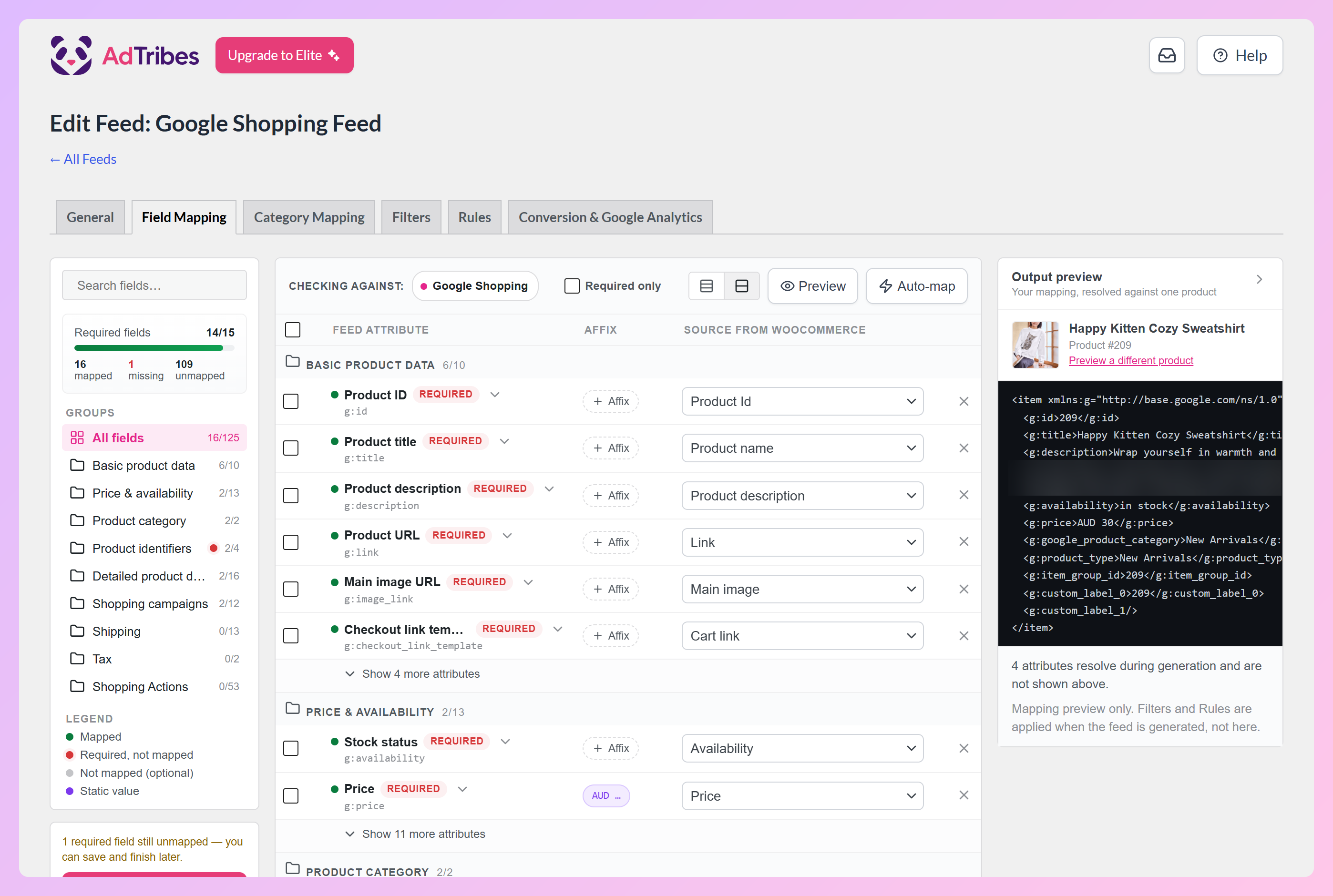
The free Product Feed Pro plugin already gives you a strong starting point with core feed creation, filters, and rules. Product Feed Elite adds more advanced capabilities such as extra product data fields, feed validation on eligible plans, multilingual and multi-currency support, and broader integration support for more complex feed setups.
For feed compliance requirements, see AdTribes’ Google Shopping feed requirements guide.
Frequently Asked Questions About Performance Max Vs Standard Shopping
What is the difference between Performance Max and Standard Shopping campaigns?
Performance Max is a goal-based campaign type that uses Google’s automation to show ads across more Google inventory from one campaign. Standard Shopping campaigns focus on Shopping ads and give you more manual control over campaign structure, product groups, and bidding. Both campaign types rely on accurate Merchant Center product data, so your WooCommerce product feed still matters either way.
Which is better for a WooCommerce store, Performance Max or Standard Shopping?
It depends on your goals. Standard Shopping can be a better fit when you want more manual control, clearer product-level testing, or a simpler setup to evaluate. Performance Max can be a stronger option when your tracking is reliable, your product feed is clean, and you want Google to automate placements across more channels. Many stores test both before shifting more budget to one campaign type.
Does my product feed matter for Performance Max?
Yes. Performance Max uses your product feed as an important campaign input, especially when you run it with a Merchant Center feed. Product titles, descriptions, images, prices, availability, categories, and identifiers can all help Google understand your products and match them to relevant shoppers. A cleaner feed gives the campaign better product data to work with.
Can I run Performance Max and Standard Shopping at the same time?
Yes, you can run both at the same time. The key is to structure them intentionally instead of pushing the same products in the same way without a clear reason. For example, you might use Standard Shopping for products that need tighter control and Performance Max for broader catalog reach, seasonal campaigns, or products where automation makes sense. Custom labels can also help you segment products by margin, season, category, or campaign goal.
How do I keep my product feed updated for Performance Max?
Use a feed tool that can refresh your WooCommerce product data automatically, especially when prices, stock levels, or promotions change often. AdTribes Product Feed Pro helps you create and manage WooCommerce product feeds, while AdTribes Product Feed Elite adds more advanced options for stores with larger or more complex feed setups.
Does AdTribes support the fields Performance Max needs?
AdTribes helps map WooCommerce product data into the fields used by shopping platforms like Google Merchant Center, including core details such as product titles, prices, availability, image links, categories, and identifiers when available. You can also use rules, filters, and field mapping to clean up feed data before submitting it. For more advanced needs, AdTribes Product Feed Elite includes extra product fields, broader integration support, and feed validation on eligible plans.
Can I use Performance Max if I don’t have conversion tracking set up?
You can create a Performance Max campaign without conversion tracking, but it is not recommended. Performance Max relies on conversion signals to understand which actions matter and optimize toward your campaign goals. Before launching, make sure your WooCommerce store is passing accurate purchase data into Google Ads so the campaign has meaningful data to learn from.
Wrapping Up
Both campaign types can work for WooCommerce stores. Standard Shopping is often easier when you want tighter manual control or a simpler testing setup. Performance Max is stronger when your tracking is clean, your feed is solid, and you’re comfortable giving Google more automation.
In either case, your product feed still matters. Clear titles, accurate pricing, complete attributes, and reliable refreshes make it easier for Google to understand your products and show them more effectively.
In this guide, we covered:
- What Performance Max is
- What Standard Shopping is
- How Performance Max vs Standard Shopping compares side by side
- When it makes sense to use each campaign type
- Whether you can run both together
- How your WooCommerce product feed affects performance in either setup
For WooCommerce stores, AdTribes can help you build and manage a cleaner product feed for Google Shopping and Performance Max, whether you’re starting with the free plugin or using Elite for a more advanced setup.
Hope this guide helped!