Reviewed by
AI shopping agents may sound like something built for huge retailers with dedicated data teams. For a WooCommerce store owner, the practical question is much simpler: when an AI shopping tool looks for products like yours, can it understand your catalog clearly?
That depends on how easy your product information is for shopping tools to understand. Some can read public product pages, while others use merchant feeds or structured commerce integrations. Either way, complete and current product data matters. A well-maintained feed gives supported channels clear details like titles, prices, availability, images, and identifiers, while the WordPress Abilities API opens another path for compatible tools to work with your feed workflows.
What Are AI Shopping Agents?
AI shopping agents are software programs that can browse, compare, and in some cases complete purchases on a shopper’s behalf. Depending on the system, they may use merchant feeds, structured commerce data, public product pages, or a mix of sources. They’re the “doing” layer of what the industry calls agentic commerce.
A useful shorthand is to think of an assistant as primarily helping a shopper research and decide, while an agent can take more actions on the shopper’s behalf, such as checking availability across stores, filtering by criteria, or moving toward checkout. Both need reliable product information, and as an agent takes on more of the task, incomplete or inconsistent data can make products harder to compare, match, or act on.
AI-assisted shopping is already gaining traction. Gartner predicts that by 2028, AI agents will intermediate more than $15 trillion in B2B purchases, and Adobe Analytics found that traffic to U.S. retail sites from generative AI sources jumped roughly 1,200% in February 2025 compared with July 2024. Together, those signals show AI becoming a more meaningful part of product research and purchasing workflows.
How Do AI Agents Read And Act On Your Store?
AI shopping systems can use several data sources, but machine-readable product data gives them a consistent way to understand your catalog. Two things matter here: the product information itself and the connections that make it available to supported tools and channels.
Structured product data gives agents cleaner inputs
Feeds and structured product data give AI shopping systems clearly labeled fields to work with, while some tools can also read public product pages. For merchants, that means your site’s visual design isn’t the only thing that matters. Complete fields such as title, description, price, availability, images, and identifiers like GTIN, MPN, and brand make products easier to interpret and compare. A shopper may infer what a vague title means from context; AI shopping systems have clearer signals when those details are explicit.
How agentic commerce protocols fit together
Different parts of agentic commerce use different standards. MCP helps AI clients connect to tools and capabilities, while commerce protocols such as OpenAI’s Agentic Commerce Protocol and Google’s Universal Commerce Protocol support shopping and transaction workflows. These standards are still evolving, and merchants don’t need to implement every one just to improve product readiness. A practical starting point is simpler: keep your product data complete, consistent, and easy to reuse.
Why A Clean Product Feed Matters For AI Shopping Agents
A clean product feed gives supported shopping tools a consistent source of product information. Complete titles, correct identifiers where applicable, accurate prices, current availability, and good images are all core feed fields that can make a catalog easier to interpret and match.
Feed quality matters: Shopping tools have an easier time working with products when titles, descriptions, availability, images, and applicable identifiers are complete and consistent. Missing or conflicting fields can make matching and comparison harder across AI and traditional shopping channels.
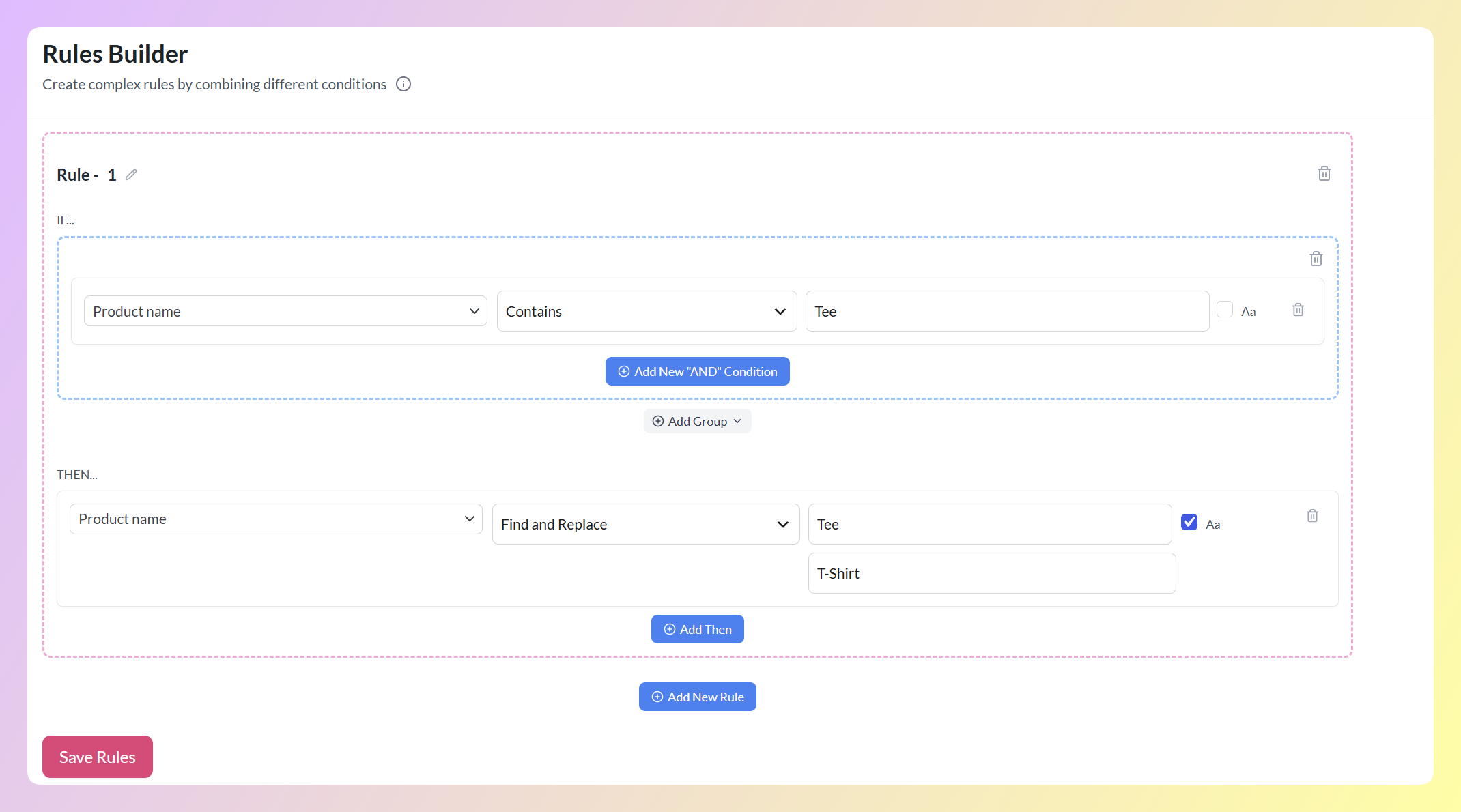
This is where a feed plugin earns its keep. AdTribes Product Feed Pro generates structured product feeds from your WooCommerce catalog, including an OpenAI product feed for WooCommerce, with field mapping and feed rules to help clean up gaps.
Product Feed Elite adds extra product fields for GTIN, MPN, brand, EAN, condition, and other attributes you may need across shopping channels. Keeping that data organized makes the same catalog easier to reuse as you expand to new channels.
The WordPress Abilities API: How AdTribes Exposes Feed Actions To AI Tools
The WordPress Abilities API is a WordPress standard that gives plugins, themes, and core a consistent, machine-readable way to register the actions they can perform. It shipped in WordPress 6.9 in December 2025. Registered abilities can describe what an action does, what information it needs, and who can use it, giving compatible tools a structured way to understand WordPress functionality.
AdTribes Product Feed Pro 13.5.7 or later registers a set of feed-management abilities through the Abilities API. To use those abilities with an AI assistant, your site also needs WordPress 6.9 or later, a separate MCP adapter, and a compatible AI client.
Once connected, the assistant can discover and use the Product Feed Pro abilities that the WordPress user has permission to access. It’s still an emerging workflow rather than a one-click connection, but it gives compatible AI tools a structured way to work with your existing feed-management actions.
How To Get Your WooCommerce Store Ready (Practical Steps)
Most of the practical work comes down to product-data quality. Start with these steps:
- Complete your product data. Fill in real titles, descriptions, prices, and availability for every product, not just your best sellers.
- Add your product identifiers. Populate GTIN, MPN, and brand where they apply, since these are common matching fields for agents and shopping channels alike. WooCommerce has included a native global unique ID field for GTIN, UPC, EAN, or ISBN since version 9.2, and Product Feed Elite adds extra fields for MPN, brand, EAN, and condition.
- Use feed rules to fix gaps at scale. Rather than editing hundreds of products by hand, use AdTribes Product Feed Pro feed rules to patch missing fields, standardize values, and exclude items that aren’t ready.
- Generate a clean feed. Produce your structured product feed, including an OpenAI product feed, so the same well-formed data is available across channels.
- Check the connection requirements. To use Product Feed Pro’s registered abilities with an AI assistant, you’ll need Product Feed Pro 13.5.7 or later, WordPress 6.9 or later, a separate MCP adapter, and a compatible AI client.
Frequently Asked Questions
What are AI shopping agents?
AI shopping agents are software programs that browse, compare, and sometimes buy products on a shopper’s behalf. Depending on the system, they may use merchant feeds, structured commerce data, public product pages, or a mix of sources. They’re the action layer of agentic commerce, and cleaner product data gives them more consistent information to work with.
How do AI shopping agents find products?
AI shopping systems can use feeds, structured data, and in some cases public product pages. Fields like title, price, availability, images, and identifiers give them clearer product information to match and compare. Missing or conflicting fields can make a product harder for the system to interpret accurately.
Do I need to do anything for AI agents to read my WooCommerce store?
Not always. Some AI shopping tools can read public product pages, while others rely on merchant feeds or commerce integrations. For channels that accept product feeds, complete product data and a clean, structured feed give the platform a more consistent source for titles, prices, availability, images, and identifiers.
What is the WordPress Abilities API?
It’s a WordPress standard that lets plugins, themes, and core register their capabilities in a machine-readable way. The API describes what an action does, what information it needs, and who can use it. It shipped in WordPress core 6.9 in December 2025; AI assistants still need a compatible connection layer, such as an MCP adapter, to use registered abilities.
Does AdTribes support AI shopping agents?
Yes, in two ways. AdTribes Product Feed Pro generates structured product feeds for supported channels, and version 13.5.7 or later registers feed-management abilities through the WordPress Abilities API. Both capabilities are available in the free plugin. To use the registered abilities with an AI assistant, you also need WordPress 6.9 or later, a separate MCP adapter, and a compatible AI client. Product Feed Elite adds extra product fields, including GTIN, MPN, brand, EAN, and condition, that can give supported shopping channels more structured product data to work with.
Is this the same as an MCP server?
No. The WordPress Abilities API is where Product Feed Pro registers the feed actions it can expose. MCP is a separate protocol layer, and an MCP adapter can bridge those registered abilities to a compatible AI client. In AdTribes’ current setup, you need both the Abilities API support and a separate MCP adapter to let an assistant use those feed abilities.
Is agentic commerce worth preparing for now?
It’s worth preparing for if AI-driven shopping is relevant to your store, especially because much of the work also supports existing feed workflows. Keeping titles, prices, availability, images, and applicable identifiers complete and consistent is useful across shopping channels, regardless of which agent or commerce protocol becomes most important to your business.
Getting Ready For Agentic Commerce In WooCommerce
Getting ready for AI shopping doesn’t mean rebuilding your WooCommerce catalog from scratch. Start with the product data you already use across shopping channels: keep it complete, current, and consistent. That same catalog can support Google Shopping, an OpenAI product feed, and other channels that rely on structured product data.
Start with these three steps:
- Complete your product data and identifiers so agents have clean fields to match.
- Generate a structured feed to give supported channels consistent catalog data.
- Review the WordPress Abilities API setup if you want compatible AI assistants to work with your product-feed workflows.
For a broader look at the tools behind these workflows, see our roundup of WordPress AI tools and product feeds. You can also review Product Feed Elite features for the paid capabilities, or compare the best WooCommerce product feed plugins if you’re still choosing a feed tool.