Reviewed by
If your one-time products show up on Google Shopping but your subscription products keep getting rejected, the problem may be the pricing data rather than the product itself. Google expects recurring charges in a specific format.
Google treats recurring pricing differently from a standard product price, so subscription listings need a few extra checks before they’re ready to submit.
If you’re setting up Google Shopping subscription products from WooCommerce, AdTribes Product Feed Pro already gets the products into your feed. From there, the main job is checking Google’s eligibility rules and adding the subscription-specific data it requires.
- Can You List Subscription Products On Google Shopping?
- What Google Needs For Subscription Products
- You’ll Need WooCommerce Subscriptions
- How To Map Subscription Products In AdTribes
- Common Subscription Feed Errors (And How To Fix Them)
- Frequently Asked Questions
- Get Your Subscription Products On Google Shopping
Can You List Subscription Products On Google Shopping?
Yes, for eligible physical goods in the United States. Google supports physical-goods subscriptions through Shopping ads, provided the product falls into an allowed category, you submit the recurring charge with the subscription_cost attribute, and you meet Google’s data and landing-page requirements.
For physical goods, Google Merchant Center Help lists the eligible categories as Personal Care, Health Care, Home & Garden, Pet Supplies, Toys, Prepared Foods, Apparel & Accessories, Coffee, Alcoholic Beverages, and Medicine & Drugs. That list does change: alcohol subscriptions such as wine clubs became eligible for U.S. merchants in a March 2026 policy update. So check your product category before you build the feed rather than assuming a blanket yes or no. The pricing format is another key requirement to get right.
What Google Needs For Subscription Products
Google needs the recurring charge described with the subscription_cost attribute, the subscription terms clearly shown on your landing page, and the same product identifier requirements that apply to your other listings. For physical goods, the subscription_cost amount should reflect the total non-discounted periodic payment, and the price, currency, and billing period shown on the landing page should match the feed. One detail catches people out: Google expects the standard price attribute submitted as 0, with the recurring charge carried inside subscription_cost. Before you submit, check the final feed output to make sure both fields meet Google’s requirements.
The subscription_cost Format Explained
The subscription_cost value combines three parts, written as period:period_length:amount, for example month:1:25.00 USD. In an XML Google Shopping feed, AdTribes outputs those parts as Google’s nested g:period, g:period_length, and g:amount child nodes.
Here’s how the pieces break down (example data):
| Part | Example value | Google child node | Meaning |
|---|---|---|---|
| Billing period | month | g:period | The billing unit (week, month, or year) |
| Period length | 1 | g:period_length | How many billing cycles the buyer commits to (1 means cancel anytime) |
| Amount | 25.00 USD | g:amount | The recurring charge |
Google Merchant Center Help lists standard billing periods of one week, one month, or one year. Weekly periods are supported for physical goods only, so confirm your plan fits before you map it.
You’ll Need WooCommerce Subscriptions
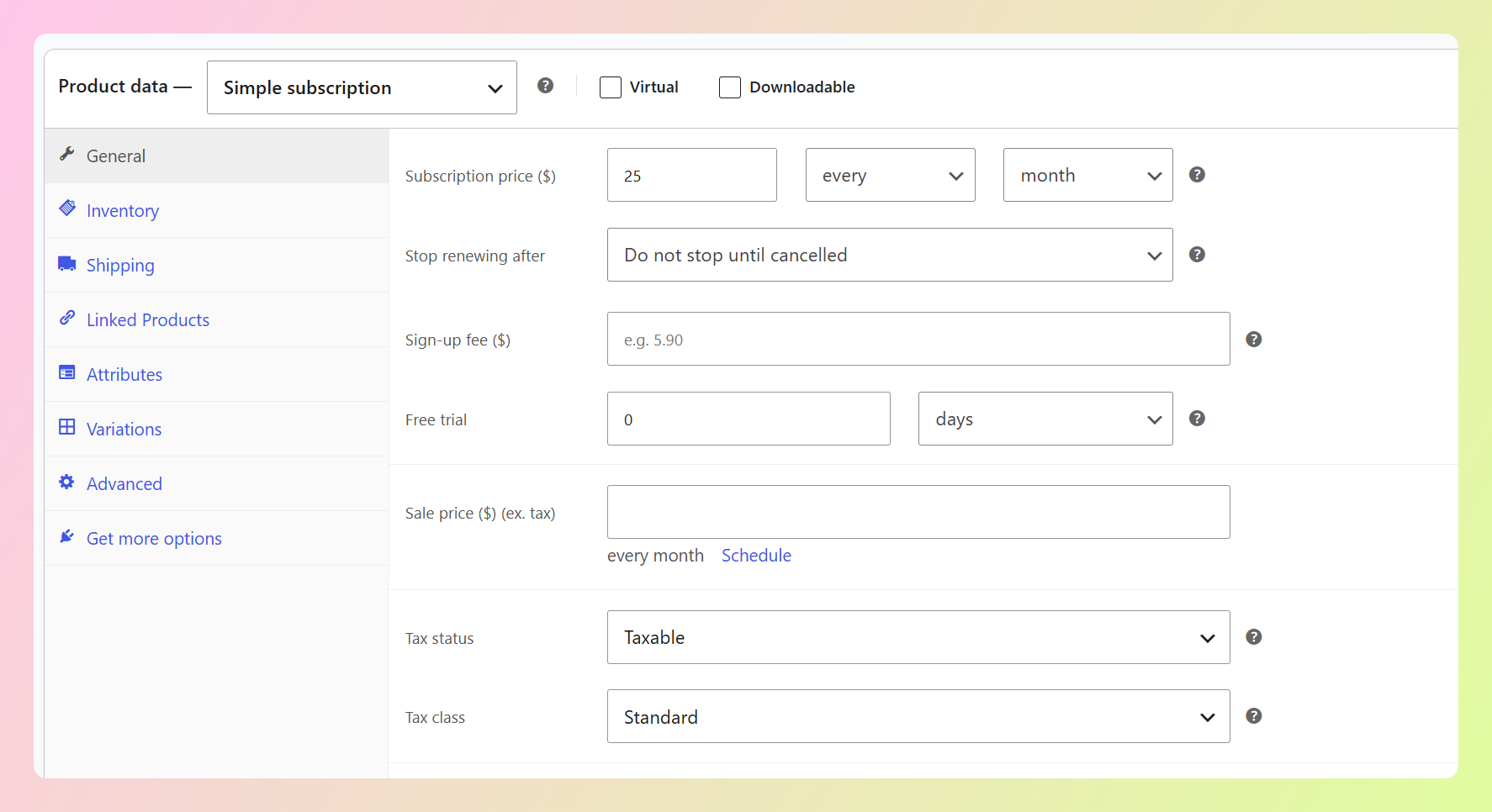
The recurring price and billing period come from a WooCommerce Subscriptions product. Without that plugin there’s no subscription data for the feed to read at all.
If you’re selling subscription boxes, auto-ship replenishment, or other recurring physical goods, you likely already run WooCommerce Subscriptions. AdTribes doesn’t replace it. It reads the subscription data stored on each product and uses it in your feed.
AdTribes Product Feed Pro already includes your subscription products automatically. Their title, description, link, image, and recurring price can flow into the feed without extra setup. For the price, AdTribes uses the amount billed each cycle rather than the signup fee.
So subscriptions aren’t missing from your feed. For Google Shopping, the extra work is adding the dedicated subscription_cost field and checking that the final standard price value meets Google’s physical-goods requirement.
How To Map Subscription Products In AdTribes
AdTribes Product Feed Pro is a free WooCommerce plugin that generates product feeds for Google Shopping and 250+ other channels from your store data. Mapping subscription_cost means pointing your feed’s Subscription cost field at the Subscription cost (Google) value, which builds Google’s format for you from your WooCommerce Subscriptions billing terms. That auto-filled value is available in Product Feed Elite.
- Create or open your WooCommerce Google Shopping feed.
- Map the standard required attributes first:
id,title,price,availability, and your identifiers. For physical goods subscriptions, confirm the finalpriceoutput is 0 before you submit. - Selling variable subscriptions? Turn on Include product variations on the feed’s General tab, so each plan exports as its own item with its own recurring price.
- On the Field Mapping tab, type “Subscription cost” in the Search fields box (it sits in the Price & availability group) and select Subscription cost (Google) as its source. Leave its Period, Period Length, and Amount sub-attributes empty, because filled-in sub-attributes replace the auto-filled value. In an XML feed, AdTribes outputs the value as nested
g:period,g:period_length, andg:amountchild nodes. - Use the feed preview to confirm the subscription node renders as expected.
- Generate the feed and submit its URL in Merchant Center.
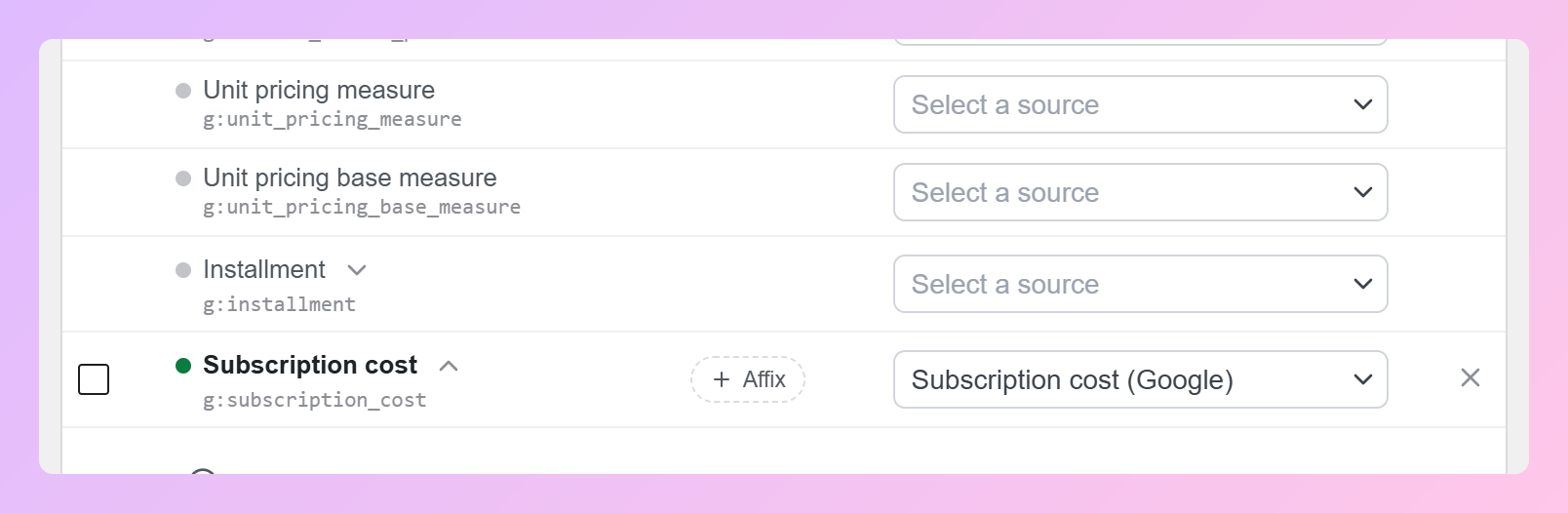
Watch for this: Don’t map the subscription price as a plain number. Google needs the period, commitment length, and amount together, like
month:1:25.00 USD, so the recurring charge can be read correctly.
For products sold with installment payments, Google also supports an installment attribute with its own nested values. If you don’t offer installment payments, you can leave it out.
Common Subscription Feed Errors (And How To Fix Them)
If a subscription product is disapproved or missing from the feed, start with these data checks.
- Missing subscription_cost: The feed doesn’t include Google’s recurring-price attribute for the product. Map the Subscription cost attribute and regenerate the feed.
- Malformed or skipped period value: The value isn’t in
period:period_length:amountform, or the plan bills on a cycle Google can’t represent. AdTribes leaves the attribute out rather than send something invalid, so a plan billed every three months, billed daily, or with no recurring price comes through with no subscription node at all. - Variable subscription plans missing entirely: Variable subscription plans don’t reach the feed until Include product variations is enabled on the feed’s General tab. Turn it on and regenerate, and each plan appears as its own item carrying its own recurring price.
- A “subscribe and save” product shows only one price: When a product carries several subscription schemes, the feed exports just one of them rather than every interval a customer could pick. That’s expected behavior, not a mapping fault.
- Price mismatch with the landing page: The recurring price and period shown on your product page must match what’s in the feed. Align the two before requesting a review.
- Missing identifiers: Subscription products still need to meet Google’s usual product identifier requirements. Our guide to product identifiers like GTIN, MPN, and brand covers how to add them.
Frequently Asked Questions
Can you sell subscription products on Google Shopping?
Yes, for eligible physical goods in the United States when your product falls into one of Google’s supported categories and you submit the recurring price with the subscription_cost attribute. That includes categories such as Personal Care, Pet Supplies, Prepared Foods, Apparel & Accessories, and Coffee, with alcohol subscriptions added for eligible U.S. merchants in March 2026. Check Google Merchant Center Help for your specific product type.
What is the subscription_cost attribute?
It’s the Google attribute that describes a recurring charge. It combines a billing period, a period length, and an amount, written like month:1:25.00 USD. In an XML feed, AdTribes outputs those parts as the nested g:period, g:period_length, and g:amount nodes.
Do I need WooCommerce Subscriptions to list subscription products?
Yes. AdTribes reads the recurring price and billing period from WooCommerce Subscriptions. Product Feed Elite must also be active for the auto-filled Subscription cost (Google) value to appear in your feed’s mapping options.
Why do my subscription products keep getting disapproved?
Start by checking the subscription_cost format, the final price value, and the price and period shown on the landing page. For physical goods subscriptions, Google requires price to be 0 while the recurring charge goes in subscription_cost. Correct any format or landing-page mismatches before requesting another review.
Which subscription price does AdTribes use?
AdTribes reads the recurring price from WooCommerce Subscriptions, meaning the amount billed each cycle, rather than the signup fee. For physical goods on Google Shopping, the final feed still needs to follow Google’s separate requirement: price must be 0, while the recurring charge goes in subscription_cost.
What billing periods does Google support for subscriptions?
Google Merchant Center Help lists standard billing periods of one week, one month, or one year. Weekly periods are supported for physical goods only. Because platform policies change, confirm the current supported periods before mapping a plan that bills on a different cycle.
Does AdTribes have a native WooCommerce Subscriptions integration?
Yes. AdTribes reads the recurring pricing stored on your WooCommerce Subscriptions products and formats it for your channel, and it works alongside WooCommerce Subscriptions rather than replacing it. That also covers “subscribe and save” products built with All Products for WooCommerce Subscriptions, where subscription options are attached to an otherwise regular product.
Do I need Product Feed Elite for subscription products?
Not to get subscriptions into your feed or to send their recurring price. AdTribes Product Feed Pro is free, with unlimited products and unlimited feeds, and it exports subscription products automatically. Elite is needed only for the auto-filled Subscription cost (Google) value on Google Shopping feeds.
Get Your Subscription Products On Google Shopping
Subscriptions can create repeat revenue from customers who stay enrolled, so it’s worth taking the extra time to get the feed requirements right. According to Fortune Business Insights, the broader subscription e-commerce market is projected to grow at a compound annual rate of roughly 14% through 2034.
- Can You List Subscription Products On Google Shopping?: confirm eligibility for your product type.
- What Google Needs For Subscription Products: learn the subscription_cost format.
- You’ll Need WooCommerce Subscriptions: the recurring data comes from here.
- How To Map Subscription Products In AdTribes: map the attribute and preview it.
- Common Subscription Feed Errors (And How To Fix Them): check common feed issues.
With Product Feed Elite, AdTribes builds the subscription_cost value from your WooCommerce Subscriptions billing terms, so you don’t have to format the period, length, and amount manually. If you’re still comparing feed tools, our guide to WooCommerce product feed plugins walks through more options.