Reviewed by
Choosing a WooCommerce ChatGPT product feed plugin can be confusing. Some tools include an OpenAI feed for free, while others require a paid version. The important differences are the files they generate, the controls they give you, and how easily you can keep product data up to date.
Choosing the right tool matters as AI-assisted shopping grows. According to Adobe, traffic to US retail sites from generative AI tools rose 693.4% year over year during the 2025 holiday season. A well-prepared feed helps you submit accurate product information to OpenAI, although it does not guarantee that your products will appear in ChatGPT.
When choosing a plugin, focus on file formats, eligibility flags, refresh schedules, validation, and cost.
Best WooCommerce ChatGPT Product Feed Plugin (Quick Answer)
AdTribes Product Feed Pro is our top pick: its free OpenAI channel supports all four file formats in OpenAI’s upload guide, including Parquet, with unlimited products and feeds. You can also map ChatGPT eligibility flags without buying a license.
RexFeed and CTX Feed also include ChatGPT channels in their free plugins. WebToffee Product Feed reserves its OpenAI channel for the premium version, while Webkul offers a paid ChatGPT-focused plugin.
What To Look For In A ChatGPT Product Feed Plugin
A good ChatGPT feed plugin turns your WooCommerce catalog into a file that follows OpenAI’s product-feed requirements and helps you keep that file current. It contains product details such as IDs, titles, descriptions, prices, availability, and links. Once the feed is delivered through OpenAI’s merchant process, OpenAI can use those details to understand your products.
If you’d like to see the shopper experience, start with our guide to ChatGPT Shopping. In Adobe’s 2025 survey of 5,000 US consumers, 39% had used generative AI for online shopping. Among people using AI for shopping, 47% used it to get product recommendations.
When you compare plugins, check these six things:
- OpenAI file formats: According to OpenAI’s file upload guide, OpenAI prefers Parquet and also supports jsonl.gz, csv.gz, and tsv.gz. A plugin that only writes XML or plain CSV leaves you converting files by hand.
- Eligibility flag mapping: OpenAI’s spec uses three flags, is_eligible_search, is_eligible_checkout, and is_ads_eligible. You want to set them per product, not live with a hard-coded value.
- Refresh schedule: OpenAI recommends delivering an updated feed at least daily. Scheduled regeneration keeps your file fresh, but the updated file still needs to reach OpenAI.
- Validation: A checker can catch missing fields or invalid prices before you submit your feed.
- Free vs paid: Some plugins put the ChatGPT channel in the free version and others keep it behind a license.
- Update recency: OpenAI has updated some field names. Check whether your plugin uses current names or accepted aliases; AdTribes recommends version 13.5.6 or later for its OpenAI template.
For a broader comparison of tools for Google, Meta, and other marketplaces, see our guide to the best WooCommerce product feed plugins overall.
AdTribes Product Feed Pro For WooCommerce (Best Overall, Free)
AdTribes Product Feed Pro is our strongest free pick because it generates all four OpenAI upload formats, including Parquet, without a product cap. With 80,000+ active installs on WordPress.org, it also lets you manage ChatGPT feeds alongside Google Shopping, Meta, and other channels in one plugin.
Selecting OpenAI Product Feed from the Channel dropdown loads the OpenAI field template, with core fields such as item_id, title, description, url, and price pre-mapped. For help getting started, see our guide on how to create a ChatGPT product feed or follow the step-by-step OpenAI feed setup.
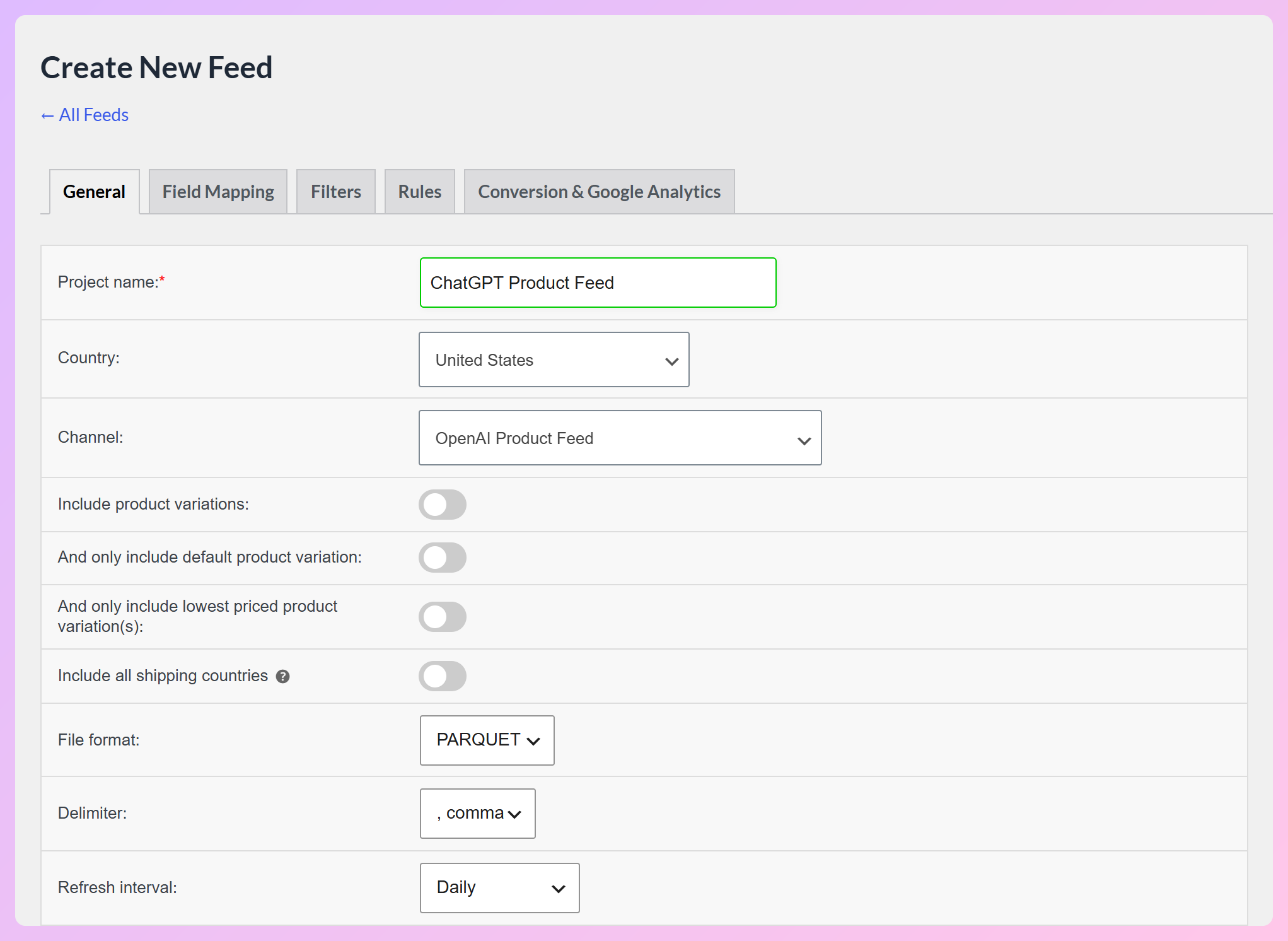
Your feed regenerates on the schedule you pick. The free plugin offers hourly, twice-daily, or daily refresh, and Product Feed Elite adds custom refresh intervals. Include and exclude filters and IF/THEN rules are free too, so you can exclude out-of-stock products or selected categories from the generated feed.
Formats and eligibility flags
AdTribes generates JSONL.GZ, CSV.GZ, TSV.GZ and Parquet files for the OpenAI channel. Parquet appears in the file format dropdown only when your server has both the bcmath and zlib PHP extensions.
The three eligibility flags are available in field mapping. Search eligibility starts mapped to true and checkout to false, while the ads flag starts unmapped. You can map the ads flag if you are setting up an OpenAI Ads integration. In JSONL output, the plugin writes these flags as JSON booleans, as OpenAI’s specification requires.
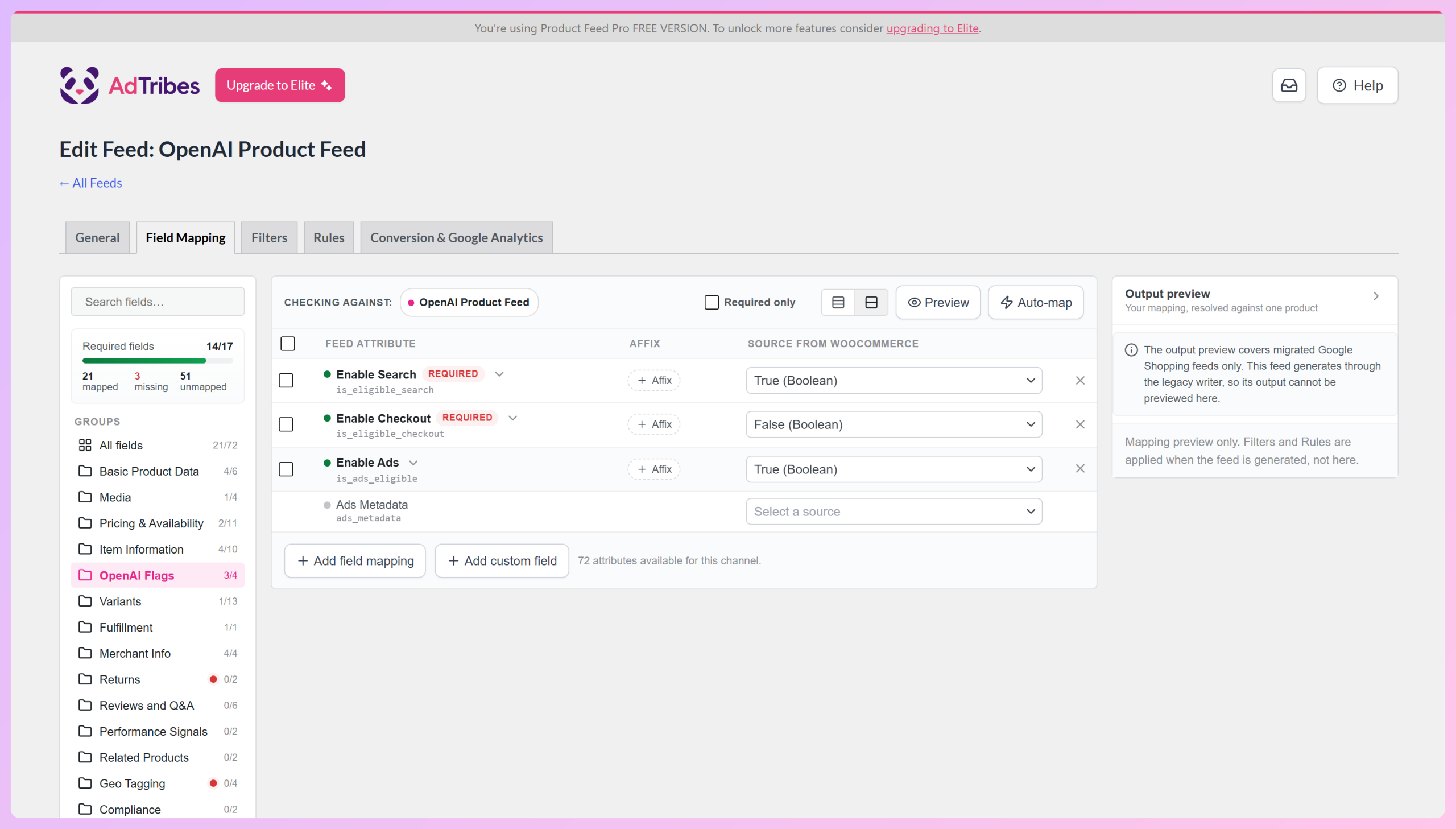
Setting is_eligible_checkout to true does not enable checkout by itself. According to OpenAI’s product feed spec, a product is eligible for checkout only when search eligibility is also true and checkout is enabled for your integration.
Feed Validator support for OpenAI feeds (Plus/Business)
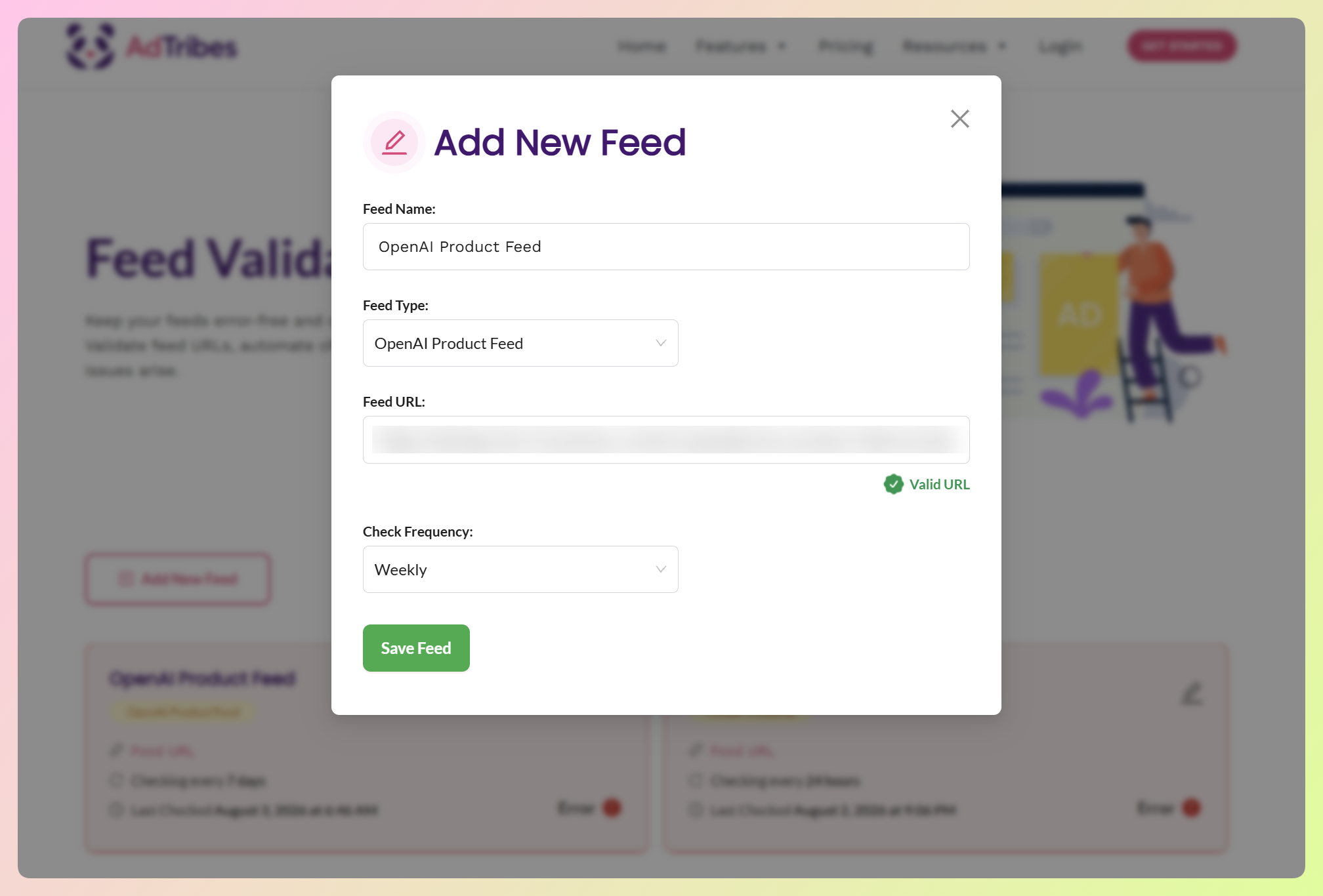
On the Plus and Business plans, the Feed Validator checks supported OpenAI feed files on a schedule. It helps catch missing data, formatting issues, and problems with conditional fields, including checkout-related information. You can see the supported checks in our OpenAI Feed Validator overview.
Each finding names the record, the field, and the offending value. You can run checks daily, weekly, or monthly, and errors are listed apart from warnings. The validator reads JSONL.GZ, CSV.GZ and TSV.GZ files, so if you want scheduled checks, generate your OpenAI feed in one of those formats rather than Parquet.
AdTribes strengths:
- Free OpenAI channel: Unlimited products and feeds at no cost.
- All four OpenAI upload formats: JSONL.GZ, CSV.GZ, TSV.GZ and Parquet.
- Flags as mapped fields: Set search, checkout, and ads eligibility per product.
- Several channels in one plugin: Google Shopping, Meta, TikTok, Pinterest, and ChatGPT live side by side.
AdTribes trade-offs:
- Server requirements for Parquet: It needs bcmath and zlib, so check with your host.
- Paid extras: Custom refresh intervals need Product Feed Elite, and the Feed Validator needs Plus ($179.50 for the first year, then $359 a year) or Business ($249.50 for the first year, then $499 a year).
RexFeed
RexFeed is an actively updated multichannel feed plugin with an OpenAI Commerce template in its free version. It also includes a built-in feed validator for ChatGPT feeds.
Its free tier is worth a look for smaller catalogs:
- Recent updates: Version 7.14.1 shipped on October 22, 2026, a sign of active development.
- User rating: It’s rated 4.8 out of 5 across 256 ratings, from more than 10,000 active installs.
- Free product cap: The free version is limited to 200 products, so larger catalogs need RexFeed Pro.
- Setup help: A ChatGPT feed tutorial is available to guide setup.
RexFeed’s OpenAI template offers JSON, XML, CSV, and TSV output. OpenAI’s file-upload guide supports Parquet or gzip-compressed JSONL, CSV, and TSV, so plain CSV or TSV exports need compression before upload. AdTribes generates all four supported upload formats directly, with no free-tier product cap.
CTX Feed
CTX Feed includes a ChatGPT Merchant option among its 220+ shopping, AI, and social channels. It has 90,000+ active installs on WordPress.org and a rating of 4.6 out of 5 from 837 reviews.
CTX Feed also offers:
- Frequent releases: Version 8.0.39 went out on October 19, 2026.
- Big channel catalog: ChatGPT sits alongside hundreds of shopping, AI, and social destinations.
- Setup guide: A ChatGPT feed setup guide is available.
If you already use CTX Feed for other channels, its free ChatGPT template may be convenient. Just check the export format before submitting it to OpenAI.
CTX Feed’s ChatGPT channel is in its free plugin, but it writes plain CSV or TSV files rather than the gzipped or Parquet files OpenAI’s guide lists. AdTribes Product Feed Pro writes all four OpenAI formats for free.
WebToffee Product Feed
WebToffee Product Feed supports an OpenAI Agentic Commerce Feed in its premium version. Its WordPress.org plugin has 2,000+ active installs and a rating of 4.8 out of 5 from 27 reviews.
For stores considering WebToffee:
- Premium only: The OpenAI channel requires the premium version; it isn’t included in the free WordPress.org plugin.
- Active development: Version 2.4.2 shipped on September 8, 2026.
WebToffee also offers per-product controls for ChatGPT search and checkout eligibility, which can be useful if you already use its premium plugin. AdTribes includes its OpenAI channel in the free version, with unlimited feeds and products.
Webkul ChatGPT Product Feed For WooCommerce
Webkul ChatGPT Product Feed for WooCommerce is a paid, ChatGPT-focused plugin that generates product feeds and includes tools for Agentic Commerce Protocol (ACP) checkout integrations. OpenAI still requires separate checkout onboarding before in-chat purchases are available.
Its main distinctions are:
- ChatGPT focus: Its feed and ACP tools focus on ChatGPT rather than managing Google Shopping or Meta feeds.
- Checkout setup: It includes ACP checkout tools, but merchants still need a separately enabled OpenAI checkout integration.
A dedicated tool may suit you if ChatGPT is the only channel you need. If you also create feeds for Google Shopping or Meta, you will need a separate feed tool for those channels. AdTribes lets you manage them alongside ChatGPT in one dashboard.
Ovena also offers an ACP-focused WooCommerce plugin. Its WordPress.org listing shows 20 active installs and a last update in November 2025, so check its current compatibility and support before relying on it.
ChatGPT Feed Plugins Compared
AdTribes supports all four OpenAI upload formats in its free plugin, without a product limit. The table highlights the differences in formats, eligibility flags, and pricing.
| Plugin | ChatGPT/OpenAI feed | Price for the ChatGPT feed | Feed output formats | Eligibility flags | Last updated |
|---|---|---|---|---|---|
| AdTribes Product Feed Pro | Yes (free plugin) | Free | JSONL.GZ, CSV.GZ, TSV.GZ, Parquet | is_eligible_search, is_eligible_checkout, is_ads_eligible | 2026-10-01 (13.5.8) |
| RexFeed | Yes (free plugin) | Free (200-product limit) | JSON, XML, CSV, TSV (uncompressed) | enable_search, enable_checkout | 2026-10-22 |
| CTX Feed | Yes (free plugin) | Free | CSV, TSV (uncompressed) | is_eligible_search, is_eligible_checkout, is_ads_eligible | 2026-10-19 |
| WebToffee Product Feed | Yes (premium version) | Premium | Not listed publicly | Search and checkout, per product | 2026-09-08 |
| Webkul ChatGPT Product Feed | Yes (ChatGPT-focused) | Paid | JSONL.GZ, CSV.GZ (plus uncompressed) | Not listed publicly | 2026-07-17 |
With a multichannel feed plugin, you can manage ChatGPT, Google Shopping, and Meta feeds from one dashboard. Each channel still needs its own field mapping and refresh schedule. AdTribes lets you create all of these feeds at no cost.
Don’t see Parquet in the File format dropdown? AdTribes hides that option when your server lacks the bcmath or zlib PHP extension. Ask your host to enable both, or choose JSONL.GZ instead.
Frequently Asked Questions
Is there a free WooCommerce ChatGPT product feed plugin?
Yes. AdTribes Product Feed Pro includes the OpenAI channel in its free version, with unlimited products and feeds. You can generate the supported upload formats and map eligibility flags without a license. Paid extras include custom refresh intervals and the Feed Validator, but neither is required to generate and schedule a ChatGPT feed.
Which file formats does OpenAI’s product feed accept in AdTribes?
AdTribes generates JSONL.GZ, CSV.GZ, TSV.GZ and Parquet for its OpenAI channel. OpenAI prefers Parquet and also supports the three gzip formats. Parquet is available for the OpenAI channel only when your server has the bcmath and zlib PHP extensions. If it is unavailable, JSONL.GZ is another supported option.
What do the ChatGPT eligibility flags do?
According to OpenAI’s product spec, is_eligible_search controls search eligibility and defaults to true when left empty. The is_eligible_checkout flag opts a product into checkout only when search is also true and checkout is enabled for your integration. The is_ads_eligible flag is used for Ads processing when your Ads integration is configured. AdTribes lets you map each flag, but setting a flag doesn’t guarantee display or turn on checkout by itself.
Can one plugin handle Google Shopping and ChatGPT feeds?
Yes. AdTribes Product Feed Pro builds separate Google Shopping, OpenAI, and other feeds from the same WooCommerce catalog. Each feed has its own field mapping, filters, and refresh schedule, but you can manage them all in one plugin.
Do I need a separate plugin for ChatGPT and Meta?
No. AdTribes Product Feed Pro includes an OpenAI channel and a Facebook catalog feed in the free plugin, and you can use the Meta catalog for Instagram Shopping too. A ChatGPT-focused plugin without a Meta feed would require another tool for that channel.
Which ChatGPT Product Feed Plugin Should You Choose?
Our pick is AdTribes Product Feed Pro. You can prepare an OpenAI feed in any of the four formats from OpenAI’s upload guide, including Parquet, with no product or feed limit in the free plugin.
Your ChatGPT, Google, and Meta feeds can draw from the same WooCommerce catalog, even though each has its own mapping and refresh schedule. Once you’ve prepared and submitted your OpenAI feed through the merchant process, you can also get your store ready for AI shopping agents by keeping your product details clear and up to date.
- Check the six criteria that matter for an OpenAI feed
- Start with the free AdTribes OpenAI channel
- Compare the plugins side by side before you commit
- Confirm your server supports Parquet, or use JSONL.GZ
Ready to prepare your catalog for ChatGPT shopping? Create an OpenAI product feed with AdTribes for free, then follow OpenAI’s merchant onboarding and feed-delivery steps to submit it for review.