
Aelia Currency Switcher
Aelia
Get Aelia Currency Switcher (opens in a new tab)
Leverage TranslatePress to Target Visitors by Country or Language
Translate your entire website with TranslatePress and generate product feeds based on the selected language, ensuring accurate and localized content for every market.
TranslatePress is fully integrated with Product Feed Elite, allowing you to deliver accurate, language-specific product data across your entire store. Simply ensure that your translations are properly applied and visible on the shop page.
Once everything is set, the plugin will automatically detect and use the correct product information based on the language you select for each feed, ensuring localized, consistent, and platform-ready product data for every target audience.
1- Go to Product Feed Elite > Settings > and Enable TranslatePress Support option

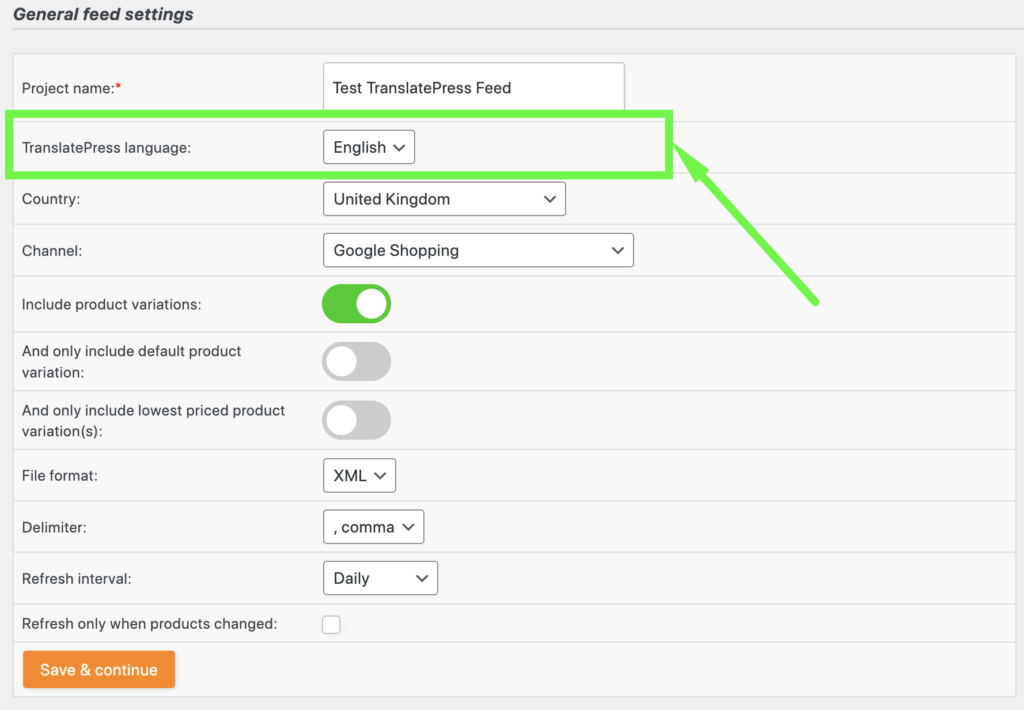
2- On the Feed General Settings you can then set the language of the feed. Ensure that the product has been translated to the set language to work without any issues.
Support is provided by the developers of the plugins. Please contact them directly as we are unable to support them.
Tell us about your integration with Product Feed Pro or Elite and get it listed.
The best WooCommerce product feed plugin