

Aelia Currency Switcher
Aelia
Get Aelia Currency Switcher (opens in a new tab)
Use WPML & WCML To Translate Products and Set Local Currencies
Create language-specific product feeds with automatically converted currencies for every market you target.
Product Feed Elite works with WPML and WCML through two addons. The Feed Translation Addon powers multilingual feeds (WPML, Polylang, TranslatePress), and the Product Feed Multi-Currency Addon powers local-currency feeds (Aelia Currency Switcher, Curcy, WCML). Both are available on the Plus and Business plans.
This ensures that every product feed you generate with Product Feed Elite is accurately tailored to each language and region you want to target, resulting in more relevant listings and higher conversion potential across global marketplaces.
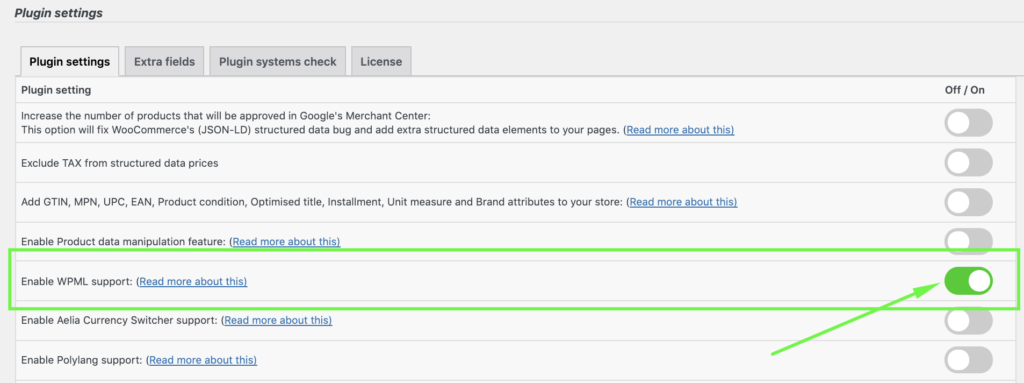
1- Go to Product Feed Elite > Settings > and Enable WPML Support option
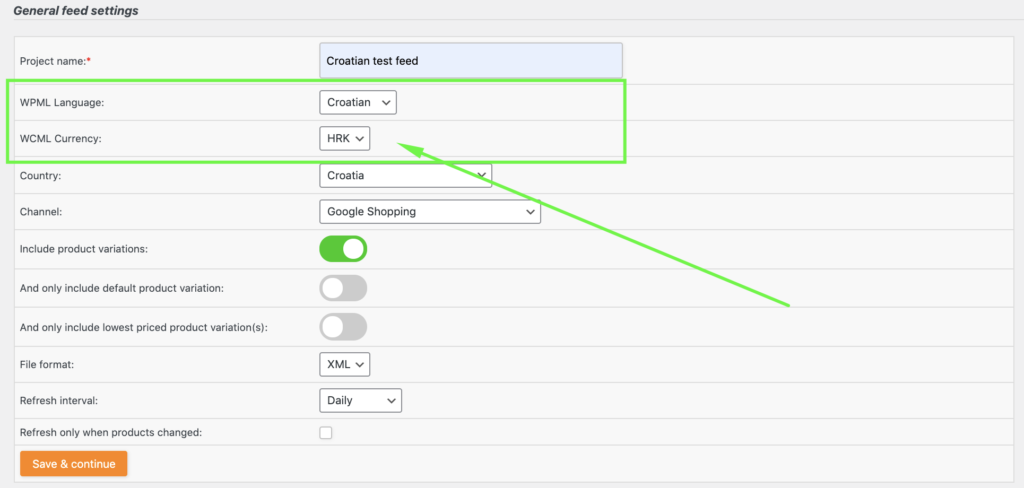
2- On the Feed General Settings you can then set the language and currency of the feed and proceed with the general setup
Support is provided by the developers of the plugins. Please contact them directly as we are unable to support them.
Tell us about your integration with Product Feed Pro or Elite and get it listed.
The best WooCommerce product feed plugin