Reviewed by
Comparing AdTribes Product Feed Pro vs Elite? Is it time to upgrade?
For many WooCommerce stores, the free AdTribes plugin already does a lot of the heavy lifting. It gives you a solid starting point for building product feeds and getting your listings ready for the channels you want to sell on. But once your setup becomes more complex, staying on the free version can start to slow you down.
That’s where AdTribes Product Feed Elite comes in. It’s built for stores that need more control, more flexibility, and more confidence in how their feeds are managed.
In the next sections, we’ll break down the key differences in AdTribes Product Feed Pro vs Elite and help you decide which setup makes the most sense for your store. Let’s get right into it!
What You Get With AdTribes Product Feed Pro (Free)
AdTribes Product Feed Pro already covers far more than the basics. For many WooCommerce stores, it gives you enough to build, manage, and optimize product feeds without needing to upgrade right away. Here’s what you get:
- Unlimited product feeds — Create as many feeds as you need for different channels, regions, or campaigns without hitting a feed limit.
- Unlimited products — Include your full catalog in your feeds, even if your store carries a large number of items.
- 100+ pre-configured product feed channel templates — Start faster with ready-made templates for major sales channels and marketplaces.
- Custom feed rules and filters — Control which products appear in your feed and adjust feed data to better match channel requirements.
- Category mapping with Google taxonomy — Map your WooCommerce categories more accurately so your listings fit platform expectations.
- Support for variable products — Include product variations correctly, which is especially important for stores selling items in multiple sizes, colors, or styles.
- Refresh options, feed previews, and update settings — Use built-in feed settings to preview your feed and manage how it updates over time.
If you’re creating feeds for channels like Google Shopping, Meta, TikTok, Pinterest, Bing, and other supported destinations, AdTribes Product Feed Pro gives you a strong base to start from and enough control to shape how your products appear.
Where Elite starts to pull ahead is in the extra layer of protection, flexibility, and store-level scalability it adds. If your workflow is getting more demanding, the paid plans start to feel much more useful — not because the free plugin stops working, but because your store starts needing more from it.
What You Unlock With AdTribes Product Feed Elite
AdTribes Product Feed Elite builds on the same core foundation, but it adds features that make a bigger difference once your store becomes harder to manage. This is where the upgrade starts to make sense for store owners who need stronger validation, more advanced scheduling, broader integration support, or room to manage multiple sites more efficiently.
Here’s what Elite adds on top of the free plugin:
- Feed Validator Tool — Check your feed URLs on a schedule, catch issues like missing attributes or formatting problems, and get alerts before they hurt your listings.
- Custom refresh intervals — Go beyond standard update behavior with more control over how often and when each feed refreshes.
- Extra product data fields — Add fields such as GTIN, MPN, EAN, product condition, and unit pricing to better meet channel requirements.
- Product data manipulation tools — Make deeper feed-level adjustments when you need more control over how product data is prepared for each channel.
- Language and currency integrations — Connect with tools like WPML, TranslatePress, Polylang, Aelia Currency Switcher, and other supported plugins.
- More site licenses — Choose a plan that fits your setup, whether you run one store, several storefronts, or a larger client portfolio.
- Officially supported integrations — Higher plans include 20+ officially supported integrations for stores with more advanced marketing and localization needs.
- WordPress multisite compatibility — Business supports multisite setups, which is especially useful for larger operations and agencies.
- Premium support — Plus includes standard email support, while Business includes priority email support for faster help when you need it.
For a simple single-store setup, the free plugin may already be enough to get your feeds live and working well. But when your store setup becomes more complex, the added tools in Product Feed Elite can make feed management easier and much more scalable.
That’s where the difference between AdTribes Product Feed Pro vs Elite starts to become more noticeable, especially for stores that need more protection, flexibility, and room to scale.
5 Signs It May Be Time to Upgrade to Product Feed Elite
Here are the clearest signs that your store may be ready for the extra control, flexibility, and protection that Product Feed Elite adds.
1. You want to catch feed issues before they affect your listings
If you’ve dealt with Google Merchant Center disapprovals, missing attributes, broken URLs, or formatting issues, upgrading starts to make a lot more sense.
Product Feed Elite Plus and Business include the Feed Validator Tool, which checks your feed URLs on a schedule, flags critical issues, and alerts you when something needs attention. Instead of finding out after your listings are affected, you get a chance to catch problems earlier and fix them faster.
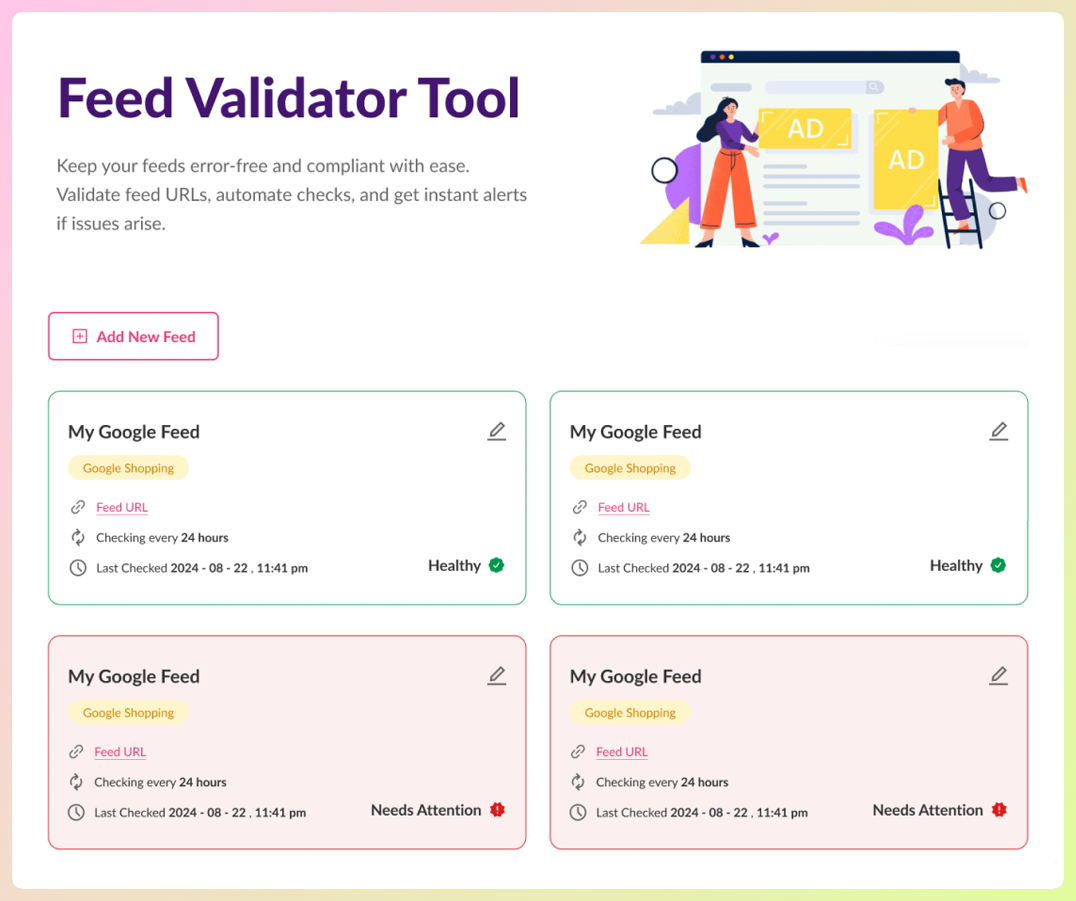
For stores that rely heavily on Google Shopping or other feed-driven channels, that extra layer of visibility can be one of the clearest reasons to move beyond the free plugin.
2. Your store needs more control over when feeds refresh
The free plugin already gives you refresh settings, but some stores need more precise control than the default options allow.
Elite adds custom refresh intervals, which are especially helpful if your prices, stock levels, or promotions change often. If you’re managing a busier catalog or running campaigns where timing matters, being able to fine-tune when feeds update can make your setup easier to manage and more reliable.
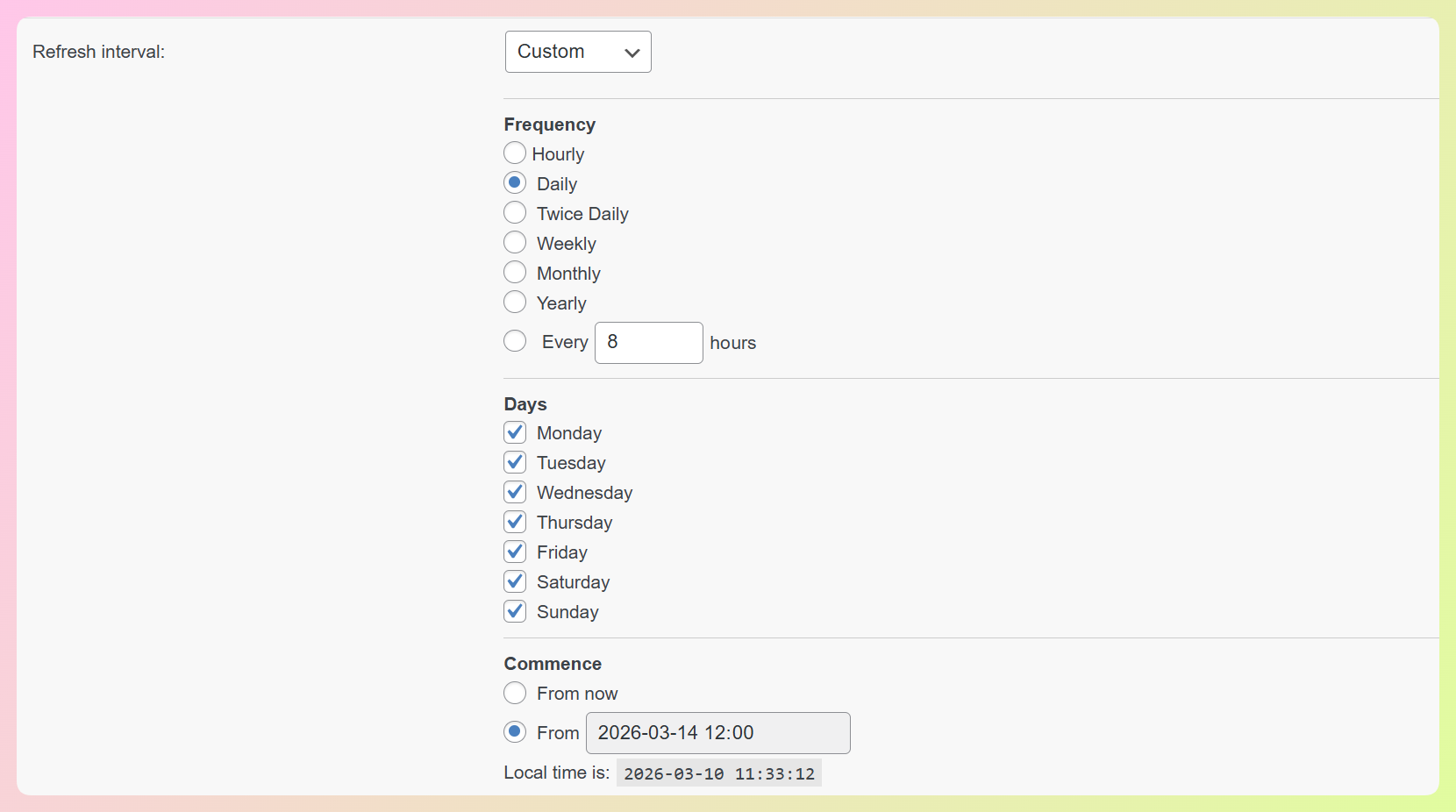
This is the kind of upgrade that starts to matter when your feed is no longer something you set and forget.
3. You need more feed-specific product data and stronger data control
This is the most underappreciated limitation of the free version.
Google Shopping and other channels have specific requirements for product titles, descriptions, and attributes. Your WooCommerce product data often doesn’t match those requirements exactly — titles might be missing the brand, descriptions might be too short, or you might need to add a custom label based on product margin.
Elite plans add extra fields and data tools that give you more control over how your products are prepared for different channels, including:
- Brand
- GTIN
- MPN
- EAN
- Product condition
- Unit pricing
- And more
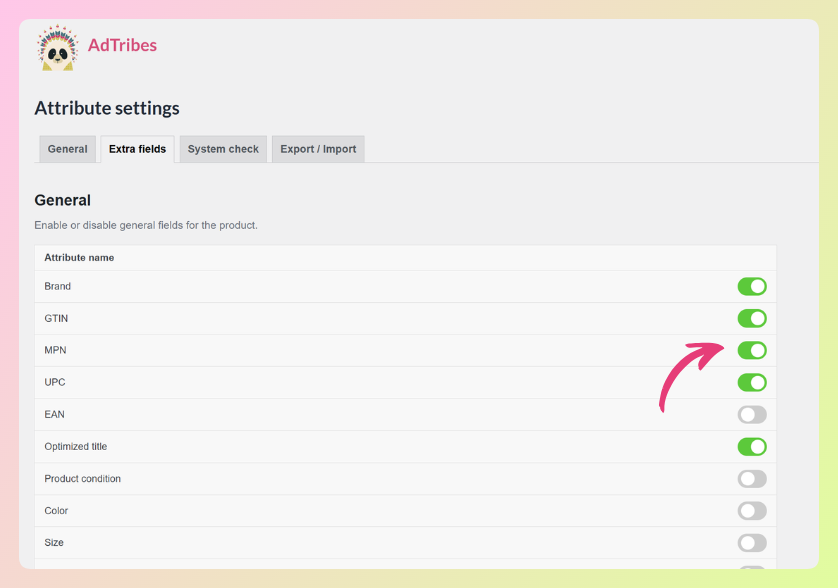
If you’re trying to create cleaner, more complete feeds for advertising platforms and marketplaces, this is one of the strongest reasons to upgrade.
4. You sell across multiple markets or rely on other WooCommerce tools
Once your store starts selling across languages, currencies, or a more customized plugin stack, compatibility becomes a much bigger deal.
Product Feed Elite includes integrations for tools like WPML, TranslatePress, Polylang, Aelia Currency Switcher, and Curcy, and higher tiers include 20+ officially supported integrations. That makes Elite a stronger fit for stores that need their feeds to work smoothly alongside a more complex WooCommerce setup.
For example, in our case study on Yazzy’s, founder Samantha shared that the plugin worked seamlessly with WPML, helping their team generate localized feeds in German, French, Dutch, and English for a multilingual store setup.
5. You’re managing more than one WooCommerce store
If you run multiple storefronts, manage client sites, or work inside a multisite setup, the paid plans are much better aligned with how you actually work.
Plus covers three sites, and Business gives you unlimited sites plus WordPress multisite compatibility. Business also includes priority email support, which makes it the most practical choice for freelancers, agencies, and teams managing feeds across multiple installs.
For that kind of setup, upgrading is less about unlocking one extra feature and more about using the right license for the scale of your work.
Which Product Feed Elite Plan Should You Choose?
If you’ve been weighing AdTribes Product Feed Pro vs Elite, this is the point where the decision becomes more practical. Once you know an upgrade makes sense, the next step is choosing the plan that best matches your store.
The right choice depends on how many sites you manage, how much feed oversight you need, and how advanced your WooCommerce setup has become. Here’s a quick overview:
Elite Growth ($99.50/year — 1 site)
Growth is a strong fit for single-store owners who want more control over how their feeds are managed. It includes custom refresh intervals, advanced rules and filters, product data manipulation, extra fields like GTIN, MPN, and EAN, WooCommerce structured data fixes, and integrations for tools like WPML, TranslatePress, Polylang, Aelia, and Curcy. If you run one store and want a more advanced feed setup without jumping to a higher-tier license, this is the most practical place to start
Elite Plus ($179.50/year — 3 sites)
Plus is the better choice if you manage multiple storefronts or want stronger feed oversight. It includes everything in Growth, adds a 3-site license, and unlocks the Feed Validator Tool plus 20+ officially supported integrations. If you want more visibility into feed issues or you’re working with a more advanced WooCommerce setup, this is usually the tier where the upgrade starts to feel much more worthwhile.
Elite Business ($199.50/year — Unlimited sites)
Business is built for freelancers, agencies, and teams managing feeds across multiple stores. It includes everything in Plus, along with unlimited site licenses, WordPress multisite compatibility, and priority email support. If you manage client stores or need a plan that can scale with a larger setup, Business gives you the most flexibility with only a small jump in price from Plus.
Is Product Feed Elite Worth It for Your Store?
That depends on what your store needs.
If AdTribes Product Feed Pro already covers what you need, there’s no pressure to upgrade too early. But once you start needing stronger feed validation, custom refresh intervals, broader integration support, or more site coverage, upgrading to Elite is a smart move. At that point, the upgrade is less about getting “more features” for the sake of it and more about giving your store the tools to manage feeds with less friction and more confidence.
For many store owners, the biggest value is not just what Elite adds, but what it helps prevent: feed errors that go unnoticed, compatibility issues with a more advanced WooCommerce setup, or the limitations of managing multiple stores under a simpler setup. If those problems are starting to show up in your workflow, upgrading is worth it.
AdTribes Product Feed Pro vs Elite Frequently Asked Questions
Can I start with free and upgrade later?
Yes. Product Feed Pro is a solid starting point if you want to create and manage WooCommerce product feeds without paying upfront. Then, if your store needs more advanced tools later, such as the Feed Validator Tool, custom refresh intervals, broader integration support, or more site coverage, you can upgrade to Product Feed Elite and choose the plan that fits your setup.
What’s the main difference between Product Feed Pro and Elite?
The main difference is that Product Feed Pro gives you the core tools to create and manage product feeds, while Product Feed Elite adds more advanced features for growing stores. Depending on the plan, Elite adds tools like custom refresh intervals, Feed Validator, extra product data fields, multi-language and multi-currency support, broader integration support, and higher site limits.
If I upgrade, do my existing feeds carry over?
In most cases, upgrading gives you access to Elite features on top of your existing setup. If you want extra peace of mind, AdTribes also provides export and import tools that help you back up, migrate, and restore feed configurations when needed.
Can I try Elite before committing?
All Elite plans include a 14-day money-back guarantee. If the tools aren’t the right fit for your store, you can reach out within 14 days to request a refund.
What happens to my feeds if I downgrade back to free?
If you downgrade, you may lose access to Elite-only features such as the Feed Validator Tool, custom refresh intervals, certain integrations, and higher site-license allowances. To ensure a smooth transition and prevent unexpected feed disruptions, we recommend reviewing your current setup against the features included in the free Pro version before downgrading.
Conclusion
When comparing AdTribes Product Feed Pro vs Elite, the right choice really comes down to what your store needs today.
Product Feed Pro already gives WooCommerce store owners a strong starting point for creating and managing product feeds. But as your store grows, your feed setup can become more demanding too. That’s where Product Feed Elite starts to make more sense, especially if you need stronger validation, more advanced feed controls, broader compatibility, or support for multiple stores.
In this guide, we explored:
- What Product Feed Pro already includes for free
- What Product Feed Elite adds on top of the free plugin
- The clearest signs it may be time to upgrade
- Which Elite plan may be the best fit for your store
Hope this guide helped!