Lista completa de atributos de feed de productos para mapeo
Lista completa de atributos de feed de productos para mapeo
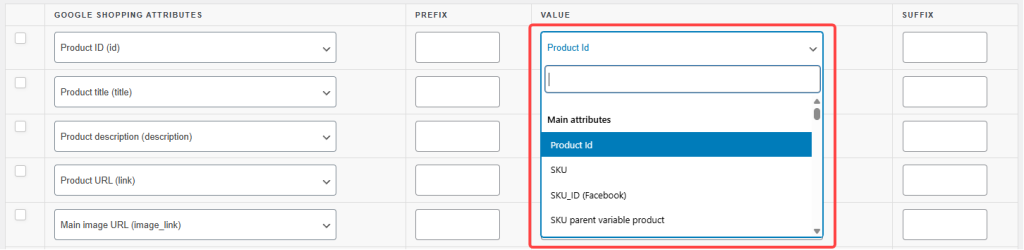
Cuando creas una fuente de productos en Product Feed Pro o Product Feed Elite, cada fila en tu pantalla de mapeo de atributos se rellena utilizando uno de los atributos disponibles del plugin.
Este artículo es una guía de referencia completa de esos atributos: qué son, a qué grupo pertenecen y un ejemplo de qué valor generan.
En el selector de atributos, los atributos se organizan en cuatro grupos integrados más dos que el plugin genera automáticamente:
Atributos principales: datos básicos del producto, incluidos ID, títulos, descripciones, enlaces, stock, dimensiones y todas las variantes de precios.
Atributos de imagen: imagen principal, imágenes adicionales y variantes específicas del formato.
Taxonomía de categorías de Google: el campo de taxonomía de productos de Google (disponible solo en reglas y filtros).
Otros campos: información de la tienda, valores booleanos, etiquetas, reseñas, avisos al consumidor y campos de utilidad.
Atributos dinámicos: generados automáticamente a partir de atributos de productos de WooCommerce y taxonomías personalizadas.
Atributos personalizados: generados automáticamente a partir de campos meta de productos y atributos de variación.
Este artículo divide las variantes de precios en su propia sección para facilitar la lectura, aunque aparezcan en Atributos principales en el selector. Todas las demás secciones coinciden directamente con las agrupaciones del selector.
Utiliza esta referencia junto con el selector de atributos en el constructor de fuentes. Si buscas un campo específico y no lo encuentras, consulta las secciones Dinámicos y Personalizados: muchos atributos específicos de la tienda aparecen allí automáticamente.
Los atributos principales cubren los datos fundamentales del producto que todos los canales de feed esperan. Siempre están disponibles independientemente de tu tipo de producto o canal.
Identificación e información básica
Atributo
Descripción
Salida de ejemplo
ID de producto
El ID de producto de WooCommerce. Identificador único y estable; úsalo como tu campo id a menos que tu canal requiera IDs basados en SKU.
1234
SKU
El código de unidad de mantenimiento de existencias del producto.
BOOT-BLK-10
ID_SKU (Facebook)
Formato SKU específico de Facebook.
BOOT-BLK-10
ID_GRUPO_ARTICULO_SKU (Facebook)
Formato SKU de grupo de artículos específico de Facebook para variantes.
BOOT-BLK
ID_PRODUCTO_Wc_post_id (Facebook)
ID de publicación de WooCommerce en el formato que espera Facebook. Usa esto para los feeds del catálogo de Facebook en lugar de ID de producto cuando tu catálogo de Facebook se basa en IDs de publicación.
1234
Nombre del producto
El título de esta variación específica tal como se muestra en la tienda.
Bota de montaña para hombre – Negra, Talla 10
Slug del nombre del producto
Versión segura para URL del nombre del producto.
bota-de-senderismo-hombre-negra-talla-10
Nombre del producto guion
Nombre de la variante con espacios reemplazados por guiones.
Bota-de-Senderismo-para-Hombre-–-Negro,-Talla-10
Nombre del producto producto principal
Título del producto variable principal — el mismo para todas las variantes.
Bota de senderismo para hombre
Nombre del producto principal guion
Título del producto principal con espacios reemplazados por guiones.
Bota-de-Senderismo-para-Hombre
Nombre del producto en minúsculas
Nombre de la variante en minúsculas.
bota de senderismo para hombre – negro, talla 10
Nombre del producto caracteres iniciales en mayúsculas
Nombre de la variante con la primera letra de cada palabra en mayúscula.
Bota de montaña para hombre – Negra, Talla 10
Nombre del producto sin filtrar
Nombre de la variante con HTML conservado, antes de que se apliquen los filtros de WooCommerce.
Bota de Senderismo <em>para Hombre</em> – Negro, Talla 10
Nombre del producto principal sin filtrar
Nombre del producto principal con HTML conservado — no incluye atributos de variante.
Bota de Senderismo <em>para Hombre</em>
SKU producto principal
SKU del producto principal — compartido entre todas las variantes de este producto.
BOOT-BLK
Descripciones
Atributo
Descripción
Salida de ejemplo
Descripción del producto
La descripción completa de esta variante (HTML eliminado). Se utiliza la descripción del producto principal si no se establece una descripción específica de la variante.
La versión en negro presenta una puntera reforzada y un agarre mejorado en la suela para senderos técnicos.
Descripción del producto sin filtrar
Descripción de la variante con HTML conservado.
<p>La versión en negro presenta una puntera reforzada...</p>
Descripción corta del producto
La descripción corta de esta variación (sin HTML). Se utiliza la descripción corta del producto principal si no se establece.
Negro, puntera reforzada, talla 10
Descripción corta del producto sin filtrar
Descripción corta de la variación del producto con HTML conservado.
Negro
Puntera reforzada
Descripción del producto principal del producto padre
Descripción completa del producto variable principal; la misma para todas las variantes, independientemente de la variante que se esté procesando.
Bota de senderismo impermeable y duradera con soporte para el tobillo y suela Vibram.
Descripción corta del producto principal del producto padre
Descripción corta del producto variable principal; compartida entre todas las variantes.
Impermeable, soporte para el tobillo, suela Vibram
Descripción del producto principal del producto padre sin filtrar
Descripción del producto principal con HTML conservado.
Bota de senderismo impermeable y duradera con soporte para el tobillo y suela Vibram.
Descripción corta del producto principal del producto padre sin filtrar
Descripción corta del producto principal con HTML conservado.
Impermeable
Soporte para el tobillo
Suela Vibram
Descripción de la variación del producto
La descripción introducida directamente en el panel de la variación; solo el texto a nivel de variación, sin la opción de usar la del producto padre.
Opción negra ligera con puntera reforzada.
Descripción corta de la variación del producto
Descripción corta introducida en el panel de la variación; sin opción de usar la del producto padre.
Negro, puntera reforzada.
Variación de descripción de producto sin filtrar
Descripción del panel de variación con HTML conservado.
Opción negra ligera con puntera reforzada.
Variación de descripción corta de producto sin filtrar
Descripción corta del panel de variación con HTML conservado.
Negro, puntera reforzada.
Enlaces
Atributo
Descripción
Salida de ejemplo
Enlace
URL canónica de esta variación específica, incluyendo parámetros de consulta de atributos.
URL de variación con todos los parámetros de consulta eliminados — se resuelve en la página del producto principal.
https://yourstore.com/products/mens-hiking-boot/
Enlace de producto variable
URL del producto principal variable. Siempre apunta a la página principal independientemente de la variación que se esté procesando — útil cuando desea que todas las variantes compartan una única URL de producto.
https://yourstore.com/products/mens-hiking-boot/
Enlace para añadir al carrito
URL directa que añade el producto al carrito.
https://yourstore.com/?add-to-cart=1234
Enlace al carrito
URL de la página del carrito.
https://yourstore.com/cart/
Estado y visibilidad del producto
Atributo
Descripción
Salida de ejemplo
Tipo de producto
Simple, variable o agrupado.
variable
Tipo de contenido
Designación utilizada por algunos canales para categorizar productos.
producto
Imagen no local
Si la imagen principal del producto está alojada en un dominio externo en lugar de en su propio servidor.
no
Excluido del catálogo
Si el producto está oculto en el catálogo de su tienda.
no
Excluido de la búsqueda
Si el producto está oculto en la búsqueda del sitio.
no
Excluido de todo (oculto)
Si el producto está excluido tanto del catálogo como de la búsqueda.
no
Visibilidad
El ajuste de visibilidad de WooCommerce para el producto.
visible
Destacado
Si el producto está marcado como destacado.
sí
Virtual
Si el producto es virtual.
no
Descargable
Si el producto es descargable.
no
Información de la categoría
Atributo
Descripción
Salida de ejemplo
Categoría
La categoría principal de WooCommerce del producto.
Calzado
Categoría (separada por comas)
Todas las categorías asignadas al producto, separadas por comas.
Calzado, Botas, Rebajas
Categoría (no se usa para mapeo)
Cadena de categoría sin procesar antes de cualquier procesamiento. Disponible en reglas y filtros; no para mapeo directo de columnas de feed.
Calzado
Enlace de categoría
URL de la página de categoría principal.
https://yourstore.com/product-category/footwear/
Ruta de categoría
Ruta completa de migas de pan.
Ropa > Calzado > Botas
Ruta de categoría corta
Ruta de categoría abreviada.
Calzado > Botas
Ruta de categoría Skroutz
Ruta de categoría en el formato requerido por Skroutz.
Ropa/Calzado/Botas
Categoría principal de Yoast / Rankmath
Categoría principal según lo establecido en Yoast SEO o RankMath.
Botas
Categoría de Google (solo para reglas y filtros)
Categoría de taxonomía de productos de Google. Disponible para usar solo en reglas y filtros; no para mapeo directo de campos.
Ropa y Accesorios > Zapatos
Impuesto
Atributo
Descripción
Salida de ejemplo
Estado de impuestos
Si el producto es imponible.
imponible
Clase de impuestos
La clave de clase de impuestos interna asignada al producto.
estándar
Nombre de la clase de impuestos
El nombre legible de la clase de impuestos.
Estándar
IVA
El importe del IVA aplicado al precio del producto.
18.00
Stock e inventario
Atributo
Descripción
Salida de ejemplo
Cantidad [Stock]
La cantidad actual de stock del producto.
25
Estado de stock WooCommerce
Estado de stock de WooCommerce.
en stock
Disponibilidad
Etiqueta de disponibilidad de stock para la salida del feed.
en stock
Número de variaciones
Número total de variaciones para un producto variable.
6
Número de variaciones en stock
Número de variaciones actualmente en stock.
4
Detalles y metadatos del producto
Atributo
Descripción
Salida de ejemplo
Condición
Estado del producto.
nuevo
Nota de compra
La nota que se muestra a los clientes después de la compra.
¡Gracias por tu pedido!
Moneda
El código de moneda activa de la tienda.
USD
Pedidos totales de productos
Recuento de pedidos de por vida para el producto.
142
Dimensiones
Atributo
Descripción
Salida de ejemplo
Peso
Peso del producto (en tu unidad de peso de WooCommerce).
0.8
Ancho
Ancho del producto.
15
Alto
Alto del producto.
12
Largo
Largo del producto.
30
Envío
Atributo
Descripción
Salida de ejemplo
Envío
Detalles completos de envío de tus zonas de envío de WooCommerce.
tarifa_plana:5.99 USD
Coste de envío
Solo el valor numérico del coste de envío.
5.99
Costes de envío más bajos
La tarifa de envío disponible más barata para el producto.
4.99
Slug de clase de envío
Clave segura para URL de la clase de envío asignada al producto.
articulos-pesados
Nombre de la clase de envío
Nombre legible de la clase de envío.
Artículos Pesados
Identificadores de producto (GTIN / MPN)
Atributo
Descripción
Salida de ejemplo
GTIN8 de Yoast WooCommerce
Número de Identificación Comercial Global de 8 dígitos (de Yoast WooCommerce SEO).
12345678
GTIN12 de Yoast WooCommerce
GTIN de 12 dígitos (formato UPC).
012345678901
GTIN13 de Yoast WooCommerce
GTIN de 13 dígitos (formato EAN).
0123456789012
GTIN14 de Yoast WooCommerce
GTIN de 14 dígitos.
00012345678905
ISBN de Yoast WooCommerce
Número Estándar Internacional de Libros.
978-3-16-148410-0
Identificador global único (GTIN, UPC, EAN o ISBN)
Campo GTIN combinado: muestra el valor que esté rellenado.
0123456789012
MPN de Yoast WooCommerce
Número de Pieza del Fabricante (de Yoast WooCommerce SEO).
BT-BLK-2024
ID de grupo de artículo
Agrupa todas las variantes de un producto. Se rellena automáticamente a partir del ID del producto principal.
1230
Disponibilidad y fechas
Atributo
Descripción
Salida de ejemplo
Fecha y hora de publicación del feed
La fecha y hora en que se publicó la entrada del producto en el feed.
2024-01-15 09:00:00
Fecha de creación del producto
La fecha en que se publicó el producto en WooCommerce.
2023-06-01
Días desde la creación del producto
Número de días desde la creación del producto. Útil para filtrar novedades.
326
Fecha de inicio de la oferta
La fecha en que comienza un precio de oferta programado.
2024-12-20
Fecha de fin de la oferta
La fecha en que finaliza un precio de oferta programado.
2024-12-31
Fecha de disponibilidad + 1 semana
Fecha de hoy más 1 semana. Úselo para feeds de preventa que necesiten una fecha de disponibilidad futura.
2026-05-07
Fecha de disponibilidad más 2 semanas
Fecha de hoy más 2 semanas.
2026-05-14
Fecha de disponibilidad + 3 semanas
Fecha de hoy más 3 semanas.
2026-05-21
Fecha de disponibilidad + 4 semanas
Fecha de hoy más 4 semanas.
2026-05-28
Fecha de disponibilidad + 5 semanas
Fecha de hoy más 5 semanas.
2026-06-04
Fecha de disponibilidad + 6 semanas
Fecha de hoy más 6 semanas.
2026-06-11
Fecha de disponibilidad + 7 semanas
Fecha de hoy más 7 semanas.
2026-06-18
Fecha de disponibilidad + 8 semanas
Fecha de hoy más 8 semanas.
2026-06-25
Id. de región
Identificador de región utilizado por los canales que requieren datos de productos geolocalizados.
US-NY
Valoraciones y reseñas
Atributo
Descripción
Salida de ejemplo
Valoración total
Número de reseñas de clientes aprobadas.
38
Valoración media
Valoración media en estrellas de todas las reseñas.
4.7
Cantidad de ventas
Número de veces que se ha vendido el producto.
142
Atributos de precio
El plugin proporciona una amplia gama de variantes de precios para que pueda generar exactamente el formato de precio que requiere cada canal. Todos los atributos de precio forman parte del grupo Atributos principales en el selector; se presentan aquí en una sección separada para facilitar su consulta.
Precios estándar
Atributo
Descripción
Salida de ejemplo
Precio
El precio activo actualmente: precio de oferta si hay una oferta en curso, de lo contrario, el precio normal.
89.95
Precio normal
El precio de lista sin descuento.
119.95
Precio de oferta
El precio con descuento (vacío cuando no hay ninguna oferta activa).
89.95
Fecha de entrada en vigor del precio de oferta
El rango de fechas completo de la oferta en formato de intervalo ISO 8601, según lo requiere Google Shopping.
2024-12-20T00:00+00:00/2024-12-31T23:59+00:00
Precio incl. IVA front end
Precio activo con IVA incluido, tal como se muestra a los clientes en el front end.
107.94
Precio normal incl. IVA front end
Precio normal con IVA incluido.
143.94
Precio de oferta incl. IVA front end
Precio de oferta con IVA incluido.
107.94
Precio excl. IVA
Precio activo con IVA restado.
74.96
Precio normal excl. IVA
Precio normal con IVA restado.
99.96
Precio de oferta excl. IVA
Precio de oferta con IVA restado.
74.96
Precios redondeados
Las variantes redondeadas están disponibles para precios activos, normales y de oferta, tanto con como sin IVA. Úsalas cuando un canal requiera precios de números enteros o un número fijo de decimales.
Atributo
Salida de ejemplo
Precio redondeado
90
Precio normal redondeado
120
Precio de oferta redondeado
90
Precio incl. IVA front end redondeado
108
Precio normal incl. IVA front end redondeado
144
Precio de oferta incl. IVA front end redondeado
108
Precio excl. IVA redondeado
75
Precio normal excl. IVA redondeado
100
Precio de oferta excl. IVA redondeado
75
Precios del sistema
Los precios del sistema son los precios internos brutos de WooCommerce antes de los ajustes de visualización en el front end (por ejemplo, plugins de conversión de moneda o anulaciones de visualización de impuestos). Úsalos cuando otros campos de precio devuelvan valores inesperados debido a un plugin de precios activo.
Atributo
Descripción
Salida de ejemplo
Precio del sistema
Precio activo bruto de la base de datos de WooCommerce.
89.95
Precio normal del sistema
Precio normal bruto de la base de datos de WooCommerce.
119.95
Precio de oferta del sistema
Precio de oferta bruto de la base de datos de WooCommerce.
89.95
Precio del sistema con IVA incluido
Precio del sistema con el IVA añadido.
107.94
Precio normal del sistema con IVA incluido
Precio normal del sistema con el IVA añadido.
143.94
Precio de oferta del sistema con IVA incluido
Precio de oferta del sistema con el IVA añadido.
107.94
Precio del sistema sin IVA
Precio del sistema con el IVA eliminado.
74.96
Precio normal del sistema sin IVA
Precio normal del sistema con el IVA eliminado.
99.96
Precio de oferta del sistema sin IVA
Precio de oferta del sistema con el IVA eliminado.
74.96
Precios específicos del canal (Pinterest / TikTok / Vivino)
Estos atributos formatean los precios en el patrón importe divisa requerido por Pinterest, TikTok y Vivino (p. ej. 89,95 USD).
Atributo
Descripción
Salida de ejemplo
Precio de Pinterest / TikTok / Vivino
Precio activo con código de divisa añadido.
89,95 USD
Precio normal de Pinterest / TikTok / Vivino
Precio normal con código de divisa añadido.
119,95 USD
Precio de oferta de Pinterest / TikTok / Vivino
Precio de oferta con código de divisa añadido.
89,95 USD
Precio de Pinterest / TikTok / Vivino sin IVA
Precio activo sin IVA, con código de divisa.
74,96 USD
Precio normal de Pinterest / TikTok / Vivino sin IVA
Precio normal sin IVA, con código de divisa.
99,96 USD
Precio de oferta de Pinterest / TikTok / Vivino sin IVA
Precio de venta sin IVA, con código de divisa.
74,96 USD
Separador de precios
El separador de precios formatea el valor del precio con un separador de miles, según lo exigen algunos canales y mercados europeos.
Atributo
Descripción
Salida de ejemplo
Precio separador
Precio activo formateado con separador de miles.
1.299,95
Separador de precio normal
Precio normal formateado con separador de miles.
1.499,95
Separador de precio de oferta
Precio de oferta formateado con separador de miles.
1.299,95
Tipos de precio especial
Atributo
Descripción
Salida de ejemplo
Porcentaje de descuento
El porcentaje de descuento entre el precio normal y el precio activo.
25
Precio WCML no GEO
Precio de WooCommerce Multilingual (WCML) sin aplicar ajustes de geolocalización. Úselo cuando su tienda utilice WCML y necesite el precio base no geolocalizado en un feed.
89.95
Precio mínimo de Mix & Match
El precio más bajo posible cuando el producto forma parte de un paquete Mix & Match.
79.95
Precio normal mínimo de Mix & Match
Precio normal mínimo (no de oferta) en un paquete Mix & Match.
99.95
Precio máximo de Mix & Match
El precio más alto posible en un paquete Mix & Match.
139.95
Precio normal máximo de Mix & Match
Precio normal máximo (no de oferta) en un paquete Mix & Match.
159.95
Coste de los bienes vendidos (COGS)
El precio de coste por unidad del producto. Requiere un plugin de COGS o un campo personalizado.
42.00
Valor del coste de los bienes
El valor total de todas las unidades en stock a precio de coste.
1,050.00
Valor total del coste de los bienes
El valor total de COGS, incluidas todas las variantes y cantidades.
1,260.00
Atributos de imagen
Atributo
Descripción
Salida de ejemplo
Imagen principal
La imagen principal del producto. Para productos variables, devuelve la imagen de la variación si está configurada; de lo contrario, recurre a la imagen del producto principal.
Estos campos generan información a nivel de tienda en lugar de datos a nivel de producto. Tienen el mismo valor para cada producto en el feed, lo que los hace equivalentes a valores estáticos, pero se rellenan automáticamente a partir de la configuración de tu WordPress/WooCommerce.
Atributo
Descripción
Salida de ejemplo
URL del sitio
La URL raíz de tu sitio de WordPress.
https://yourstore.com
Título del sitio
El título de tu sitio de WordPress (desde Ajustes → Generales).
El nombre de tu tienda
URL de la tienda
Tu URL de la página de la tienda de WooCommerce.
https://yourstore.com/shop/
URL de la página de Términos y Condiciones (WooCommerce)
URL de la página asignada como página de Términos y Condiciones en WooCommerce.
https://yourstore.com/terms/
URL de la página de Política de Privacidad (WordPress)
URL de la página asignada como tu Política de Privacidad en WordPress (Ajustes → Privacidad).
https://yourstore.com/privacy-policy/
URL de la página
URL de una página específica de WordPress (seleccionada a través del selector de atributos).
https://yourstore.com/returns/
URL de la entrada
URL de una entrada específica de WordPress (seleccionada a través del selector de atributos).
https://yourstore.com/blog/hiking-tips/
Valores booleanos
Atributo
Descripción
Salida de ejemplo
Verdadero (Booleano)
Genera el valor literal true para cada producto. Úsalo cuando un canal requiera un booleano fijo true para un campo.
verdadero
Falso (Booleano)
Genera el valor literal false para cada producto. Úsalo cuando un canal requiera un booleano fijo false para un campo.
falso
Etiquetas del producto
Atributo
Descripción
Salida de ejemplo
Etiquetas del producto
Todas las etiquetas asignadas al producto, separadas por comas.
senderismo, exterior, impermeable
Etiquetas del producto separadas por espacios
Etiquetas separadas por espacios en lugar de comas.
senderismo exterior impermeable
Reseñas y prueba social
Atributo
Descripción
Salida de ejemplo
Reseñas
El contenido de la reseña del producto o el recuento de reseñas, dependiendo de las expectativas del campo del canal.
38
Calificación de la reseña
Valoración media en estrellas de todas las reseñas.
4.7
Utilidad y visualización
Atributo
Descripción
Salida de ejemplo
Orden del menú
El orden numérico de clasificación establecido en el editor de productos.
5
Autor
El usuario de WordPress que creó el producto.
administrador
Pago a plazos
Información de pago a plazos (si está configurado a través de un plugin compatible).
4 x 22,49 €
Puntos destacados del producto
Campo de puntos destacados del producto con viñetas (si está rellenado).
Impermeable, suela Vibram, soporte para el tobillo
Cálculo del plugin
Devuelve yes para productos nuevos que tengan una marca y al menos uno de GTIN o MPN; no en caso contrario. Lo utiliza Google Shopping para el campo identifier_exists. Úselo como filtro de feed para excluir productos que carezcan de los datos identificadores requeridos.
sí
Valor estático
Un valor de texto fijo que usted escribe; se aplica idénticamente a cada producto del feed. Úselo para campos obligatorios donde todos los productos comparten el mismo valor (por ejemplo, condition = new, return_window = 30).
nuevo(o lo que sea que introduzcas)
Avisos al consumidor
Los campos de aviso al consumidor son utilizados por ciertos canales (principalmente en mercados regulados) para mostrar divulgaciones obligatorias del producto junto con los listados.
Atributo
Descripción
Salida de ejemplo
Aviso al consumidor 1
Primer campo de aviso al consumidor.
Este producto contiene sustancias químicas que se sabe que causan daño.
Aviso al consumidor 2
Segundo campo de aviso al consumidor.
No apto para niños menores de 3 años.
Aviso al consumidor 3
Tercer campo de aviso al consumidor.
Deseche el embalaje de forma responsable.
Atributos dinámicos
Los atributos dinámicos se generan automáticamente a partir de los atributos de sus productos de WooCommerce y taxonomías personalizadas. No es necesario configurarlos; aparecen en el selector de atributos tan pronto como el plugin los detecta en sus productos.
Convención de nomenclatura: Los atributos de producto de WooCommerce van precedidos de Product (por ejemplo, Product Color, Product Size). Las taxonomías personalizadas aparecen directamente con su etiqueta registrada (por ejemplo, Brands, Themes).
Atributo
Origen
Salida de ejemplo
Color del producto
Atributo pa_color de WooCommerce
Negro
Tamaño del producto
Atributo pa_size de WooCommerce
10
Marcas
Taxonomía personalizada de brands
Salomon
Temas
Taxonomía personalizada de themes
Exterior
Taxonomías excluidas: El plugin excluye las taxonomías estructurales y no de producto — menús de WordPress, categorías y etiquetas de entradas, formatos de entrada, categorías de portfolio/FAQ/plantilla/elemento/diapositiva, además del tipo de producto de WooCommerce, visibilidad del producto, categorías de producto, clases de envío y etiquetas de producto.
Atributos personalizados
Los atributos personalizados se generan a partir de campos meta de producto y atributos de variación que no se corresponden con los atributos estándar de WooCommerce. El plugin escanea todos los productos y variaciones publicados para crear esta lista.
Los atributos globales de WooCommerce (taxonomías cuyo slug empieza por pa_ — p. ej. pa_color, pa_size) aparecen solo en Atributos dinámicos, no aquí. Si has actualizado desde una versión anterior del plugin y anteriormente los seleccionabas en este grupo, cambia el mapeo a Producto <Atributo> en Atributos dinámicos; el valor fluye de la misma manera a la salida del feed.
Prefijo: Todos los atributos personalizados utilizan el prefijo custom_attributes_.
Caché: Los atributos personalizados se almacenan en caché durante 24 horas. Si agregas nuevos campos meta y no los ves en el selector, ve a Feed de productos → Ajustes y haz clic en Limpiar caché de atributos personalizados.
Atributo generado
Nombre para mostrar en el selector
Salida de ejemplo
sku_atributos_personalizados
Sku
BOOT-BLK-10
total_ventas_atributos_personalizados
Ventas totales
142
marca_producto_atributos_personalizados
Marca del producto
Salomon
Notas de uso
Mapeo de campos
Utiliza estos atributos al mapear los datos de tus productos a los campos específicos del canal
Los diferentes canales pueden requerir distintas combinaciones de estos atributos
Reglas y filtros de feed
Todos los atributos se pueden usar en reglas y filtros de feed
Los atributos de precio reciben un tratamiento especial para el formato de moneda
Los atributos de categoría se pueden usar para filtrar por categoría
Compatibilidad con canales
Algunos atributos están diseñados específicamente para ciertos canales (p. ej., Facebook, Pinterest, TikTok, Vivino)
Consulta los requisitos de tu canal de destino para determinar qué atributos utilizar
Consideraciones de rendimiento
Los atributos personalizados se almacenan en caché durante 24 horas
Los atributos dinámicos se generan bajo demanda
Para catálogos grandes, considera limitar el alcance de los atributos personalizados utilizando la opción de atributos básicos
Implementación técnica
La clase Product_Feed_Attributes proporciona varios métodos:
get_attributes(): Devuelve todos los atributos disponibles (predeterminados + personalizados + dinámicos)
get_dynamic_attributes(): Obtiene atributos de taxonomía generados dinámicamente
get_custom_attributes(): Obtiene atributos de campos meta personalizados
ajax_get_attributes(): Punto final AJAX para recuperar atributos en la interfaz de administración
Preguntas frecuentes
No encuentro el atributo que necesito. ¿Dónde debería buscar?
Comprueba primero las secciones Dinámico y Personalizado en el selector. Los atributos añadidos a través de los paneles de atributos de productos de WooCommerce aparecen como atributos Dinámicos. Los atributos almacenados en campos meta de productos aparecen como atributos Personalizados (con el prefijo custom_attributes_). Si tu atributo aún no aparece, ve a Feed de productos → Ajustes, haz clic en Borrar caché de atributos personalizados y actualiza el constructor de feeds.
¿Cuál es la diferencia entre "Precio" y "Precio del sistema"?
Precio muestra el precio activo después de cualquier ajuste en el frontend (plugins de divisa, anulaciones de visualización de impuestos, etc.). Precio del sistema es el valor bruto almacenado en la base de datos de WooCommerce antes de esos ajustes. Usa Precio del sistema cuando otro plugin interfiera con la salida del precio y necesites el valor original almacenado.
¿Cuál es la diferencia entre "Precio" y "Precio normal"?
Precio muestra el precio que el cliente pagaría en este momento: el precio de oferta cuando hay una oferta en curso, de lo contrario el precio normal. Usa Precio para el campo principal price en tu feed. Usa Precio normal y Precio de oferta como campos separados cuando tu canal (por ejemplo, Google Shopping) necesite ambos valores simultáneamente.
¿Qué hace "Cálculo de plugin"?
Devuelve yes para productos nuevos que tengan una marca y al menos uno de GTIN o MPN, y no en caso contrario. Úsalo como filtro de feed para excluir productos que carezcan de los datos identificativos requeridos por canales más estrictos como Google Shopping.
¿Cuándo debería usar un valor Estático?
Cuando un campo es requerido por el canal pero todos los productos de tu tienda tienen la misma respuesta. Por ejemplo, si todos los productos que vendes son nuevos, establece condition a un valor Estático de new en lugar de mapearlo a un atributo de producto.
¿Cuándo debería usar los atributos Booleanos en lugar de un valor Estático?
Usa Verdadero (Booleano) o Falso (Booleano) cuando el tipo de campo de un canal espere explícitamente un valor booleano (true/false) en lugar de una cadena. Algunos canales (por ejemplo, enable_search de OpenAI) requieren un booleano adecuado; un valor estático de true como cadena puede ser rechazado.
¿Para qué sirven los atributos de desplazamiento de fecha de disponibilidad?
Los canales que admiten listados de preventa a menudo requieren una fecha de disponibilidad futura. En lugar de establecer una fecha estática que caduca, usa Fecha de disponibilidad + N semanas para mostrar una fecha que siempre sea N semanas a partir de hoy, manteniendo tus fechas de disponibilidad de preventa actualizadas automáticamente.
¿Para qué sirven los precios separadores?
Algunos canales y mercados europeos esperan precios formateados con un punto como separador de miles y una coma como separador decimal (por ejemplo, 1.299,95 en lugar de 1299.95). Usa atributos de precio separador cuando la especificación del canal requiera este formato.
¿Cómo añado un nuevo atributo de producto para que aparezca en el selector?
Añádelo como un atributo de producto de WooCommerce (en Productos → Atributos) o como un campo personalizado en tus productos. Los atributos dinámicos se actualizan bajo demanda. Los atributos personalizados se actualizan cada 24 horas o cuando haces clic en Borrar caché de atributos personalizados en Feed de productos → Ajustes.
¿Por qué la “categoría de Google” solo está disponible para reglas y filtros, no para mapeo directo?
El campo de taxonomía de productos de Google es utilizado internamente por el plugin para la coincidencia de reglas basada en categorías. Puedes escribir reglas que se apliquen a productos de una categoría específica de Google, pero el campo en sí no se genera como una columna del feed; en su lugar, mapea tus categorías de WooCommerce a la taxonomía de Google en la sección Mapeo de categorías de los ajustes de tu feed.
Usuarios de Product Feed Pro: publica un nuevo tema en el foro de soporte de WordPress.org y el equipo te responderá allí.
Por qué falta un atributo en tu pantalla de mapeo
Los atributos de esta página son proporcionados por el propio plugin, por lo que la lista que ves depende de la versión que tengas instalada. Los atributos más nuevos llegan con las actualizaciones del plugin. Si lees sobre un atributo aquí y no puedes encontrarlo en tu pestaña de Mapeo de campos, actualiza Product Feed Pro y vuelve a comprobar.
Por ejemplo, Precio máximo de venta al público llegó en la versión 13.5.5, y Título corto, Puntos de fidelidad y Precio mínimo automático llegaron en la 13.3.1. Una tienda que todavía use una versión anterior no los verá.
La disponibilidad de atributos no es una cuestión de plan. La lista de mapeo proviene de Product Feed Pro, por lo que es la misma tanto si también usas Product Feed Elite como si no. Elite añade canales y funciones, no atributos adicionales en esta pantalla.