If you’ve already written keyword-optimised SEO titles and meta descriptions in Rank Math, your raw WooCommerce product title probably isn’t the best fit for your feed. Product Feed Elite lets you map those Rank Math fields straight into your feed instead of rebuilding the same copy with feed rules.
Six Rank Math attributes are available in the Field Mapping dropdown. Rank Math title and Rank Math description arrived in Elite 5.0.9, and Elite 5.1.0 added Rank Math focus keyword, Rank Math SEO score, Rank Math ContentAI score, and Rank Math internal links processed. That means you can send your Rank Math SEO copy to Google Shopping, Facebook, and any other channel your feed supports, and pass your SEO metrics through to channels or internal reports that accept custom fields.
Prerequisites
- Product Feed Elite version 5.1.0 or later for all six attributes. Version 5.0.9 is enough if you only need Rank Math title and Rank Math description.
- Rank Math SEO, the free plugin, is active on your store.
Map the Rank Math attributes
Open the feed’s Field Mapping tab
- Go to Product Feed in your WordPress admin.
- Open the feed you want to edit.
- Click the Field Mapping tab.
Select the Rank Math attributes
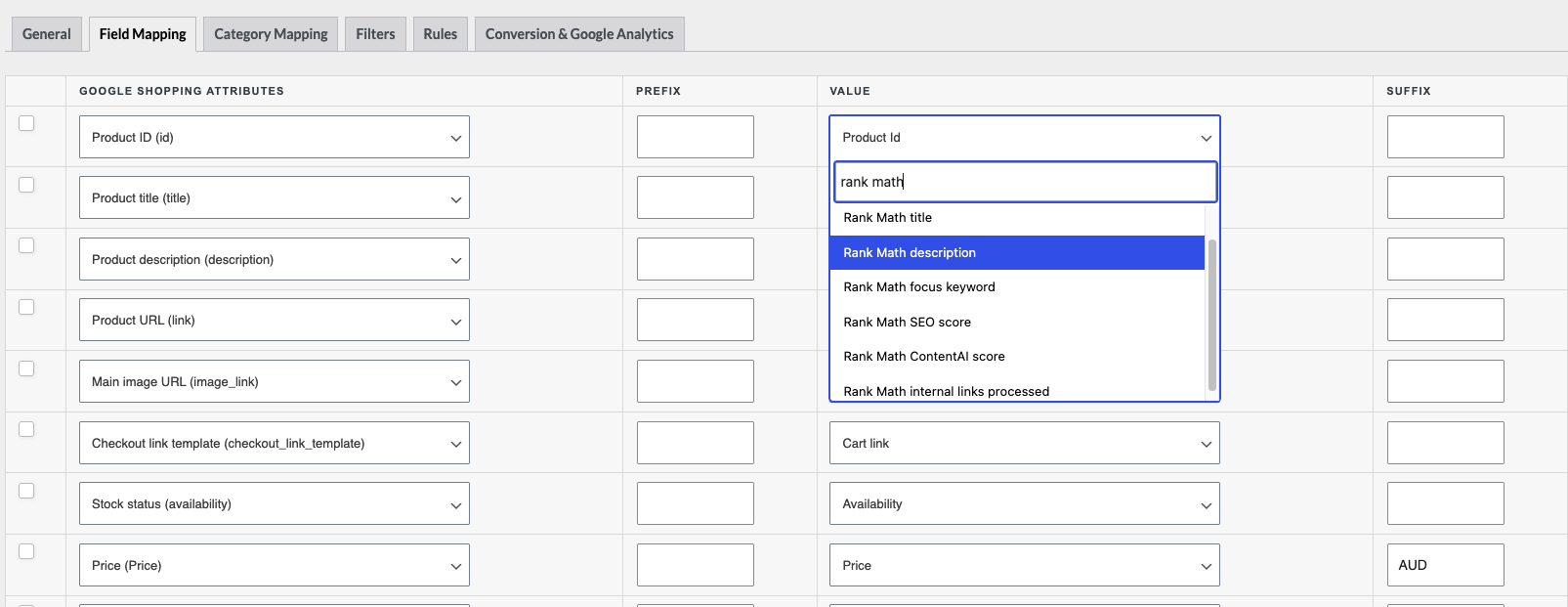
- Open the Value dropdown for the row you want to map, then find the Added Custom Attributes group. You can type
rank mathin the dropdown’s search box to jump straight to them. - Select the attribute you want: Rank Math title, Rank Math description, Rank Math focus keyword, Rank Math SEO score, Rank Math ContentAI score, or Rank Math internal links processed.
- Repeat for any other channel field you want to fill from Rank Math.
How it works
The two text attributes and the four metric attributes behave differently, so it’s worth knowing which you’re mapping.
Rank Math title and Rank Math description
Each of these reads the SEO title or description you’ve set for that product in Rank Math, expands any Rank Math replacement variable it contains (like %title% or %sitename%) into the real value, and falls back to your product’s own WooCommerce title or description when the Rank Math field is empty or a variable can’t be expanded. That fallback means the mapped attribute is never blank: if you’ve only set a Rank Math title on some products, the rest of your catalog still ships a usable value in your feed.
Focus keyword, SEO score, ContentAI score, and internal links processed
These four are passed through exactly as Rank Math stored them. There’s no replacement-variable expansion, and there’s no fallback to a WooCommerce value, so a product with nothing saved in Rank Math ships an empty value for that attribute. A score of 0 is treated as a real value and ships as 0, not as empty. For a variation, Elite reads the variation’s own value first and falls back to the parent product, because Rank Math saves these against the product rather than the variation.
Why map Rank Math fields into your feed
Better search performance. A Rank Math title is usually already keyword-optimised and trimmed to a search-friendly length, which often outperforms a raw product title in feed listings.
Less duplicate work. You write SEO copy once in Rank Math and reuse it in your feed, instead of rebuilding it with feed rules.
Consistent messaging. Your product page and your feed listing show the same title and description.
For the full list of attributes available for mapping, see Complete list of Product Feed attributes for mapping.
FAQ
Need more help?
If you’re on Product Feed Elite and need help mapping Rank Math fields into your feed, open a support ticket and our team will help you out.
If you’re using the free Product Feed Pro plugin, post your question on the WordPress.org support forum, and our team will get back to you there.