Do you sell in more than one currency with FOX – Currency Switcher Professional for WooCommerce, but your product feed still shows prices in your store’s base currency? Shopping channels match feeds to local shoppers, so a feed set to the wrong currency can result in rejected products or lost sales.
The Product Feed Multi-Currency Addon fixes this. It connects Product Feed Pro to FOX, letting each feed output prices and shipping costs in the currency of your choice. This guide shows you how to set the currency for a feed.
Prerequisites
Before you begin, ensure you have all the items listed in the table below.
| Requirement | Details |
|---|---|
| Product Feed Pro | Version 13.5.5 or later, and active (the core Product Feed plugin) |
| Product Feed Multi-Currency Addon | Installed and active (included in the Plus and Business plans, which is how you get the addon and its updates) |
| FOX Currency Switcher | Active on your store, with the currencies you want to output configured in its settings |
Set the currency for a feed
Follow these steps to pick which currency a feed uses.
- In the WordPress admin menu, click Product Feed.
- Open the feed you want to update, or create a new one to reach the feed edit screen.
- On the General tab, find the Currency (FOX) dropdown. It sits just above the Country field.
- Choose the currency you want this feed to use.
- Finish setting up the rest of your feed, then save and generate it.
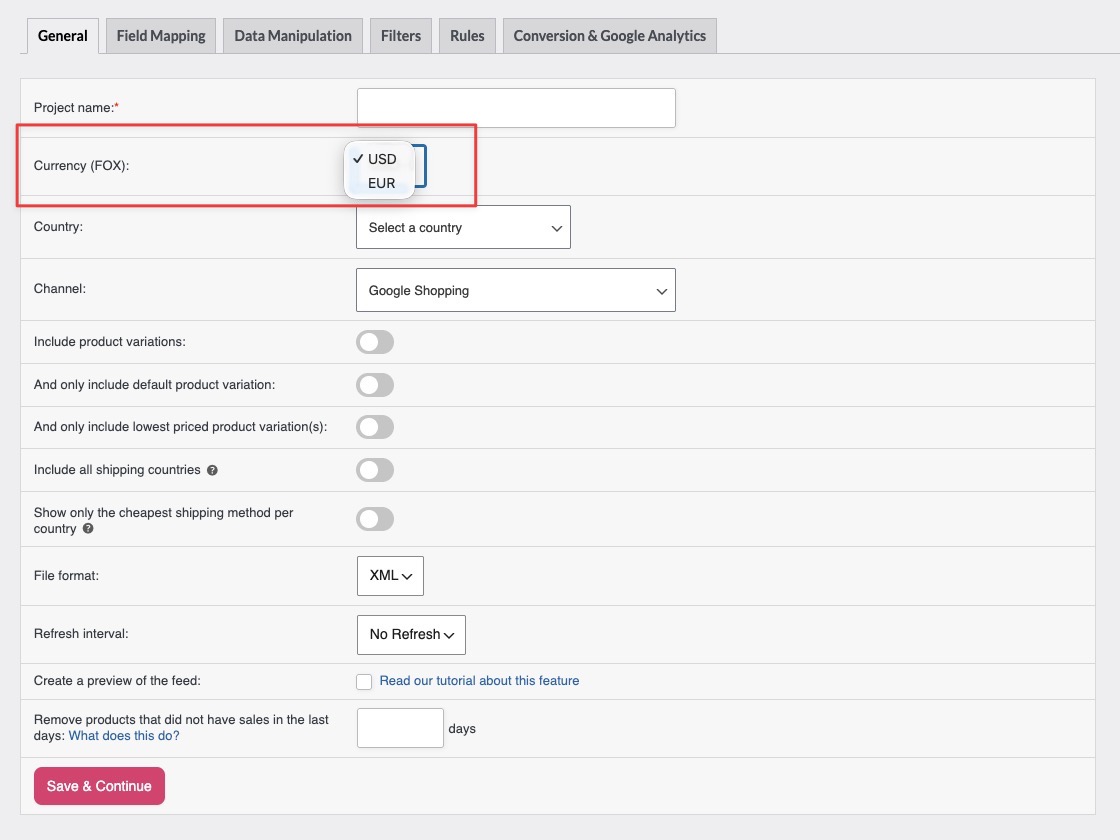
That’s it. From now on, this feed outputs prices in the currency you selected.
How the conversion works
When you pick a non-base currency, the addon converts each product’s price and shipping cost into that currency using FOX’s own exchange rates, decimal settings, and thousand separators, so the feed matches how FOX displays prices on your store. If you’ve turned on FOX’s fixed pricing feature and set a manual price for a product in that currency, the addon uses that fixed price instead of the auto-converted amount. The same applies to a fixed shipping cost you’ve set on a flat rate shipping method for that currency. Because feeds generate over cron and WP-CLI, where there’s no shopper session to read a live exchange rate from, the addon reads FOX’s saved currency settings directly instead of relying on FOX’s own display-time conversion.
Troubleshooting
- FOX Currency Switcher is active.
- The Product Feed Multi-Currency Addon is installed and active.
- You’re running Product Feed Pro 13.5.5 or later.
FAQ
Need more help?
If you have the Multi-Currency Addon (included in the Plus and Business plans), the fastest way to reach us is to open a support ticket from your account. Our team can check your feed and FOX setup directly.
If you’re using the free Product Feed Pro plugin without the Addon, post your question in the WordPress.org support forum. Keep in mind that multi-currency feeds need the Multi-Currency Addon.