When generating XML feeds for Google, Facebook, Bing, Pinterest, and TikTok, currency values must be formatted correctly to ensure they are processed without errors. These platforms require prices to use a period as the decimal separator, no thousand separators, and three-letter currency codes. The currency codes are defined by ISO 4217, while the separator rules come from each platform’s own feed specification.
Submitting feeds that do not meet these platform formatting requirements will result in feed rejections or incorrect price parsing across Google Merchant Center, Facebook Catalog, Microsoft Bing Shopping, Pinterest Catalogs, and TikTok Product Catalog. Product Feed Pro and Product Feed Elite handle this formatting automatically for all of these platforms.
If you need to use regional separators instead of this format, a developer-level workaround using PHP snippets is available. See the Using regional separators section below. Note that this approach is unsupported.
Requirements
| Requirement | Details |
|---|---|
| Plugin | Product Feed Pro or Product Feed Elite installed and active |
| WooCommerce | Installed and configured with your store currency |
| Product feed | At least one feed configured for Google, Facebook, Bing, Pinterest, or TikTok |
Understanding ISO 4217 and feed formatting rules
ISO 4217 is the international standard for currency codes. It defines the three-letter codes used to identify currencies across financial and commercial systems, such as USD for US Dollar, EUR for Euro, and JPY for Japanese Yen. Google, Facebook, Bing, Pinterest, and TikTok all require these ISO 4217 currency codes in product feed submissions.
The decimal and thousand separator rules are not part of ISO 4217. They come from each platform’s own feed specification, though all five platforms align on the same requirements:
- Decimal separator: A period (
.) must be used for decimal values. - Thousand separators: Not used. Omitting them prevents parsing errors.
- Currency codes: The ISO 4217 three-letter code (e.g.,
USD,EUR,JPY) is appended to the price value.
Why Google, Facebook, Bing, Pinterest, and TikTok require this format
When submitting product feeds to Google Merchant Center, Facebook Catalog, Microsoft Bing Shopping, Pinterest Catalogs, or TikTok Product Catalog, currency values must follow these formatting rules to avoid feed errors. These platforms enforce a uniform standard because:
- Prevents data misinterpretation: Some countries use commas (
,) as decimal separators and periods (.) for thousands (e.g.,1.000,50instead of1,000.50). Without standardisation, this leads to incorrect price parsing. - Ensures consistency: By requiring the same decimal (
.) format, platforms can accurately interpret price values regardless of regional differences. - Mandatory feed compliance: Google, Facebook, Bing, Pinterest, and TikTok reject feeds that do not adhere to their required formatting. See the official documentation for each platform: Google, Facebook, Bing, Pinterest, TikTok.
How Product Feed Pro handles this formatting
Product Feed Pro and Product Feed Elite automatically format prices in your XML feeds to meet these platform requirements. You do not need to configure anything. The plugin handles this by default:
- Prices are always formatted using a period (
.) as the decimal separator. - No thousand separators are included to prevent parsing issues.
- The correct three-letter currency code (e.g.,
USD,GBP,EUR) is appended to the price values, read from your WooCommerce store currency setting (get_woocommerce_currency()).
For example:
| Regional format (not accepted by these channels) | Required feed format |
|---|---|
| 1.234,56 EUR | 1234.56 EUR |
| 10,500.99 USD | 10500.99 USD |
| 5.000,75 GBP | 5000.75 GBP |
Common issues and fixes
If your feed is rejected due to currency formatting errors, check for:
- Incorrect decimal separators: use
.instead of, - Use of thousand separators: remove them entirely
- Missing currency codes: ensure prices include the proper three-letter code
Using regional separators instead of the required format
By default, Product Feed Pro and Product Feed Elite enforce the correct formatting for all Google, Facebook, Bing, Pinterest, and TikTok feeds. However, if your store uses regional number formatting (for example, a dot as the thousand separator and a comma as the decimal separator) and you need your feeds to reflect this, you can use the PHP snippets below to override the default behaviour.
First, ensure your WooCommerce currency options match your preference. Navigate to WooCommerce → Settings → General and scroll to the Currency options section. For European regional formatting, set the thousand separator to a dot (.) and the decimal separator to a comma (,).
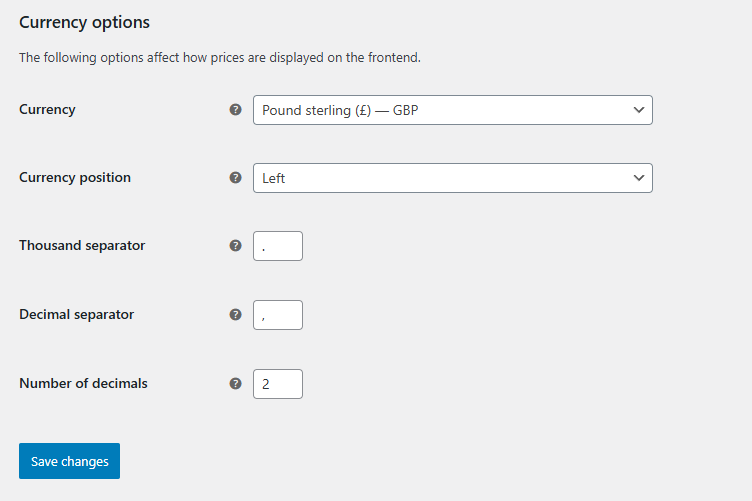
Next, add the following snippet to your functions.php or via the WPCode plugin. This forces all your feeds and templates to use your preferred separators via the adt_product_feed_localize_price_args filter. For European regional formatting, the snippet must set 'decimal_separator' => ',' and 'thousand_separator' => '.':
add_filter('adt_product_feed_localize_price_args', function($args) {
    $args['decimal_separator'] = ',';
    $args['thousand_separator'] = '.';
    return $args;
});
Then add one or more of the following snippets to remove the required formatting for specific platforms via the adt_pfp_localize_price_iso4217_feeds filter:
// Google feeds
add_filter('adt_pfp_localize_price_iso4217_feeds', function($feeds) {
    return array_filter($feeds, function($feed) {
        return strpos($feed, 'google_') !== 0;
    });
});

// Facebook feeds
add_filter('adt_pfp_localize_price_iso4217_feeds', function($feeds) {
    return array_filter($feeds, function($feed) {
        return strpos($feed, 'facebook_') !== 0;
    });
});

// Bing feeds
add_filter('adt_pfp_localize_price_iso4217_feeds', function($feeds) {
    return array_filter($feeds, function($feed) {
        return strpos($feed, 'bing_') !== 0;
    });
});

// Pinterest feeds
add_filter('adt_pfp_localize_price_iso4217_feeds', function($feeds) {
    return array_filter($feeds, function($feed) {
        return $feed !== 'pinterest';
    });
});

// TikTok feeds
add_filter('adt_pfp_localize_price_iso4217_feeds', function($feeds) {
    return array_filter($feeds, function($feed) {
        return $feed !== 'tiktok';
    });
});
For example, a complete snippet to remove the required formatting for Google feeds only:
add_filter('adt_product_feed_localize_price_args', function($args) {
    $args['decimal_separator'] = ',';
    $args['thousand_separator'] = '.';
    return $args;
});

add_filter('adt_pfp_localize_price_iso4217_feeds', function($feeds) {
    return array_filter($feeds, function($feed) {
        return strpos($feed, 'google_') !== 0;
    });
});
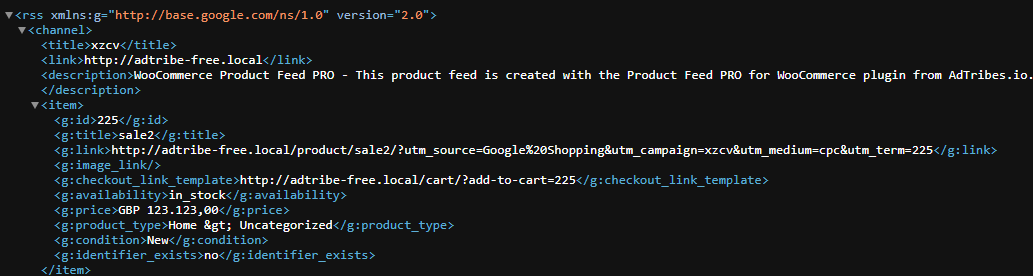
After adding the snippets, refresh your feeds. The output will reflect your regional separator preferences:
Frequently asked questions
1234.56 USD). If the feed looks correct, check that you have not applied any regional separator snippets that could be overriding the output. Also verify your WooCommerce currency settings match your intended output.1500.00 JPY, not 1500 JPY. This is enforced by the plugin to meet platform requirements.adt_product_feed_localize_price_args (with 'decimal_separator' => ',' and 'thousand_separator' => '.' for European formatting), and the second removes the specific platform from the enforcement list via adt_pfp_localize_price_iso4217_feeds. Also ensure you have refreshed the affected feed after saving the snippets, as feeds are cached and will not update until regenerated.adt_pfp_localize_price_iso4217_feeds filter lets you remove individual platforms (Google, Facebook, Bing, Pinterest, or TikTok) from the enforcement list independently. Simply include only the filter block for the platform you want to override and leave the others out.1500.00 in the feed regardless of how WooCommerce is configured to display it on your storefront.Help & support
If you need any further assistance with currency formatting in your product feeds, feel free to open a support ticket to reach out to the support team.
Please note that the ticket support system is exclusive to Product Feed Elite users.
If you’re using only the Product Feed Pro plugin, feel free to open a new topic in the WordPress.org forum.