Reviewed by
Running a marketplace on WC Vendors? Your WC Vendors product feed can now reflect vendor-specific shipping. AdTribes Product Feed Pro uses the rate WC Vendors calculates for a vendor’s product instead of automatically falling back to your store-wide flat rate.
The nice part? There’s nothing extra to configure in AdTribes. Once WC Vendors, WC Vendors Pro, and AdTribes Product Feed Pro are active, the integration can use vendor shipping rates on feeds where shipping is mapped. Here’s how it works and how to check the result in your own feed.
Feature Overview: Per-Vendor Shipping In Your WC Vendors Product Feed
WC Vendors turns a single WooCommerce store into a multi-vendor marketplace. Sellers get their own storefront inside your site, publish their own products, and handle their own orders, while you set the commission structure and collect a share of every sale. That lets one WooCommerce site bring products from multiple sellers into the same marketplace.
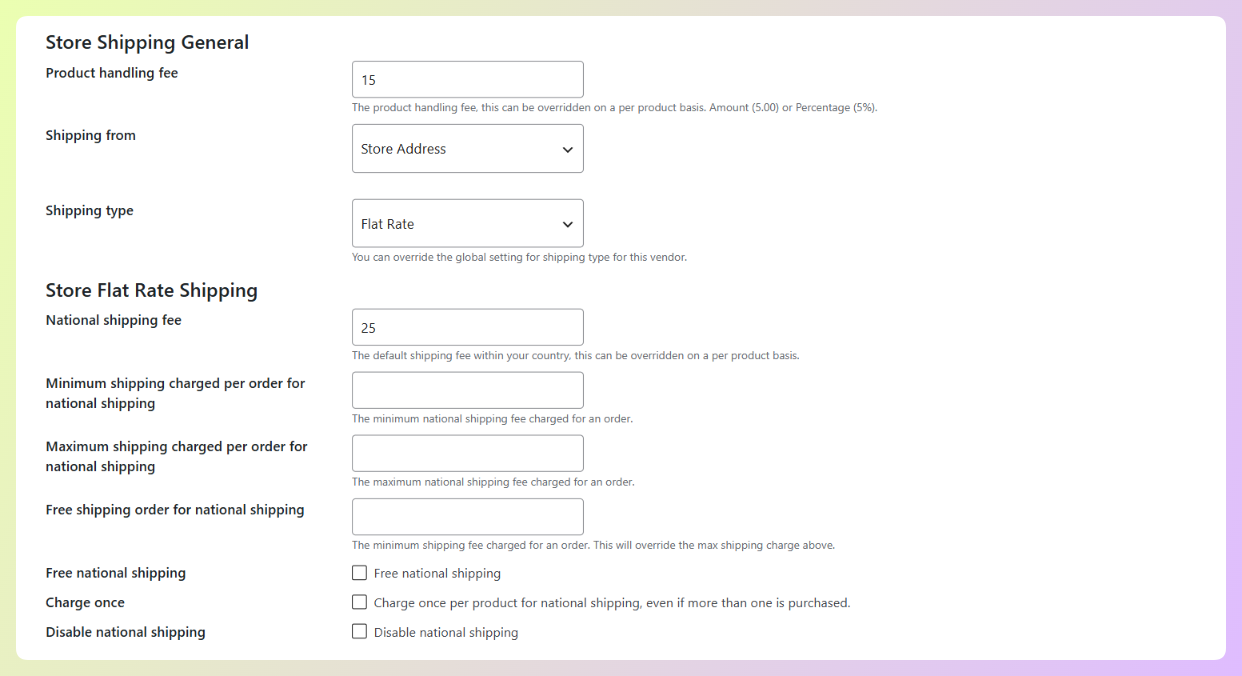
Vendors can also manage their own shipping. One might charge a flat fee, another might set rates by destination country, and another might add a handling fee to their products. WC Vendors Pro provides those vendor-level shipping settings, including flat-rate and table-rate shipping.
Before this integration, vendor-specific WC Vendors shipping rates were not reflected in AdTribes feeds, so vendor products could use the store-level WooCommerce rate instead.
With our newest update, AdTribes can build shipping data for vendor products using the rate returned by that vendor’s WC Vendors shipping method. Here’s what that gives you:
- Vendor-specific shipping on vendor products, using the rate returned by WC Vendors’ own shipping calculation.
- Your store’s flat rate steps aside when a vendor rate applies, so the feed can use the seller-specific rate instead of the store-wide flat rate.
- A service label naming the vendor, so you can tell at a glance whose rate you’re looking at.
- Store-owned products keep your store’s shipping, so your own catalog continues using the existing store-level rates.
There’s no new tab and no checkbox to find. The integration recognizes the required plugins and uses WC Vendors shipping rates automatically when your feed generates shipping data for vendor products.
What You Need
To use this integration, make sure you have the following:
- WC Vendors, the free marketplace plugin that identifies which vendor is behind each product.
- WC Vendors Pro, where vendors configure their own shipping settings, including flat-rate and table-rate shipping. These settings provide the vendor-specific rates AdTribes can use in the feed.
- AdTribes Product Feed Pro 13.5.8 or newer, with the Shipping attribute mapped in the feed you want to generate.
If you already have all three in place and your vendors have shipping configured in WC Vendors Pro, your next feed generation can start using those vendor-specific rates wherever Shipping is mapped.
How It Works
When your feed builds shipping data for a product, it now checks who sells it. If the product belongs to a WC Vendors seller, AdTribes uses the rate returned by that vendor’s shipping method. Store-owned products continue using the store’s shipping setup.
Here’s a simplified Google Shopping example using a $9.99 store flat rate. The first product belongs to a vendor, while the second belongs to the store:
<!-- a vendor's product -->
<g:shipping>
  <g:country>US</g:country>
  <g:service>Coastal Supply Shipping - Vendor Shipping US</g:service>
  <g:price>40.00 USD</g:price>
</g:shipping>

<!-- one of your own products -->
<g:shipping>
  <g:country>US</g:country>
  <g:service>United States Flat rate US</g:service>
  <g:price>9.99 USD</g:price>
</g:shipping>
The vendor product uses the vendor’s $40.00 rate under a service label that names their store, while the store’s $9.99 flat rate is absent from that product. This mirrors WC Vendors’ checkout behavior: when a vendor rate applies, the store flat rate gives way. Free shipping and local pickup remain in place.
WC Vendors still handles the shipping calculation
AdTribes uses the rate WC Vendors returns for each vendor product, so the seller’s applicable shipping settings can still shape the result. Depending on their setup, that can include:
- Flat-rate and table-rate shipping rules
- Minimum and maximum shipping charges
- Free shipping thresholds
- Quantity overrides and per-product handling fees
In the example above, the vendor has a $25.00 national rate plus a $15.00 product handling fee. WC Vendors returns $40.00, and AdTribes uses that result in the feed.
If WC Vendors does not return a vendor rate for a product, the integration keeps the store-level rate instead of dropping it.
How To Check It In Your Own Feed
There’s nothing extra to configure in AdTribes, so you can go straight to checking the shipping output in your feed.
Step 1: Map shipping on your feed
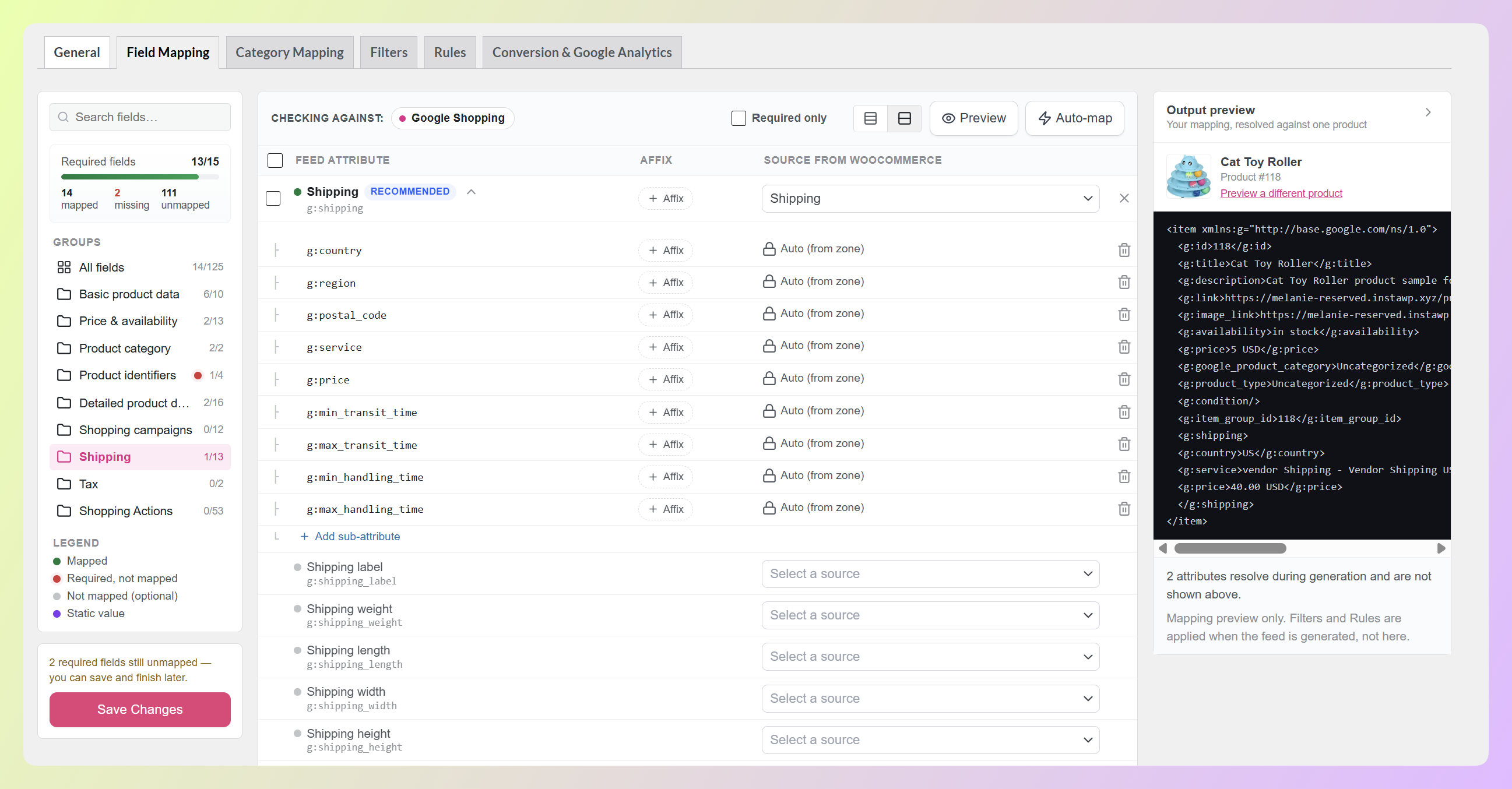
Head to your WordPress dashboard > Product Feed > Manage feeds, click Edit on the feed you want to check, and open the Field Mapping tab. Find the Shipping attribute and map it to your Shipping source.
The Shipping attribute opens a panel of sub-attributes for details such as country, service, price, and transit times. AdTribes fills these from your shipping setup automatically, so you don’t need to enter them one by one.
Step 2: Generate the feed and compare two products
Save your changes, generate the feed, then open the generated file. Find a product belonging to a vendor who charges their own shipping, and find one of your own products for comparison.
A correct result looks like the example further up. The vendor’s product shows shipping data carrying the vendor rate and store name in the service label, while your store-owned product keeps your usual store rate. And that’s basically it!
🎯 POWER TIP: The service label starts with the vendor’s store name when a vendor rate is used. Search the generated file for that store name to quickly spot products using that vendor’s shipping rate.
How This Update Benefits Your WooCommerce Store
Shipping gets more complicated on a marketplace because different sellers can charge different rates. A single store-wide flat rate cannot always represent what WC Vendors calculates for each seller’s products.
For a marketplace feed, that changes three practical things:
1. Your feed reflects vendor-specific shipping
Vendor products can now carry the rate returned by WC Vendors instead of automatically using your store-wide flat rate. That keeps the shipping data in your feed aligned with the vendor’s own shipping setup.
It also means you don’t have to recreate a separate shipping rule in AdTribes just to make the feed use a vendor-specific rate.
2. Your vendors keep control of their own shipping
The feed uses the rate WC Vendors calculates from the vendor’s shipping settings, including applicable handling fees and free-shipping thresholds. You’re not recreating those rates in AdTribes or asking sellers to fill in a second form for your marketplace channels.
When a vendor adjusts their rates, the next feed generation can use the updated result. New sellers work the same way once they’ve configured shipping in WC Vendors Pro.
3. There’s no extra AdTribes setup to maintain
There’s no separate AdTribes configuration screen, per-feed integration toggle, or extra integration setup for each vendor. Vendors still manage shipping in WC Vendors Pro, while AdTribes uses those rates when the feed is generated.
Once shipping is mapped, AdTribes handles the vendor-specific rate during feed generation without a separate WC Vendors integration setup for each feed.
RELATED READ: Order Handling Time And Shipping Transit Time In WooCommerce
Frequently Asked Questions
What is per-vendor shipping in a WC Vendors product feed?
It means a vendor product can carry the shipping rate returned by that seller’s WC Vendors shipping setup instead of automatically using one store-wide rate. Store-owned products continue to use your store’s shipping, so both can live in the same feed.
Do I need a paid AdTribes plan for this?
No. This is part of AdTribes Product Feed Pro, our free plugin, from version 13.5.8 onward. You do need WC Vendors Pro, since vendor-level shipping is a Pro feature in WC Vendors.
Do I have to turn it on?
No. It activates automatically when WC Vendors, WC Vendors Pro, and AdTribes Product Feed Pro are all active. If shipping is already mapped on a feed, the next generation can use the vendor-specific rates without a separate integration setting.
Which shipping settings does it use?
The feed uses the rate WC Vendors returns for the vendor product instead of recalculating shipping separately. That means the vendor’s applicable shipping method and settings, including minimum or maximum charges, free-shipping thresholds, quantity overrides, and handling fees, can affect the result.
What happens to products that aren’t sold by a vendor?
Store-owned products keep your store’s shipping rates. If WC Vendors does not return a vendor rate for a vendor product, AdTribes keeps the available store-level rate instead of removing it.
Wrapping Up
For a multi-vendor marketplace, shipping can depend on who’s actually selling the product. With this integration, your WC Vendors product feed can use vendor-specific rates when WC Vendors returns them, while store-owned products continue using your store’s shipping setup.
In this guide, we learned:
- What per-vendor shipping sends to your channels
- What you need to have in place
- How the vendor’s rate reaches your feed
- How to confirm it on a feed of your own
- Why it matters for your marketplace
If you’re already using WC Vendors Pro for vendor shipping, this update lets AdTribes use those rates during feed generation. ❤️ Update to AdTribes Product Feed Pro 13.5.8, generate your feed, and check a vendor product to confirm the shipping output.
Do you have any questions about this update? Let us know in the comments. Happy to help!