Reviewed by
Your Merkandi WooCommerce feed can now send quantity-based wholesale pricing. Instead of one price per product, AdTribes Product Feed Elite reads the quantity rules you’ve already set in WooCommerce Wholesale Prices Premium and turns them into Merkandi pricing tiers, with a price for each quantity bracket.
We’ll walk through how Merkandi tiered pricing works, where to enable it, and how to check the pricing in your generated feed.
Feature Overview: Merkandi Tiered Pricing From Wholesale Prices Premium
Merkandi is an international B2B wholesale marketplace for products such as overstock, clearance, and bulk goods. Its XML feed format supports quantity-based pricing ranges.
By default, a Merkandi feed sends one price for each product. If you use quantity-based wholesale pricing, though, a single price doesn’t reflect the different brackets you’ve set in your store.
If you use WooCommerce Wholesale Prices Premium to set quantity-based pricing, those rules are already in your store. Product Feed Elite connects the two by reading the quantity rules for the wholesale role you choose and sending them to Merkandi as tiered pricing.
For a product with three quantity brackets, your feed sends a nested pricing block like this one:
<pricing>
  <price>
    <qFrom>10</qFrom>
    <qTo>49</qTo>
    <price>8.00</price>
  </price>
  <price>
    <qFrom>50</qFrom>
    <qTo>99</qTo>
    <price>7.00</price>
  </price>
  <price>
    <qFrom>100</qFrom>
    <price>6.00</price>
  </price>
</pricing>
Each bracket carries the quantity it starts at, the quantity it runs to, and the price that applies. The final bracket has no end quantity, representing 100 units and above in this example. Products without matching quantity rules for the selected wholesale role keep sending their normal flat price.
You’ll need Product Feed Elite and WooCommerce Wholesale Prices Premium for this, along with a feed set to the Merkandi channel.
How To Set Up Tiered Pricing For Your Merkandi WooCommerce Feed (Tutorial)
Once Product Feed Elite 5.1.1 or newer and WooCommerce Wholesale Prices Premium are active, you can set up tiered pricing from your product and Merkandi feed settings.
Step 1: Set your quantity pricing in Wholesale Prices Premium
Open the product you want to sell in bulk, then stay on the General tab in the Product data section. Scroll down until you reach Product Quantity Based Wholesale Pricing.
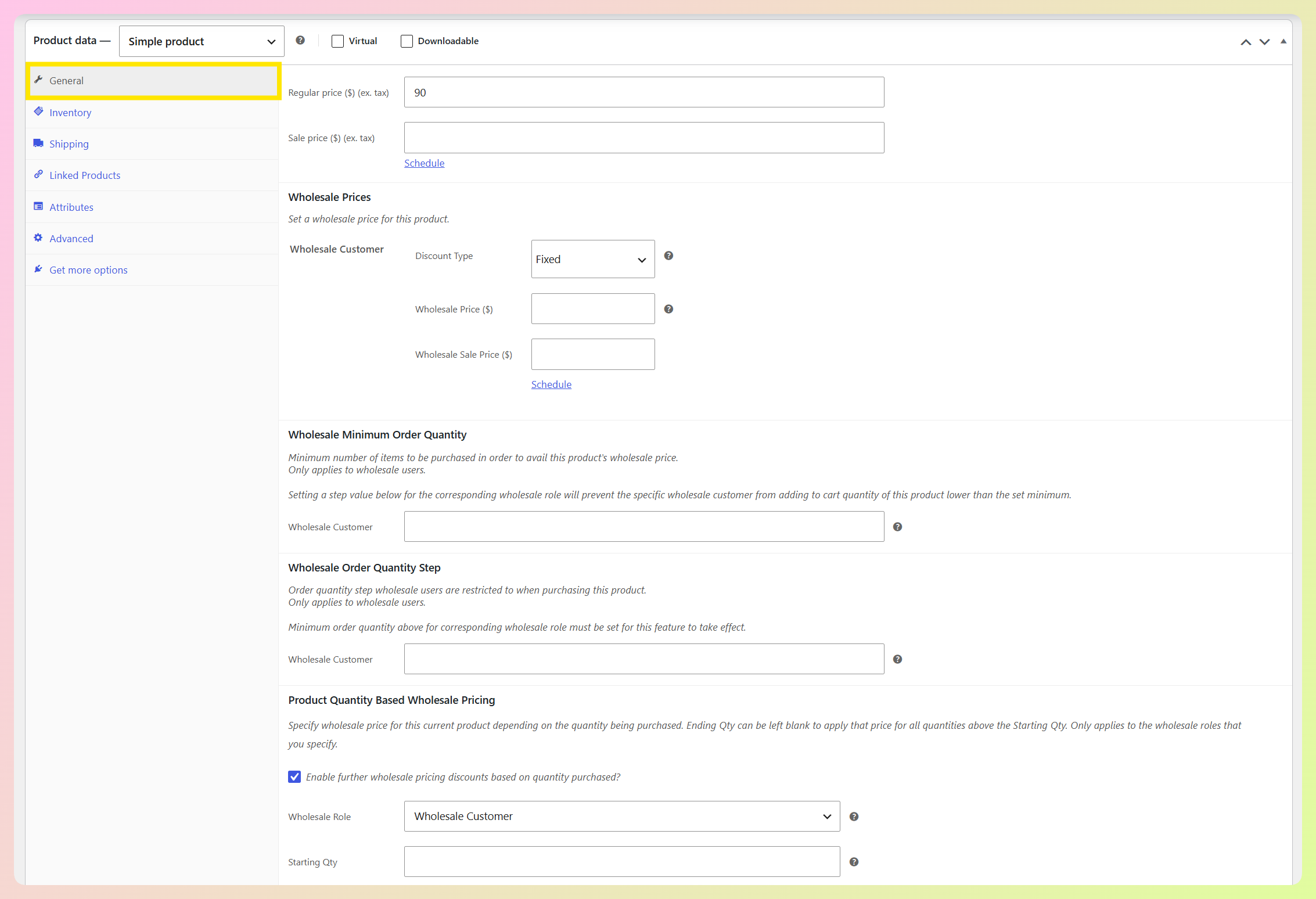
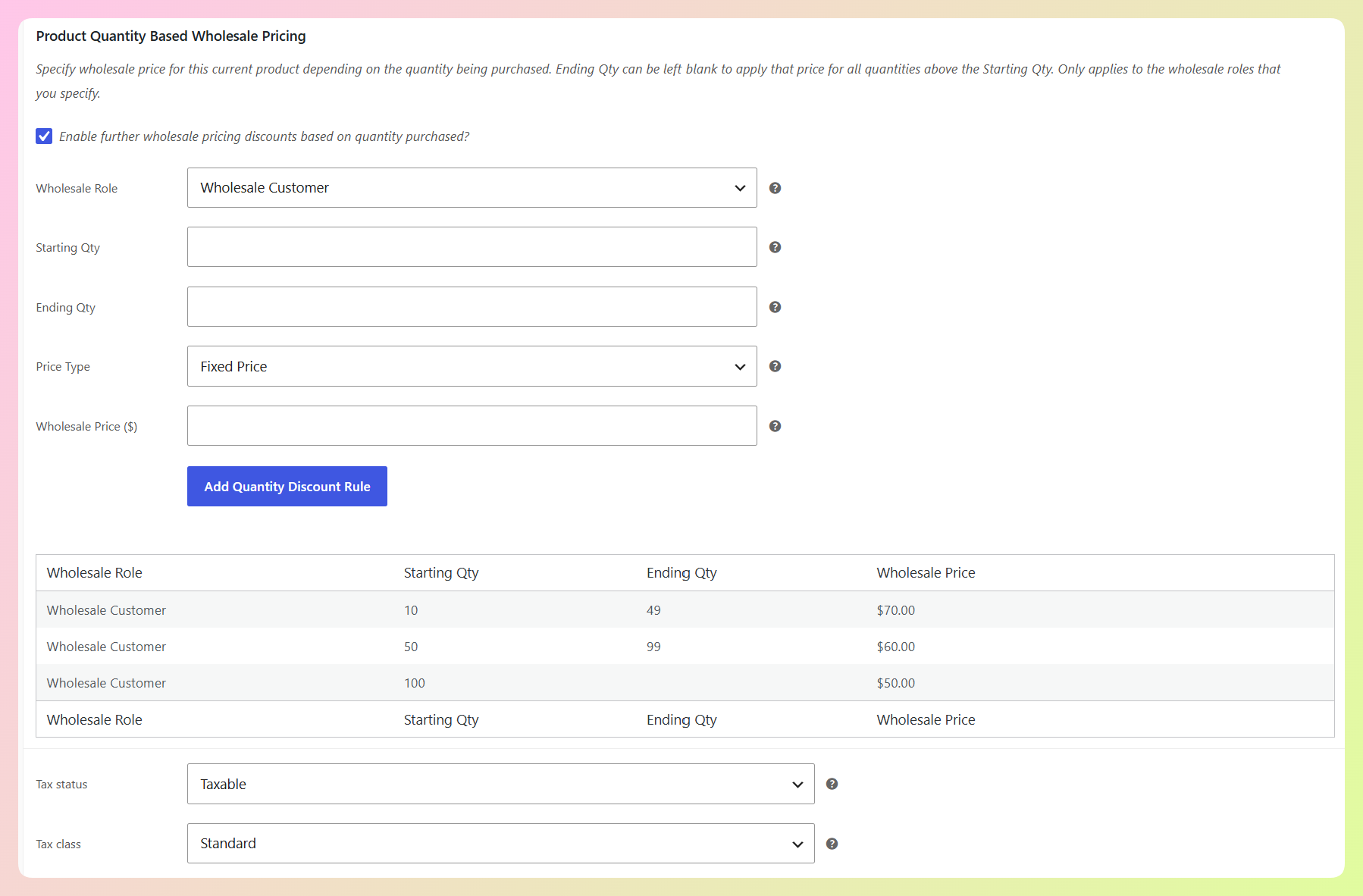
Enable quantity-based wholesale pricing, choose the wholesale role you want to price for, then add a bracket for each quantity range you offer. Each rule includes a starting quantity, an ending quantity, and the wholesale price that applies within that range.
Leave the ending quantity blank on your highest bracket. That tells the feed the price applies from that quantity upward, with no ceiling.
In our example, we’ve set three brackets for the Wholesale Customer role: 10 to 49, 50 to 99, and 100 with the end left empty. This means a buyer taking 120 units gets the price from that top bracket.
Step 2: Turn on tiered pricing for your Merkandi feed
Head to your WordPress dashboard > Product Feed > Manage feeds, then click Edit on your Merkandi feed and open the General tab.
You’ll find a checkbox labeled Use Wholesale Prices Premium quantity pricing for tiers. Tick it, and your feed starts building pricing tiers from your quantity rules instead of sending a single price.
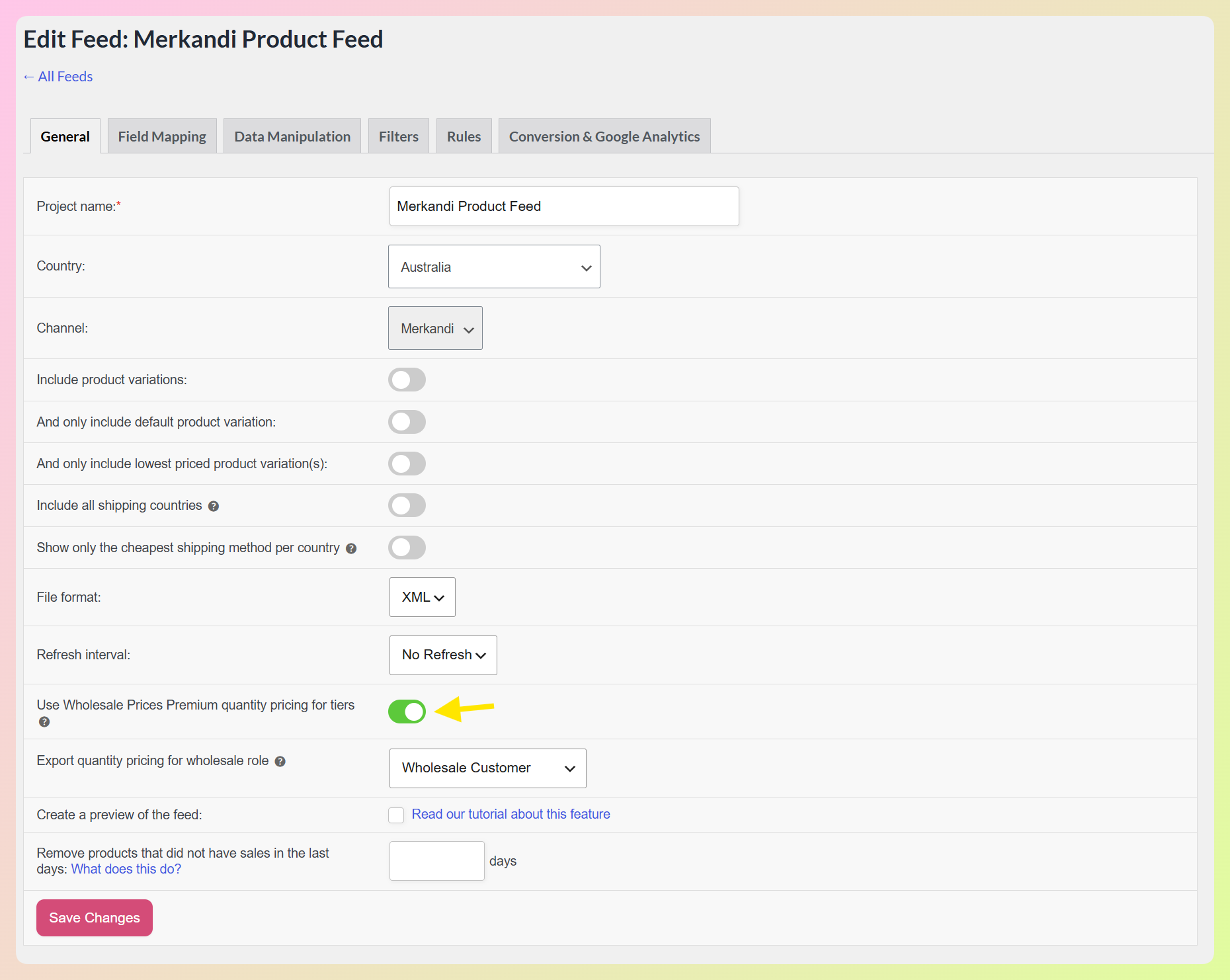
This setting only appears on Merkandi feeds, so your other feeds carry on exactly as they are.
Step 3: Choose which wholesale role to export
Directly underneath, a dropdown labeled Export quantity pricing for wholesale role lists every wholesale role registered in your store. Pick the one whose pricing this feed should send.
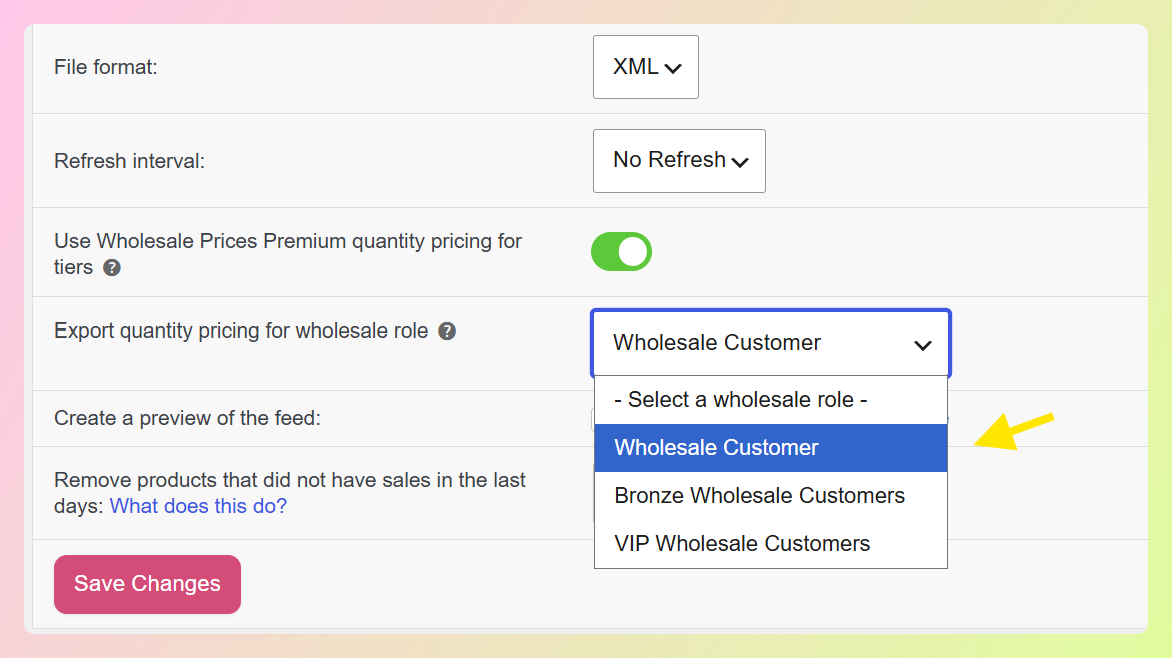
Each feed exports one role, which keeps pricing separate when you use different wholesale roles. If you need to send pricing for another role, configure a separate Merkandi feed and select that role there.
In our example, we’re selecting Wholesale Customer, the same role our quantity brackets were assigned to in step 1. Matching those two is the part worth double-checking, since the feed exports the rules belonging to the role you pick here.
Step 4: Generate your feed and check the result
Save your changes and generate the feed. In the generated XML, each product with quantity rules for the selected wholesale role carries its pricing block, with the brackets ordered from the smallest quantity upward.
Products without matching quantity rules keep their usual single price, so you can use tiered pricing only where you need it. And that’s basically it!
🎯 POWER TIP: Your tier prices are given the same tax treatment as the single price they replace. If your feed was sending prices with tax included, your tiers include tax the same way, so enabling tiered pricing doesn’t change that tax treatment.
How This Update Benefits Your WooCommerce Store
On a B2B marketplace, order quantity can affect the price you want to send. Tiered pricing lets your Merkandi feed carry the different volume brackets you’ve configured instead of flattening them into one figure.
Here are three practical benefits:
1. You can send pricing for each quantity range
Instead of sending only one price, tiered pricing adds the quantity ranges you’ve configured and the price that applies to each one.
This is especially helpful when your prices change across larger order quantities, because the feed carries those differences to Merkandi. This brings us to the next benefit!
2. You maintain your pricing in one place
The tiers come from the quantity rules already set on your products in Wholesale Prices Premium. You don’t need to rebuild those brackets for Merkandi or maintain a separate set of tier prices for the marketplace.
In fact, once the feed is configured, you only need to update the quantity pricing rule in Wholesale Prices Premium. The next generated feed uses the new tier price.
3. Your tax treatment stays consistent
Tiered pricing doesn’t introduce separate tax handling. Your tiers follow the same tax treatment as the single price they replace.
What’s more, the switch is reversible at any time. Clear the checkbox and your next feed run goes back to sending one price per product.
RELATED READ: Reach B2B Buyers With A WooCommerce Merkandi Product Feed
Frequently Asked Questions
What is Merkandi tiered pricing?
It’s pricing that changes with order quantity and is sent as part of your Merkandi feed. Rather than one figure per product, the feed carries a set of quantity brackets, each with the price that applies inside it.
What do I need to use this?
Product Feed Elite 5.1.1 or newer, WooCommerce Wholesale Prices Premium, and a feed set to the Merkandi channel. The Merkandi channel itself is available in AdTribes Product Feed Pro, our free plugin, and tiered pricing is the feature Elite adds.
Where do the tier prices come from?
From the quantity-based wholesale pricing rules on your products in Wholesale Prices Premium, for the single wholesale role you select on the feed. Your regular prices and your wholesale prices for other roles are left untouched.
Can one feed export more than one wholesale role?
Each feed exports the role you choose for it, which keeps your pricing clear when different buyer groups pay different rates. To send a second role’s pricing, create another Merkandi feed and select that role on it.
Do my tier prices include tax?
They follow the same tax treatment as the single price they replace. So if your Merkandi feed was already sending prices with tax included, your tiers include it too, and switching to tiered pricing doesn’t alter that behavior.
Wrapping Up
Selling wholesale often means pricing by volume, and your Merkandi feed can now carry those quantity brackets. Product Feed Elite reads the rules already set on your products and sends them to Merkandi without you maintaining a second set of numbers.
In this guide, we learned:
If you already use Wholesale Prices Premium, Product Feed Elite makes it easy to carry those quantity rules into your Merkandi feed too. ❤️ Open your Merkandi feed settings and enable tiered pricing when you’re ready!
Do you have any questions about this update? Let us know in the comments. Happy to help!