Reviewed by
Facebook for WooCommerce (now known as Meta for WooCommerce) can sync your catalog and tracking directly to Meta, with attribute mapping, category and tag exclusions, and product-level settings. But if you want to make changes across your whole catalog before that data reaches Meta, its built-in controls don’t offer the same rule-based editing layer as a product feed.
That’s where a feed-based Facebook for WooCommerce alternative can be useful. A scheduled product feed gives you more control over the data you send to Meta, including the ability to filter products, adjust fields, and apply catalog-wide rules before the feed is fetched.
With a plugin like AdTribes, you can send your WooCommerce catalog to Meta, use the same catalog across eligible Facebook and Instagram product experiences, and manage your feed separately from your tracking setup. In this guide, we’ll compare the two approaches and walk through what to consider if you’re thinking about switching.
The Best Facebook For WooCommerce Alternative (Quick Answer)
Use a product feed plugin like AdTribes. It publishes your WooCommerce catalog as a feed URL that Meta Commerce Manager fetches on a schedule, covering Facebook and Instagram from one catalog, with filters and rules to control your product data first.
The free AdTribes Product Feed Pro plugin handles the feed and the Meta Pixel. If you also want the Conversions API, that’s part of the paid Product Feed Elite plans. The same Meta catalog can support eligible Facebook and Instagram product experiences, so you don’t need a separate Instagram feed.
What Meta For WooCommerce Does (And Where It Stops)
Meta for WooCommerce is Meta’s official plugin for connecting WooCommerce to Facebook, Instagram, and WhatsApp. It installs the Meta Pixel, syncs your store catalog for dynamic ads, and can connect a WhatsApp Business account for order updates.
WordPress.org currently shows 400,000+ active installations, version 3.7.6 and a rating of about 2.1 out of 5 stars from 480 ratings. Version 3.7.6 was released on July 23, 2026.
The main differences are how catalog data reaches Meta and how much you can change before it syncs:
- It syncs through a plugin connection. Meta for WooCommerce manages product sync from WooCommerce into your Meta catalog rather than giving you a feed file to edit first.
- Its catalog controls focus on mapping, exclusions, and product-level overrides. You can map WooCommerce attributes to Meta fields, exclude products by category or tag, switch sync off for individual products, and set custom Facebook descriptions. What it doesn’t include is the same catalog-wide IF/THEN rules layer AdTribes uses to rewrite feed values before sync.
Meta for WooCommerce also has real strengths. It sets up the Conversions API alongside the Pixel at no cost, and it includes WhatsApp order updates that AdTribes does not provide.
Catalog-wide control is where a feed adds something. Without rules, cleaning up messy titles or descriptions before they land in your ads means editing products one at a time in WooCommerce or fixing them in Commerce Manager. A feed-based alternative gives you that rules layer.
Plugin Connector Vs Scheduled Feed: Two Ways To Sync Your Catalog
There are two common ways to get WooCommerce products into a Meta catalog: a plugin connector that syncs products through its connection, or a scheduled feed, which is a file URL that Commerce Manager fetches on a timetable you set.
Meta treats these as different data sources. According to Meta Business Help Center, a data feed is a spreadsheet or XML file you upload, with scheduled uploads that can run hourly, daily, or weekly. A partner platform integration syncs products from the platform where you already manage them.
How a scheduled feed works
With a feed, your plugin builds a file of your products at a fixed URL and keeps it updated. Commerce Manager then fetches that URL on its schedule and updates your catalog. Nothing is pushed from your store to Meta; Meta pulls the latest version of the file.
For very large catalogs, you can split products across multiple scheduled feeds instead of relying on one oversized file.
Why a feed gives you an editing layer
The big advantage of a feed is the step in the middle. Your product data passes through the feed plugin before Meta ever sees it, so you can:
- Filter products: Leave out out-of-stock items, test products, or a whole category.
- Rewrite data with rules: Clean up titles, add a brand value, or swap in a different field.
- Map fields: Decide exactly which WooCommerce field fills each Meta attribute.
Meta cares about that data quality. According to Meta Business Help Center, product titles can be up to 200 characters, but Meta recommends staying under 65 so they don’t get cut off. A feed rule can shorten long titles in one place instead of product by product.
What To Look For In A Facebook Catalog Alternative
A good Facebook catalog alternative should give you control over what reaches Meta, keep your data fresh, and not lock you into one channel. Start by making sure it can produce the fields Meta expects in a Facebook product feed, then compare the workflow features that matter to your store:
- Refresh schedule: How often the feed rebuilds. If prices or stock change during the day, you’ll want hourly updates.
- Product filters: A way to include or exclude products by stock, category, price, or any other attribute.
- Title and description rules: IF/THEN rules that rewrite data across the whole catalog at once.
- Variable products: Options to include all variations, only the default variation, or only the lowest-priced one.
- Pixel and Conversions API: A clear way to replace the tracking handled by the official plugin when you switch.
- Other channels from the same setup: Google Shopping, TikTok, and Pinterest feeds from the same product data, so you’re not running a separate plugin per channel.
If a tool covers the catalog but not tracking, you’ll need a second plugin for the Pixel. If it covers Meta only, you’ll repeat your setup for every other channel you sell on.
How AdTribes Syncs Your Meta Catalog
AdTribes builds your Meta catalog as a product feed. The free AdTribes Product Feed Pro plugin supports unlimited products and unlimited feeds, and the same plugin also builds feeds for Google Shopping, TikTok, Pinterest, Snapchat, and Bing Shopping.
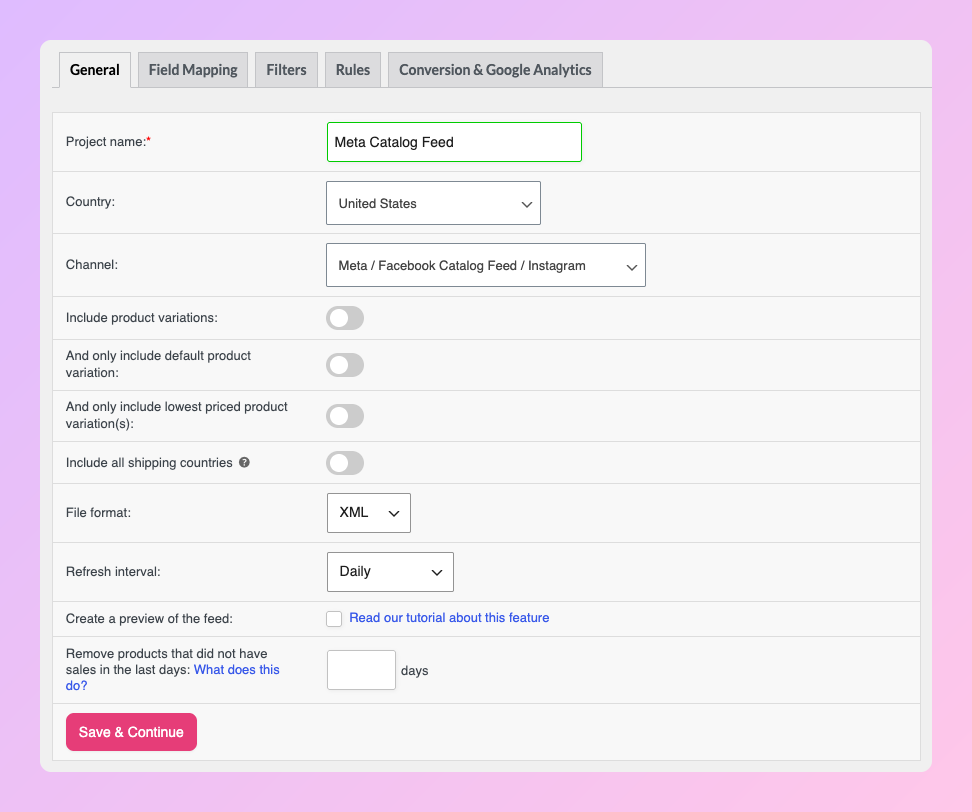
Setting up the Meta feed starts on the feed’s General tab, which you reach from Product Feed > Create feed. Three settings shape the feed from the start:
- The channel list depends on the country. Once you pick a country, the Channel dropdown fills with the channels available there. For Facebook and Instagram, you choose Meta / Facebook Catalog Feed / Instagram.
- You choose the file format. The plugin can output XML, CSV, TSV, or TXT. We recommend XML for Meta, since it’s the least prone to errors.
- Refresh runs on its own. The free plugin refreshes daily, twice daily, or hourly. Product Feed Elite adds custom refresh intervals.
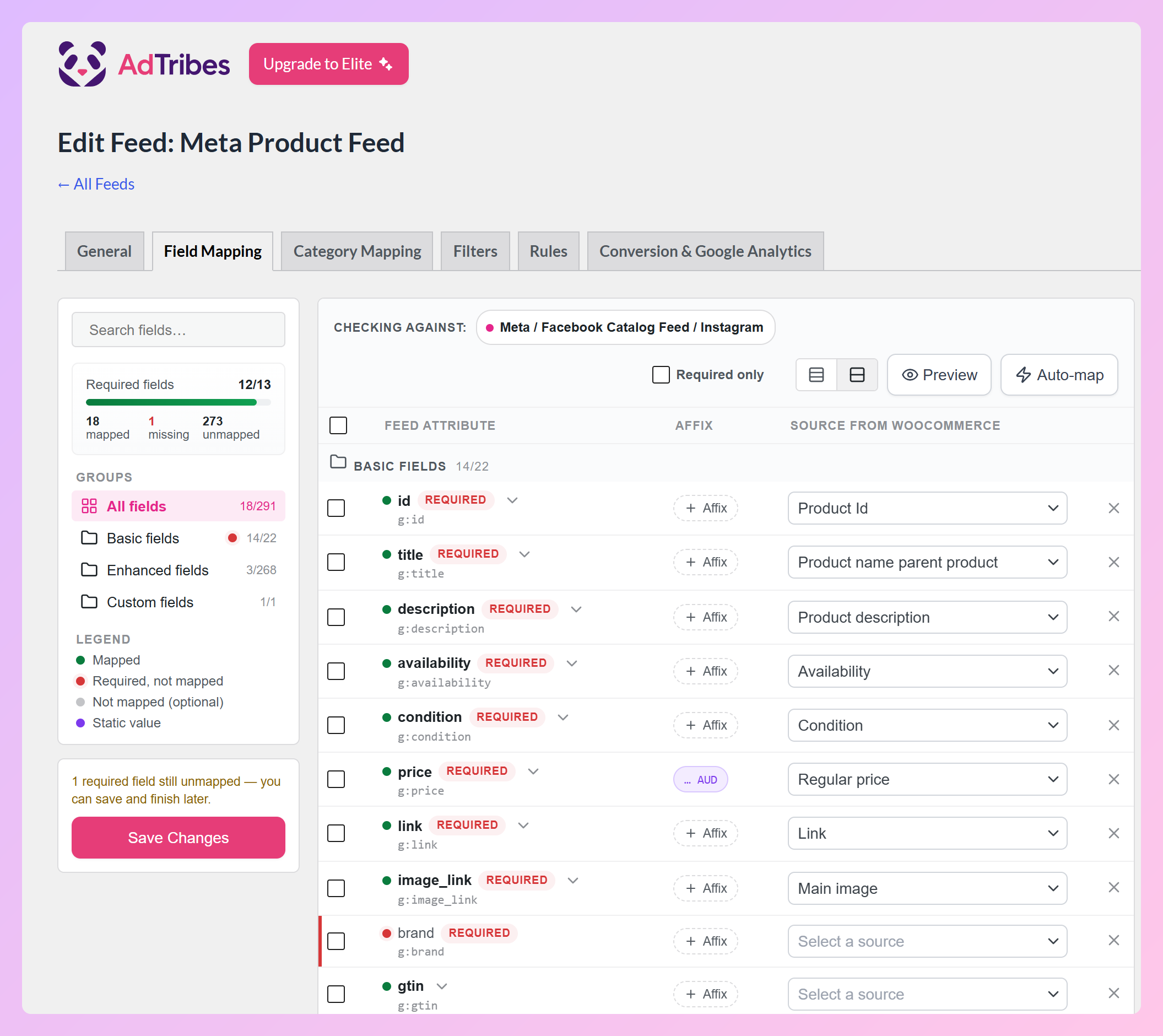
On the field mapping page, the plugin pre-maps most of Meta’s required fields for you, such as ID, title, price, availability, and image. Brand is required too but has no automatic source, so map it to a brand attribute or custom field you already use (Product Feed Elite adds a dedicated brand field). By default, the Product ID field maps to the WooCommerce product ID instead of the SKU, which avoids relying on SKUs that may be blank or edited later.
From there, you move on to category mapping, then filters and rules. Filters and IF/THEN rules are free, and Product Feed Elite adds advanced rules such as Between, In List, and Combine Fields.
Gomé uses AdTribes for Google Shopping, Facebook, and Instagram. As the team told us: “It allows us to efficiently manage and optimize our listings across these key channels to reach our target audience effectively.”
Instagram Shopping from the same catalog
You don’t need a separate Instagram feed. The same Meta catalog can support eligible Facebook and Instagram product experiences once it is connected to the appropriate business assets in Commerce Manager.
Meta recommends keeping your products in one catalog where possible and aiming for a catalog match rate of 90% or higher. For a closer look at the Instagram side of the setup, our Instagram product feed guide walks through the details.
Pixel in the free plugin, CAPI in Elite
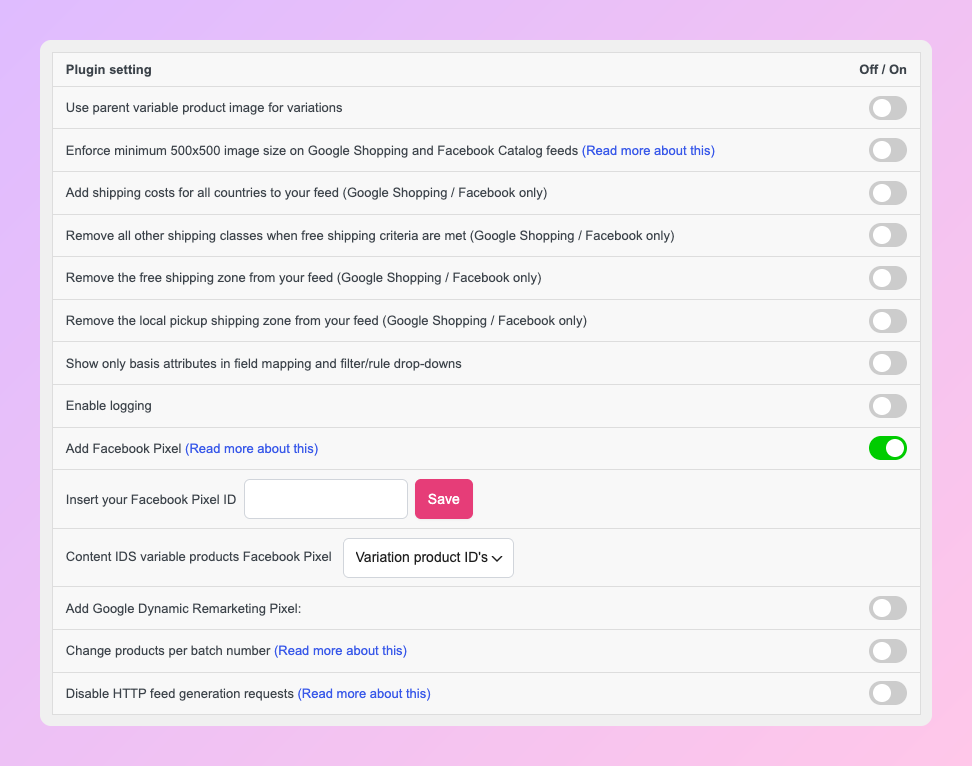
If you remove the official plugin, you’ll need to replace the tracking it handled. The Meta Pixel is built into the free AdTribes Product Feed Pro plugin, and you turn it on under Product Feed > Settings > General with the Add Facebook Pixel toggle and your Pixel ID.
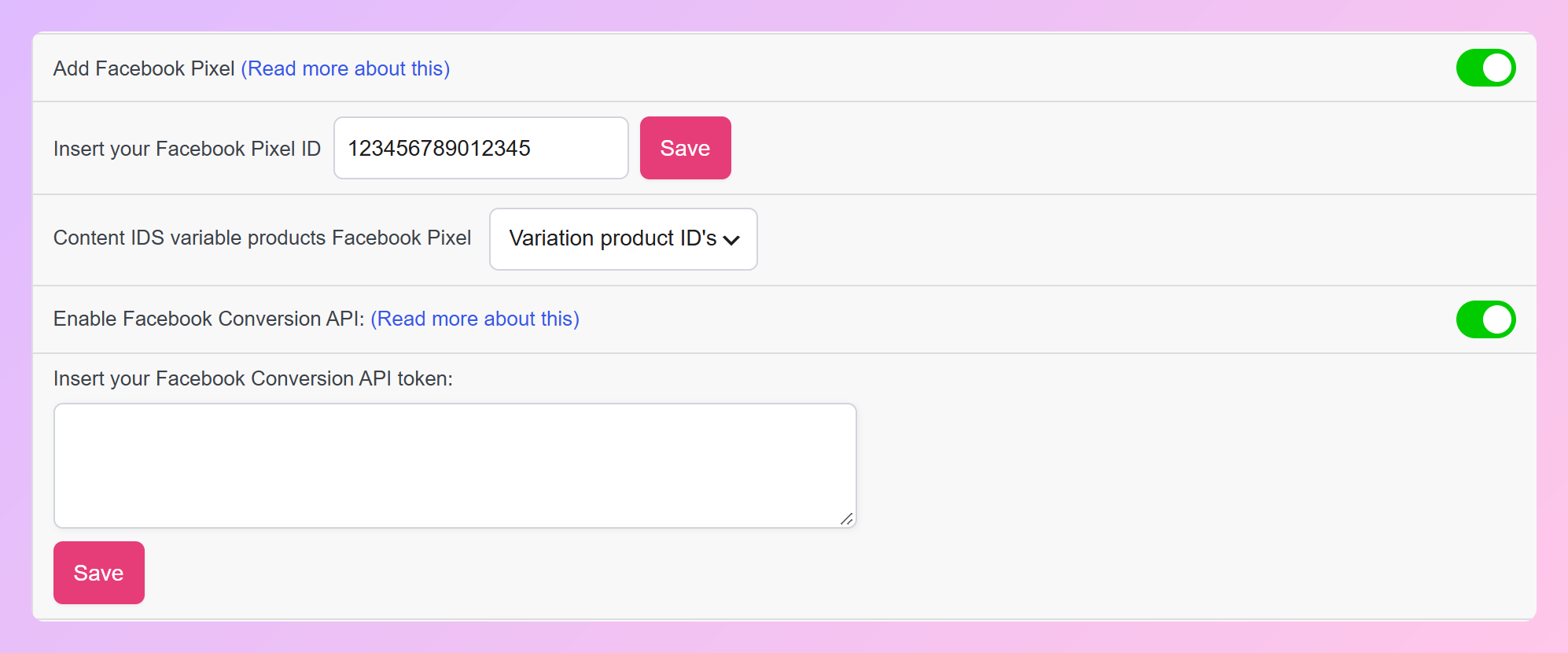
The Conversions API (CAPI) is a Product Feed Elite feature. With the Pixel enabled, Elite can also send matching events from your server through CAPI, which helps preserve tracking when browser-based signals are limited. Elite also sends the fbc and fbp values Meta uses for Event Match Quality.
For setup details, our guide to the Facebook Conversion API with your product feeds walks through how it works.
Meta For WooCommerce Vs AdTribes: Feature Comparison
AdTribes gives you rule-based control over your Meta catalog and covers more channels, while Meta for WooCommerce includes the Conversions API for free and adds WhatsApp order updates. Here’s how the core features compare.
| Feature | AdTribes Product Feed Pro (free) | AdTribes Product Feed Elite | Meta for WooCommerce |
|---|---|---|---|
| How the catalog reaches Meta | Scheduled Feed (URL) | Scheduled Feed (URL) | Plugin connection to Meta |
| Same catalog across Facebook and Instagram | Yes | Yes | Yes |
| Meta Pixel | Yes | Yes | Yes |
| Conversions API | No | Yes | Yes |
| Product filters and IF/THEN rules | Yes | Yes, plus advanced rules | Category, tag, and per-product exclusions; no catalog-wide IF/THEN rules |
| Other channels (Google, TikTok, Pinterest) | Yes | Yes | No (Meta platforms only) |
| WhatsApp order updates | No | No | Yes |
| Price | Free | From $99.50/yr (first year) | Free |
Both tools get products into a Meta catalog. AdTribes adds rules to shape that data first and reuses the same setup for Google, TikTok, and Pinterest.
Pro Tip: Treat tracking as a handoff, not an overlap. If Meta for WooCommerce is still firing your Pixel and Conversions API events, don’t enable the AdTribes Pixel on top of it. Switch to one tracking implementation, then make sure your Pixel and catalog use matching product IDs so Meta can match events to the right products.
How To Switch From Meta For WooCommerce To A Feed
You can prepare the AdTribes feed before you cut over, but check your existing catalog source and tracking setup before you make the switch. The goal is to move catalog delivery to the feed cleanly while keeping one tracking implementation active for that Pixel.
- Build and validate your Meta feed in AdTribes. Create a feed with the Meta / Facebook Catalog Feed / Instagram channel, check the field mapping, and review the feed before changing your live Meta connection.
- Review the current catalog source in Commerce Manager. Before adding the AdTribes feed, check how Meta for WooCommerce is currently managing the catalog and which product IDs are tied to that source. Plan the cutover so the AdTribes feed becomes the intended source for those items.
- Switch tracking in one handoff. If Meta for WooCommerce is sending your Pixel and Conversions API events, disable that tracking before enabling the AdTribes Pixel and, on Elite, CAPI. Running another Pixel integration with the same Pixel ID can send duplicate events.
- Add the AdTribes feed and verify the new source. Add the feed URL as a Scheduled Feed to the catalog you plan to use, then confirm the products are active and the catalog IDs match the content IDs sent by your Pixel. If the switch requires a new catalog, reconnect any ads or Instagram assets that depended on the old one before relying on the new catalog.
For a step-by-step walkthrough of the AdTribes setup and Commerce Manager upload, see our guide to setting up your first Facebook catalog feed.
Frequently Asked Questions
Is Facebook for WooCommerce the same as Meta for WooCommerce?
Yes. Meta for WooCommerce is the new name for the official Facebook for WooCommerce plugin. It connects WooCommerce to Facebook, Instagram, and WhatsApp. If you’re searching for a replacement under the old name, the plugin you’re replacing is the same one.
Can I use Instagram Shopping without the official plugin?
Yes, as long as your business and products meet Meta’s eligibility requirements. AdTribes can send the catalog to Meta as a scheduled feed, and the same catalog can support eligible Facebook and Instagram product experiences. You don’t need a separate Instagram feed.
Do I lose the Facebook Pixel if I remove Meta for WooCommerce?
You lose the Pixel and Conversions API tracking that Meta for WooCommerce set up when you stop using that integration, but you can replace them as part of the same handoff. The free AdTribes Product Feed Pro plugin includes the Meta Pixel, which you turn on under Product Feed > Settings > General. To keep server-side Conversions API events too, you’ll need Product Feed Elite. Avoid leaving both tracking implementations active at the same time.
Is there a free Facebook for WooCommerce alternative?
Yes. AdTribes Product Feed Pro is free and builds a Meta catalog feed with unlimited products and feeds. It includes filters, IF/THEN rules, field mapping, category mapping, and the Meta Pixel. You only need a paid Product Feed Elite plan for extras such as the Conversions API, advanced rules, and custom refresh intervals.
How often does a feed-based catalog update?
It depends on two schedules: how often your feed rebuilds and how often Meta fetches it. The free AdTribes plugin rebuilds the feed daily, twice daily, or hourly, and Product Feed Elite adds custom intervals. In Commerce Manager, you can set Meta to fetch the feed hourly, daily, or weekly.
Which Facebook Catalog Option Should You Choose?
For WooCommerce stores that want catalog-wide rules for their Meta catalog, or plan to sell on Google, TikTok, or Pinterest too, AdTribes is the better Facebook for WooCommerce alternative. The official plugin connects your store directly to Meta, while AdTribes adds a rules layer and can generate feeds for those additional channels from the same plugin.
You also gain visibility into the data Meta receives. You can inspect the generated feed and correct your source data, mappings, or rules before the next fetch.
- Understand the two sync models before you change anything.
- Check your alternative against the key criteria, including tracking.
- Build your Meta feed in AdTribes and turn on the Pixel.
- Compare the feature table, WhatsApp updates included.
- Plan the catalog and tracking handoff carefully before you retire the old integration.
Ready to replace the official plugin? Create a Facebook product feed with AdTribes using the free AdTribes Product Feed Pro plugin, and move up to AdTribes Product Feed Elite (from $99.50 for the first year) when you want the Conversions API and advanced rules.