Elenco completo degli attributi del feed di prodotto per il mapping
Elenco completo degli attributi del feed di prodotto per il mapping
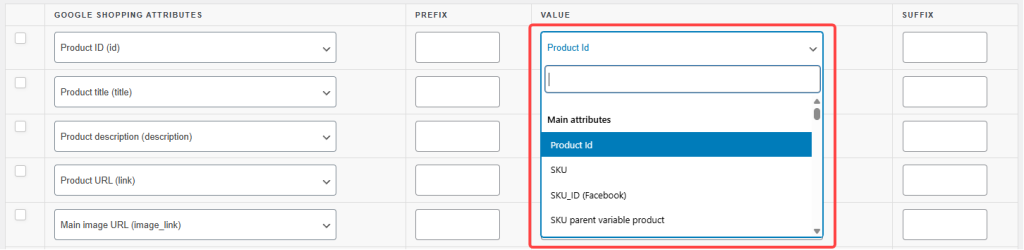
Quando crei un feed di prodotti in Product Feed Pro o Product Feed Elite, ogni riga nella schermata di mappatura degli attributi viene compilata utilizzando uno degli attributi disponibili del plugin.
Questo articolo è una guida di riferimento completa a tali attributi: cosa sono, a quale gruppo appartengono e un esempio del valore che producono.
Nell'elenco degli attributi, questi sono organizzati in quattro gruppi predefiniti più due che il plugin genera automaticamente:
Attributi principali — dati di base del prodotto inclusi ID, titoli, descrizioni, link, scorte, dimensioni e tutte le varianti di prezzo
Attributi immagine — immagine principale, immagini aggiuntive e varianti specifiche del formato
Tassonomia delle categorie di Google — il campo della tassonomia dei prodotti di Google (disponibile solo nelle regole e nei filtri)
Altri campi — informazioni sul negozio, valori booleani, tag, recensioni, avvisi per i consumatori e campi di utilità
Attributi dinamici — generati automaticamente dagli attributi del prodotto WooCommerce e dalle tassonomie personalizzate
Attributi personalizzati — generati automaticamente dai campi meta del prodotto e dagli attributi delle varianti
Questo articolo suddivide le varianti di prezzo in una sezione separata per facilitare la scansione, anche se appaiono sotto Attributi principali nell'elenco. Tutte le altre sezioni corrispondono direttamente ai raggruppamenti dell'elenco.
Utilizza questo riferimento insieme all'elenco degli attributi nel generatore di feed. Se stai cercando un campo specifico e non riesci a trovarlo, controlla le sezioni Dinamici e Personalizzati: molti attributi specifici del negozio appaiono lì automaticamente.
Gli attributi principali coprono i dati fondamentali del prodotto che ogni canale di feed si aspetta. Sono sempre disponibili indipendentemente dal tipo di prodotto o dal canale.
Identificazione e informazioni di base
Attributo
Descrizione
Output di esempio
ID prodotto
L'ID del prodotto WooCommerce. Identificatore univoco stabile: usalo come campo id a meno che il tuo canale non richieda ID basati su SKU.
1234
SKU
Il codice dell'unità di mantenimento delle scorte del prodotto.
BOOT-BLK-10
SKU_ID (Facebook)
Formato SKU specifico di Facebook.
BOOT-BLK-10
SKU_ITEM_GROUP_ID (Facebook)
Formato SKU di gruppo di articoli specifico di Facebook per le varianti.
BOOT-BLK
Wc_post_id_product_id (Facebook)
ID post di WooCommerce nel formato previsto da Facebook. Usalo per i feed del catalogo di Facebook invece di ID prodotto quando il tuo catalogo di Facebook è indicizzato per ID post.
1234
Nome del prodotto
Il titolo di questa specifica variante come mostrato nel negozio.
Scarponi da trekking da uomo – Nero, Taglia 10
Slug del nome del prodotto
Versione del nome del prodotto sicura per gli URL.
scarponi-da-trekking-uomo-nero-taglia-10
Nome prodotto trattino
Nome variante con spazi sostituiti da trattini.
Scarponi da Trekking da Uomo – Nero, Taglia 10
Nome prodotto prodotto padre
Titolo del prodotto padre variabile: lo stesso per tutte le varianti.
Scarponcino da trekking da uomo
Nome prodotto padre trattino
Titolo del prodotto padre con spazi sostituiti da trattini.
Scarponi da Trekking da Uomo
Nome prodotto minuscolo
Nome variante tutto in minuscolo.
scarponcino da trekking da uomo – nero, taglia 10
Nome prodotto con iniziali maiuscole
Nome variante con la prima lettera di ogni parola maiuscola.
Scarponi da trekking da uomo – Nero, Taglia 10
Nome prodotto non filtrato
Nome variante con HTML conservato, prima che vengano applicati filtri WooCommerce.
Scarponcino da <em>Trekking</em> da Uomo – Nero, Taglia 10
Nome prodotto padre non filtrato
Nome prodotto padre con HTML conservato — non include gli attributi della variante.
Scarponcino da <em>Trekking</em> da Uomo
SKU prodotto padre variabile
SKU del prodotto padre — condiviso tra tutte le varianti di questo prodotto.
BOOT-BLK
Descrizioni
Attributo
Descrizione
Output di esempio
Descrizione del prodotto
La descrizione completa di questa variante (HTML rimosso). Utilizza la descrizione del prodotto padre se non è impostata una descrizione specifica per la variante.
La colorazione nera presenta una punta rinforzata e una migliore aderenza della suola per sentieri tecnici.
Descrizione prodotto non filtrata
Descrizione variante con HTML conservato.
<p>La colorazione nera presenta una punta rinforzata...</p>
Breve descrizione del prodotto
La breve descrizione di questa variazione (HTML rimosso). Viene utilizzata la breve descrizione del genitore se non impostata.
Punta rinforzata nera, taglia 10
Breve descrizione del prodotto non filtrata
Breve descrizione della variazione del prodotto con HTML conservato.
Nero
Punta rinforzata
Descrizione del prodotto genitore
Descrizione completa del prodotto variabile genitore — la stessa per tutte le varianti, indipendentemente dalla variante in fase di elaborazione.
Scarponcino da trekking resistente e impermeabile con supporto per la caviglia e suola Vibram.
Breve descrizione del prodotto genitore
Breve descrizione del prodotto variabile genitore — condivisa tra tutte le varianti.
Impermeabile, supporto caviglia, suola Vibram
Descrizione del prodotto genitore non filtrata
Descrizione del prodotto genitore con HTML conservato.
Scarponcino da trekking resistente e impermeabile con supporto per la caviglia e suola Vibram.
Breve descrizione del prodotto genitore non filtrata
Breve descrizione del prodotto genitore con HTML conservato.
Impermeabile
Supporto caviglia
Suola Vibram
Descrizione della variazione del prodotto
La descrizione inserita direttamente nel pannello della variazione — solo il testo a livello di variazione, senza fallback del genitore.
Opzione nera leggera con punta rinforzata.
Breve descrizione della variazione del prodotto
Breve descrizione inserita nel pannello della variazione — nessun fallback del genitore.
Nero, punta rinforzata.
Descrizione della variazione del prodotto non filtrata
Descrizione del pannello della variazione con HTML conservato.
Opzione nera leggera con punta rinforzata.
Breve descrizione della variazione del prodotto non filtrata
Breve descrizione del pannello della variazione con HTML conservato.
Nero, punta rinforzata.
Link
Attributo
Descrizione
Output di esempio
Link
URL canonico per questa specifica variante, inclusi i parametri di query degli attributi.
URL variante con tutti i parametri di query rimossi — rimanda alla pagina del prodotto padre.
https://yourstore.com/products/mens-hiking-boot/
Link prodotto variabile
URL del prodotto padre variabile. Punta sempre alla pagina padre indipendentemente dalla variante in elaborazione — utile quando si desidera che tutte le varianti condividano un unico URL del prodotto.
https://yourstore.com/products/mens-hiking-boot/
Link aggiungi al carrello
URL diretto che aggiunge il prodotto al carrello.
https://yourstore.com/?add-to-cart=1234
Link carrello
URL della pagina del carrello.
https://yourstore.com/cart/
Stato e visibilità del prodotto
Attributo
Descrizione
Output di esempio
Tipo di prodotto
Semplice, variabile o raggruppato.
variabile
Tipo di contenuto
Designazione utilizzata da alcuni canali per categorizzare i prodotti.
prodotto
Immagine non locale
Se l'immagine principale del prodotto è ospitata su un dominio esterno anziché sul tuo server.
no
Escluso dal catalogo
Se il prodotto è nascosto dal catalogo del tuo negozio.
no
Escluso dalla ricerca
Se il prodotto è nascosto dalla ricerca del sito.
no
Escluso da tutto (nascosto)
Se il prodotto è escluso sia dal catalogo che dalla ricerca.
no
Visibilità
L'impostazione di visibilità di WooCommerce per il prodotto.
visibile
In primo piano
Se il prodotto è contrassegnato come in primo piano.
sì
Virtuale
Se il prodotto è virtuale.
no
Scaricabile
Se il prodotto è scaricabile.
no
Informazioni sulla categoria
Attributo
Descrizione
Output di esempio
Categoria
La categoria principale di WooCommerce del prodotto.
Calzature
Categoria (separata da virgole)
Tutte le categorie assegnate al prodotto, separate da virgole.
Calzature, Stivali, Saldi
Categoria (non utilizzata per il mapping)
Stringa di categoria grezza prima di qualsiasi elaborazione. Disponibile in regole e filtri - non per il mapping diretto delle colonne del feed.
Calzature
Link categoria
URL della pagina della categoria principale.
https://yourstore.com/product-category/footwear/
Percorso categoria
Percorso completo del breadcrumb.
Abbigliamento > Calzature > Stivali
Percorso categoria breve
Percorso categoria abbreviato.
Calzature > Stivali
Percorso categoria Skroutz
Percorso categoria nel formato richiesto da Skroutz.
Abbigliamento/Calzature/Stivali
Categoria principale Yoast / Rankmath
Categoria principale impostata in Yoast SEO o RankMath.
Stivali
Categoria Google (solo per regole e filtri)
Categoria della tassonomia dei prodotti Google. Disponibile per l'uso solo in regole e filtri - non per la mappatura diretta dei campi.
Abbigliamento e Accessori > Scarpe
Tasse
Attributo
Descrizione
Output di esempio
Stato fiscale
Se il prodotto è tassabile.
tassabile
Classe fiscale
La chiave della classe fiscale interna assegnata al prodotto.
standard
Nome classe fiscale
Il nome della classe fiscale leggibile dall'uomo.
Standard
IVA
L'importo dell'IVA applicato al prezzo del prodotto.
18.00
Scorte e inventario
Attributo
Descrizione
Output di esempio
Quantità [Scorte]
La quantità attuale in magazzino del prodotto.
25
Stato scorte WooCommerce
Stato delle scorte di WooCommerce.
disponibile
Disponibilità
Etichetta di disponibilità in magazzino per l'output del feed.
in magazzino
Numero di varianti
Numero totale di varianti per un prodotto variabile.
6
Numero di varianti in magazzino
Numero di varianti attualmente in magazzino.
4
Dettagli prodotto e metadati
Attributo
Descrizione
Output di esempio
Condizione
Condizione del prodotto.
nuovo
Nota d'acquisto
La nota mostrata ai clienti dopo l'acquisto.
Grazie per il tuo ordine!
Valuta
Il codice valuta attivo del negozio.
USD
Ordini totali del prodotto
Conteggio ordini a vita per il prodotto.
142
Dimensioni
Attributo
Descrizione
Output di esempio
Peso
Peso del prodotto (nell'unità di peso di WooCommerce).
0.8
Larghezza
Larghezza del prodotto.
15
Altezza
Altezza del prodotto.
12
Lunghezza
Lunghezza del prodotto.
30
Spedizione
Attributo
Descrizione
Output di esempio
Spedizione
Dettagli completi di spedizione dalle tue zone di spedizione WooCommerce.
flat_rate:5.99 USD
Costo di spedizione
Solo il valore numerico del costo di spedizione.
5.99
Costi di spedizione più bassi
La tariffa di spedizione disponibile più economica per il prodotto.
4.99
Slug della classe di spedizione
Chiave sicura per URL della classe di spedizione assegnata al prodotto.
articoli-pesanti
Nome della classe di spedizione
Nome della classe di spedizione leggibile dall'uomo.
Articoli pesanti
Identificatori del prodotto (GTIN / MPN)
Attributo
Descrizione
Output di esempio
Yoast WooCommerce GTIN8
Numero di identificazione commerciale globale a 8 cifre (da Yoast WooCommerce SEO).
12345678
Yoast WooCommerce GTIN12
GTIN a 12 cifre (formato UPC).
012345678901
Yoast WooCommerce GTIN13
GTIN a 13 cifre (formato EAN).
0123456789012
Yoast WooCommerce GTIN14
GTIN a 14 cifre.
00012345678905
Yoast WooCommerce ISBN
International Standard Book Number.
978-3-16-148410-0
ID univoco globale (GTIN, UPC, EAN o ISBN)
Campo GTIN combinato: restituisce qualsiasi valore sia popolato.
0123456789012
Yoast WooCommerce MPN
Codice articolo del produttore (da Yoast WooCommerce SEO).
BT-BLK-2024
ID gruppo articoli
Raggruppa tutte le varianti di un prodotto. Popolato automaticamente dall'ID del prodotto padre.
1230
Disponibilità e date
Attributo
Descrizione
Output di esempio
Data e ora di pubblicazione del feed
La data e l'ora in cui la voce del prodotto è stata pubblicata nel feed.
2024-01-15 09:00:00
Data di creazione del prodotto
La data in cui il prodotto è stato pubblicato in WooCommerce.
2023-06-01
Giorni dalla creazione del prodotto
Numero di giorni dalla creazione del prodotto. Utile per filtrare i nuovi arrivi.
326
Data di inizio saldi
La data in cui inizia un prezzo di saldo programmato.
2024-12-20
Data di fine saldi
La data in cui termina un prezzo di saldo programmato.
2024-12-31
Data di disponibilità + 1 settimana
Data odierna più 1 settimana. Utilizzare per feed di preordini che richiedono una data di disponibilità futura.
2026-05-07
Data di disponibilità + 2 settimane
Data odierna più 2 settimane.
2026-05-14
Data di disponibilità + 3 settimane
Data odierna più 3 settimane.
2026-05-21
Data di disponibilità + 4 settimane
Data odierna più 4 settimane.
2026-05-28
Data di disponibilità + 5 settimane
Data odierna più 5 settimane.
2026-06-04
Data di disponibilità + 6 settimane
Data odierna più 6 settimane.
2026-06-11
Data di disponibilità + 7 settimane
Data odierna più 7 settimane.
2026-06-18
Data di disponibilità + 8 settimane
Data odierna più 8 settimane.
2026-06-25
ID regione
Identificatore di regione utilizzato dai canali che richiedono dati di prodotto geo-targettizzati.
US-NY
Valutazioni e recensioni
Attributo
Descrizione
Output di esempio
Valutazione totale
Numero di recensioni clienti approvate.
38
Valutazione media
Valutazione media in stelle di tutte le recensioni.
4.7
Quantità di vendite
Numero di volte in cui il prodotto è stato venduto.
142
Attributi del prezzo
Il plugin fornisce un'ampia gamma di varianti di prezzo in modo da poter visualizzare esattamente il formato del prezzo richiesto da ciascun canale. Tutti gli attributi di prezzo fanno parte del gruppo Attributi principali nell'editor: sono presentati qui in una sezione separata per una scansione più semplice.
Prezzi standard
Attributo
Descrizione
Output di esempio
Prezzo
Il prezzo attualmente attivo: prezzo in saldo se è in corso un saldo, altrimenti il prezzo normale.
89.95
Prezzo normale
Il prezzo di listino non scontato.
119.95
Prezzo in saldo
Il prezzo scontato (vuoto quando non è attivo alcun saldo).
89.95
Data di validità del prezzo in saldo
L'intervallo di date completo del saldo in formato intervallo ISO 8601, come richiesto da Google Shopping.
2024-12-20T00:00+00:00/2024-12-31T23:59+00:00
Prezzo IVA inclusa front end
Prezzo attivo con IVA inclusa, come visualizzato ai clienti sul front end.
107.94
Prezzo normale IVA inclusa front end
Prezzo normale con IVA inclusa.
143.94
Prezzo in saldo IVA inclusa front end
Prezzo in saldo con IVA inclusa.
107.94
Prezzo IVA esclusa
Prezzo attivo senza IVA.
74.96
Prezzo normale IVA esclusa
Prezzo normale senza IVA.
99.96
Prezzo in saldo IVA esclusa
Prezzo in saldo senza IVA.
74.96
Prezzi arrotondati
Sono disponibili varianti arrotondate per i prezzi attivi, normali e in saldo, sia con che senza IVA. Utilizzale quando un canale richiede prezzi interi o un numero fisso di cifre decimali.
Attributo
Output di esempio
Prezzo arrotondato
90
Prezzo normale arrotondato
120
Prezzo in saldo arrotondato
90
Prezzo IVA inclusa front end arrotondato
108
Prezzo normale IVA inclusa front end arrotondato
144
Prezzo in saldo IVA inclusa front end arrotondato
108
Prezzo IVA esclusa arrotondato
75
Prezzo regolare IVA esclusa arrotondato
100
Prezzo in saldo IVA esclusa arrotondato
75
Prezzi di sistema
I prezzi di sistema sono i prezzi interni grezzi di WooCommerce prima degli aggiustamenti di visualizzazione front-end (ad es. plugin di conversione valuta o override della visualizzazione delle imposte). Usali quando altri campi prezzo restituiscono valori imprevisti a causa di un plugin di prezzi attivo.
Attributo
Descrizione
Output di esempio
Prezzo di sistema
Prezzo attivo grezzo dal database di WooCommerce.
89.95
Prezzo regolare di sistema
Prezzo regolare grezzo dal database di WooCommerce.
119.95
Prezzo in saldo di sistema
Prezzo in saldo grezzo dal database di WooCommerce.
89.95
Prezzo di sistema IVA inclusa
Prezzo di sistema con IVA aggiunta.
107.94
Prezzo regolare di sistema IVA inclusa
Prezzo regolare di sistema con IVA aggiunta.
143.94
Prezzo in saldo di sistema IVA inclusa
Prezzo in saldo di sistema con IVA aggiunta.
107.94
Prezzo di sistema IVA esclusa
Prezzo di sistema con IVA rimossa.
74.96
Prezzo regolare di sistema IVA esclusa
Prezzo regolare di sistema con IVA rimossa.
99.96
Prezzo in saldo di sistema IVA esclusa
Prezzo in saldo di sistema con IVA rimossa.
74.96
Prezzi specifici del canale (Pinterest / TikTok / Vivino)
Questi attributi formattano i prezzi nel modello importo valuta richiesto da Pinterest, TikTok e Vivino (ad es. 89,95 USD).
Attributo
Descrizione
Output di esempio
Prezzo Pinterest / TikTok / Vivino
Prezzo attivo con codice valuta aggiunto.
89,95 USD
Prezzo regolare Pinterest / TikTok / Vivino
Prezzo regolare con codice valuta aggiunto.
119,95 USD
Prezzo di vendita Pinterest / TikTok / Vivino
Prezzo di vendita con codice valuta aggiunto.
89,95 USD
Prezzo Pinterest / TikTok / Vivino IVA esclusa
Prezzo attivo IVA esclusa, con codice valuta.
74,96 USD
Prezzo di listino Pinterest / TikTok / Vivino IVA esclusa
Prezzo di listino IVA esclusa, con codice valuta.
99,96 USD
Prezzo di vendita Pinterest / TikTok / Vivino IVA esclusa
Prezzo di vendita IVA esclusa, con codice valuta.
74,96 USD
Prezzi separatori
I prezzi separatori formattano il valore del prezzo con un separatore delle migliaia, come richiesto da alcuni canali e marketplace europei.
Attributo
Descrizione
Output di esempio
Prezzo separatore
Prezzo attivo formattato con separatore delle migliaia.
1.299,95
Prezzo di listino separatore
Prezzo di listino formattato con separatore delle migliaia.
1.499,95
Prezzo di vendita separatore
Prezzo di vendita formattato con separatore delle migliaia.
1.299,95
Tipi di prezzo speciali
Attributo
Descrizione
Output di esempio
Percentuale di sconto
La percentuale di sconto tra il prezzo di listino e il prezzo attivo.
25
Prezzo WCML non GEO
Prezzo da WooCommerce Multilingual (WCML) senza aggiustamenti di geolocalizzazione applicati. Usalo quando il tuo negozio utilizza WCML e hai bisogno del prezzo base non geografico in un feed.
89.95
Prezzo minimo Mix & Match
Prezzo più basso possibile quando il prodotto fa parte di un bundle Mix & Match.
79.95
Prezzo di listino minimo Mix & Match
Prezzo minimo di listino (non in saldo) in un bundle Mix & Match.
99.95
Prezzo massimo Mix & Match
Prezzo più alto possibile in un bundle Mix & Match.
139.95
Prezzo di listino massimo Mix & Match
Prezzo massimo di listino (non in saldo) in un bundle Mix & Match.
159.95
Costo del venduto (cogs)
Prezzo di costo unitario del prodotto. Richiede un plugin COGS o un campo personalizzato.
42.00
Valore del costo del venduto
Il valore totale di tutte le unità di magazzino al prezzo di costo.
1,050.00
Valore totale del costo del venduto
Il valore totale del COGS, comprese tutte le varianti e le quantità.
1,260.00
Attributi dell'immagine
Attributo
Descrizione
Output di esempio
Immagine principale
Immagine principale del prodotto. Per i prodotti variabili, restituisce l'immagine della variante se impostata; in caso contrario, ripiega sull'immagine del prodotto padre.
Questi campi restituiscono informazioni a livello di negozio anziché dati a livello di prodotto. Hanno lo stesso valore per ogni prodotto nel feed, rendendoli equivalenti a valori statici, ma popolati automaticamente dalle impostazioni di WordPress/WooCommerce.
Attributo
Descrizione
Output di esempio
URL del sito
URL principale del sito WordPress.
https://yourstore.com
Titolo del sito
Titolo del sito WordPress (da Impostazioni → Generali).
Nome del tuo negozio
URL Negozio
URL della pagina del tuo negozio WooCommerce.
https://yourstore.com/shop/
URL della pagina Termini e Condizioni (WooCommerce)
URL della pagina assegnata come pagina Termini e& Condizioni in WooCommerce.
https://yourstore.com/terms/
URL della pagina dell'Informativa sulla privacy (WordPress)
URL della pagina assegnata come Informativa sulla privacy in WordPress (Impostazioni → Privacy).
https://yourstore.com/privacy-policy/
URL pagina
URL di una specifica pagina WordPress (selezionata tramite il selettore di attributi).
https://yourstore.com/returns/
URL articolo
URL di un specifico articolo WordPress (selezionato tramite il selettore di attributi).
https://yourstore.com/blog/hiking-tips/
Valori booleani
Attributo
Descrizione
Output di esempio
Vero (Booleano)
Restituisce il valore letterale true per ogni prodotto. Usare quando un canale richiede un booleano fisso true per un campo.
vero
Falso (Booleano)
Restituisce il valore letterale false per ogni prodotto. Usare quando un canale richiede un booleano fisso false per un campo.
falso
Tag del prodotto
Attributo
Descrizione
Output di esempio
Tag del prodotto
Tutti i tag assegnati al prodotto, separati da virgole.
escursionismo, outdoor, impermeabile
Tag prodotto spazio
Tag separati da spazi invece che da virgole.
escursionismo outdoor impermeabile
Recensioni e& social proof
Attributo
Descrizione
Output di esempio
Recensioni
Il contenuto delle recensioni del prodotto o il numero di recensioni a seconda delle aspettative del campo del canale.
38
Valutazione recensione
Valutazione media in stelle di tutte le recensioni.
4.7
Utilità e& visualizzazione
Attributo
Descrizione
Output di esempio
Ordine menu
L'ordine numerico di ordinamento impostato nell'editor del prodotto.
5
Autore
L'utente WordPress che ha creato il prodotto.
admin
Rateizzazione
Informazioni sul pagamento rateale (se configurato tramite un plugin compatibile).
4 x $22,49
Evidenziazione prodotto
Campo con punti elenco per le caratteristiche principali del prodotto (se compilato).
Impermeabile, Suola Vibram, Supporto caviglia
Calcolo del plugin
Restituisce yes per i nuovi prodotti che hanno un marchio e almeno uno tra GTIN o MPN; no in caso contrario. Utilizzato da Google Shopping per il campo identifier_exists. Usare come filtro feed per escludere i prodotti che mancano dei dati identificativi richiesti.
sì
Valore statico
Un valore di testo fisso che digiti: applicato in modo identico a ogni prodotto nel feed. Usalo per i campi obbligatori in cui tutti i prodotti condividono lo stesso valore (ad es. condition = new, return_window = 30).
nuovo(o qualunque cosa tu inserisca)
Avvisi per i consumatori
I campi degli avvisi per i consumatori sono utilizzati da alcuni canali (principalmente nei mercati regolamentati) per visualizzare le informative obbligatorie sui prodotti accanto alle inserzioni.
Attributo
Descrizione
Output di esempio
Avviso per il consumatore 1
Primo campo di avviso per il consumatore.
Questo prodotto contiene sostanze chimiche note per causare danni.
Avviso per il consumatore 2
Secondo campo di avviso per il consumatore.
Non adatto a bambini di età inferiore a 3 anni.
Avviso per il consumatore 3
Terzo campo di avviso per il consumatore.
Smaltire l'imballaggio in modo responsabile.
Attributi dinamici
Gli attributi dinamici vengono generati automaticamente dagli attributi dei prodotti WooCommerce e dalle tassonomie personalizzate. Non è necessario configurarli: appaiono nell'elenco degli attributi non appena il plugin li rileva sui tuoi prodotti.
Convenzione di denominazione: gli attributi dei prodotti WooCommerce sono preceduti da Product (ad es. Product Color, Product Size). Le tassonomie personalizzate appaiono direttamente utilizzando la loro etichetta registrata (ad es. Brands, Themes).
Attributo
Origine
Output di esempio
Colore Prodotto
Attributo pa_color di WooCommerce
Nero
Taglia Prodotto
Attributo pa_size di WooCommerce
10
Marche
Tassonomia personalizzata brands
Salomon
Temi
Tassonomia personalizzata themes
Outdoor
Tassonomie escluse: il plugin esclude tassonomie strutturali e non di prodotto: menu di WordPress, categorie e tag di post, formati di post, categorie di portfolio/FAQ/template/element/slide, oltre a tipo di prodotto WooCommerce, visibilità del prodotto, categorie di prodotto, classi di spedizione e tag di prodotto.
Attributi personalizzati
Gli attributi personalizzati vengono generati dai campi meta dei prodotti e dagli attributi delle variazioni che non corrispondono agli attributi standard di WooCommerce. Il plugin analizza tutti i prodotti e le variazioni pubblicati per creare questo elenco.
Gli attributi globali di WooCommerce (tassonomie il cui slug inizia con pa_ — es. pa_color, pa_size) compaiono solo sotto Attributi dinamici, non qui. Se hai eseguito l'aggiornamento da una versione precedente del plugin e li avevi precedentemente selezionati da questo gruppo, cambia il mapping in Prodotto <Attributo> sotto Attributi dinamici — il valore fluisce allo stesso modo nell'output del feed.
Prefisso: tutti gli attributi personalizzati utilizzano il prefisso custom_attributes_.
Cache: gli attributi personalizzati vengono memorizzati nella cache per 24 ore. Se aggiungi nuovi campi meta e non li vedi nell'elenco, vai su Product Feed → Impostazioni e fai clic su Cancella cache attributi personalizzati.
Attributo generato
Nome visualizzato nel selettore
Output di esempio
custom_attributes_sku
SKU
BOOT-BLK-10
custom_attributes_total_sales
Vendite totali
142
custom_attributes_product_brand
Marca del prodotto
Salomon
Note di utilizzo
Mappatura dei campi
Usa questi attributi quando mappi i dati dei tuoi prodotti ai campi specifici del canale
Canali diversi possono richiedere combinazioni diverse di questi attributi
Regole e filtri del feed
Tutti gli attributi possono essere utilizzati nelle regole e nei filtri del feed
Gli attributi di prezzo ricevono un trattamento speciale per la formattazione della valuta
Gli attributi di categoria possono essere utilizzati per il filtraggio basato sulle categorie
Compatibilità con i canali
Alcuni attributi sono progettati specificamente per determinati canali (es. Facebook, Pinterest, TikTok, Vivino)
Controlla i requisiti del tuo canale di destinazione per determinare quali attributi utilizzare
Considerazioni sulle prestazioni
Gli attributi personalizzati vengono memorizzati nella cache per 24 ore
Gli attributi dinamici vengono generati su richiesta
Per cataloghi di grandi dimensioni, considera di limitare l'ambito degli attributi personalizzati utilizzando l'opzione attributi di base
Implementazione tecnica
La classe Product_Feed_Attributes fornisce diversi metodi:
get_attributes() – Restituisce tutti gli attributi disponibili (predefiniti + personalizzati + dinamici)
get_dynamic_attributes() – Ottiene gli attributi di tassonomia generati dinamicamente
get_custom_attributes() – Ottiene gli attributi dei meta-campo personalizzati
ajax_get_attributes() – Endpoint AJAX per il recupero degli attributi nell'interfaccia di amministrazione
Domande frequenti
Non riesco a trovare l'attributo che mi serve: dove dovrei cercare?
Controlla prima le sezioni Dinamico e Personalizzato nell'elenco. Gli attributi aggiunti tramite i pannelli degli attributi del prodotto WooCommerce appaiono come attributi Dinamici. Gli attributi memorizzati nei campi meta del prodotto appaiono come attributi Personalizzati (con il prefisso custom_attributes_). Se il tuo attributo non appare ancora, vai su Feed Prodotto → Impostazioni, fai clic su Svuota cache attributi personalizzati e aggiorna il costruttore del feed.
Qual è la differenza tra “Prezzo” e “Prezzo di sistema”?
Prezzo restituisce il prezzo attivo dopo eventuali aggiustamenti sul front-end (plugin valuta, override visualizzazione tasse, ecc.). Prezzo di sistema è il valore grezzo memorizzato nel database WooCommerce prima di tali aggiustamenti. Usa Prezzo di sistema quando un altro plugin interferisce con l'output del prezzo e hai bisogno del valore originale memorizzato.
Qual è la differenza tra “Prezzo” e “Prezzo di listino”?
Prezzo restituisce il prezzo che il cliente pagherebbe al momento — il prezzo in saldo quando è in corso un saldo, altrimenti il prezzo di listino. Usa Prezzo per il campo principale price nel tuo feed. Usa Prezzo di listino e Prezzo in saldo come campi separati quando il tuo canale (es. Google Shopping) richiede entrambi i valori contemporaneamente.
Cosa fa “Calcolo plugin”?
Restituisce sì per i nuovi prodotti che hanno un marchio e almeno uno tra GTIN o MPN, e no in caso contrario. Usalo come filtro del feed per escludere i prodotti che mancano dei dati identificativi richiesti da canali più restrittivi come Google Shopping.
Quando dovrei usare un Valore statico?
Quando un campo è richiesto dal canale ma ogni prodotto nel tuo negozio ha la stessa risposta. Ad esempio, se ogni prodotto che vendi è nuovo, imposta condition su un Valore statico di new invece di mapparlo a un attributo del prodotto.
Quando dovrei usare gli attributi Booleani invece di Valore statico?
Usa Vero (Booleano) o Falso (Booleano) quando il tipo di campo di un canale si aspetta esplicitamente un valore booleano (true/false) anziché una stringa. Alcuni canali (es. enable_search di OpenAI) richiedono un booleano corretto — un valore statico di true come stringa potrebbe essere rifiutato.
A cosa servono gli attributi di offset della data di disponibilità?
I canali che supportano le inserzioni in pre-ordine richiedono spesso una data di disponibilità futura. Invece di impostare una data statica che diventa obsoleta, usa Data di disponibilità + N settimane per restituire una data che sia sempre N settimane da oggi, mantenendo automaticamente aggiornate le date di disponibilità dei tuoi pre-ordini.
A cosa servono i prezzi separatori?
Alcuni canali e marketplace europei si aspettano prezzi formattati con un punto come separatore delle migliaia e una virgola come separatore decimale (es. 1.299,95 invece di 1299.95). Usa gli attributi di prezzo separatore quando la specifica del canale richiede questo formato.
Come aggiungo un nuovo attributo prodotto in modo che appaia nell'elenco?
Aggiungilo come attributo prodotto WooCommerce (sotto Prodotti → Attributi) o come campo personalizzato sui tuoi prodotti. Gli attributi dinamici si aggiornano su richiesta. Gli attributi personalizzati si aggiornano ogni 24 ore o quando fai clic su Cancella cache attributi personalizzati sotto Feed Prodotti → Impostazioni.
Perché la “categoria Google” è disponibile solo per regole e filtri, non per mappatura diretta?
Il campo tassonomia prodotti Google viene utilizzato dal plugin internamente per l'abbinamento di regole basate sulle categorie. Puoi scrivere regole che si applicano ai prodotti in una specifica categoria Google, ma il campo stesso non viene visualizzato come colonna del feed; invece, mappa le tue categorie WooCommerce alla tassonomia di Google nella sezione Mappatura categorie delle impostazioni del tuo feed.
Perché un attributo è mancante nella schermata di mappatura
Gli attributi in questa pagina sono forniti dal plugin stesso, quindi l'elenco che vedi dipende dalla versione installata. Nuovi attributi arrivano con gli aggiornamenti del plugin. Se leggi di un attributo qui e non riesci a trovarlo nella scheda Field Mapping, aggiorna Product Feed Pro e controlla di nuovo.
Ad esempio, Maximum retail price è arrivato nella versione 13.5.5, e Short title, Loyalty points e Auto pricing min price sono arrivati nella 13.3.1. Un negozio ancora su una versione precedente non li vedrà.
La disponibilità degli attributi non è una questione di piano. L'elenco di mappatura proviene da Product Feed Pro, quindi è lo stesso sia che tu esegua anche Product Feed Elite. Elite aggiunge canali e funzionalità, non attributi aggiuntivi in questa schermata.