Il prezzo unitario è essenziale per i prodotti venduti tipicamente a peso, volume o lunghezza, come cosmetici, prodotti per la cura della salute, articoli alimentari e altro ancora. La visualizzazione del prezzo unitario (ad esempio, costo per 100 ml o per kg) aiuta i clienti a comprendere il valore che stanno ottenendo e crea trasparenza e fiducia.
Esempio
Se vendi una bottiglia di profumo da 100 ml per $ 146,50, mostrare un prezzo unitario di $ 43,95 per 30 ml offre ai clienti un migliore confronto dei costi con altri prodotti.
Configurazione del prezzo unitario con Product Feed Elite
Il plugin Product Feed Elite supporta il prezzo unitario tramite due campi aggiuntivi:
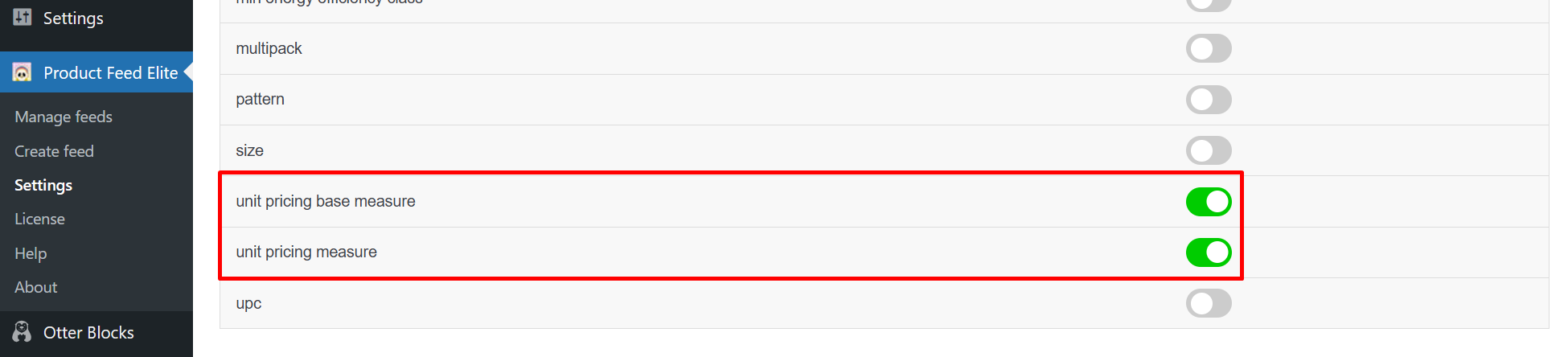
- Misura del prezzo unitario: Rappresenta la quantità effettiva del prodotto (ad esempio,
100 ml). - Misura base del prezzo unitario: Questa è la misura di riferimento per il prezzo unitario (ad esempio,
30 ml).
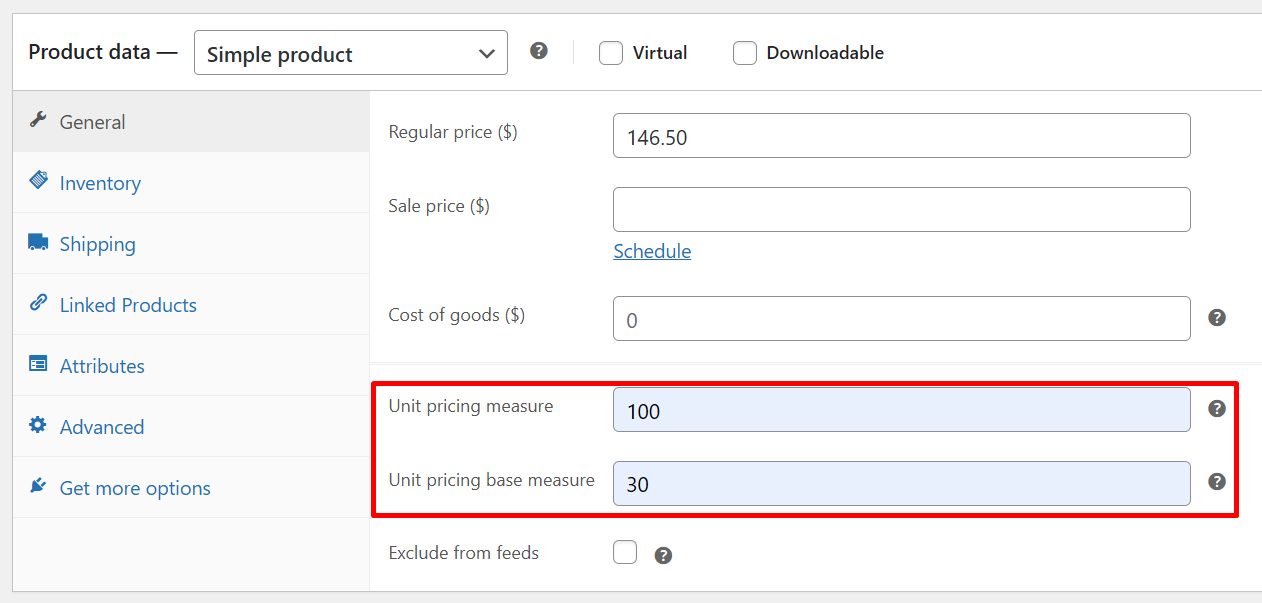
Questa configurazione visualizzerà il prezzo unitario come costo per 30 ml in Google.
Configurazione del prezzo unitario utilizzando il plugin Germanized for WooCommerce
Se stai utilizzando il plugin Germanized for WooCommerce:
- Imposta la quantità del prodotto nel campo Unità di prodotto (ad esempio,
100 ml). - Imposta l'unità di riferimento di base nel campo Unità di prezzo unitario (ad esempio,
30 ml).
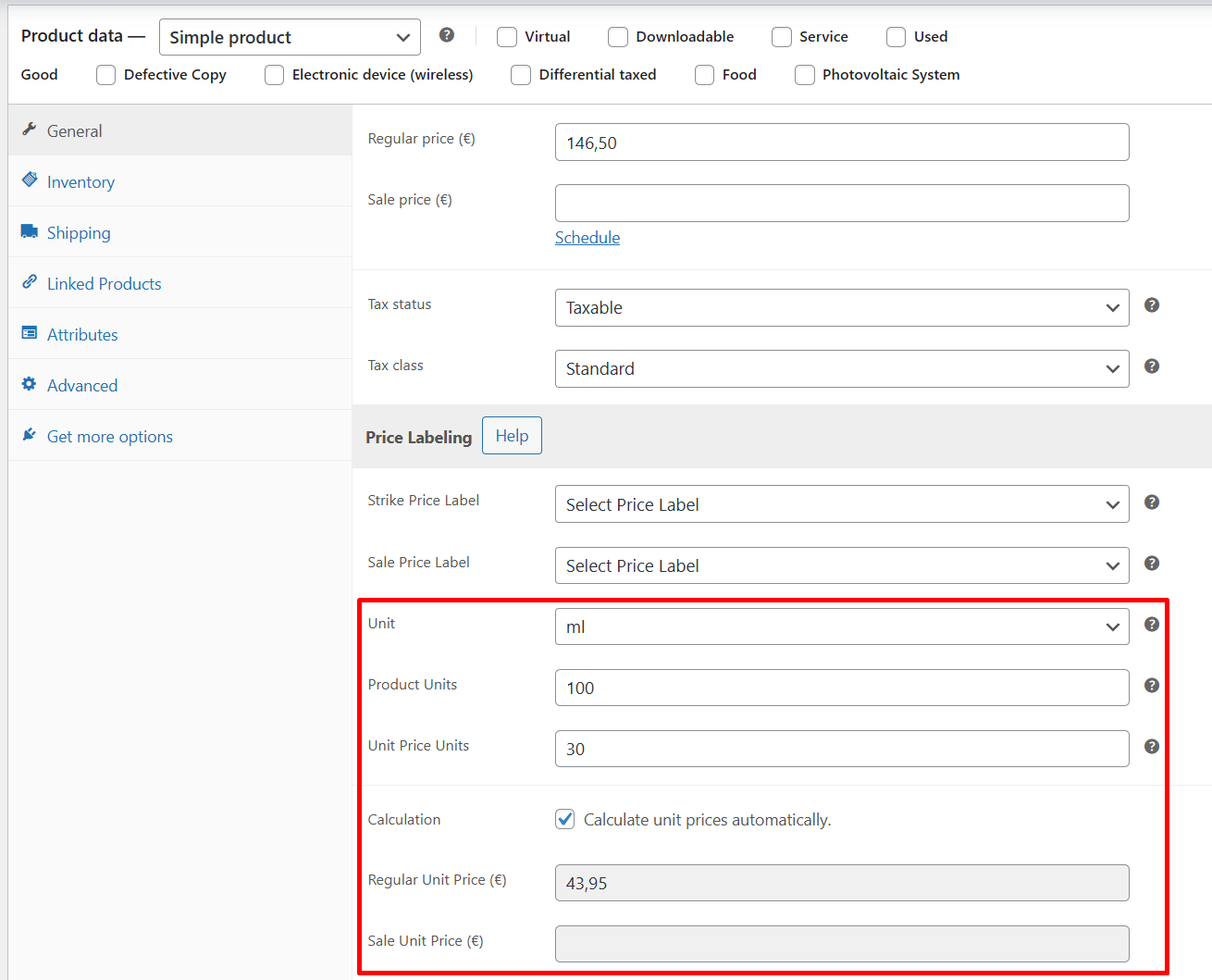
Ciò consente al plugin di calcolare dinamicamente il prezzo unitario.
Utenti Pro di Germanized
Se stai utilizzando Germanized for WooCommerce Pro e hai abilitato l'opzione Calcola automaticamente i prezzi unitari, il prezzo unitario verrà calcolato automaticamente in base al prezzo normale o in saldo del prodotto e visualizzato accanto ai rispettivi campi prezzo.
Mappatura dei campi per il prezzo unitario
Per includere il prezzo unitario nel tuo feed di prodotti, dovrai mappare due attributi chiave:
unit_pricing_measureunit_pricing_base_measure
Questi attributi consentono ai motori di comparazione prezzi (CSE) come Google Shopping di visualizzare il costo per unità (ad es. prezzo per 100 ml o per kg), aiutando gli acquirenti a prendere decisioni informate.
Per gli utenti del plugin Product Feed Elite
Se stai utilizzando la funzionalità Campi aggiuntivi del plugin Product Feed Elite:
| Attributo prezzo unitario | Mappa a |
|---|---|
| unit_pricing_measure | Misura del prezzo unitario Woosea |
| unit_pricing_base_measure | Misura base del prezzo unitario Woosea |
Questi campi assicurano che i dati corretti sul prezzo unitario siano inclusi nell'output del tuo feed.

Per gli utenti del plugin Germanized for WooCommerce
Se stai utilizzando il plugin Germanized for WooCommerce:
| Attributo prezzo unitario | Mappa a |
|---|---|
| unit_pricing_measure | Prodotto unitario |
| unit_pricing_base_measure | Base unitaria |
Queste mappature corrispondono ai campi forniti da Germanized per gestire i prezzi dei prodotti basati sull'unità.

Se i campi Unit product o Unit base non compaiono nel menu a discesa della mappatura dei campi:
- Vai su Product Feed Pro/Elite > Impostazioni.
- Fai clic sul pulsante “Svuota la cache degli attributi personalizzati”.
- Torna alla schermata di mappatura dei campi e cerca di nuovo.
Questa azione aggiorna l'elenco dei campi e consente al plugin di riconoscere i campi personalizzati aggiunti da plugin di terze parti come Germanized
Aggiungi unità supportate nel campo suffisso
Infine, dovresti aggiungere l'unità di misura supportata al campo Suffisso nella configurazione del tuo feed di prodotti.

Google aggiunge automaticamente uno spazio tra la quantità netta e l'unità di misura. Pertanto, assicurati che non ci sia spazio aggiuntivo prima dell'unità di misura. Altrimenti, Google non sarà in grado di analizzarla.
Anteprima feed XML
Una volta completata la configurazione, un articolo con gli attributi unit_pricing_measure e unit_pricing_base_measure apparirà come di seguito:
<item>
<g:id>72</g:id>
<g:title>Perfume</g:title>
<g:link>https://wpeu.test/product/perfume/</g:link>
<g:image_link>https://wpeu.test/wp-content/uploads/2025/07/perfume.jpg</g:image_link>
<g:checkout_link_template>https://wpeu.test/cart/?add-to-cart=72</g:checkout_link_template>
<g:availability>in_stock</g:availability>
<g:price>EUR 146.50</g:price>
<g:product_type>Home > Uncategorized</g:product_type>
<g:condition>new</g:condition>
<g:unit_pricing_measure>100 ml</g:unit_pricing_measure>
<g:unit_pricing_base_measure>30 ml</g:unit_pricing_base_measure>
<g:identifier_exists>no</g:identifier_exists>
</item>
Serve Aiuto?
Questo è tutto ciò che devi sapere sulla configurazione del prezzo unitario nel tuo feed di prodotto. Se riscontri ancora problemi o hai bisogno di ulteriore assistenza, non esitare a contattare il nostro team di supporto. Siamo qui per aiutarti a garantire che il tuo feed sia completamente ottimizzato e conforme.
Se sei un cliente esistente, vai al modulo di richiesta ticket di supporto e inviaci un messaggio.
Se sei un utente di plugin gratuiti, inviaci una richiesta di supporto sul forum. Monitoriamo attivamente i forum di supporto di WordPress.org per il plugin gratuito e aiutiamo i nostri utenti lì al meglio delle nostre capacità.