Reviewed by
If you’ve spent any time researching paid advertising for your WooCommerce store, you’ve probably run into a wall of overlapping terminology. Product listing ads, Shopping ads, PLAs, Performance Max campaigns, Dynamic ads. They all sound like they do the same thing, and half the guides you find use the names interchangeably.
That confusion isn’t just annoying. It can lead you to set up the wrong campaign type, waste ad spend, or overlook a channel that could help you reach high-intent shoppers. Understanding what product listing ads are and how they connect to your product data is the first step toward running stronger Shopping campaigns.
This article breaks down exactly what product listing ads are, how they work behind the scenes, where the naming confusion comes from, and how to get your WooCommerce store’s first campaign live using a product feed you control.
What Are Product Listing Ads?
Product listing ads are image-based product ads that can appear in Google Search and Shopping placements when someone searches for something they want to buy. Unlike standard text ads, product listing ads can show a product image, title, price, and store name directly in the ad.
You’ve likely seen this format even if you didn’t know the name. Search for a product like “running shoes” or “wireless earbuds” and you may see a row of product cards with images and prices near the search results. Those are commonly referred to as product listing ads, or Google Shopping ads.
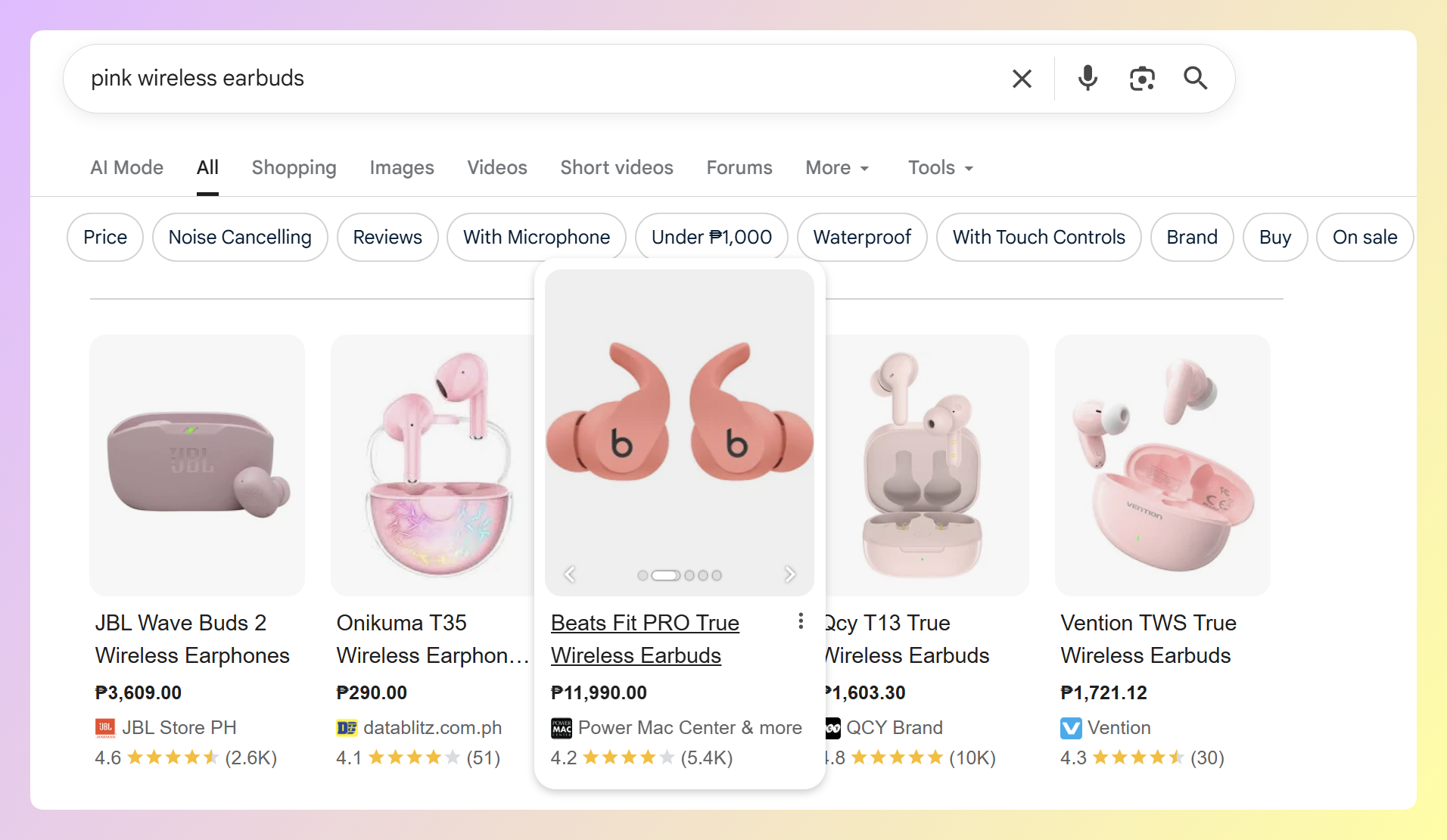
What makes them different from regular Google Ads is that you don’t write the ad copy. Instead, your product data becomes the ad. Google pulls the image, title, price, and availability directly from a product feed you submit to Google Merchant Center. That feed is the foundation of everything.
Common mistake: Store owners sometimes assume they need to write headlines and descriptions for each Shopping ad the way they would for a text campaign. Product listing ads work differently. Your feed data becomes the ad creative, so clear product titles, accurate prices, and strong images matter more than traditional ad copy.
Here’s what a product listing ad typically includes:
- Product image: Pulled from the image URL in your feed
- Product title: Taken directly from your feed’s title field
- Price: Synced from your feed data, including sale prices if set
- Store name: Your business name from Merchant Center
- Shipping or promotion details: May appear when your Merchant Center or Google Ads setup supports them and the listing is eligible
How Product Listing Ads Work
Product listing ads run on an auction system powered by your product feed data. Here’s the step-by-step flow from your store to a shopper’s screen.
First, you create a product feed that contains structured data about every product in your store, including titles, descriptions, images, prices, categories, and availability. You then submit that feed to Google Merchant Center, which validates your product data and flags any errors.
From there, you connect Merchant Center to a Google Ads account and create a Shopping campaign (or a Performance Max campaign). When a shopper searches for a product-related query, Google’s algorithm matches their search against the product data in your feed. If your product is relevant, your ad enters the auction.
Several inputs can influence whether your products are eligible to show and how well they compete in Shopping campaigns, including:
- Bid and budget settings: How much you’re willing to spend and how your campaign is configured
- Product data quality: How complete, accurate, and useful your feed information is
- Search relevance: How closely your product data matches what the shopper is looking for
- Account and product eligibility: Whether your products meet Merchant Center requirements and Shopping ads policies
The critical takeaway is that feed quality affects both eligibility and relevance. If your titles are vague, your images are low quality, or your product data has errors, Google may have less reliable information to match your products to the right searches. In more serious cases, product data issues can lead to item disapprovals or account-level issues in Merchant Center, which can stop products from showing on Google.
Product Listing Ads Vs. Shopping Ads, Performance Max, And Dynamic Ads
Product listing ads (PLAs) are an older industry term for the Google ad format that shows product images, prices, and store details from your Merchant Center feed. Google’s current documentation generally uses Shopping ads, but marketers still often use “product listing ads” and “PLAs” when talking about the same visual product ad format.
In most WooCommerce marketing conversations, “Shopping ads” and “product listing ads” refer to the same core format: product-based ads created from Merchant Center feed data.
Performance Max campaigns are Google’s automated, goal-based campaign type. When connected to Merchant Center, Performance Max can use your product feed to serve ads across Google surfaces such as Search, Display, YouTube, Gmail, Discover, and Maps. Shopping ads can appear as part of a Performance Max campaign, but Performance Max goes beyond standard search results.
Dynamic ads are a different concept. They are catalog-based ads, often used for retargeting on Meta platforms like Facebook and Instagram. Instead of focusing only on a search query, the platform pulls product details from a catalog or feed and matches those products to shoppers based on audience and campaign settings.
Here’s a quick summary:
- Product listing ads / PLAs / Shopping ads: Same thing. Product-image ads on Google Search, powered by your Merchant Center feed.
- Performance Max: A Google campaign type that uses your feed to show ads across multiple Google surfaces, including Search.
- Dynamic ads / catalog ads: Product-based ads on Meta and other platforms, often used for retargeting and powered by a product feed or catalog.
The common thread? All of them depend on a product feed or catalog. Without accurate, structured product data, these ad types become much harder to run reliably.
Why Product Feed Quality Matters For Product Listing Ads
Because product listing ads are built from your product data, feed quality has a major influence on how your ads perform. Your titles, images, descriptions, prices, and product attributes help shape what shoppers see and give Google the information it needs to match your products to relevant searches.
Better product titles lead to better relevance matching. If someone searches “organic cotton baby blanket” and your feed title just says “Baby Blanket,” you’re less likely to win that auction. But a title like “Organic Cotton Baby Blanket – Soft Knit Swaddle for Newborns” matches the query much more closely.
The same applies to images. Google requires product image URLs to be crawlable and expects images to meet minimum quality requirements, including size, file, and content rules. It also recommends clear, high-quality images with minimal staging, no promotional overlays, and a solid white or transparent background where appropriate. Better images make it easier for shoppers to understand the product before they click.
Feed quality also affects your account health in Merchant Center. Too many disapproved products, missing attributes, or data mismatches between your feed and your landing pages can trigger account-level warnings. In severe cases, Google can suspend your entire Merchant Center account.
Here’s what high-quality feed data looks like in practice:
- Titles: Include the product type, brand, key attributes (color, size, material), and relevant search terms
- Descriptions: Detailed, accurate product descriptions that match your landing page content
- Images: High-resolution, clean product photos that meet Google’s image requirements
- Pricing: Accurate pricing that matches what’s on your website, including sale prices
- Availability: Updated stock status so you’re less likely to advertise out-of-stock items
- Product categories: Properly mapped to Google’s product taxonomy
For most stores, feed optimization is one of the most practical first areas to improve before raising bids. Cleaner titles, accurate attributes, stronger images, and up-to-date availability give Google better product data to work with and give shoppers clearer information before they click.
How WooCommerce Stores Can Start Running Product Listing Ads
Getting your WooCommerce store’s products into product listing ads takes three main steps. You don’t need a massive ad budget or a dedicated marketing team to get started.
Step 1: Set up Google Merchant Center
Create a free Google Merchant Center account at merchants.google.com. You’ll need to verify and claim your website, set your shipping and tax settings, and make sure your store meets Google’s Shopping ads policies.
Key things to have ready before you start:
- A live WooCommerce store with product pages that include prices, images, and descriptions
- A return and refund policy published on your site
- Accurate contact information on your website
Step 2: Create your product feed with AdTribes Product Feed Pro
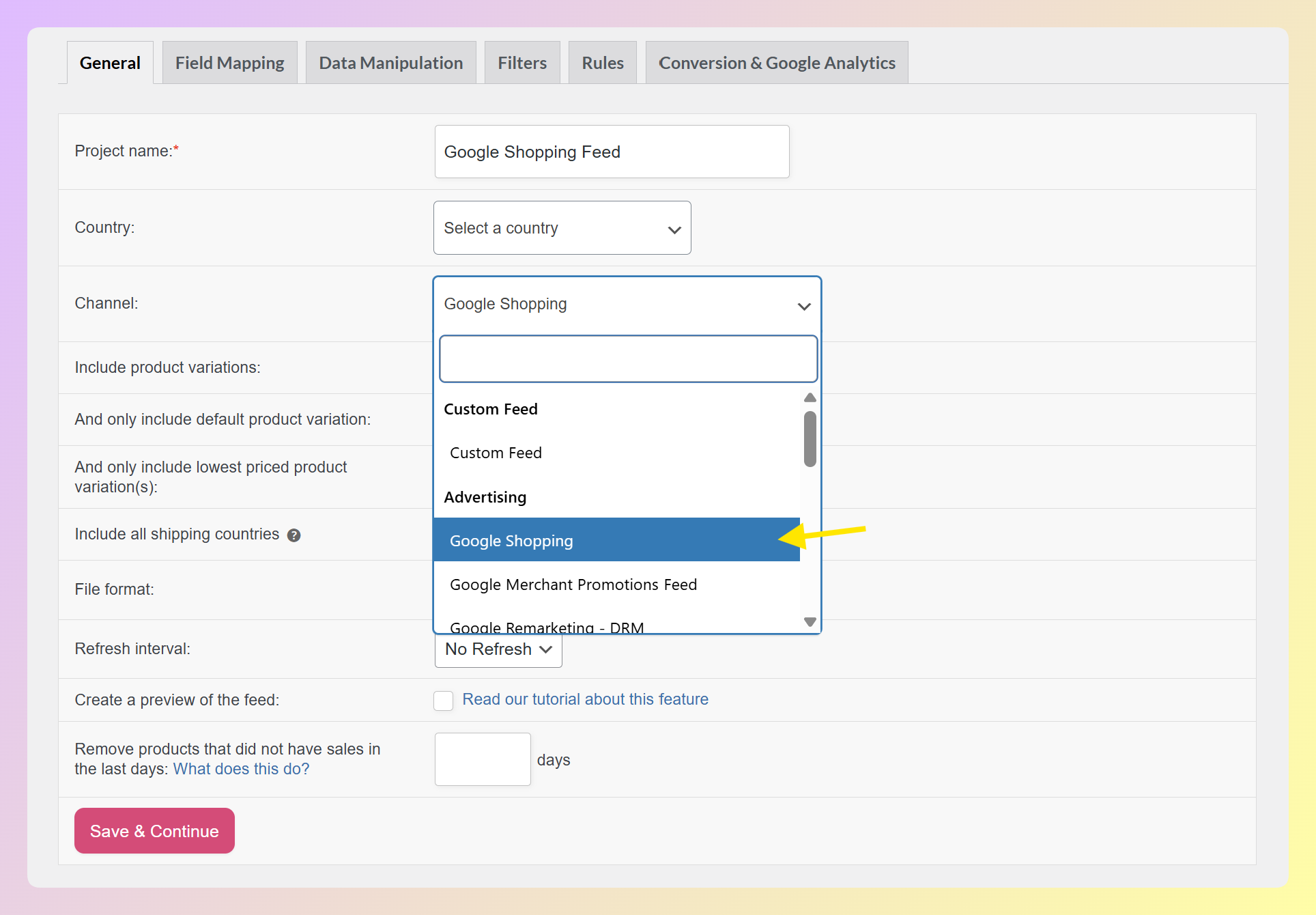
Your product feed is what connects your WooCommerce store to Merchant Center. AdTribes Product Feed Pro for WooCommerce helps generate a Google Shopping product feed from your store’s product data, so you don’t have to build the feed manually.
Install the plugin, choose Google Shopping as your channel, and review how your WooCommerce fields are mapped to Google’s feed attributes. You can also adjust field mappings, apply filters to control which products appear in the feed, and use rules to refine product data before submitting it to Merchant Center.
For a detailed walkthrough of connecting your feed to Google, check out our Google Shopping ads setup guide.
Step 3: Launch a Shopping or Performance Max campaign
Once Merchant Center has approved your products, connect it to your Google Ads account. From Google Ads, create either a standard Shopping campaign or a Performance Max campaign.
Standard Shopping campaigns give you more control over bids and product grouping. Performance Max campaigns use automation to serve product ads across multiple Google surfaces. If you want more manual control while learning which products perform best, Standard Shopping can be a practical starting point. If you want broader automated reach across Google’s channels, Performance Max may be worth testing once your feed is clean and your goals are clear.
Set a daily budget you’re comfortable with, configure your bidding strategy, and launch. Google will start matching your products to relevant searches based on your feed data.
Frequently Asked Questions
Are product listing ads the same as Google Shopping ads?
Yes, in most WooCommerce and ecommerce marketing conversations, product listing ads (PLAs) and Google Shopping ads refer to the same core ad format. These ads use product data from Google Merchant Center to show product details such as images, titles, prices, and store information. You may still see “product listing ads” and “PLAs” used in older or industry-facing resources, while Google’s current materials usually refer to them as Shopping ads.
How much do product listing ads cost?
Product listing ads usually operate on a cost-per-click (CPC) model, meaning you pay when someone clicks your ad. Actual costs vary by industry, competition, product category, bid strategy, and campaign setup. You can control spend by setting your budget and bids in Google Ads, then adjusting them once you have enough performance data to make a decision.
Do I need a product feed to run product listing ads?
Yes. A product feed is required. Product listing ads pull every element of the ad, from image to price, directly from your product feed data in Google Merchant Center. Without a feed, there’s nothing for Google to display. For WooCommerce stores, plugins like AdTribes Product Feed Pro automate feed generation so you don’t need to build XML or CSV files manually.
Can I run product listing ads on platforms other than Google?
Google is the main platform associated with product listing ads, but similar product-based ad formats exist elsewhere. Microsoft Advertising offers Shopping campaigns that also rely on product data submitted through Microsoft Merchant Center. Meta platforms like Facebook and Instagram use product catalogs for catalog-based ads, including retargeting campaigns. AdTribes Product Feed Pro helps WooCommerce stores generate feeds for multiple platforms from one plugin.
Start Running Product Listing Ads For Your WooCommerce Store
Product listing ads give WooCommerce store owners a direct path to putting their products in front of shoppers who are actively searching for what they sell. The key insight is that product feed quality has a major influence on your campaign, from whether your products are eligible to show to how clearly shoppers understand them before they click.
Here’s a recap of what to do next:
- Learn what product listing ads are and how they differ from text-based campaigns
- Understand the auction system that determines which products get shown
- Clear up the naming confusion between PLAs, Shopping ads, and Dynamic ads
- Optimize your product feed because your data is your ad creative
- Follow the three setup steps to launch your first campaign
Your product feed is the foundation of every product listing ad campaign. Get AdTribes Product Feed Pro for free and start generating channel-ready feeds for Google Shopping, Microsoft Advertising, and Meta from your WooCommerce store today.