Running a multilingual store with Polylang? The Product Feed Translation Addon lets you point each product feed at one Polylang language, so you can send a separate feed to each channel and locale.
This guide covers the requirements, how to pick a language for a feed, and how to include products from every language when your feed filters need to reach translated products.
For installation and licensing, see Getting started with the Product Feed Translation Addon.
Before you start
Make sure you meet the following requirements:
| Requirement | Notes |
|---|---|
| WooCommerce | Installed, active, and up to date. |
| Polylang | Installed, with your languages created. Polylang Pro works too, and the addon detects either one. |
| Product Feed Pro | Required and active. The Translation Addon expects Product Feed Pro 13.5.3 or newer. |
| Product Feed Translation Addon | Separate plugin. It detects Polylang and loads the integration for you, with nothing to switch on. |
Install and activate the Translation Addon only after WooCommerce and Product Feed Pro are in place. If a dependency is missing, the addon shows an admin notice and skips loading integrations.
Create your languages in Polylang before you look for them in a feed. The addon reads the language list from Polylang, so a language that does not exist there will not appear in the feed dropdown.
Choose the Polylang language for each feed
When Polylang is active, the feed General step shows a Polylang language field, just under Project name. The setting is saved on the feed, so different feeds on the same store can use different languages.
- Create a new feed under Product Feed → Create feed, or open an existing one under Product Feed → Manage feeds.
- In General, find Polylang language.
- Select the language this feed should use.
- Complete mapping, filters, rules, and scheduling as usual.
- Save the feed and generate it.
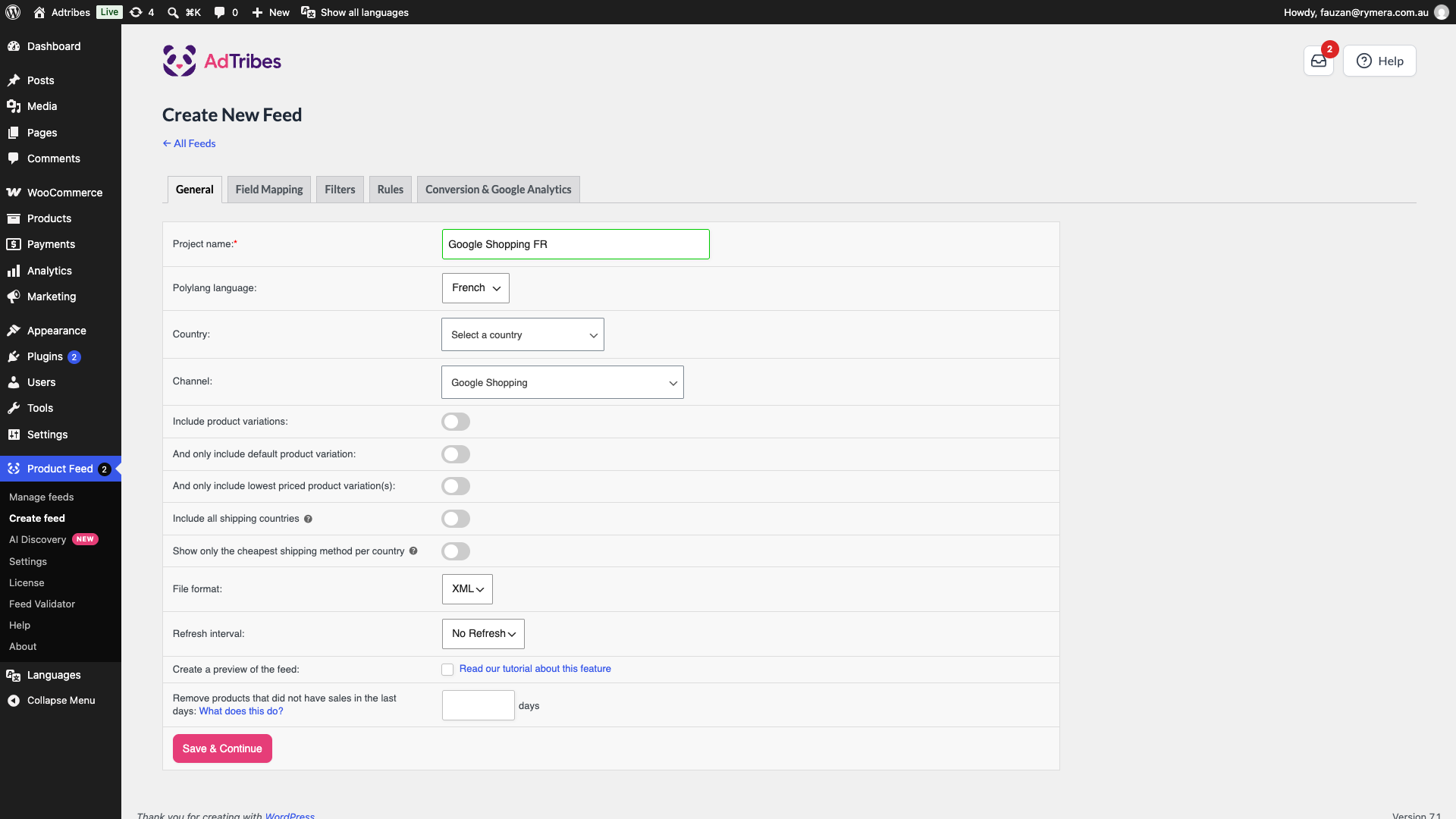
If you leave the field alone on a new feed, the feed uses your Polylang default language.
How the integration works
The addon narrows the feed to the products that belong to the language you picked. Because Polylang stores each translation as its own product, the feed then reads that product’s own title, description, URL, and other fields, so the output matches what a shopper sees browsing your store in that language.
There is no fallback. If a product has no translation in the language a feed uses, that product is not in the feed. This is different from a string-level translation plugin, which can fall back to your default language for a missing string. With Polylang, translate the product before you rely on that language’s feed.
Best practices
- One language per channel feed: create a separate feed per language, for example one file for English and one for Spanish, rather than sending a mixed file to a channel.
- Translate products before you rely on a feed: a product with no translation in that language will not appear in the feed at all.
- Check your filters against the feed’s language: a filter that names products by ID can only match products in the language the feed uses, because Polylang gives every translation its own ID.
- Match channel setup: point each localized feed URL at the Merchant Center, Meta, or other account configured for that language or country.
Frequently asked questions
Troubleshooting
Need help?
If you have a question or run into any issues, we’re here to help.
Premium users: Open a support ticket. Include your Product Feed version, Polylang version, and the feed configuration so the team can help you faster.
Free users: Visit the community forum on WordPress.org for help from the community.