If you’ve already activated Product Feed Elite, it’s easy to assume the Multi-Currency Addon is licensed too. It isn’t. The addon ships with its own key and needs separate activation before AdTribes treats your site as fully entitled for it.
So activate your key early. An unlicensed addon still runs, but it won’t receive automatic updates or qualify for support. This guide walks you through where to enter the key, how to confirm it worked, and what unlocks once a supported currency plugin is active.
Before you start
| Requirement | Why it matters |
|---|---|
| A Plus or Business plan | The Multi-Currency Addon is available on the AdTribes Plus and Business plans. The Growth plan doesn’t include it, so confirm your plan covers the addon before activating. |
| WooCommerce | Installed and active. The addon needs it to run. |
| Product Feed PRO | Version 13.5.5 or newer, and active. The addon checks this version and won’t load on anything older. |
| Multi-Currency Addon plugin | Installed and activated, so the Multi-Currency Addon tab appears on the License page. |
| A supported currency plugin | One of Aelia Currency Switcher, CURCY – WooCommerce Multi Currency, or WPML’s WooCommerce Multilingual & Multicurrency. A currency option only appears on a feed when one of these is active. |
| License key and activation email | From your AdTribes account. If you’ve lost them, see How Do I Retrieve My License Keys?. |
If a dependency check fails, fix it first. Otherwise, the addon may show an Action required notice instead of loading. The troubleshooting section below covers that notice.
Step 1: Open the License page
Go to Product Feed → License in your WordPress admin menu.
The License screen is shared across your AdTribes products, so the same page hosts a tab for each one you have installed.
If you run a multisite network, open the License screen from Network Admin on the main site when your setup expects network-level licensing. For the full process, see Activating the License Key in a Multisite Network.
Step 2: Open the Multi-Currency Addon tab
The License page shows a row of tabs at the top of the license box. Each tab represents an AdTribes product installed on your site, such as Product Feed Elite or Multi-Currency Addon.
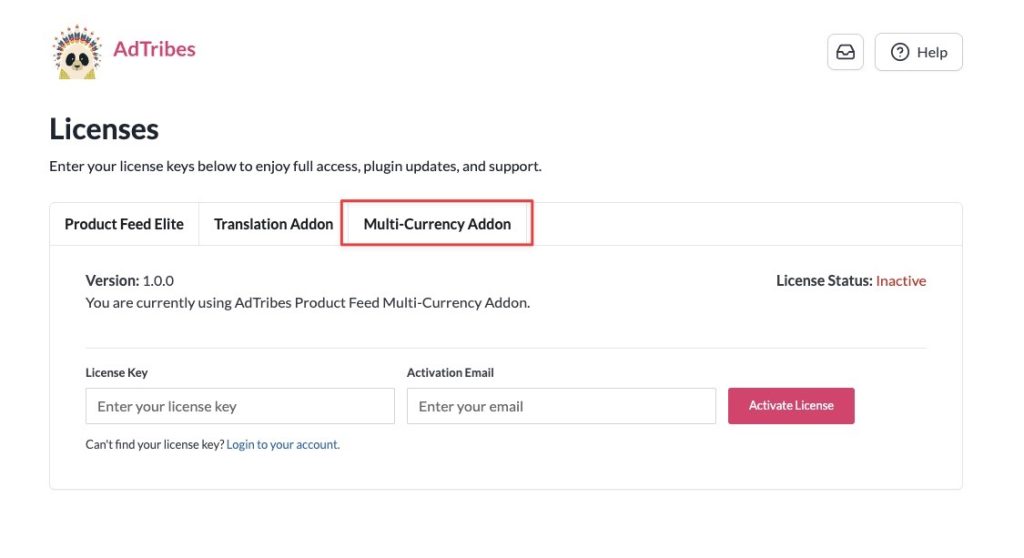
Click the Multi-Currency Addon tab. From there, check the Version and License Status. Both update after you activate in the next step.
Step 3: Enter your credentials and activate
- In the License Key field, paste the Multi-Currency Addon key from your AdTribes account.
- In the Activation Email field, enter the email AdTribes has on file for your account.
- Click Activate License.
On success, a notice appears, and the page refreshes with your updated status.
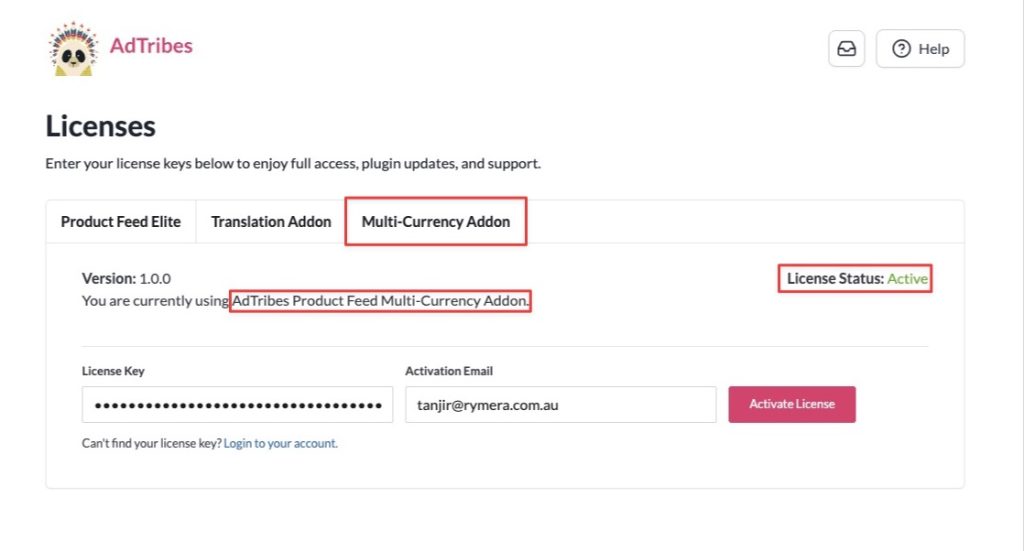
If activation fails, read the error text in the notice. Common causes include a typo in the key, the wrong email, an expired subscription, or the server being unable to reach AdTribes.
Step 4: Verify activation
Stay on the Multi-Currency Addon tab and check the License Status.
| Status | What it means |
|---|---|
| Active | Your license is verified. The addon receives automatic updates, and you can open support tickets. |
| Inactive | No active license is recorded yet, or validation failed. Re-enter your License Key and Activation Email, then activate again. |
| Expired | Your license has lapsed. A Renew Now link appears so you can restore updates and support. |
The plugin also runs a daily background check to refresh the license status. So if you renew your license or change activations in My Account, the status updates automatically during the next check.
After activation: set a currency on your feeds
With the addon active, every feed gains a currency dropdown on its General tab, just above the Country field. Its label reflects the currency plugin you run:
- Aelia Currency Switcher active → the field reads Currency (Aelia)
- CURCY – WooCommerce Multi Currency active → Currency (CURCY)
- WPML’s WooCommerce Multilingual & Multicurrency active → Currency (WCML)
Open the feed you want to convert, choose the target currency from the dropdown, then save and regenerate the feed. The addon converts each product’s prices using your currency plugin’s exchange rates, so the feed matches what shoppers see on your store.
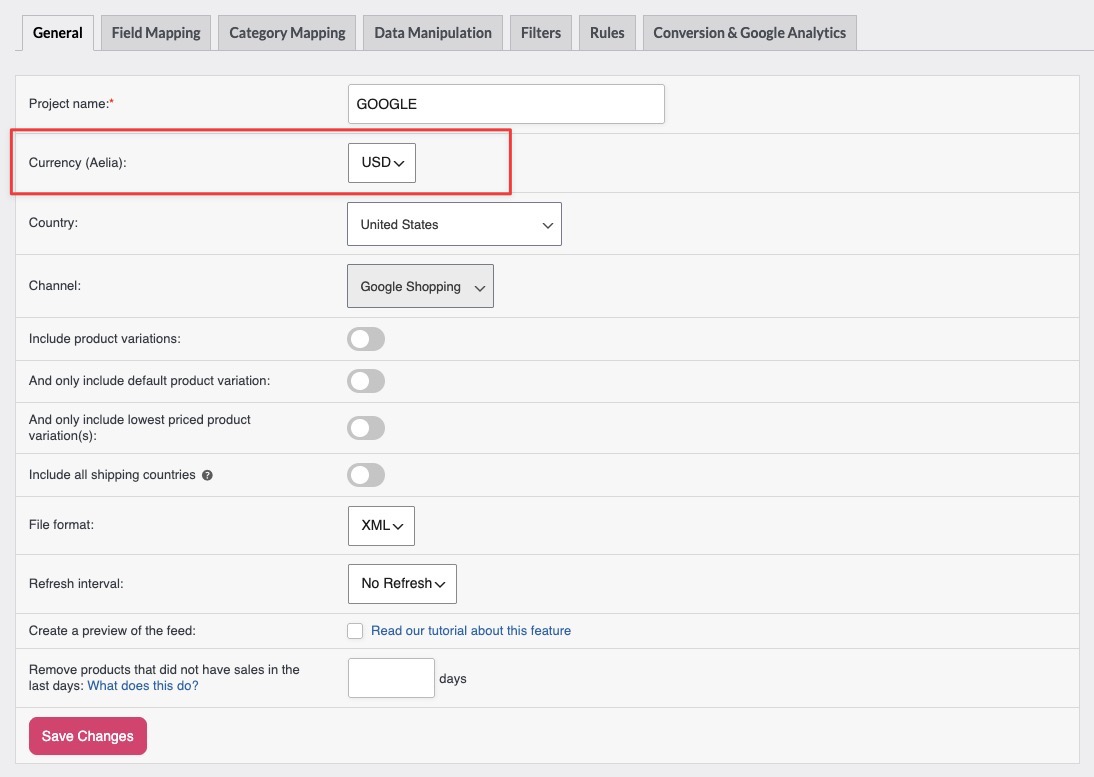
This dropdown appears only while both the addon and a supported currency plugin are active. Without a currency plugin installed, there’s nothing to convert, so the field stays hidden. Install and activate one to bring it back.
Why activate your license
Your multi-currency feed options keep working even when the license is inactive, because the feature itself isn’t license-gated. Activating the license keeps three things flowing: automatic updates delivered through WordPress, access to technical support, and any future premium features. Activation also ties this site URL to your license on AdTribes servers, which is how activation limits on your plan are enforced. Note that the Multi-Currency Addon license is separate from your Product Feed Elite license, so you need the correct key for each product you run.
Troubleshooting
Frequently asked questions
Need help?
If you have a question or run into any issues, we’re here to help.
- Elite and addon users: Open a support ticket
- Product Feed PRO (free) users: Start a topic on our community forum
When contacting support, include your site URL and a screenshot of any error message.