Reviewed by
What is field mapping, and how does it keep your product listings accurate?
If you have a WooCommerce store, you can extend your reach and sales by showcasing your products on platforms such as Google Shopping, Meta, or TikTok. To make this possible, however, you need to map fields, a process that prevents errors in your product listings and helps get your products in front of the right customers.
In this article, we’ll explore what it means to map fields. We’ll also look at how it relates to product feeds, the data files you need to showcase your listings on various sales channels.
So let’s get cracking!
What Is Product Data?
Before we go into what field mapping is, we must first discuss product data.
Product data is the information about a product that helps describe it and show it to customers in your online store or on other platforms. Basically, this data makes it easier for customers to find, understand, and buy the product.
Common elements, or fields, of product data include:
- Name: The name of the item (e.g., “Wireless Bluetooth Headphones”)
- Price: The cost of the product
- Description: Information about the product, such as its features, uses, or benefits
- SKU: A unique code used to identify and track the product
- Images: Pictures of the product to show what it looks like
- Stock Information: Details about how many items are available
- Category: The type or group the product belongs to (e.g., “Electronics” or “Clothing”)
Product data is vital. For one thing, it helps customers understand and choose what to buy. For another, it helps you manage your store’s inventory. Furthermore, it makes it easy to share your listings on platforms like marketplaces, price comparison sites, social media, and ads.
In short, product data is key to running a successful online business.
If you’ve already set up your WooCommerce store, then your products have data such as the examples shown above.
So, how is product data related to field mapping?
What Is Field Mapping?
Field mapping is the process of matching your store’s product data to the specific requirements of the platforms where you want to sell.
To understand this better, let’s examine the table below:
| WooCommerce | Google Shopping |
|---|---|
| Product ID Product Name Product Description Link Main Image Cart Link Price Category | Product ID Product Title Product Description Product URL Main Image Checkout Link Price Google Product Category |
The left column shows how your WooCommerce store organizes and displays your product data, with each field consisting of a specific detail such as Product Name or Price. However, other sales channels have their own unique ways of structuring and presenting their product data. For instance, in the right column, we see the exact same fields, just with different naming conventions, as this is how Google Shopping arranges their product data.
Thus, field mapping is making sure the product data fields in one column appropriately match the product data fields in the other column.
By connecting these fields, field mapping allows your product data to be correctly received by another sales channel. This, in turn, ensures that the data goes to the right place so that the sales channel can display it accurately to its customers.
Furthermore, sales channels often have extremely strict requirements. This means that if you don’t format your product data exactly right, the sales channel could reject your products, leading to delays or lost sales.
In short, field mapping helps make sure that your product information fits the format each sales channel needs, so your listings are accurate and ready for customers to see. If you’re selling on Amazon, our guide to creating an Amazon product feed from WooCommerce covers mapping your fields to Amazon’s required columns.
Why Is Field Mapping Important?
Let’s look more closely at why field mapping is essential for WooCommerce businesses hoping to showcase their products on various sales channels.
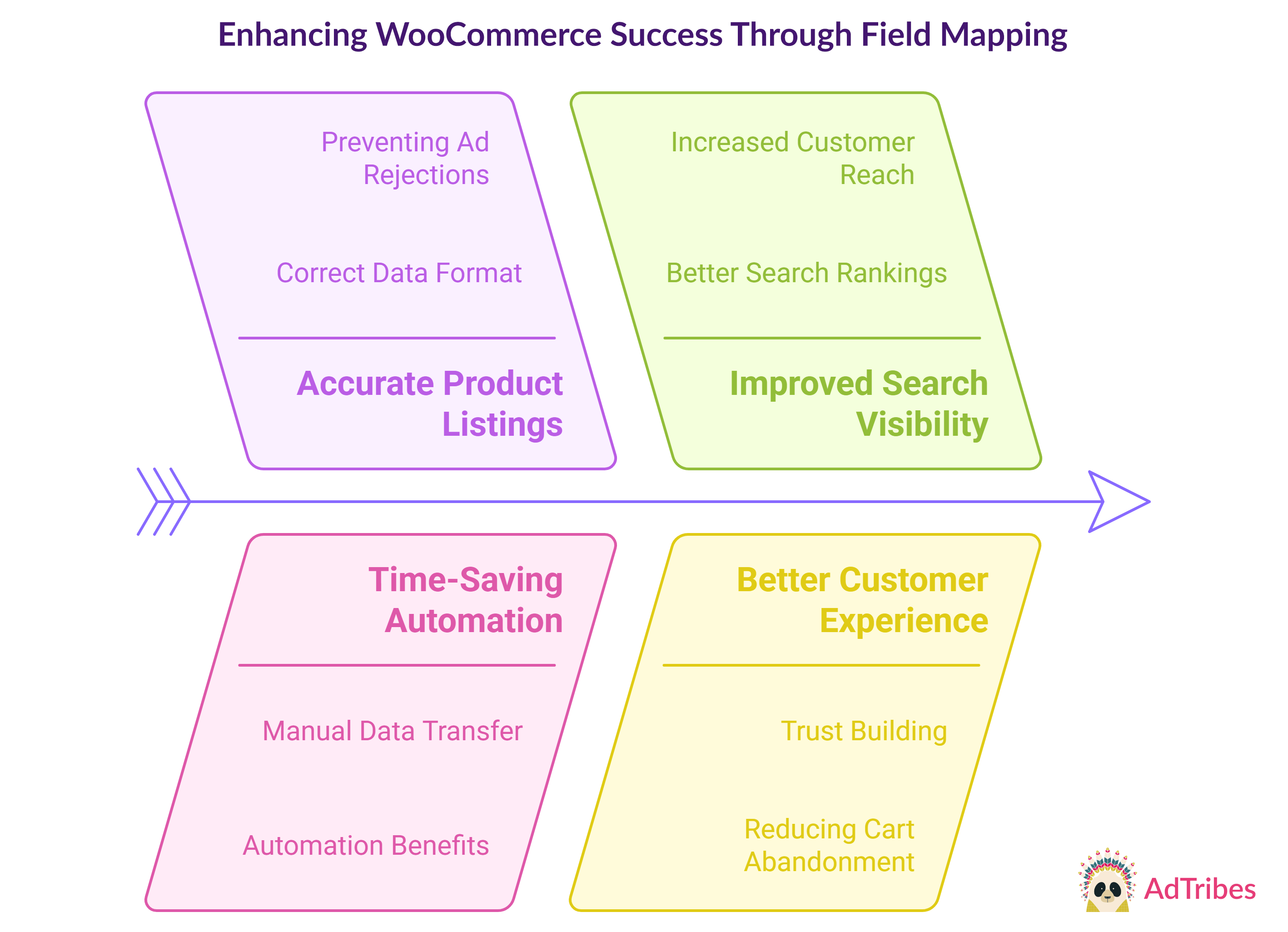
1. Accurate product listings
Field mapping makes sure key product details (like price, title, and description) are correct on your chosen sales channels.
If these details are wrong, your listings might confuse customers. For example, if the price shows incorrectly, people might hesitate to buy the item. It could even cause ads to be rejected, leading to missed sales.
Field mapping helps you avoid all these problems by making sure your product data matches the platform’s required format.
2. Time-saving automation
Manually transferring product data between your store and multiple sales platforms can be exhausting and time-consuming. Thankfully, field mapping helps automate this process, meaning you don’t have to do it manually every time you update or add a product.
With automation, the data flows from your store to the platforms on its own, saving you time and effort that could be better spent elsewhere, like improving your products or marketing strategies.
3. Improved search visibility
When you map your data accurately, it helps platforms like Google Shopping understand and list your products better. This means your products are more likely to be displayed more prominently in search results, helping you get noticed by more potential customers. And the more visible your products are, the more likely they are to sell.
4. Better customer experience
Accurate product listings build trust with customers. When they see consistent and correct information, they’re more likely to feel confident about buying.
On the other hand, incorrect or confusing product details can lead to cart abandonment, where customers leave without making a purchase. With field mapping, you ensure that all the right details are in place, improving the shopping experience and reducing the chances of losing customers.
In short, mapping fields doesn’t just make your product feeds run smoothly. It also helps your sales, saves you time, and keeps your customers happy!
Field Mapping And Product Feeds
We’ve already mentioned how much mapping fields matters for product feeds. But what is a product feed?
Basically, a product feed is a file that contains necessary details about your store’s products, like titles, prices, images, and descriptions. This file is shared with one or more sales channels, such as online marketplaces and comparison shopping engines, so that they can showcase your products to their customers.
For example, you can send a product feed to Google Shopping and Facebook. These platforms will then showcase your products to their users. By doing so, product feeds help you promote your products not only on your website but also on different platforms, which can give your visibility and sales a real boost.
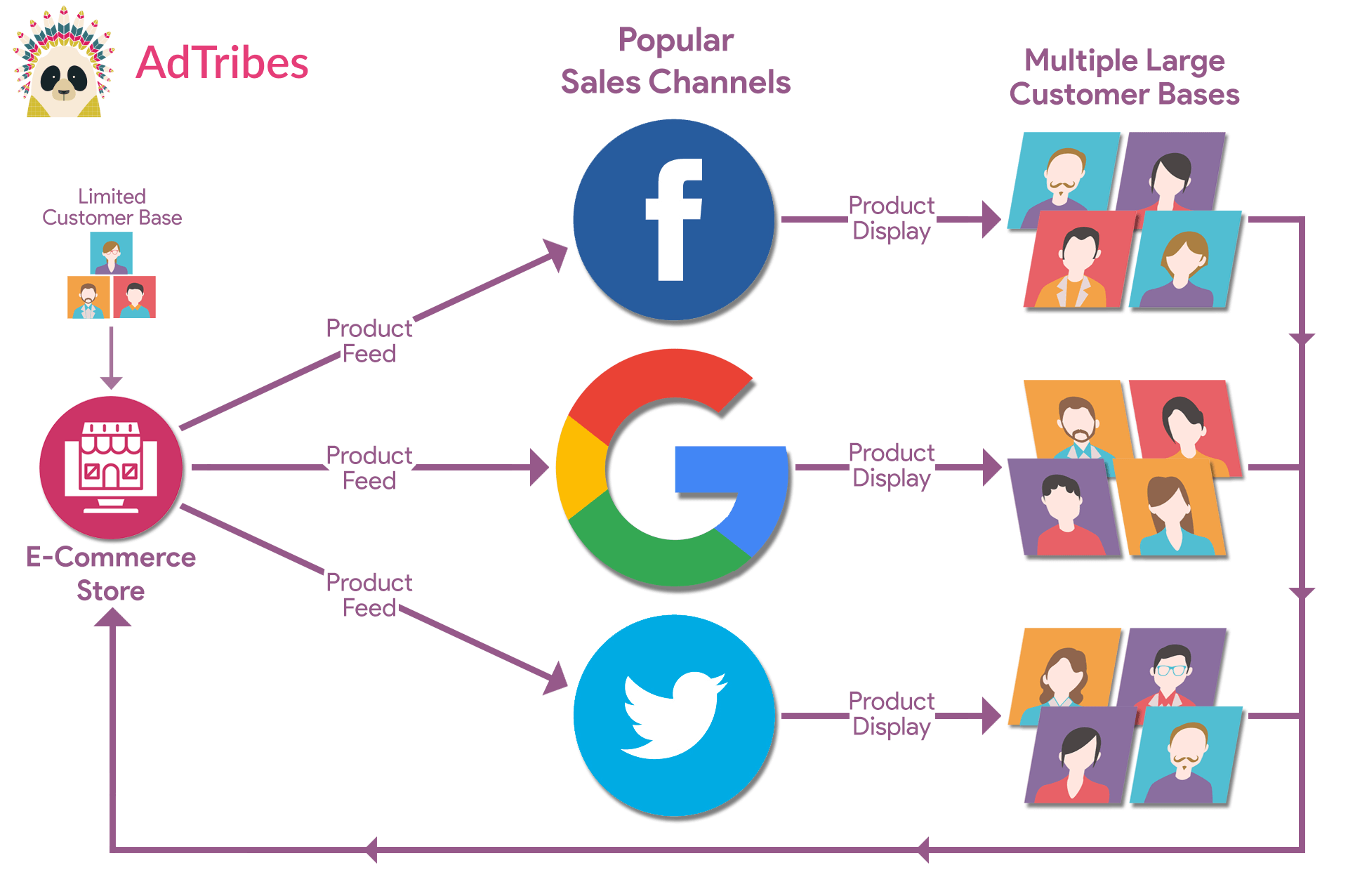
To create product feeds, you need product feed software. An excellent example is AdTribes Product Feed Pro, a free WooCommerce plugin we’ll be using in the following example:
The field mapping phase of product feed creation
With AdTribes Product Feed Pro, creating a product feed is a simple process consisting of a few quick steps.
The first step is to choose your target country and the sales channel to send your feed to, which you do on the General tab. In the example below, we’ve picked Australia as our target country and Meta / Facebook Catalog Feed / Instagram as our channel.
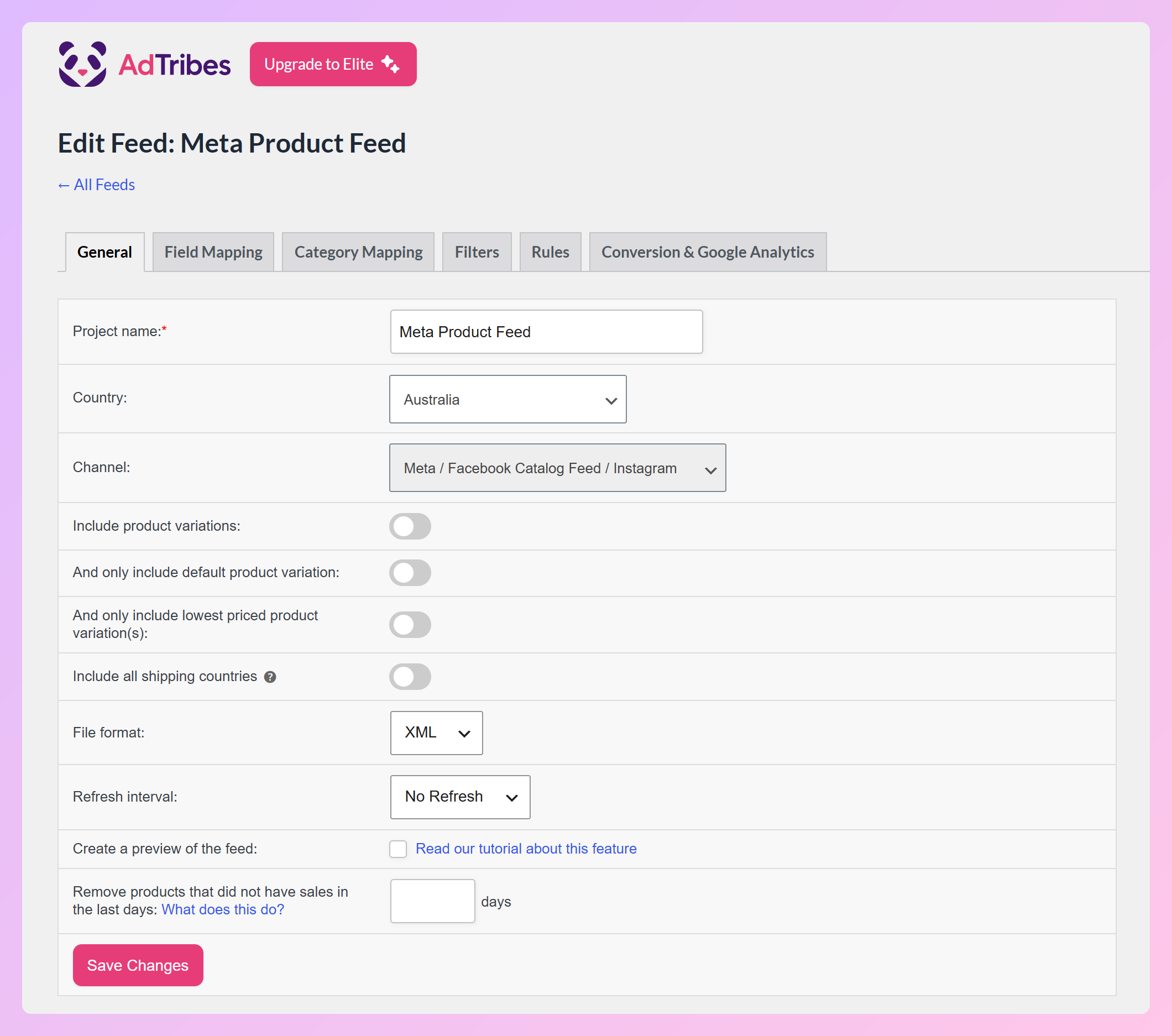
The second step involves mapping fields on the Field Mapping tab.
Completing this step is straightforward. After all, AdTribes Product Feed Pro prefills most of the mappings for you, reducing the amount of work you have to do.
As you can see in the image below, the tab lists the attributes your chosen channel accepts, sorted into groups like basic fields and enhanced fields. Next to each feed attribute, the Source from WooCommerce column shows the store field that fills it. The sidebar on the left keeps count of how many required fields already have a source, and a color legend marks each row as mapped, required but not mapped, optional, or set to a static value.
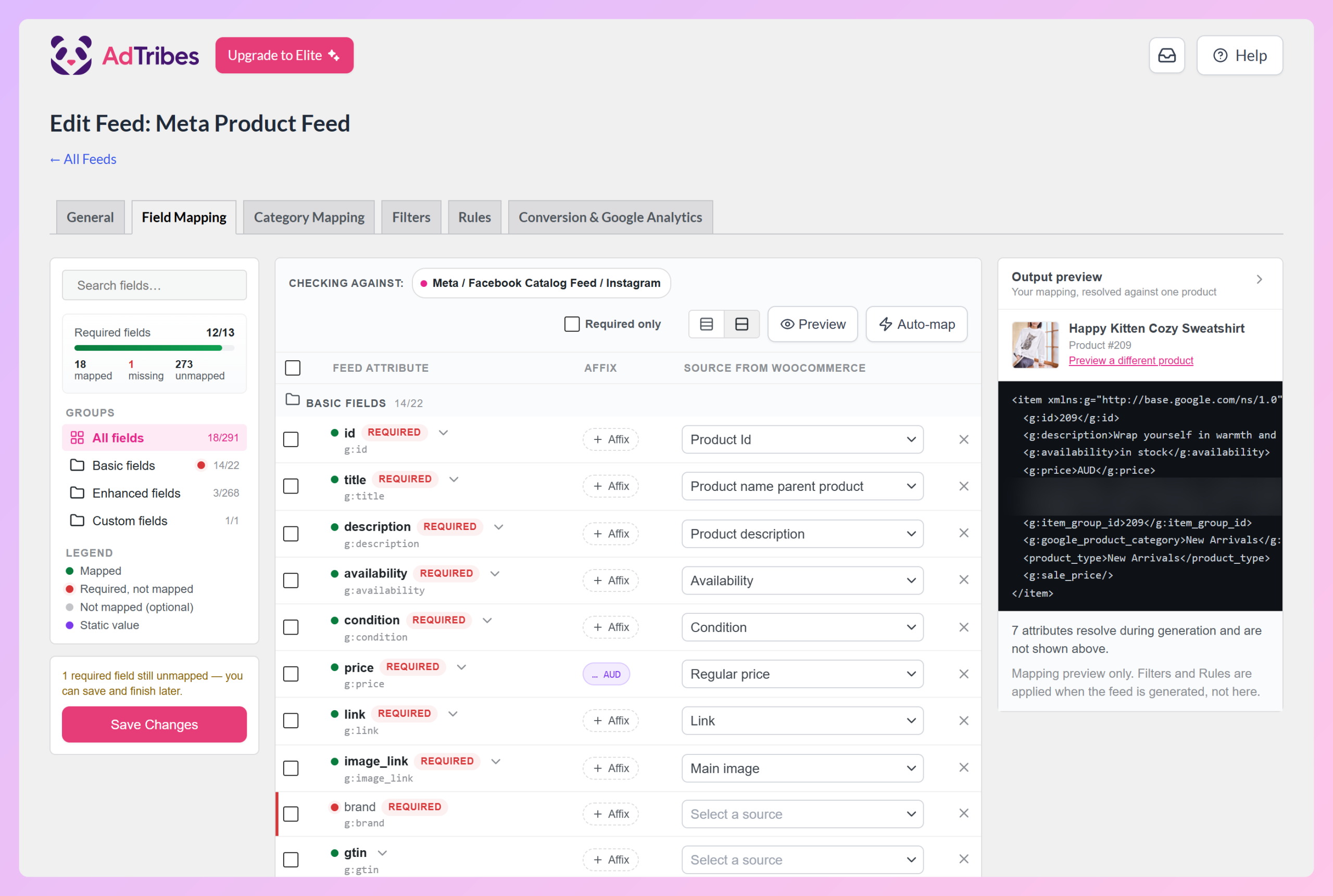
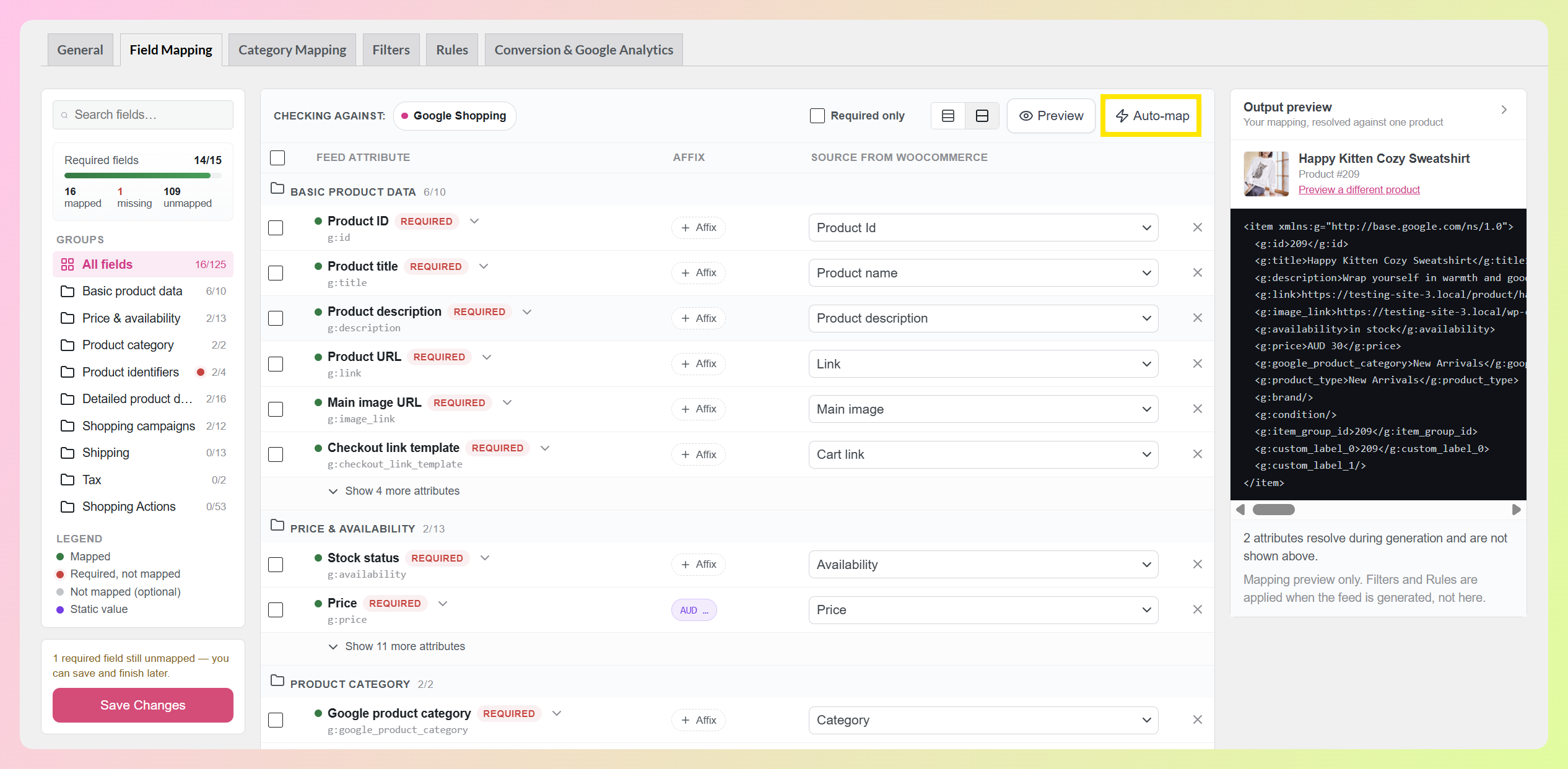
If an attribute doesn’t have a source yet, you simply have to open its Source from WooCommerce dropdown and choose the appropriate field. Or, click Auto-map in the toolbar to fill suggested mappings for every field that’s still empty. It tells you how many fields it’s about to fill and asks you to confirm first, and it leaves the fields you’ve already mapped untouched.
Want to check your work as you go? The output preview pane on the right shows the feed entry your current mapping produces for one real product from your store. Change a source in the table and the preview updates with it, so you can spot a price or brand pointing to the wrong field before you generate anything. Use Preview a different product to check another one. Our walkthrough of the upgraded field mapping builder covers this preview along with the new mapping status counts.
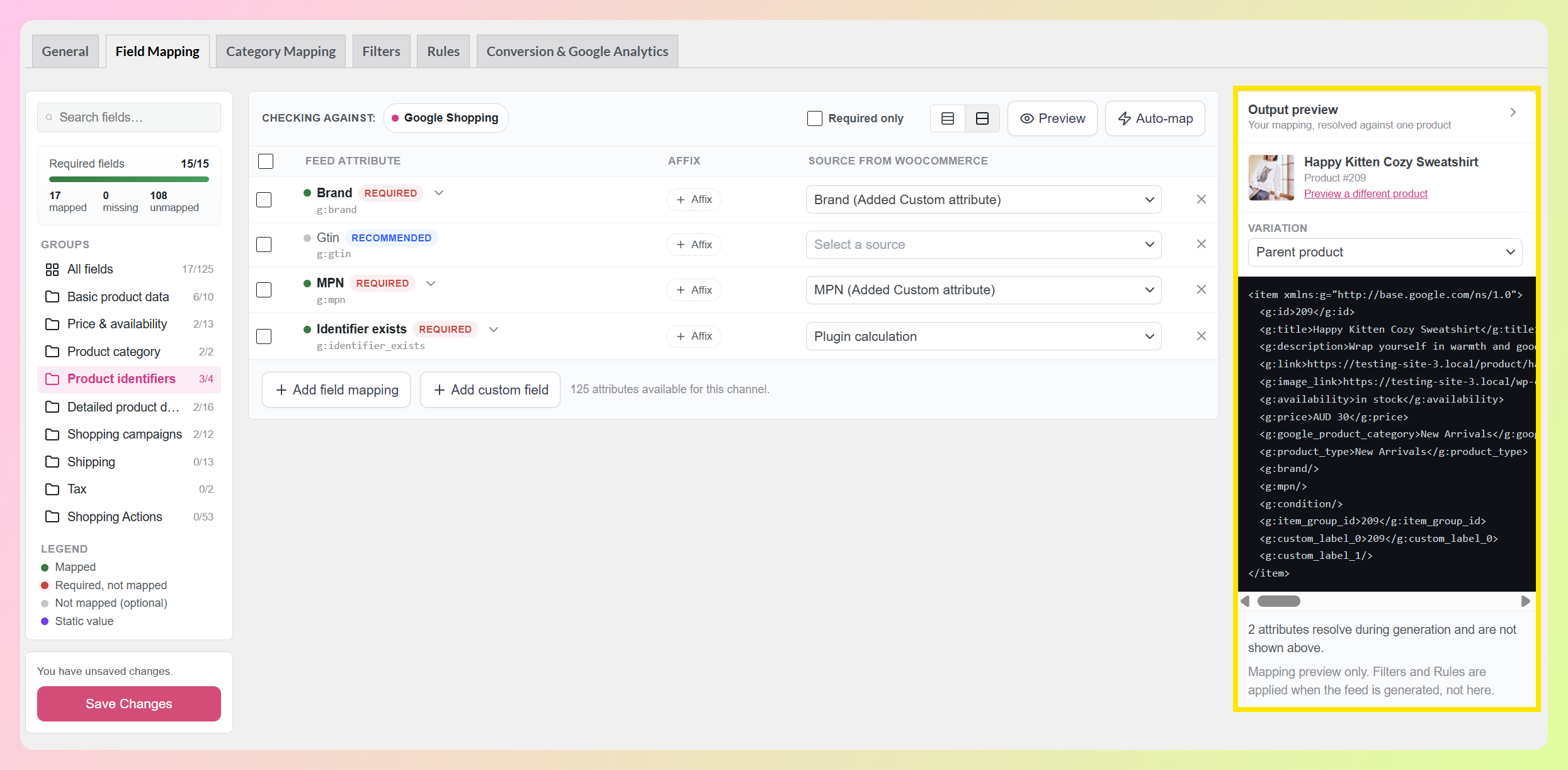
💡 GOOD TO KNOW: The preview covers your field mapping only. Your Filters and Rules are applied when the feed itself is generated.
Now, let’s go through your other field mapping options.
i. + Add field mapping
If you want to add an extra mapping, click the + Add field mapping button. This adds an empty row, which you can then fill with a feed attribute and its matching WooCommerce field.
ii. + Add custom field
If you want to add your own unique fields, click the + Add custom field button.
First, enter the name of your custom field. Then, use the Source from WooCommerce dropdown to select its corresponding field.
Take note: custom field names can only use letters, underscores, and hyphens. White spaces, numbers, and other special characters aren’t allowed.
iii. Delete
Do you want to remove one or more fields? Then tick their row checkboxes, followed by the Delete button. This removes them and their mapping details from your feed.
iv. Extra fields for Elite users
Some source fields are only available to AdTribes Product Feed Elite users.
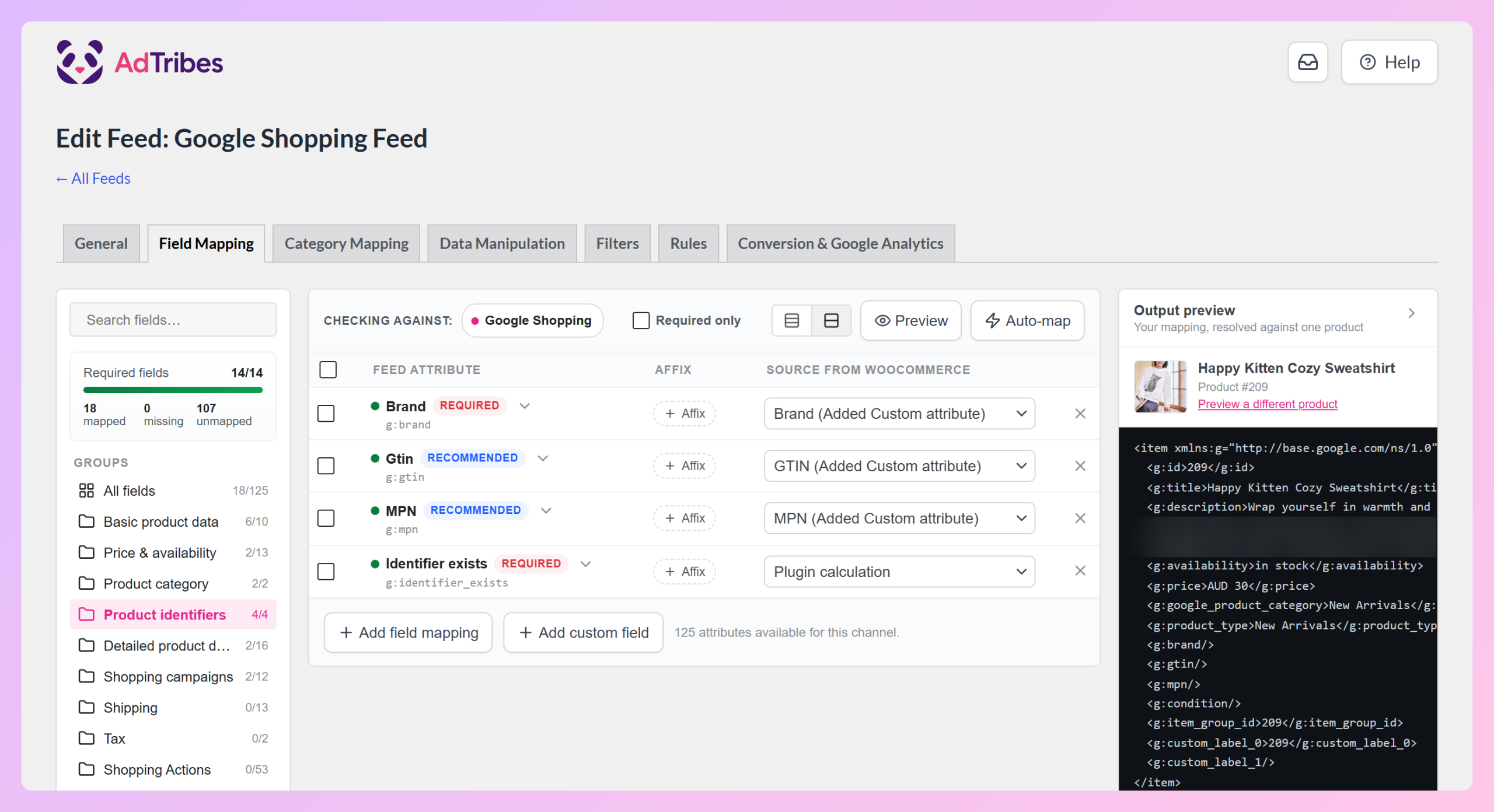
For example, AdTribes Product Feed Elite adds extra product fields such as Brand, GTIN, and MPN to your WooCommerce products. In the image below, we picked “Brand (Added Custom attribute),” “GTIN (Added Custom attribute),” and “MPN (Added Custom attribute)” as the sources for the feed’s Brand, Gtin, and MPN attributes.
Check out this document for more information on this feature.
v. Save Changes
Once you’re satisfied with your field mapping, click the Save Changes button to complete the step. You can even save a partly finished mapping and come back to it later. Now, you just need to finish the remaining steps of product feed creation so that you can showcase your items on Facebook and Instagram!
Would you like to know more about how to create product feeds? Then check out our comprehensive guide:
What Is A Product Feed And How Do You Create One? (Ultimate Guide)

Frequently Asked Questions
What does field mapping mean?
Field mapping means matching the fields in one system to the matching fields in another, so your data lands in the right place when it moves between them. For a WooCommerce store, it usually means matching your product fields, like name, price, and SKU, to the attributes a sales channel such as Google Shopping or Meta expects.
What is feed mapping?
Feed mapping is field mapping applied to a product feed. It’s the step where you decide which store field fills each attribute in the feed file you send to a sales channel. For example, you map your WooCommerce product name to the channel’s title attribute, and your product price to its price attribute.
What causes feed mapping issues?
Most feed mapping issues come from a required attribute with no source, an attribute pulling from the wrong store field, or values in a format the channel doesn’t accept. In AdTribes Product Feed Pro, the required fields counter shows which required attributes still need a source, and the output preview shows how your mapping resolves for a real product before you generate the feed.
Do I need to map every field?
No. You need a source for every attribute your sales channel requires, while optional attributes are up to you. Mapping useful optional fields can still help your listings, though. In AdTribes Product Feed Pro, tick Required only in the Field Mapping toolbar to focus on the attributes your channel needs.
Is field mapping free in AdTribes Product Feed Pro?
Yes! Field mapping is included in AdTribes Product Feed Pro, our free plugin. That includes Auto-map, the required fields counter, and the output preview. AdTribes Product Feed Elite adds extra product fields like Brand, GTIN, and MPN, plus advanced options such as Combine Fields and custom refresh intervals.
Conclusion
So, what is field mapping?
Field mapping is an essential step in ensuring your product data is accurately represented across sales channels like Facebook and Google Shopping. By aligning your WooCommerce store’s fields with the requirements of these platforms, you can prevent listing errors, improve search visibility, and create a better customer experience.
With a tool like AdTribes Product Feed Pro, most of that work is done for you. It prefills your mappings, fills suggestions with Auto-map, and previews the output for a real product, while still giving you the flexibility to customize your feeds.
To recap, this article explored the following key concepts:
- What is product data?
- What is field mapping?
- Why is field mapping important?
- Field mapping and product feeds
- Frequently asked questions
We hope we’ve answered the question “What is field mapping and why is it important for product feeds?” If you have any other concerns, reach out to us and let us know; we’d be happy to hear from you!