Reviewed by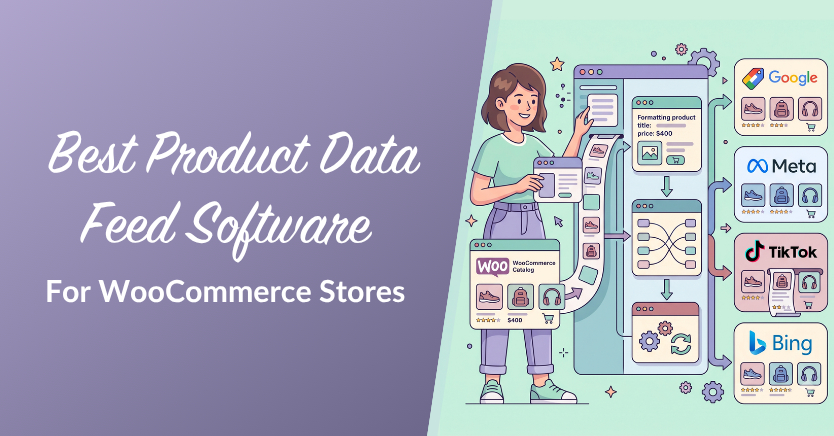
If you sell on more than one channel, your product data feed is doing quiet, heavy lifting: it decides whether your products show up correctly on Google Shopping, Meta, Bing, TikTok, and beyond, or get rejected for a missing field. The right product data feed software takes that job off your plate, pulls the data straight from WooCommerce, formats it per channel, and keeps it fresh.
The trouble is that “feed tools” range from free WordPress plugins to enterprise services built for much larger catalog and marketplace operations. Pick the wrong tier and you may either outgrow it quickly or pay for more than your store needs. This guide compares the best product data feed software for WooCommerce stores in 2026, what each tool is good at, and how to choose the one that fits your store.
What Is Product Data Feed Software?
Product data feed software collects your product information, formats it into the file structure each sales channel expects, and keeps that file updated as prices and stock change. In short, it turns your WooCommerce catalog into a channel-ready feed without manual spreadsheets. For the full breakdown of how feeds and feed management work, see our guide to what product feed management is.
Below we focus on the practical question: which tool should a WooCommerce store actually use?
What Good Product Data Feed Software Should Handle
Before comparing tools, it helps to know what good product data feed software should actually do. At minimum, it should help you format product data for each sales channel, map required fields, keep prices and stock updated, and give you enough control to improve feed quality over time.
- Data collection: pull product information from your WooCommerce catalog or other connected sources.
- Formatting: prepare product data in the file type and structure each channel expects.
- Field mapping: match WooCommerce product fields to the attributes required by Google Shopping, Meta, Bing, TikTok, and other channels.
- Feed optimization: adjust titles, categories, attributes, and product details so listings are more complete and useful.
- Automation: refresh feeds regularly so product information stays aligned with your WooCommerce catalog.
How We Compared the Tools
We weighed the things that matter most to a WooCommerce store owner choosing product data feed software:
- WooCommerce fit: whether the tool runs inside WordPress or works as an external platform.
- Ease of use: how quickly a store owner can create, review, and manage feeds without a heavy technical setup.
- Feed coverage: how well it supports shopping, advertising, comparison, and AI product feed use cases.
- Cost model: whether the free or paid plan makes sense as your catalog and feed needs grow.
- Feed control: rules, filters, and field mapping options for improving data per channel.
- Maintenance: refresh and validation options that help keep feeds accurate over time.
- Upgrade path: whether the tool can support more advanced feed needs later without forcing a full platform switch.
Best Product Data Feed Software for WooCommerce
1. AdTribes Product Feed Pro (best overall for WooCommerce)
AdTribes Product Feed Pro is our top pick for most WooCommerce stores because it runs directly inside WordPress, reads from your existing WooCommerce product data, and lets you create unlimited product feeds without a product cap. That makes it a practical product data feed software choice for stores that want to sell across multiple shopping, advertising, and comparison channels without moving their catalog into a separate feed platform. For a side-by-side look at how it measures up against another popular option, see our WebToffee product feed comparison.
Setup starts with 250+ ready-made product feed templates. You can choose a template for Google Shopping, Meta, TikTok, Pinterest, comparison shopping engines, or OpenAI product feeds. You can also set up a Bing Shopping feed with the dedicated Bing template. From there, adjust your field mapping, category mapping, filters, and rules based on what each channel needs.
- Template coverage: 250+ ready-made product feed templates for shopping, advertising, comparison, and AI product feed use cases.
- Feed control: product filters and rules, field mapping, category mapping, and custom static or dynamic fields.
- Maintenance: scheduled refreshes help keep feed data aligned with changes to prices, stock, and product details.
- Cost: AdTribes Product Feed Pro is free with unlimited products and feeds. Product Feed Elite adds advanced features such as feed validation, extra field controls, custom refresh intervals, and more flexible feed management options.
Quick tip: once your feed is live, schedule regular refreshes so prices, stock, and product details stay aligned with your WooCommerce store.
For many WooCommerce stores, that mix of native WooCommerce control, generous free limits, and broad feed-template coverage is what makes AdTribes Product Feed Pro a strong starting point. You can see how it compares to other WooCommerce feed plugins in more detail, or check current tiers on the pricing page.
How setup works in AdTribes Product Feed Pro
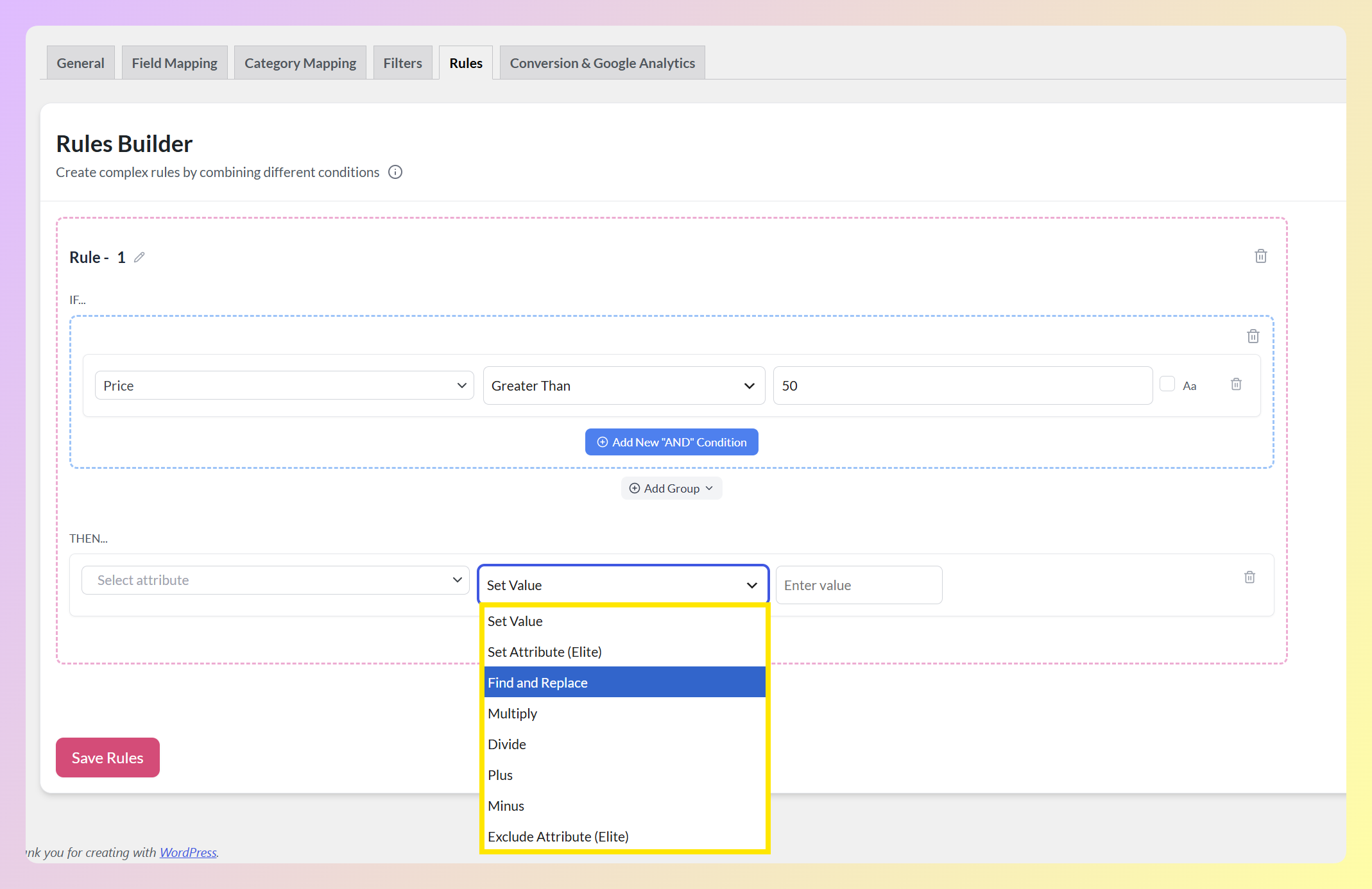
AdTribes Product Feed Pro keeps the feed creation process inside WordPress. A typical setup starts with your feed’s basic settings, then moves into field mapping, category mapping, and optional filters or rules so each channel receives cleaner product data.
- General feed settings: choose the channel, country, file format, and other core feed details.
- Field mapping: match WooCommerce product attributes to the fields required by your chosen channel.
- Category mapping: connect your store categories with the taxonomy used by the sales channel.
- Filters and rules: exclude products, adjust feed values, or send different product details to different channels.
2. DataFeedWatch
DataFeedWatch is a well-established feed management service with broad channel support and strong data-transformation tools. It’s platform-agnostic rather than WooCommerce-native, which is a plus if you run several storefronts on different platforms. The trade-off for a WooCommerce store is that it works as an external SaaS platform, so you manage feeds outside WordPress instead of directly inside your WooCommerce dashboard. If that setup isn’t the right fit, our guide to DataFeedWatch alternatives for WooCommerce compares plugin-based options.
3. Feedonomics
Feedonomics sits at the enterprise end of product feed management. It is a managed service built for larger teams that want help with feed setup, optimization, and ongoing management across advertising channels and marketplaces. That can be valuable for complex catalogs, but most small and mid-size WooCommerce stores may prefer a plugin they can manage directly inside WordPress. We cover this in detail in our Feedonomics alternative guide.
4. CTX Feed
CTX Feed is another WooCommerce feed plugin with a free tier and a paid Pro upgrade. It supports a large number of channels and can be a reasonable option if you’re already familiar with its workflow. For stores comparing native WooCommerce feed plugins, AdTribes Product Feed Pro stands out for its 250+ template coverage, OpenAI product feed support, and free unlimited products and feeds. See the full CTX Feed comparison if it’s on your shortlist.
5. Native platform extensions (Google for WooCommerce)
The official Google for WooCommerce extension can work well for a basic Google-focused setup because it syncs WooCommerce products with Google Merchant Center. However, it is not built to manage feeds across Meta, Bing, TikTok, Pinterest, comparison shopping engines, OpenAI product feeds, or custom feed workflows. If you plan to sell beyond Google, dedicated product data feed software gives you more room to grow.
Product Data Feed Software Compared
| Tool | WooCommerce-native | Feed/template coverage | Free tier | Best for |
|---|---|---|---|---|
| AdTribes Product Feed Pro | Yes | 250+ ready-made templates, including OpenAI product feeds | Yes, unlimited products and feeds | Most WooCommerce stores |
| DataFeedWatch | No, external SaaS | Broad external channel network | Trial available | Multi-platform sellers |
| Feedonomics | No, managed service | Broad feed destinations | No | Enterprise catalogs |
| CTX Feed | Yes | Large WooCommerce feed-template library | Yes | Stores comparing WooCommerce feed plugins |
| Google for WooCommerce | Yes | Google-focused product sync | Yes | Basic Google Shopping setup |
When Dedicated Product Data Feed Software Makes Sense
A basic product sync may be enough when you only sell through one channel. Dedicated product data feed software becomes more useful when your catalog needs to work across several platforms, each with its own required fields, file formats, and product data rules. Our AdTribes vs Channable comparison looks at when a WooCommerce plugin is enough and when a multichannel SaaS platform like Channable fits better.
- You sell on multiple channels: one feed tool can help you prepare data for Google Shopping, Meta, Bing, TikTok, Pinterest, comparison shopping engines, and other destinations.
- Your prices or stock change often: scheduled refreshes help keep product data aligned with your WooCommerce catalog.
- Each channel needs different details: filters, rules, field mapping, and category mapping help you tailor feeds without editing product pages one by one.
- You sell in different markets: a flexible feed setup can make it easier to manage channel, country, and format requirements as your store expands.
- You want fewer manual spreadsheet updates: the right tool reduces repetitive feed work and gives you a more reliable workflow for ongoing feed maintenance.
How to Choose Product Data Feed Software
Match the tool to your stage, not to the longest feature list:
- Running WooCommerce and want control in one place: a native plugin like AdTribes Product Feed Pro keeps feeds inside WordPress and costs nothing to start.
- Selling across several platforms, not just WooCommerce: an external service like DataFeedWatch can centralize feed management outside your store.
- Enterprise catalog with a budget for managed service: Feedonomics can remove much of the hands-on work.
- Only ever using Google Shopping: the native Google extension may be enough until you add a second channel.
For many WooCommerce stores, the deciding factors are WooCommerce-native control, feed-template coverage, and a free tier that doesn’t cap your catalog. That’s why AdTribes Product Feed Pro is our top pick.
Tips for Getting More Value From Product Data Feed Software
Once you choose a tool, the next step is making sure your feeds stay useful over time. These simple habits can help you get more value from your product data feed software without making feed management feel complicated.
- Schedule regular feed updates: keep prices, stock, and product details aligned with your WooCommerce catalog.
- Review platform requirements: check required fields, product categories, image rules, and other channel-specific details before submitting a feed.
- Use filters and rules carefully: tailor product data for each channel without changing the product details shoppers see on your store.
- Add custom attributes when needed: include extra product details when a sales channel requires more information than your default WooCommerce fields provide.
- Run periodic quality checks: review feeds for missing data, outdated values, or products that no longer meet channel requirements.
Frequently Asked Questions
What is the best product data feed software for WooCommerce?
For most WooCommerce stores, AdTribes Product Feed Pro is our top pick for product feed management software. It runs inside WordPress, supports unlimited products and feeds, includes 250+ ready-made product feed templates, and gives store owners practical controls for mapping, filtering, and refreshing feeds. AdTribes Product Feed Elite adds custom refresh intervals, extra product fields for GTIN, MPN and brand, and advanced feed rules for larger catalogs
Is there free product data feed software?
Yes. AdTribes Product Feed Pro is free and lets WooCommerce stores create unlimited products and feeds. Product Feed Elite is available for stores that need more advanced feed controls, validation, and premium features.
Do I need feed software if I already use Google for WooCommerce?
Google for WooCommerce can be enough if you only need to sync products with Google. If you also want feeds for Meta, Bing, TikTok, Pinterest, comparison shopping engines, OpenAI product feeds, or custom feed workflows, dedicated product data feed software gives you more flexibility.
What’s the difference between a feed plugin and a feed service?
A feed plugin, such as AdTribes Product Feed Pro or CTX Feed, runs inside WordPress and gives you direct control from your WooCommerce dashboard. A feed service, such as DataFeedWatch or Feedonomics, runs outside your store and can be useful when you need a separate platform or managed feed support.
Can I switch feed software without rebuilding my feeds?
Usually, you can switch without reimporting your WooCommerce products because a native feed plugin reads from your existing catalog. You may still need to choose new templates, review field mapping, confirm category mapping, and replace the old feed URL in each sales channel.
Which Product Data Feed Software Should You Choose?
If you run a WooCommerce store, AdTribes Product Feed Pro is a strong place to start. It gives you direct feed control inside WordPress, 250+ ready-made product feed templates, and a free tier with unlimited products and feeds. Enterprise sellers with managed-service budgets may want to compare Feedonomics, and multi-platform merchants may consider DataFeedWatch, but for most WooCommerce-first stores, AdTribes Product Feed Pro offers the most practical balance of control, coverage, and cost.