Reviewed by
DataFeedWatch can handle product feeds across multiple ecommerce platforms, but its pricing and limits can become more noticeable as a WooCommerce catalog grows. Plans vary by SKU count, number of feeds, shops, and daily syncs, while feed management happens outside WordPress in a separate SaaS platform.
For example, a WooCommerce catalog with 3,000 SKUs already exceeds the Shop plan’s 1,000-SKU limit, so the store needs extra SKU blocks or a higher plan. Shop also syncs once a day, which can leave price or stock changes waiting until the next scheduled update.
That makes product limits, refresh frequency, channel coverage, and long-term cost useful things to compare when looking for a DataFeedWatch alternative. AdTribes takes a different approach: it’s a WooCommerce feed plugin used by 90,000+ store owners, with a native WordPress workflow and no product or feed limits in the free version.
Best DataFeedWatch Alternative For WooCommerce (Quick Answer)
For WooCommerce stores that want a native WordPress workflow without product or feed limits, AdTribes is a strong DataFeedWatch alternative: the free plugin includes unlimited products and feeds plus hourly refresh, while paid plans start at $99.50 for the first year (renewing at $199).
The lineup at a glance:
- AdTribes (AdTribes Product Feed Pro and AdTribes Product Feed Elite): Runs inside WooCommerce with no product or feed limits in the free plugin.
- CTX Feed: A WooCommerce feed plugin with 220+ shopping and social channels, including a ChatGPT (OpenAI) product feed template.
- RexFeed: A WooCommerce feed plugin with 200+ channels and a free version capped at 200 products per feed.
- WebToffee Product Feed: A WooCommerce feed plugin with free and premium versions; OpenAI Agentic Commerce feed support is premium.
Why Consider A DataFeedWatch Alternative
The main trade-offs to compare are DataFeedWatch’s SKU and feed limits, sync frequency, and its separate SaaS workflow.
- SKU-tier pricing: Each plan caps the number of SKUs. The Shop plan covers 1,000, Merchant covers 5,000 and Agency covers 30,000. Grow past your tier and you either buy extra blocks of 1,000 SKUs (listed at $2 to $5) or move up a plan.
- Feed counts per plan: Shop allows 3 feeds, Merchant 10, and Agency 150. A store that wants separate feeds for Google, Meta, TikTok, and a second country uses up the entry plan.
- Sync frequency: Syncs run 1, 2, or 5 times a day depending on the plan. On Shop, a price change made at 9am may not reach your listings until the next daily sync.
- A separate platform: DataFeedWatch is SaaS, not a WooCommerce plugin. It imports your catalog into its own dashboard, so feed configuration lives outside WordPress and the subscription is billed separately.
WooCommerce is already the system of record for your prices, stock, and variations. According to W3Techs, WooCommerce runs 47.6% of all the ecommerce systems in its surveys. For a WooCommerce store, a native feed plugin can read that product data directly inside WordPress instead of first importing the catalog into a separate feed-management platform.
What DataFeedWatch Costs (And What Changes As You Grow)
DataFeedWatch starts at $64 per month for the Shop plan, and costs can rise with your SKU count, feed count, and number of shops. The current plans are:
| Plan | Price | SKUs | Feeds | Shops | Syncs per day |
|---|---|---|---|---|---|
| Shop | $64/month | 1,000 | 3 | 1 | 1 |
| Merchant | $84/month | 5,000 | 10 | 2 | 2 |
| Agency | $239/month | 30,000 | 150 | Unlimited | 5 |
| Enterprise | Custom | 100,000+ | Unlimited | Unlimited | 5 |
Paying yearly cuts those prices by 17%, and extra blocks of 1,000 SKUs cost $2 to $5 depending on the plan. DataFeedWatch counts each product variant as a SKU, so a product sold in five colors uses five. The Shop plan includes email support.
For teams managing stores across several ecommerce platforms, DataFeedWatch has a clear advantage: the Agency plan supports unlimited shops in one account. For a WooCommerce-only store, that cross-platform layer may be less useful than keeping feed management in WordPress and avoiding SKU-based pricing.
For the full feature-by-feature breakdown, see our AdTribes vs DataFeedWatch comparison.
Cost at your catalog size
Here’s what those plan limits cost over a year on monthly billing, before any SKU add-ons:
| Scenario | Lowest DataFeedWatch plan that fits | DataFeedWatch per year | AdTribes per year |
|---|---|---|---|
| 1,000 SKUs | Shop | $768 | $0 (free plugin) |
| 5,000 SKUs | Merchant (at its ceiling) | $1,008 | $0 (free plugin) |
| 30,000 SKUs | Agency | $2,868 | $0 (free plugin) |
| Unlimited WooCommerce sites | Agency | $2,868 | $0 (free plugin), or $249.50 first year on Business for Elite |
For product volume, the free plugin has no product or feed limit. If you want Elite features on one site, Growth is $99.50 for the first year and renews at $199.
AdTribes: What It Is And Why It Fits WooCommerce
AdTribes is a WooCommerce plugin that builds your product feeds inside WordPress, from the product data your store already has. AdTribes Product Feed Pro is our free WooCommerce product feed plugin, with unlimited products and unlimited feeds.
It supports major feed destinations including Meta (one catalog for Facebook and Instagram), Google Shopping, Google Local Products, Merchant Promotions, Google Remarketing (DRM), Bing Shopping, TikTok, Pinterest, and Snapchat, plus a Custom Feed you can build from the attributes you choose. AdTribes includes 250+ feed templates in total.
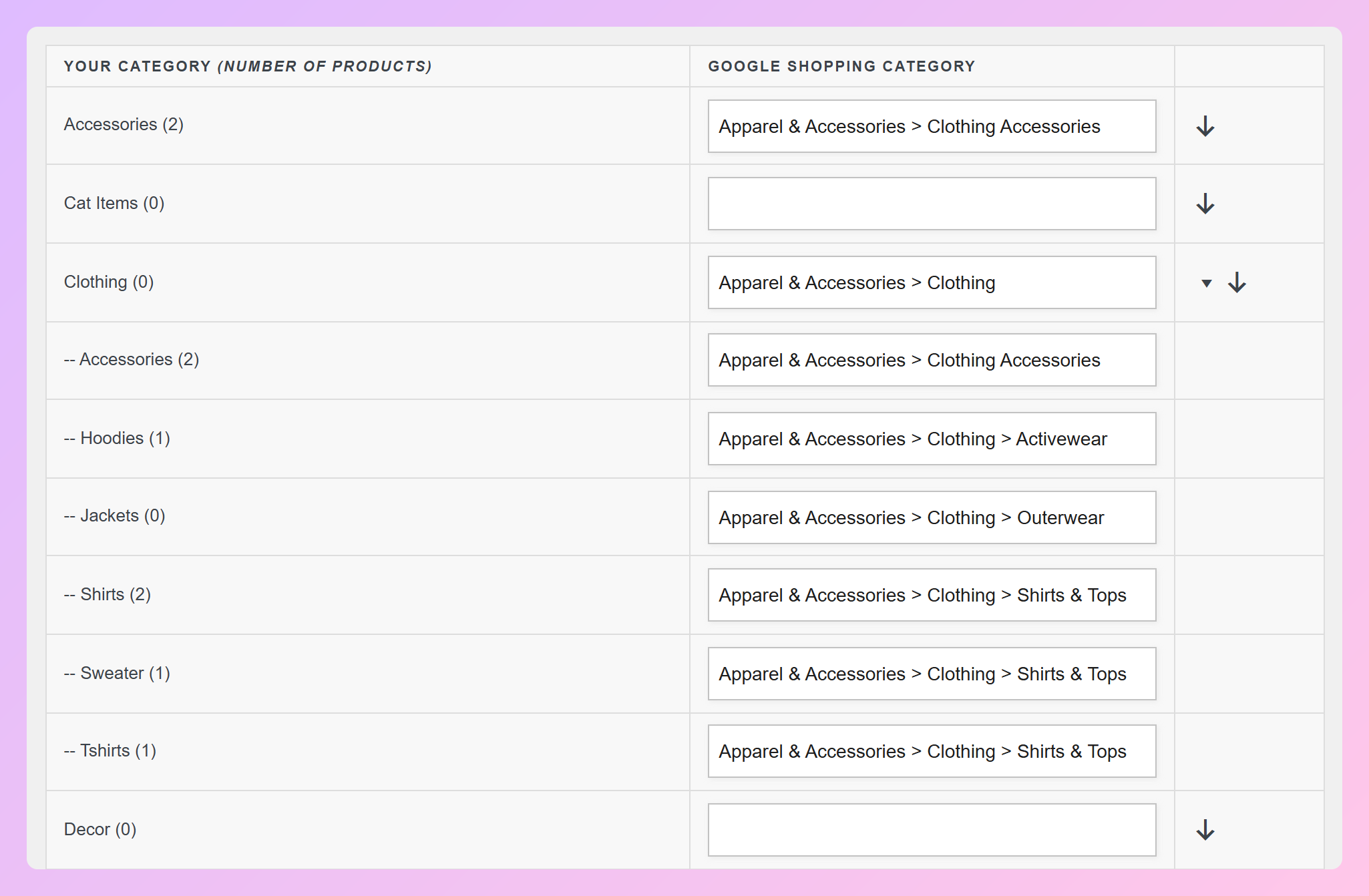
In the free plugin you get field mapping, category mapping to Google’s product taxonomy, include and exclude filters, and IF/THEN rules. Product Feed Elite adds advanced rules such as Between, In List, Combine Fields, Truncate, and Character Count.
Three details can make a switch easier:
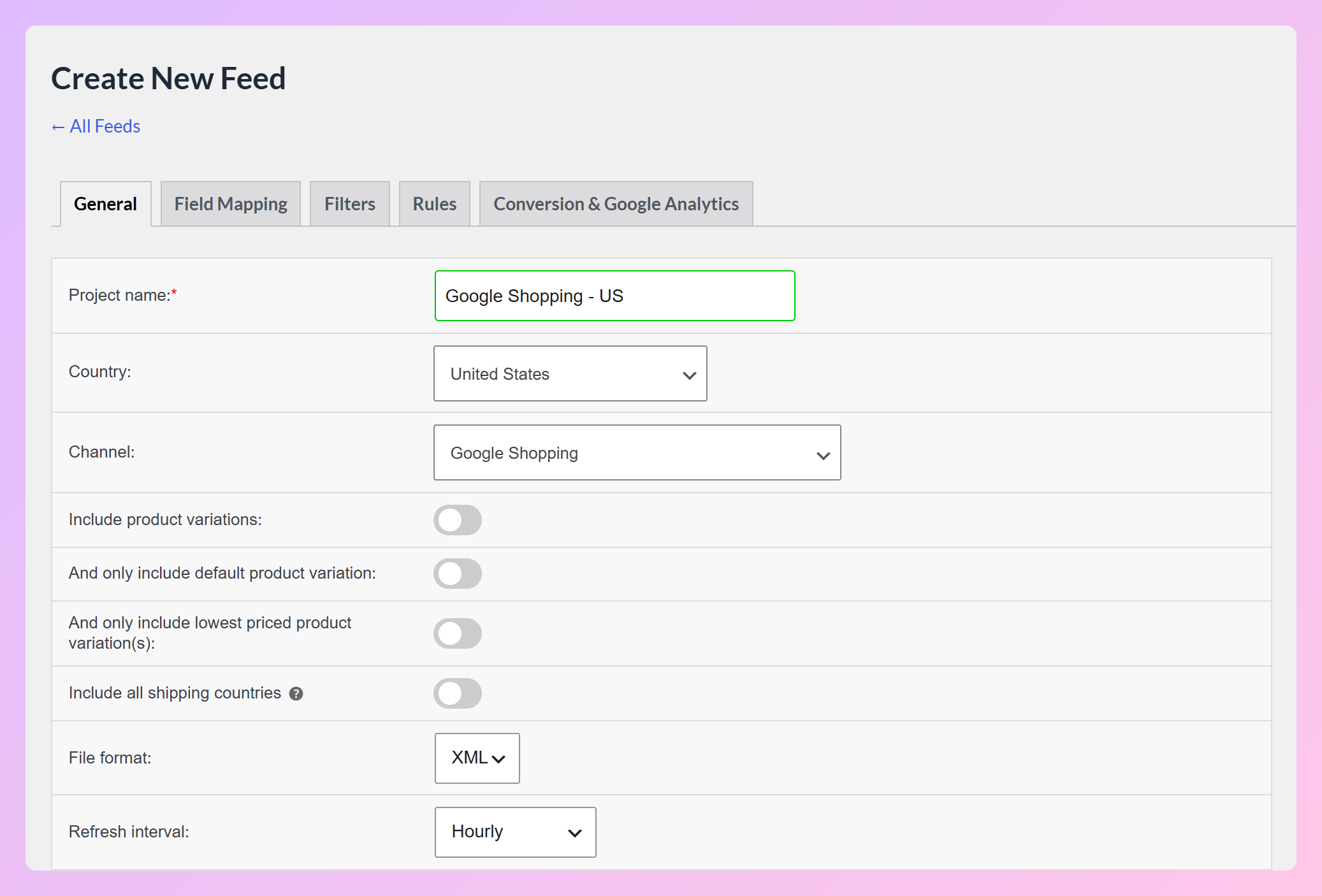
- Refresh lives on the General tab: When you create a feed, the refresh setting sits beside country, channel, and file format. The free options are No refresh, Daily, Twice daily, and Hourly.
- Category mapping has copy shortcuts: For a category with subcategories, the Category Mapping tab lets you copy its Google category down to those subcategories. You can also copy a mapping across other categories, which saves mapping rows one by one.
- Delivery is a feed URL: AdTribes publishes each feed as a file URL. Google Merchant Center fetches it on a schedule, and Meta pulls it as a Scheduled Feed. AdTribes doesn’t push products through Google’s Content API or Merchant API.
For a real multi-channel example, our case study shows how GoGoNano simplified multi-channel selling with feeds for Facebook, Instagram, and Google Shopping.
Pricing at a glance
AdTribes Product Feed Pro is free. AdTribes Product Feed Elite comes in three plans, all with a 14-day money-back guarantee:
- Growth: $99.50 for the first year (normally $199), for 1 site.
- Plus: $179.50 for the first year (normally $359), for 3 sites.
- Business: $249.50 for the first year (normally $499), for unlimited sites.
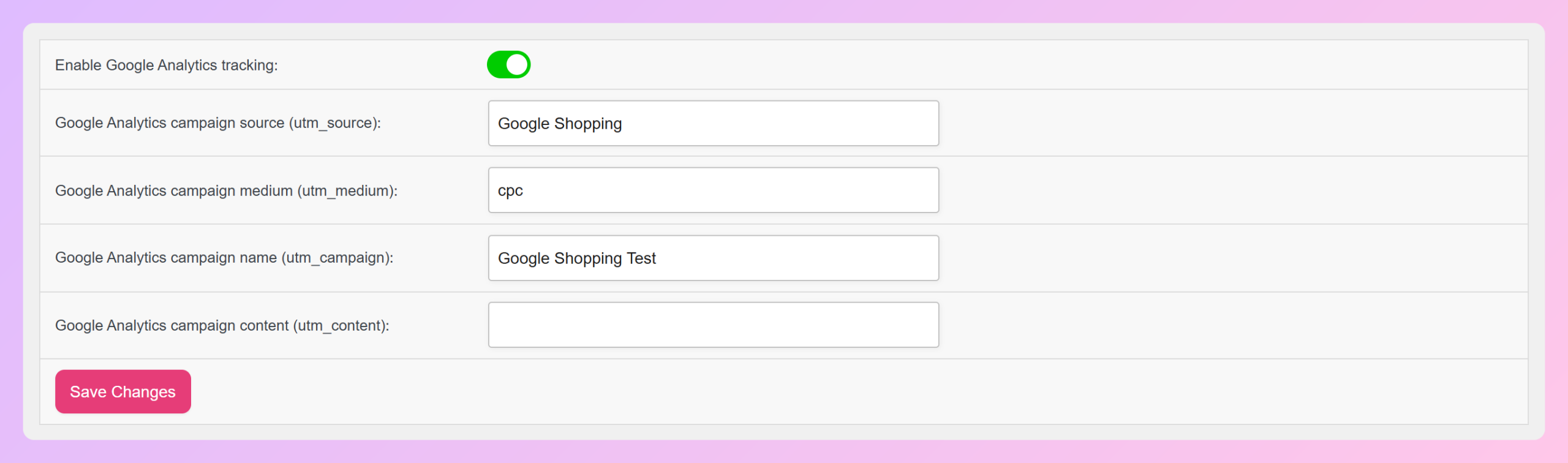
Renewals are at the normal price. Plus and Business also include three addons that aren’t sold separately: the Feed Validator Tool, the Feed Translation Addon, and the Product Feed Multi-Currency Addon. The Feed Validator runs scheduled checks on your live feed URLs and alerts you to invalid URLs, missing attributes, and formatting issues. Elite also adds GTIN, MPN, UPC, EAN, condition, and brand fields, plus custom refresh intervals. The free plugin already lets you add Google Analytics UTM parameters to the product links in each feed.
If you’re unsure which tier you need, our Product Feed Pro vs Elite guide walks through the split.
AdTribes vs DataFeedWatch: Key differences
The biggest differences between AdTribes and DataFeedWatch are:
- No SKU cap: The free plugin price does not change with product count because AdTribes Product Feed Pro has no product limit.
- Hourly refresh for free: DataFeedWatch’s Agency plan syncs 5 times a day. The free plugin can refresh every hour.
- It runs inside WooCommerce: Your feed reads prices, stock, and variations straight from the store, so there’s no separate feed-management dashboard to keep in step.
Other DataFeedWatch Alternatives For WooCommerce
Other WooCommerce plugins take the same native approach by building feeds inside WordPress. Three options to compare are CTX Feed, RexFeed, and WebToffee Product Feed. For the broader category, see our guide to product data feed software for WooCommerce.
CTX Feed
CTX Feed is the largest of these three plugins by active installs, with 90,000+ active installs and a 4.6 out of 5 rating from 800+ reviews.
CTX Feed supports 220+ shopping and social channels, including a ChatGPT (OpenAI) product feed template. That broader channel count can be useful if you sell through less common destinations. AdTribes covers Google, Meta, TikTok, Pinterest, Snapchat, and Bing in the free plugin, and its OpenAI (ChatGPT) product feed channel is free as well.
RexFeed
RexFeed has 10,000+ active installs and a 4.8 out of 5 rating from 250+ reviews.
RexFeed supports a ChatGPT (OpenAI Commerce) feed and 200+ channels. Its free version supports up to 200 products per feed, while paid plans remove that product limit and add advanced feed rules. AdTribes has over 1,000 WordPress.org ratings, compared with 250+ for RexFeed, so you can weigh both the scores and the size of each review sample.
WebToffee Product Feed
WebToffee Product Feed has 2,000+ active installs and a 4.8 out of 5 rating from 25+ reviews.
WebToffee’s premium Product Feed plugin supports OpenAI Agentic Commerce. Its WordPress.org rating is based on a smaller review sample than CTX Feed or RexFeed. AdTribes includes its OpenAI channel in the free plugin, with JSONL.GZ, CSV.GZ, TSV.GZ and Parquet formats.
If you’re weighing other SaaS tools too, you can also compare AdTribes with Feedonomics, Channable, and GoDataFeed on the AdTribes blog.
DataFeedWatch Alternatives Compared
Compared with DataFeedWatch’s Shop plan, AdTribes Product Feed Pro has higher product and feed limits, more frequent scheduled refreshes, and no plugin fee. Channel counts are not directly equivalent: DataFeedWatch’s 2,000+ figure refers to integrations, while the WooCommerce plugins count channels or feed templates.
| Feature | AdTribes | DataFeedWatch | CTX Feed | RexFeed |
|---|---|---|---|---|
| Platform | WooCommerce plugin | SaaS | WooCommerce plugin | WooCommerce plugin |
| Product / feed limits | Unlimited on free | 1,000 SKUs / 3 feeds on Shop | Unlimited | 200 products per feed on free; unlimited on paid |
| Fastest scheduled refresh | Hourly free; custom on Elite | 1×/day on Shop | Hourly free; every 5 minutes on Pro | Hourly free; custom on paid |
| Starting price | Free | $64/month | Free | Free |
| Channels / templates | 250+ | 2,000+ integrations | 220+ | 200+ |
Pro Tip: Compare SKU ceilings, not just monthly prices. A 5,000-SKU catalog sits at the top of DataFeedWatch’s Merchant plan, while AdTribes Product Feed Pro has no product limit.
When you compare, put four questions next to the price: how many products the plan allows, how many feeds, how often it refreshes, and what it costs at renewal. Our guide on how to choose a WooCommerce product feed plugin goes through that checklist in more detail.
How To Switch From DataFeedWatch To AdTribes Without Losing Data
You can switch without resetting your Merchant Center product history, as long as the new feed sends the same product IDs. According to Google Merchant Center Help, the ID tracks a product’s performance history in Merchant Center and Google Ads, and if you change the ID, you’ll overwrite your product and its history.
We recommend this order:
- Build the Google Shopping feed in AdTribes. Go to Product Feed > Create feed, pick Google Shopping as the channel, and set your country, file format, and refresh interval.
- Keep the same product ID source. Check which WooCommerce field DataFeedWatch sent as the
id(product ID or SKU, for example) and map the same field in AdTribes. - Point Merchant Center at the new feed URL. Copy the feed URL from Product Feed > Manage feeds, add it as a file-based product data source in Merchant Center, and set an update schedule.
- Pause the old feed once products validate. Wait until Merchant Center processes the items from the new source without errors, then switch off the DataFeedWatch feed.

Two Google limits apply here. According to Google Merchant Center Help on scheduled updates, a scheduled file must be under 4 GB and the URL must point directly to the feed file, not an HTML page. Google’s expiration date documentation also states that products expire from your Merchant Center account 30 days after the last refresh, so keep a refresh schedule running after you switch.
Frequently Asked Questions
What is the best DataFeedWatch alternative for WooCommerce?
For WooCommerce stores that want a native WordPress workflow without product or feed limits, AdTribes is a strong DataFeedWatch alternative. AdTribes Product Feed Pro is free, runs inside WordPress, and has no limit on products or feeds. It refreshes feeds as often as hourly at no cost. Paid Product Feed Elite plans start at $99.50 for the first year and renew at $199. That renewal costs less than three months of DataFeedWatch’s Merchant plan.
How much does DataFeedWatch cost?
DataFeedWatch’s Shop plan is $64 per month (1,000 SKUs, 3 feeds, 1 daily sync), Merchant is $84 per month (5,000 SKUs, 10 feeds, 2 syncs a day) and Agency is $239 per month (30,000 SKUs, 150 feeds, 5 syncs a day). Enterprise pricing is custom. Yearly billing is 17% cheaper, and extra blocks of 1,000 SKUs cost $2 to $5.
Is there a free DataFeedWatch alternative?
Yes. AdTribes Product Feed Pro is free and covers unlimited products and unlimited feeds. It includes Google Shopping, Meta, TikTok, Pinterest, Snapchat, Bing, and a Custom Feed channel, plus field mapping, category mapping, filters, and IF/THEN rules. You can refresh feeds daily, twice daily, or hourly without paying for a plan.
Will switching feed tools reset my Merchant Center performance?
It shouldn’t, as long as you keep the same product IDs. Google uses the ID to track a product’s performance history in Merchant Center and Google Ads, and changing it overwrites that history. Map the same WooCommerce field to id in your new feed that your old tool used, then confirm the items process before you remove the old feed.
Can one AdTribes license cover several stores?
Yes. The Plus plan covers 3 sites for $179.50 in the first year (normally $359), and the Business plan covers unlimited sites for $249.50 in the first year (normally $499). Both include the Feed Validator Tool, Feed Translation Addon, and Product Feed Multi-Currency Addon. That makes Business a practical fit for agencies running feeds for several WooCommerce stores.
Which DataFeedWatch Alternative Should You Choose?
For WooCommerce stores that want unlimited products and feeds in a native WordPress workflow, AdTribes is our pick as a DataFeedWatch alternative. AdTribes Product Feed Pro, our free WooCommerce product feed plugin, has no product or feed quota, while paid plans add premium features such as custom refresh intervals, extra product fields, and addons.
The free plugin has no product or feed cap on any WooCommerce store, while the Business plan adds Elite features across unlimited sites for agencies and multi-store teams.
- Review the main DataFeedWatch trade-offs around SKU limits, feed counts, refresh frequency, and workflow.
- Work out what DataFeedWatch costs at your catalog size before your next renewal.
- Compare the alternatives side by side on limits, refresh, and price.
- See how to switch feed tools while keeping the same product IDs so you can preserve Merchant Center product history.
If SKU-based pricing is one of the reasons you’re considering a switch, you can start with the free plugin and compare AdTribes pricing when you need Elite features.