

Amazon Logo

Easily Create Amazon Product Feeds With AdTribes

Upload-Ready Amazon Feeds

Easily build a clean product feed file that you can review, download, and upload through Seller Central.

Product Field Mapping

Map your WooCommerce data to Amazon's inventory fields for accurate listings

Filter & Rule Logic

Show the exact products you want on Amazon based on customizable filters & rules

Multiple Feed Formats

Generate your Amazon product feed in TSV, TXT, or CSV

Unlimited Products

No limits on how many products you list in your Amazon feed

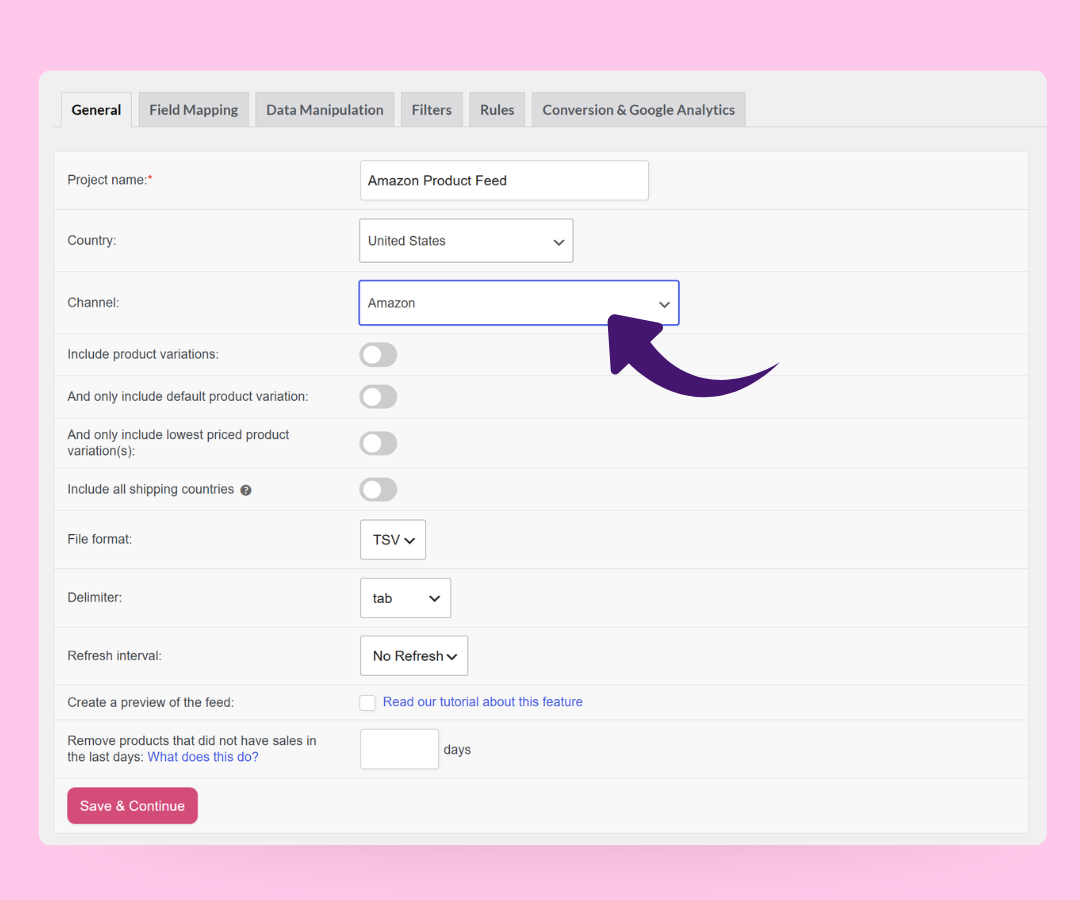
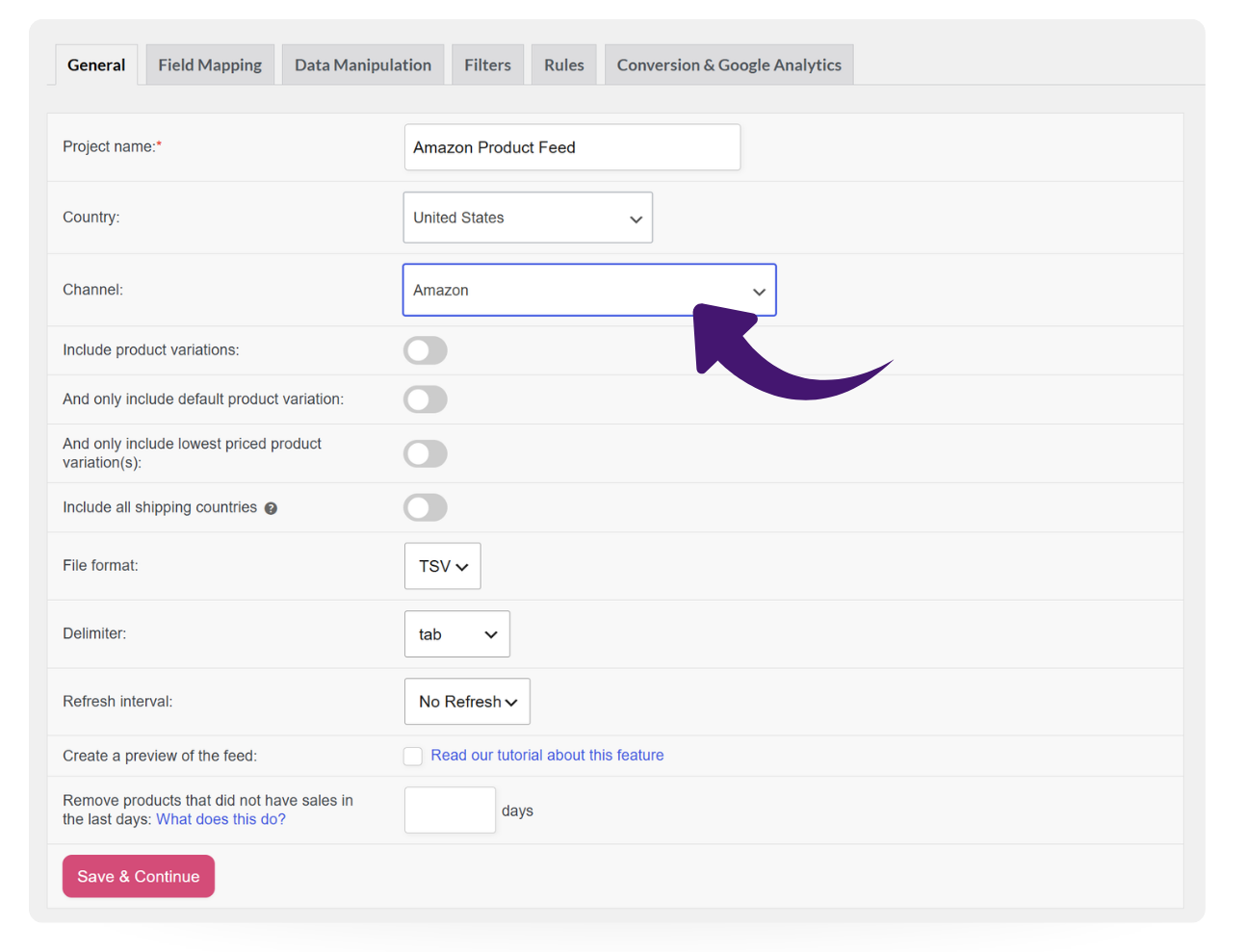
AdTribes Amazon product feed setup screen

Get Started Quickly With Amazon
As Your Channel

Listing your WooCommerce products on Amazon doesn't have to mean wrestling with Amazon's inventory template. AdTribes Product Feed Pro builds the feed file for you, so you skip the manual spreadsheet work.

Just pick Amazon from the channel list when you create a new feed, and the core product fields are mapped for you. You get a structured Amazon product feed you can upload through Seller Central.

Map Your WooCommerce Data
To Amazon's Fields

Accurate listings start with the right field mapping. With AdTribes Product Feed Pro, you match your WooCommerce data to Amazon's inventory fields without editing the file by hand.

Map core details like Seller SKU, product ID, item name, brand, price, quantity, and images. Many fields come pre-mapped, and you keep full control to adjust them for how your store is set up.
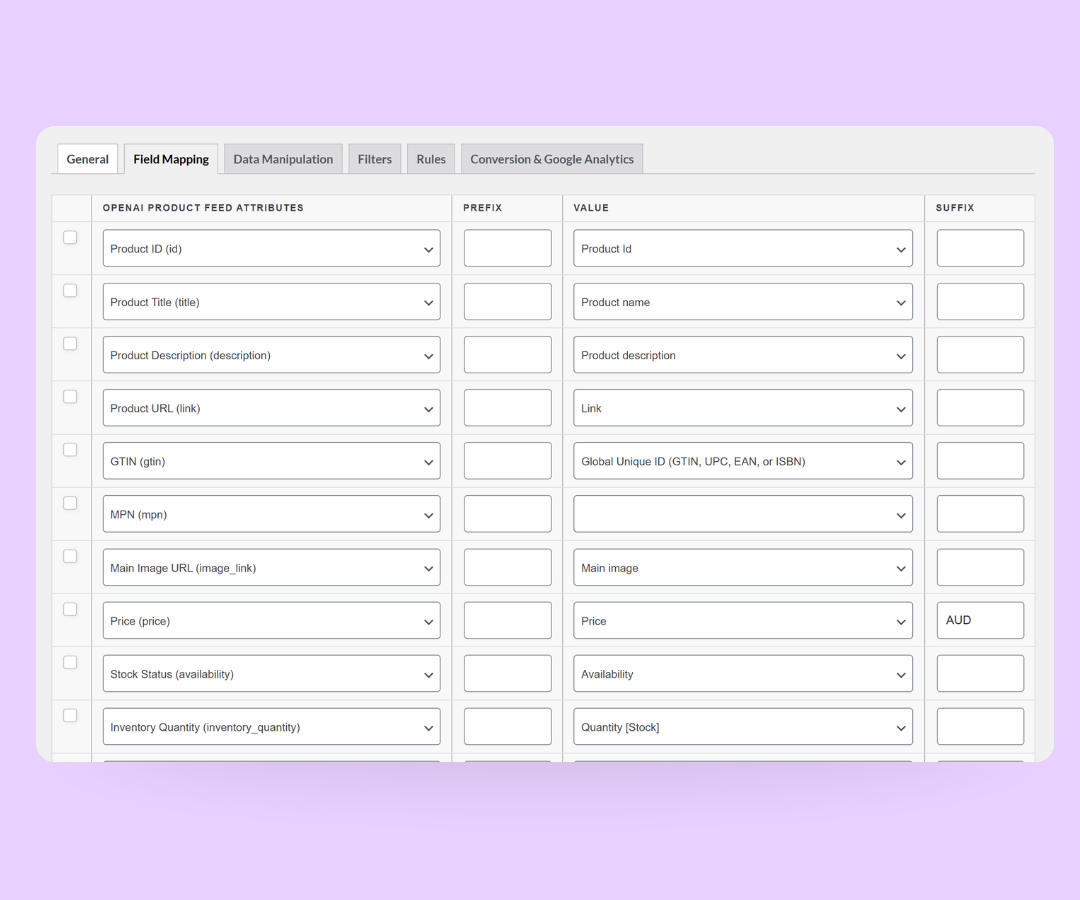
AdTribes field mapping screen for an Amazon product feed
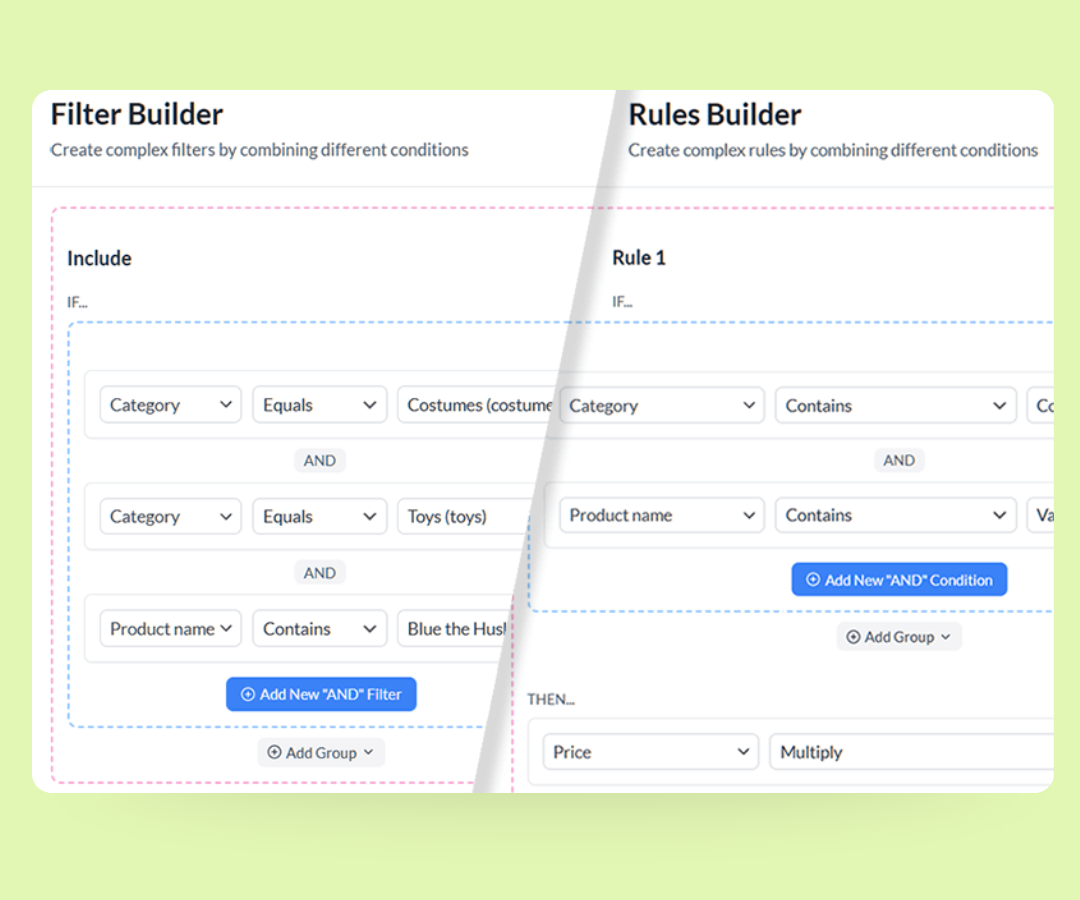
AdTribes filters and rules for a product feed

Choose Exactly Which Products Go To Amazon

Not every product in your store needs to be included in your Amazon feed. With flexible filters and rule logic, you decide which items are added to the file and under what conditions.

Include or exclude products based on stock status, price, category, brand, tags, or other attributes. For example, you can leave out low-stock items or prepare a feed for a specific product collection.

Keep Your Amazon Feed Fresh
With Custom Refresh Intervals

Your Amazon feed file is only as current as the product data behind it. AdTribes Product Feed Pro can regenerate your feed file on a schedule, so your latest WooCommerce product details are ready when it’s time to update your Amazon listings.

That way, when you head to Seller Central, you can download the current feed file and upload it through Amazon’s inventory tool.

Custom refresh intervals are available in AdTribes Product Feed Elite.
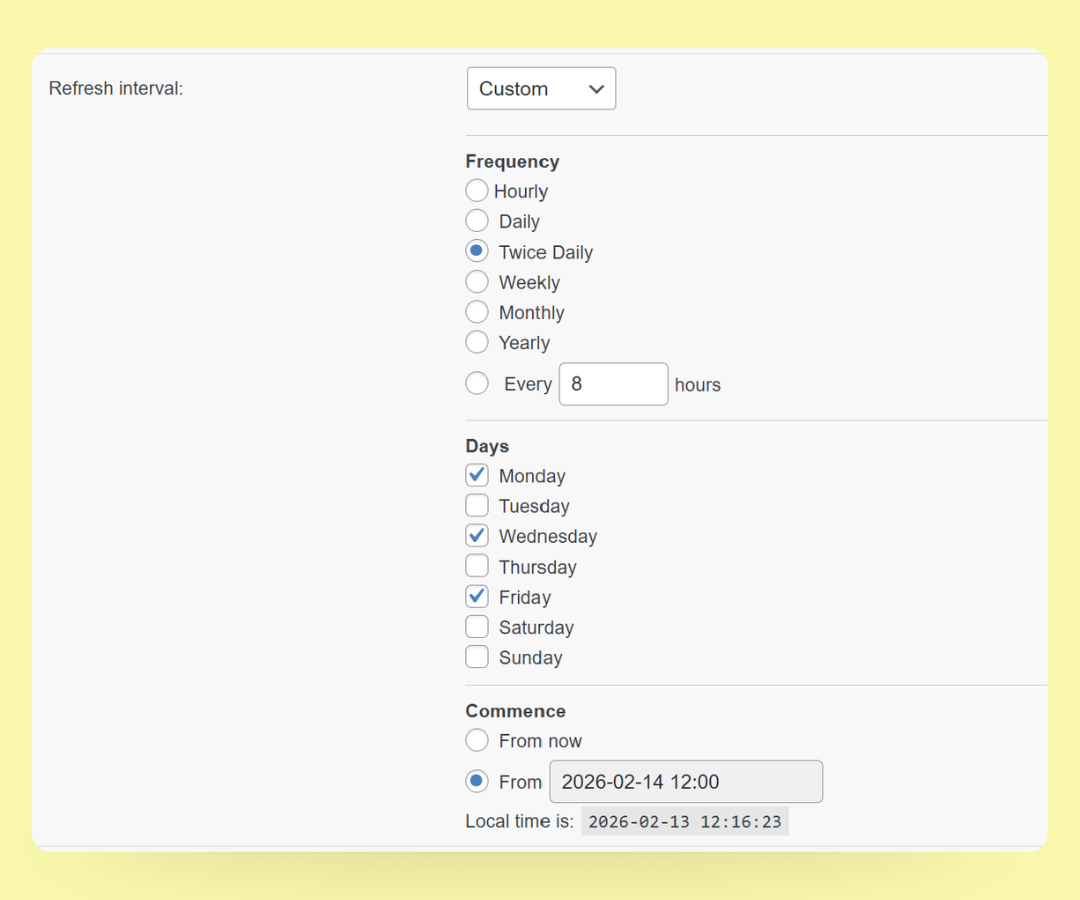
Custom Refresh Intervals

Get The Best WooCommerce Product Feed Plugin Now

The simplest way to create perfect product feeds for marketplaces, advertising platforms, and shopping networks.

How To Create Your Amazon Product Feed

🎯 Create your feed
Go to Product Feed Pro → Create feed, name it, and choose Amazon as the channel.

🧩 Choose your format
Set your file format to TSV, which matches Amazon's tab-delimited inventory files. TXT and CSV are also available.

⚙️ Map fields, filters & rules
Review the pre-mapped Amazon fields, then adjust mappings and add any filters or rules you need.

📤 Generate & upload your feed
Generate the feed, download the file, and upload it through Amazon Seller Central’s inventory file upload tool. Be sure to review Amazon’s category-specific requirements before submitting.
Amazon Product Feed

Frequently Asked Questions

Do you have questions about setting up your first Amazon product feed in WooCommerce? This FAQ covers the basics, so you know what to expect before you start.

What is an Amazon product feed?An Amazon product feed is a file that lists your WooCommerce products in a format Amazon Seller Central can process. It includes details like Seller SKU, product ID, title, price, quantity, and images so Amazon can add or update your listings.

AdTribes Product Feed Pro builds this file from your WooCommerce data, so you don't have to fill in Amazon's inventory template by hand.

Is the Amazon feed free in AdTribes Product Feed Pro?Yes. The Amazon channel is built into AdTribes Product Feed Pro, which is free. You can create, map, and generate your Amazon feed without a paid plan. AdTribes Product Feed Elite adds extra feed-management features, such as custom refresh intervals, if you need more flexibility later.

What file format does Amazon need?Amazon’s inventory file workflow uses tab-delimited files. In AdTribes Product Feed Pro, TSV is the recommended option for this channel because it keeps your product data separated into tab-delimited fields. TXT and CSV are also available if your workflow or Seller Central template calls for a different file type.

How does my feed get to Amazon?You upload it. AdTribes Product Feed Pro generates the feed file, and you add it to Amazon through Seller Central's inventory upload tool. That gives you control over what you send and when, and you can regenerate the file when your WooCommerce data changes.

Can I choose which products are included in my Amazon feed?Yes. Use AdTribes Product Feed Pro’s filters and rules to control which products are included in your Amazon feed. For example, you can limit the feed to in-stock items, a specific category, or a curated collection you want to prepare for Amazon.

What if my product category has special requirements?Amazon’s required fields can vary by category and product type. The Amazon channel maps common Amazon fields, which gives you a strong starting point. For category-specific needs, check the inventory template for your category in Seller Central and map any additional required fields before uploading your feed.

All Supported Platforms

Complete Your Purchase
AdTribes WooCommerce Product Feed

The best WooCommerce product feed plugin

  • AdTribes Pty Ltd
    ABN: 40 675 636 816
Product