Reviewed by
When shoppers use Google’s AI Mode to research products, they can ask full questions about fit, care, sizing, and accessories. But a standard product feed may leave some of those details out, even when the answers are available elsewhere in your store.
You might already have those answers in a size chart, a care guide PDF, or your product FAQs. The challenge is getting that information into your Google Shopping feed in a way Google can use.
That’s where AdTribes Product Feed Pro 13.5.9 comes in! You can now map Google conversational attributes, including questions and answers, PDF document links, and related products, into your WooCommerce Google Shopping feed.
The update also supports up to 10 video links per product and adds a certification value field. Best of all, these updates are included in the free plugin. Let’s check it out below!
What Are Google Conversational Attributes?
Google conversational attributes are optional Google Merchant Center attributes that give Google more detail about your products for conversational search, like AI Mode in Google Search. Google lists six of them: question and answer, document link, related product, item group title, variant option, and popularity rank.
They sit alongside the attributes you already send, so they don’t replace your title or description. According to Google’s Merchant Center help page, they’re “completely optional, and designed to complement your primary Merchant Center product data specification.” Adding them also won’t affect the approval status of your existing products.
Think of them as extra context for Google shopping AI. They don’t guarantee a spot in AI answers (Google decides what shows), but they give it more of your product information to draw from. For the bigger picture on getting your feed ready for AI shopping, see our guide to AI product feed optimization.
The New Google Shopping Attributes (And What Each One Answers)
Version 13.5.9 adds eight updates to the Google Shopping channel. The first six are Google’s conversational attributes, and the last two are upgrades to attributes you may already use. Each one helps answer a question a shopper might ask:
| Attribute | The shopper question it helps answer | Where it lives in AdTribes |
|---|---|---|
| Question and answer | “Is this machine washable?” | Shopping Actions (up to 30 per product) |
| Related product | “What goes with this?” | Shopping Actions (up to 30 per product) |
| Document link | “Where’s the manual or size guide?” | Shopping Actions (up to 5 PDFs) |
| Popularity rank | “What’s popular right now?” | Shopping Actions |
| Item group title | “Show me this in other sizes.” | Detailed product description |
| Variant option | “Does it come in medium?” | Detailed product description (up to 30 per product) |
| Video link (now repeats) | “Can I see it in use?” | Shopping Actions (up to 10 videos) |
| Certification value (new) | “What certification class applies?” | Shopping Actions (inside Certification) |
All eight are available for the Google Shopping channel in the free plugin. If you sell products that work together, Related product is a useful place to start. It lets you describe whether another item is part of a set, a required part, often bought together, a substitute, the same product sold under a different brand, or an accessory.
Why Add Conversational Attributes To Your Feed
These attributes let you share useful details that may be missing from your standard Google Shopping feed. Here’s how that can help.
Your products can answer the questions shoppers ask
Someone shopping for a hoodie might want to know whether it shrinks, what it’s made of, or how it fits. Questions and answers, PDF guides, and videos give Google more product-specific details to consider alongside your usual feed information.
Google says its question and answer attribute is “primarily intended for use in conversational experiences such as AI mode in Google Search.” So these are the details Google is asking for directly.
Shoppers find the right size and the right add-on
When used with your existing Item group ID, item group title and variant option help Google understand which sizes or colors belong to the same product family. Related product can describe accessories, spare parts, and substitutes you also sell.
Google says its AI Mode shopping experience draws on the Shopping Graph, which includes over 50 billion product listings, with 2 billion updated every hour. Accurate variant and related-product information gives Google more context about what you sell.
You reuse content you already have
If you already have size guides, care instructions, product FAQs, or accessory suggestions, you may be able to reuse them. In AdTribes Product Feed Pro, you choose which product fields and WooCommerce attributes to map, and you can add links to your product PDFs. For product-specific FAQs, you may need to add the questions and answers to mappable fields first, unless the same static Q&A applies to every product in the feed.
Google says you don’t need to repeat details already covered in your feed’s description, product highlights, or product details. It’s also best not to duplicate a Q&A when the same answer is available in a PDF you’ve linked. Start with information that’s genuinely missing.
How To Add Google Conversational Attributes To Your Feed
Some attributes use a single value or a list of links. Others have grouped fields that belong together. Here’s how to set up both in your Google Shopping feed.
Step 1: Open your Google Shopping feed’s Field Mapping tab
Go to Product Feed → Manage feeds, open your Google Shopping feed, and click the Field Mapping tab.
The new attributes are optional, so they’re tucked away under two groups: Shopping Actions and Detailed product description. Click Show more attributes at the bottom of each group (it shows a count, like “Show 51 more attributes”) to see them, then pick a source for each one you want to send.
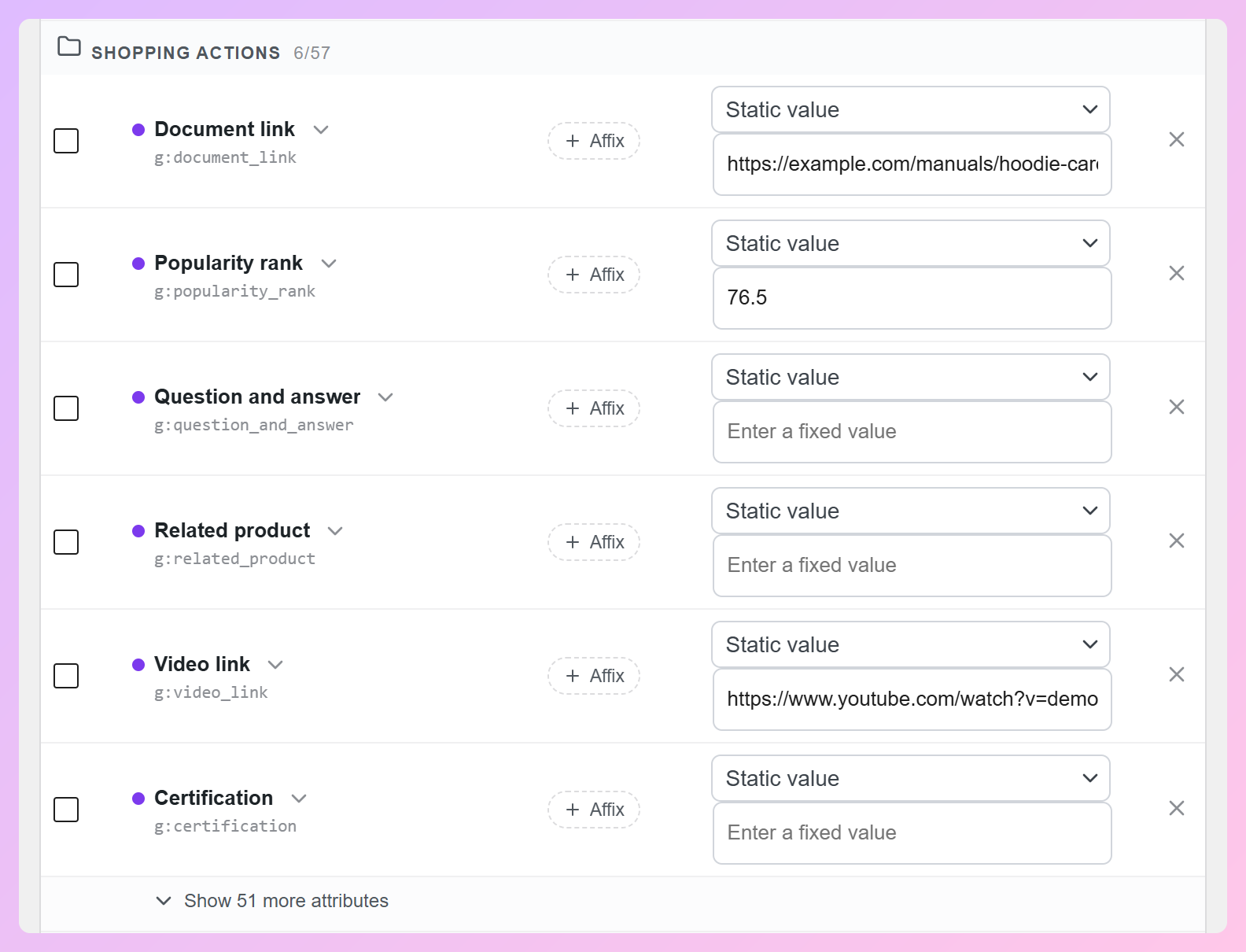
Step 2: Add single values (document link, video link, popularity rank)
For each row, choose a product field or Static value. A static value is shared across products in that feed, so use it only when the same information applies to each one.
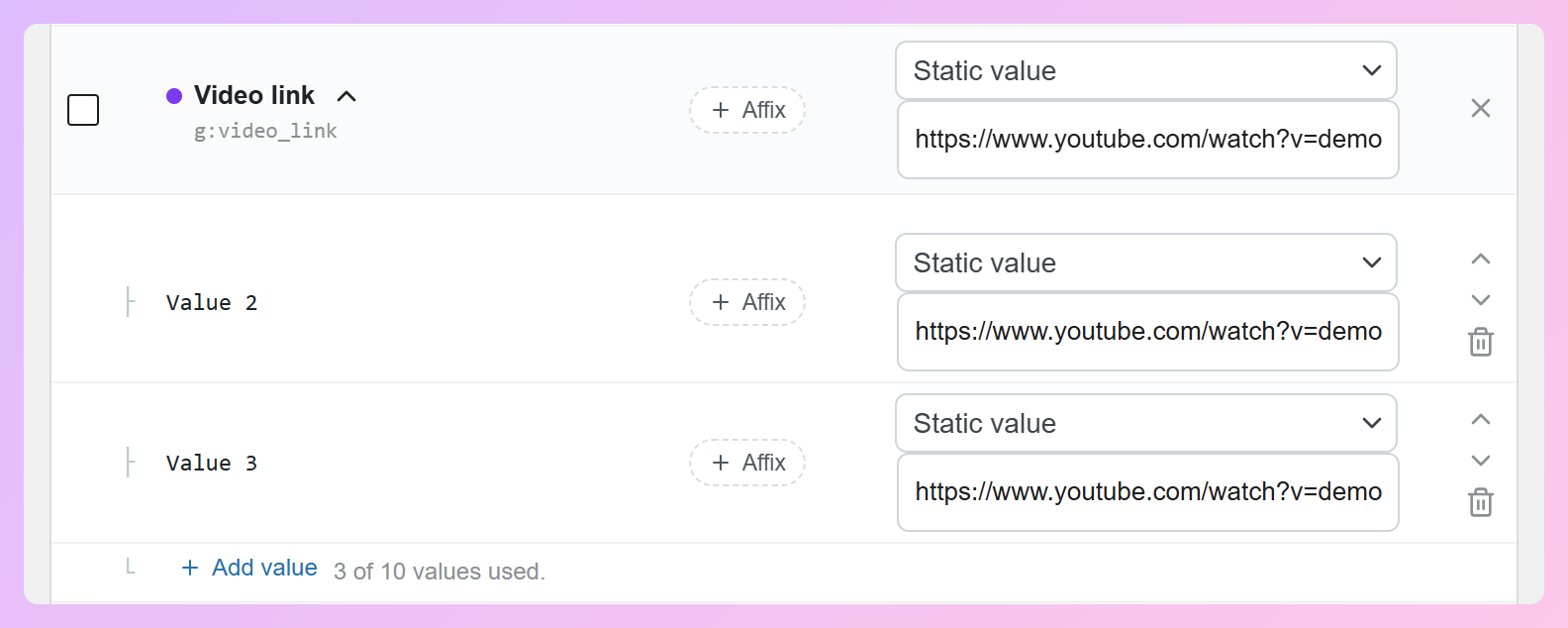
Document link and video link can repeat: open the row’s arrow and click Add value for each extra link. You’ll see a counter, such as “3 of 10 values used.”
Popularity rank takes a number from 0.0 to 100.0, with at most one decimal place and no percent sign. The value should reflect how well that product sells compared with others in your inventory, rather than a number you choose at random.
Step 3: Build a group (question and answer)
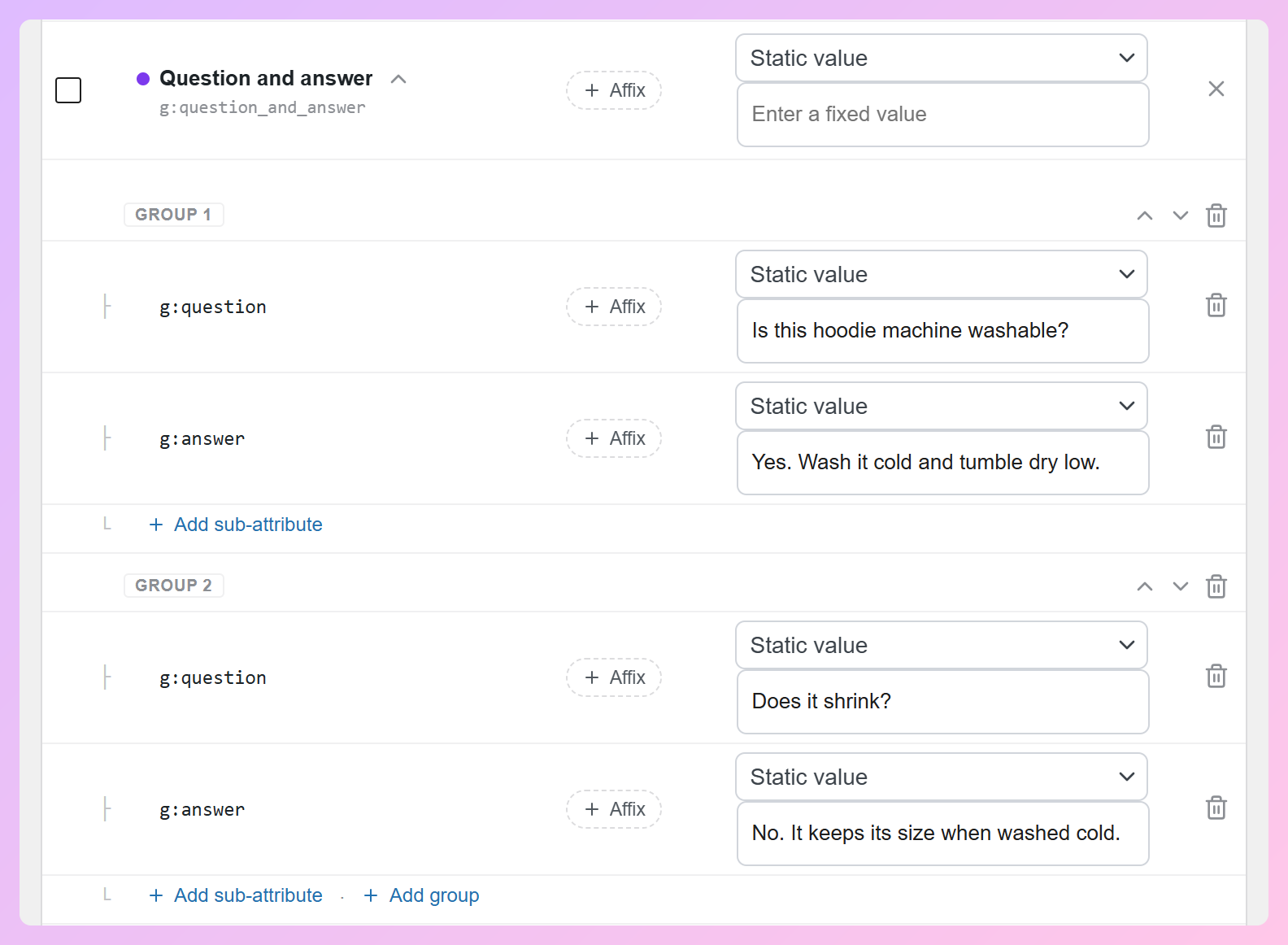
Question and answer is a group with two parts: g:question and g:answer. Open the row and choose a source for each. To add another Q&A, click Add group. You can send up to 30 per product, but make sure both parts are filled in: Google requires a question and its answer.
Step 4: Link related products
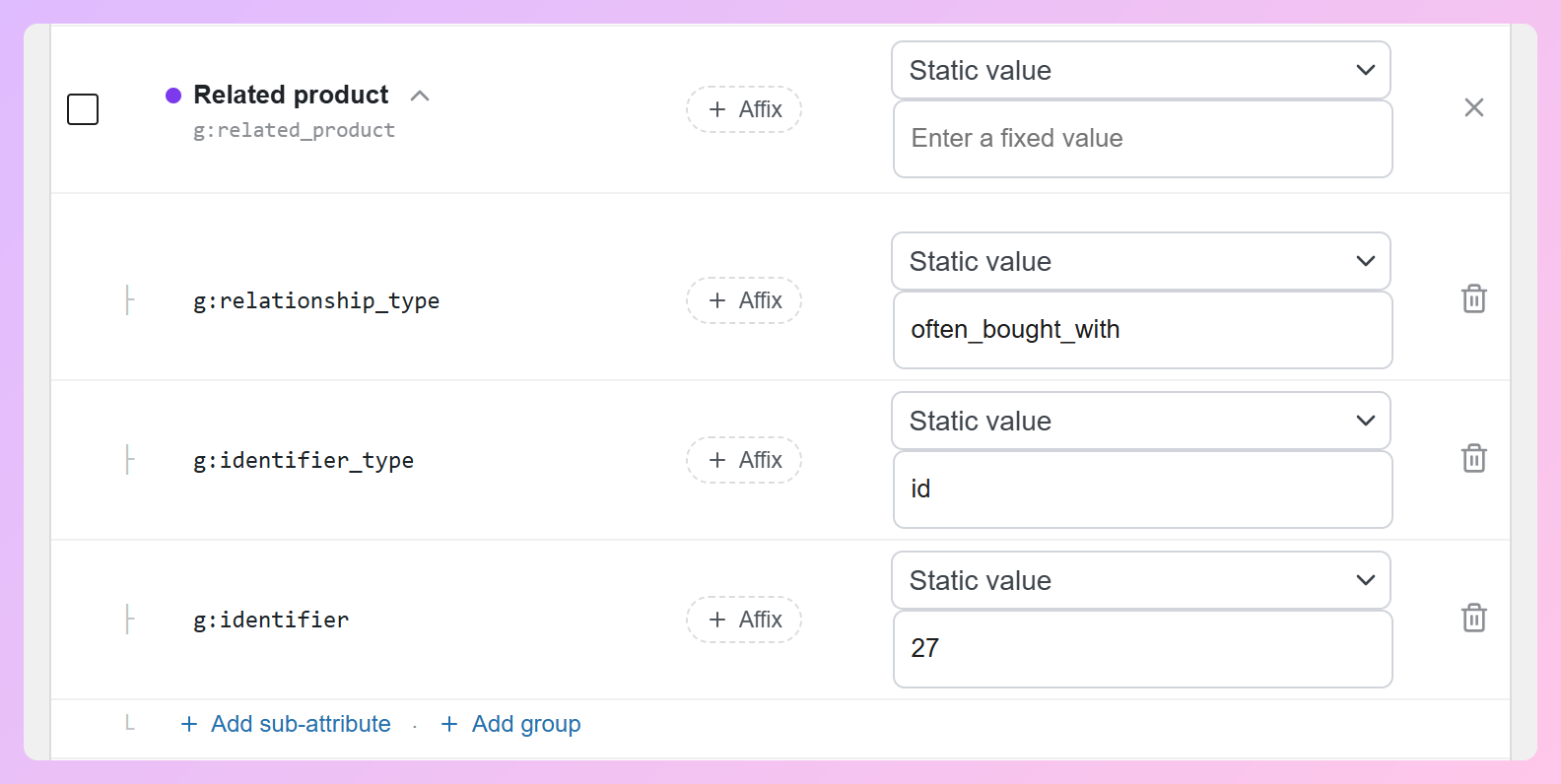
Related product works the same way, with three parts. For g:relationship_type, click the field and choose from the list (part_of_set, required_part, often_bought_with, substitute, different_brand, or accessory). For g:identifier_type, choose id or gtin. Then fill in g:identifier with the other product’s ID as your feed sends it, or its GTIN.
Step 5: Set up variations (item group title and variant option)
Under Detailed product description, map Item group title to Product name parent product. That gives each variation the parent name, such as “Hoodie with Zipper.” Make sure your variations also share the correct Item group ID, which Google uses alongside these new fields.
Next, open Variant option. Set g:name to a static value like “size,” and map g:value to your Size attribute. For the setup shown here, choose Size rather than the similarly named “Attribute size” field. Check the generated feed to confirm the mapped field supplies the actual variation value.
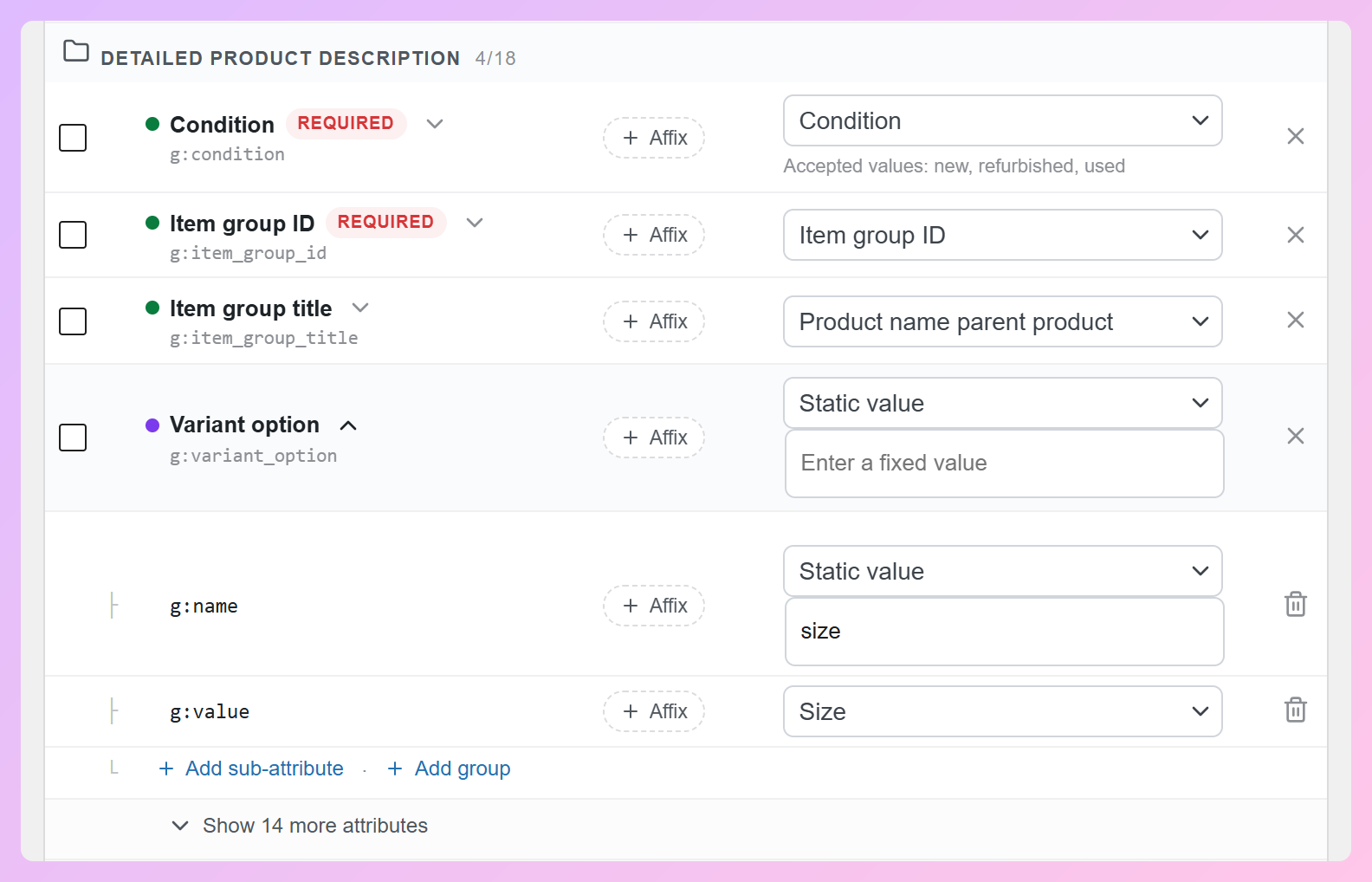
Need more than one variant dimension, like size and color? Click Add group and set up a second variant option the same way.
Step 6: Refresh and check the feed
Save your changes and refresh the feed. Then open the generated feed file and check for the new tags. Here’s an XML example showing the item group title, variant option, and question-and-answer fields for a large hoodie:
<g:item_group_title>Hoodie with Zipper</g:item_group_title>
<g:variant_option>
  <g:name>size</g:name>
  <g:value>L</g:value>
</g:variant_option>
<g:question_and_answer>
  <g:question>Is this hoodie machine washable?</g:question>
  <g:answer>Yes. Wash it cold and tumble dry low.</g:answer>
</g:question_and_answer>
If you add certification details, make sure the authority, name, code, or value matches the requirements for that product’s supported certification. Once Google fetches your updated feed, check Merchant Center for any issues. Our guide to Google Merchant Center diagnostics shows you where to look.
Tips For Filling In Your New Attributes
You can map values from a product field (like a custom field), a WooCommerce attribute (like Size), or a static value that applies across the feed. Our guide to field mapping walks through those choices. Before you refresh, it’s worth checking that each product has the information its mapped attributes need.
Only send what your products actually have
AdTribes can still write a group to the XML when one of its mapped fields is empty. But Google requires both a question and an answer for Q&A, and both a name and value for a variant option. Check your generated feed for missing values, then adjust your mappings or feed filters so you only submit complete, accurate information.
Keep your answers accurate and about the product
Keep Q&As focused on the product, with accurate answers rather than prices, dates, or promotional details. For answers that differ by product, use a product-specific field. A static value makes sense only when the same answer is true for every product in that feed.
Upload documents and videos first, then link them
Add product manuals or size guides as PDFs in your Media Library, or use another publicly accessible PDF URL. For videos, use YouTube links or direct links to supported video files from another host, not a page containing only a video player. Google needs to be able to access both. You can send up to 5 documents and up to 10 videos per product.
Use the same product IDs your feed already sends
For related products, the identifier has to match the other product’s ID exactly as it appears in your feed. If you’d rather use GTINs, set the identifier type to gtin and enter the other product’s GTIN instead.
Match your variants to your product page
The name and value you send in variant option should match the choices shown on the product page. Variations sharing an Item group ID must use the same set of option names, with a unique combination of values for each variation. Mapping from your WooCommerce attributes helps keep them consistent, but check the product page too, especially if you customize how variation names appear.
Map certifications where they apply
For a supported certification, map the authority, name, and the code or value Google requires for that certification. Use a static value only when it truly applies to all products in the feed. Product-specific certification codes should come from product-specific fields. The grouped setup is similar to the one in our guide to adding product details to your Google Shopping feed.
Frequently Asked Questions
What are Google conversational attributes?
They’re optional Google Merchant Center attributes that give Google more product detail for conversational search, like AI Mode in Google Search. Google lists six: question and answer, document link, related product, item group title, variant option, and popularity rank.
Are the new Google Shopping attributes free in AdTribes?
Yes. All eight updates are part of AdTribes Product Feed Pro, the free plugin, starting with version 13.5.9. You’ll find them on the Google Shopping channel’s Field Mapping tab.
Will conversational attributes get my products into AI Mode?
There’s no guarantee, since Google decides what shows in AI Mode. What these attributes do is give Google more accurate detail about your products to work with. Google also says adding them won’t affect the approval status of your existing products.
How many questions and answers can I add per product?
Up to 30. Google allows up to 1,000 characters for each question and each answer, with a total of 10,000 characters across all of a product’s questions and answers.
How many video links can I send to Google Shopping?
Up to 10 per product. AdTribes Product Feed Pro shows a counter as you add them, and it won’t send more than 10, even if more are set up.
Wrapping Up
Some of the details shoppers want may already be on your product pages. Google conversational attributes give you another way to include that information in your feed, alongside the product data you already send.
Here’s what to do next:
- Pick the attributes that answer your shoppers’ most common questions.
- Add them to your Google Shopping feed and refresh it.
- Run through the tips to make sure every value is filled in and accurate.
Version 13.5.9 brings a few more updates too, including conversion tracking for each of your feeds and a new way to bring feeds over from CTX Feed and RexFeed. Each one gets its own post, so keep an eye on the blog.
Ready to add more helpful details to your feed? Get started with AdTribes Product Feed Pro 13.5.9 and try the new Google conversational attributes for your products.