Reviewed by
Welcome to our Black Friday WooCommerce store guide! As the biggest shopping event of the year approaches, it’s important to prepare your online store for the surge of eager shoppers looking for the best deals. Thankfully, using the right strategies can turn this sales extravaganza into a remarkable opportunity to boost your profits and grow your customer base.
In this guide, we’ll walk you through 6 essential tips to prepare your store for Black Friday and ensure it stands out amidst the competition. In addition, we’ll explore a powerful WooCommerce product feed solution that can extend your reach, visibility, and sales across various sales channels. This will help draw more attention to your offerings, boosting your profits even further!
So let’s jump right in!
Black Friday: Important Dates To Remember
Black Friday is a major annual sales event following Thanksgiving. It signifies the unofficial beginning of the holiday shopping season, as retailers provide substantial discounts and exclusive promotions both in physical stores and online. It has since become a global phenomenon, with shoppers around the world taking advantage of the deals.
This year, Thanksgiving falls on Thursday, November 26, 2026, so Black Friday lands on Friday, November 27, and Cyber Monday follows on Monday, November 30.
Scheduling your Black Friday WooCommerce store sale
Savvy business owners often launch impressive deals in the days leading up to and following Black Friday. The timing of your sales is flexible and should be tailored to fit your business needs and audience preferences.
Here’s an example of how a sales schedule might look this year:
- Early Black Friday: Kick things off a week or two before Black Friday itself. For instance, you could run this from Friday, November 13, to Wednesday, November 25.
- Black Friday: The main event happens on Friday, November 27, offering traditional Black Friday deals.
- Small Business Saturday: Celebrated the day after Black Friday, this falls on Saturday, November 28.
- Cyber Monday: A one-day event that boosts sales with special deals on Monday, November 30, right after Black Friday weekend. Black Friday and Cyber Monday go well together, so many retailers take advantage of the extended shopping period to maximize sales.
- Cyber Monday Extended: Continue the promotions after Monday, stretching the sale from Tuesday, December 1, to Friday, December 4. This creates a long and profitable Black Friday Cyber Monday (BFCM) sales period.
You can also take advantage of other key shopping dates:
- Green Monday: This falls on Monday, December 14 this year, and it’s a popular online shopping day.
- Free Shipping Day: Usually held in mid-December, it’s an ideal time to offer free shipping for last-minute holiday shoppers.
Black Friday: Redefining Profit Potential For WooCommerce Owners
Holding WooCommerce Black Friday sales can provide many benefits, including:
1. Increased sales opportunities: Black Friday is one of the year’s highest shopping days, presenting a significant opportunity for stores to boost sales and revenue. Customers are actively looking for deals, making them more likely to purchase.
2. Customer acquisition: This event can help attract new customers. Offering compelling discounts can draw in shoppers who may not have previously visited your store, increasing your customer base.
3. Inventory clearance: Black Friday provides a perfect opportunity to clear out old inventory. Selling discounted items can help make room for new products, improving your stock turnover rate.
4. Better brand visibility: Participating in Black Friday promotions can increase brand awareness. By standing out with attractive offers, you can gain visibility among a larger audience, potentially leading to long-term customer loyalty.
5. Boost in online traffic: During Black Friday, the rise in online shopping often results in a notable spike in website traffic for WooCommerce store owners. This influx can lead to improved conversion rates and more sales.
6. Cross-selling and upselling opportunities: Black Friday promotions can encourage customers to explore more products. Bundling items or offering related products at a discount can increase the average order value.
7. Data and insights: The influx of sales during Black Friday provides valuable data on customer preferences and behaviors. Analyzing this information can help refine future marketing strategies and improve product offerings.
8. Marketing and engagement: Black Friday allows store owners to engage with customers through targeted marketing campaigns, email promotions, and social media. This engagement can strengthen customer relationships, encouraging repeat business.

Black Friday statistics
Do you need further proof of Black Friday’s importance to e-commerce store owners? Then let the numbers speak for themselves!
According to the National Retail Federation, last year’s Thanksgiving weekend set a new record:
- A record 202.9 million people shopped during the five days from Thanksgiving to Cyber Monday 2025.
- 134.9 million of them shopped online, up 9% from the year before, compared with 129.5 million in stores.
- Black Friday was still the top shopping day, drawing 85.7 million online shoppers. Cyber Monday followed with 75.9 million, up from 64.4 million.
- The most popular gifts were clothing and accessories (51%), toys (32%), books and other media (28%), and gift cards (26%).
How do you maximize sales on Black Friday?
To maximize sales on Black Friday, start by planning early and creating a well-targeted marketing campaign to build anticipation. Offer significant discounts and limited-time deals to create urgency and encourage quick purchases. Connect with a wide audience by using social media, email marketing, and paid ads.
Furthermore, ensure your WooCommerce site is optimized for mobile shopping and can handle high traffic. Additionally, streamline the checkout process to reduce abandoned carts, and consider offering special perks for high-value orders.
Lastly, analyze past sales data to tailor your offers to customer preferences and increase overall sales.
With all that in mind, let’s take a closer look at these ideas!
Your Black Friday WooCommerce Store Playbook: 6 Major Tips For Success
Now that you see how profitable Black Friday can be, let our Black Friday WooCommerce store playbook guide you in maximizing your success during this shopping frenzy.
Tip #1: Start preparing early
Getting a jump start on your Black Friday preparations is essential for success. Begin at least a few weeks in advance to set yourself up for a winning sales event.
For instance, this early preparation allows you to assess your inventory and ensure your store can meet the expected demand. If you anticipate selling a lot of a particular item, like a popular gadget or holiday gift, having ample stock will keep customers happy and prevent lost sales.
Additionally, use this time to fine-tune your marketing strategies. Craft enticing promotions and discounts that will grab attention. Consider using email campaigns and social media teasers to build anticipation.
Finally, take a good look at your website. Optimize its performance to accommodate higher traffic levels and resolve any potential issues in advance. This ensures your customers enjoy a pleasurable shopping experience, potentially resulting in more sales and repeat business.
Starting early is not just smart; it’s your ticket to a successful WooCommerce Black Friday campaign!

Tip #2: Identify your key sales dates
Choosing the right dates for your Black Friday promotions is necessary for maximizing impact. Start by pinpointing not only Black Friday itself but also other significant shopping days like Cyber Monday and Small Business Saturday.
For example, if you run an online store, consider launching a week-long promotion leading up to Black Friday. This way, you can build momentum and capture early shoppers eager for deals. Also, don’t forget about the days after Black Friday, as many customers continue to shop for gifts and discounts.
When you strategically plan your sales calendar, you can effectively tap into consumer excitement and maximize your sales potential!
Tip #3: Optimize your website
Before Black Friday arrives, ensure your website is fully prepared to handle increased traffic. A smooth and user-friendly online experience can significantly impact your conversion rates. Here are key areas to focus on:
1. Test your website’s speed
Website speed is necessary during high-traffic events like Black Friday. If your site doesn’t load quickly enough, potential customers may grow frustrated and leave without giving your offers a look.
To assess your site’s loading speed, use tools like GTmetrix or Google PageSpeed Insights. Aim for a load time of under three seconds. If your site is slower, consider reducing the number of plugins, optimizing images, or using a content delivery network (CDN) to speed things up.
Lastly, you could even invest in a more powerful hosting solution to prepare your store for Black Friday.
2. Ensure mobile-friendliness
Today, a significant portion of shoppers use their mobile devices to browse and purchase. Thus, having a mobile-friendly website is non-negotiable.
Check that your website is responsive, meaning it adapts to different screen sizes. Furthermore, ensure buttons are easy to tap, text is readable without zooming, and images load quickly.
3. Streamline the checkout process
A complex checkout process can cause shoppers to abandon their carts, especially during the busy shopping season.
Make checking out more convenient by reducing the number of steps required to complete a purchase. Offer guest checkout options to avoid frustrating customers who don’t want to create an account. Additionally, clearly display delivery times and shipping costs upfront to prevent surprises during checkout.
4. Test your payment processing system
If customers encounter issues while trying to pay, they’re likely to abandon their carts. Therefore, a smooth payment experience is essential.
Test your payment processing system in advance to ensure it functions properly. Make sure it supports multiple payment options, such as credit cards, PayPal, and digital wallets. Moreover, run through a few test transactions to identify any potential hiccups.
5. Monitor and prepare for high traffic
Anticipate increased traffic on your site during Black Friday and prepare accordingly.
Are you expecting a surge in visitors? Then consider upgrading your hosting plan to accommodate higher traffic levels. In addition, regularly monitor your site’s performance during the sale to quickly address any technical issues that may arise.

Tip #4: Create a powerful Black Friday marketing campaign
An impactful marketing campaign can be the key to attracting shoppers on Black Friday. To stand out in the crowded marketplace, you must craft a strategy that captures attention and drives sales.
1. Start early and build anticipation
Kick off your campaign weeks in advance to generate buzz around your Black Friday deals. Entice your audience with previews of upcoming promotions, exclusive discounts, or special events.
Leverage social media posts and email newsletters to announce countdowns or spotlight popular items that will be available for sale. This creates excitement and encourages customers to mark their calendars.
2. Offer promotions and discounts
Offering attractive promotions and discounts is a surefire way to draw in customers. Consider providing tiered discounts, buy-one-get-one deals, or exclusive offers for loyal customers.
For example, you can encourage larger purchases by creating limited-time discounts on popular products or bundling items at a reduced price.
Pro Tip: Use Advanced Coupons to create coupons, gift cards, and various deals to boost your Black Friday promotion. And remember, classic product discounts are still key for Black Friday, and this flexible WooCommerce tool makes them easy to set up. With Advanced Coupons Premium, a single coupon can even unlock bigger discounts as the cart grows, thanks to its Tiered Cart Discount.
In addition, consider rewarding your most loyal customers with early access or exclusive discounts to show appreciation and build excitement. VIP deals can not only boost customer loyalty but also create a sense of exclusivity that encourages others to engage with your brand.
For instance, you can send personalized emails offering members of your loyalty program access to your Black Friday sale 24 hours early. Alternatively, you could give them bigger discounts than the general public to make them feel special.
Pro Tip: Use the Advanced Loyalty Program plugin to create a points-based rewards system that encourages repeat purchases and boosts customer loyalty. This plugin can keep customers engaged before, during, and after your Black Friday campaign ends!
3. Launch giveaways or donations
Consider running a giveaway or promoting a charitable cause as part of your Black Friday campaign. This can help boost engagement and strengthen your brand image.
Offer a prize to customers who tag friends in the comments or share your post. Alternatively, pledge a portion of your Black Friday sales to a charity, encouraging customers to shop for a good cause.
4. Leverage retargeting ads
Retargeting ads are a key marketing strategy that helps recapture interest from potential customers who may have left your site without making a purchase.
Use Facebook or Google retargeting ads to show customers the exact items they viewed recently or left in their cart, with added incentives like a WooCommerce discount or free shipping.
5. Highlight social proof
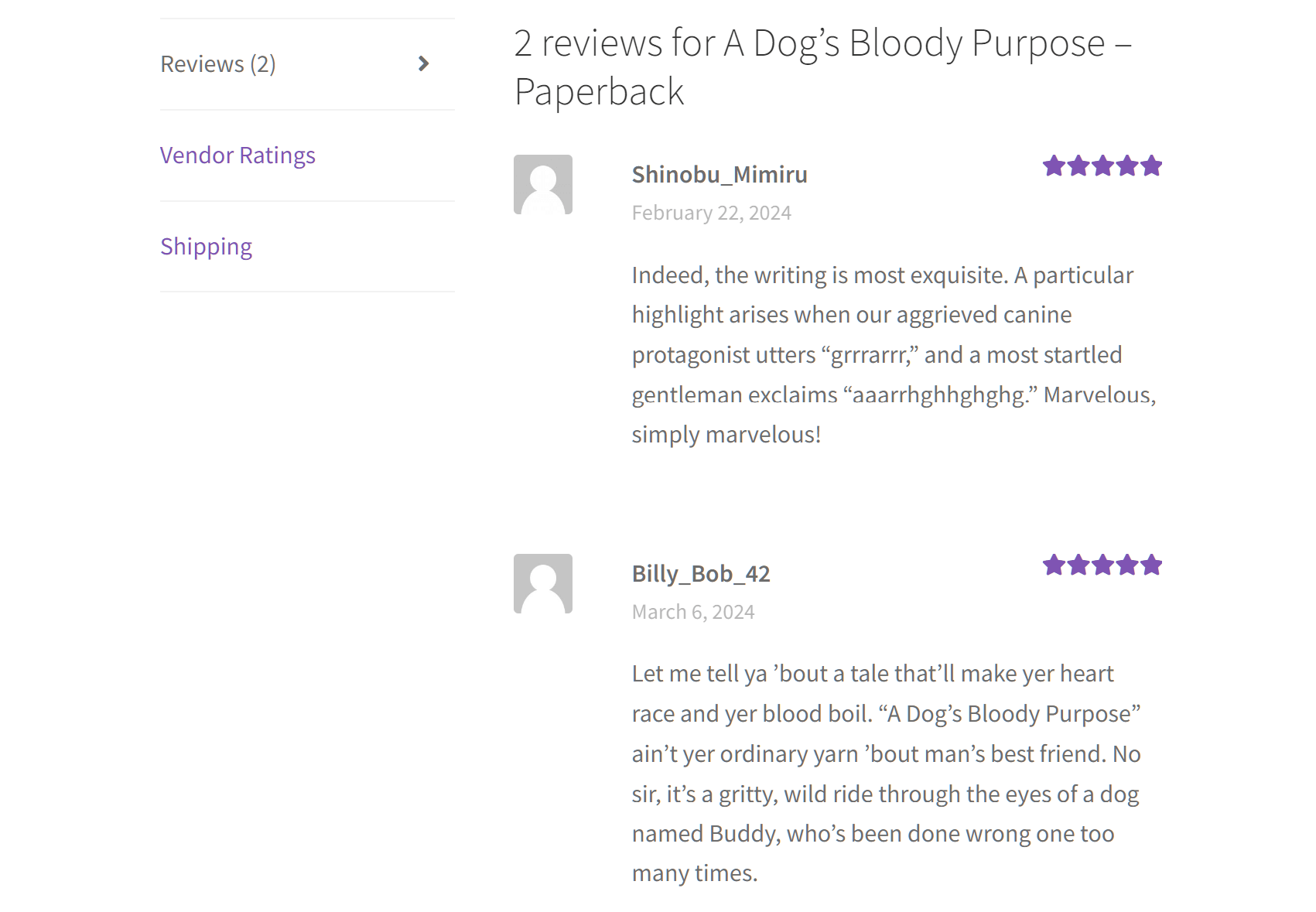
Social proof is essential for establishing trust with potential customers, particularly during significant shopping events like Black Friday.
Thus, consider displaying customer reviews prominently on product pages. Furthermore, you could share testimonials or user-generated content on your social media accounts to instill confidence in your products.
6. Create urgency and scarcity
Incorporating urgency and scarcity into your marketing can compel customers to act quickly. Thus, highlight limited-time offers or limited stock on popular items to encourage immediate purchases.
For instance, include statements such as “Sale ends in 2 hours!” or “Only 10 left in stock!” in your promotional materials. Such tactics create a sense of urgency that drives customers to buy before it’s too late.
7. Collaborate with affiliates and influencers
Leverage an affiliate marketing program to incentivize others to promote your products. Affiliates receive commissions for each sale they make, helping to expand your reach and draw more traffic to your store.
For instance, you can offer affiliates a 10% commission on every sale they refer. Then, when an affiliate shares a link to your store on their blog or social media and a follower makes a purchase through that link, the affiliate earns a commission on the sale.
To take your marketing even further, partner with influencers who resonate with your brand. Their endorsement can expose your products to a broader audience and boost your credibility, facilitating the process of attracting new customers.
For example, you can reach out to a lifestyle influencer on Instagram who has a following that matches your target audience. Offer them a free product in exchange for a review or a shoutout on their feed. They could create a post demonstrating how they use your product, tagging your brand and encouraging their followers to check it out.

8. Use multiple channels
Don’t limit your marketing efforts to just one platform. To expand your audience, use a combination of channels such as social media, email marketing, and paid ads.
Share engaging posts on platforms like Instagram and Facebook showcasing your deals while sending targeted email campaigns to loyal customers with personalized offers. Also, consider running Google Ads to capture shoppers actively searching for Black Friday deals.
💡 PRO TIP: Want your deals on even more channels? AdTribes Product Feed Pro comes with 250+ channel templates, including Google Shopping, Meta, Pinterest, TikTok, and Amazon. You can also send an OpenAI product feed, so your products are easier for AI shopping agents to find and compare when shoppers ask for Black Friday deals.
9. Use email marketing
One of the most effective ways to connect directly with your customers is using email marketing. Therefore, craft engaging email campaigns that highlight your Black Friday deals, remind customers of important dates, and encourage them to take action.
For instance, you can create email segments, then send personalized offers based on past purchases or customer preferences. Don’t forget to use eye-catching subject lines to improve open rates and include clear calls to action!
10. Extend your sale duration
Instead of limiting your Black Friday deals to just one day, consider extending the sale to a weekend or even a week-long event. This gives customers more time to take advantage of your offers, increasing your chances of making sales.
Why not turn Black Friday into a “Cyber Week” event providing daily discounts on different product categories? This approach not only keeps customers engaged longer but also allows them to shop at their convenience.

Tip #5: Set up tracking and analytics for e-commerce
To maximize your Black Friday results, keep a close eye on your sales performance and customer behavior. E-commerce analytics give you valuable insights into what strategies are successful and where improvements are needed.
1. Use tools to monitor sales
Tracking tools like Google Analytics or built-in WooCommerce reports help you monitor real-time sales and customer actions. This data allows you to see which products are performing well and where visitors are dropping off.
If you notice that certain product pages have high traffic but low sales, you can adjust the product descriptions, images, or pricing to improve conversions.
AdTribes Product Feed Pro is a WooCommerce plugin whose Conversion & Google Analytics tab adds UTM parameters to your product links. That way, you can see in Google Analytics how much traffic and how many sales each sales channel brings in. More on this versatile plugin below!
2. Analyze customer behavior
Understanding how customers navigate your site is essential for optimizing the shopping experience. Look at which pages they visit most often, how long they stay, and where they abandon their carts.
For example, if customers often abandon their carts during checkout, you could streamline the process or provide incentives, such as free shipping, to motivate them to finalize their purchases.
3. Adjust your campaigns
E-commerce analytics allow you to make real-time adjustments to your Black Friday campaign. If a promotion isn’t generating the expected results, you can tweak it to improve performance.
If your ads aren’t getting enough clicks, consider testing different headlines or visuals. You could even target new customer segments based on the data you’ve collected.

Tip #6: Streamline your operations with automation
Automating key processes can save time and ensure your Black Friday sale runs smoothly. When you set up automation, you can focus on strategy while routine tasks are handled efficiently.
1. Automate order processing
Automation tools can manage order processing, from inventory updates to customer notifications, reducing manual errors and speeding up fulfillment.
Use WooCommerce plugins or third-party tools to automatically send order confirmation emails and update stock levels when a purchase is made.
2. Schedule marketing emails
Prepare your email marketing campaigns ahead of time so that deal promotions, cart reminders, and special offers are automatically sent at the most effective times.
For example, use Drip to schedule an email series reminding customers of your Black Friday deals, offering last-minute discounts or exclusive promotions to entice them.
3. Use chatbots for customer support
Chatbots can handle common customer inquiries, like product availability or shipping details, without needing constant human oversight.
For example, you can add a WooCommerce chatbot to your site to recommend products or answer FAQs. This ensures customers get instant responses even during peak shopping times.
4. Send push notifications
Push notifications are a great way to engage customers in real time, promoting flash sales or last-minute deals straight to their devices.
You can use a multi-channel engagement platform like PushEngage to automate push notifications. These notifications alert customers about limited-time offers, restocked products, or cart abandonment reminders, driving them back to your store.
PushEngage also supports WhatsApp automation for WooCommerce. This lets you automate sending direct messages from your WooCommerce store to customers on WhatsApp.
5. Use social media management tools
When you schedule and automate your social media posts, you can engage and update your audience without needing to manually post during the hectic sale period.
For example, you can use Buffer to plan and schedule posts in advance. This allows you to focus on running your sale while your social media campaigns run automatically.
💡 PRO TIP: Your product feeds can run on autopilot too. AdTribes Product Feed Pro refreshes your feeds on a schedule, and it now supports the WordPress Abilities API. Once your site is connected through an MCP adapter, such as StoreAgent’s free WooCommerce MCP server, a compatible AI assistant can review your feeds, check them against each channel’s required fields, and regenerate them when your Black Friday prices change.

Using Product Feeds To Boost Your Reach, Visibility, And Sales During Black Friday
Do you want to boost your profits even further this Black Friday Cyber Monday? Then you must showcase your offerings not only on your WooCommerce store but also across various sales channels, such as Google Shopping, Facebook, and others. This enables you to connect with customers from these additional channels, expanding your exposure and significantly boosting your reach, visibility, and sales.
This is where product feeds come in.
What is a product feed?
A product feed is a structured data file that includes an organized list of your products along with their details, such as titles, descriptions, prices, availability, and more. By submitting these feeds to various platforms (like Google Shopping and Bing), you enable them to display your products to their users. This allows you to present your items to both your existing customers and new shoppers on other sales channels, ultimately broadening your reach and increasing your sales opportunities.
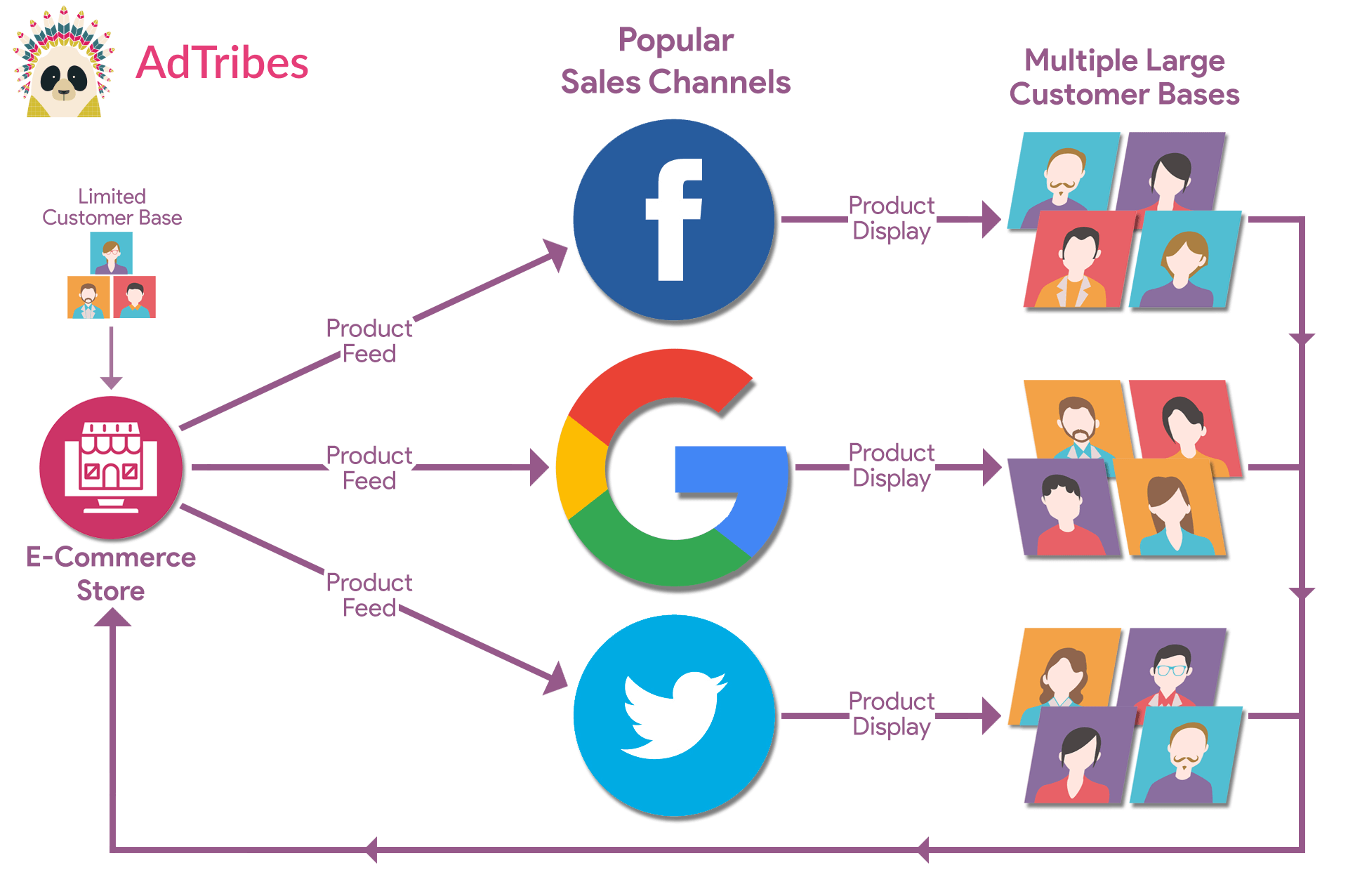
To create product feeds, you need a product feed manager. An excellent example is AdTribes Product Feed Pro, a popular WooCommerce plugin for generating product feeds, with 250+ channel templates.
This plugin has a free version (AdTribes Product Feed Pro) and a premium version (AdTribes Product Feed Elite). While both enable the creation of effective feeds, the latter comes with more features allowing you to customize your feeds to meet all your unique needs.
Eager to learn how to create product data feeds? Then check out our comprehensive guide:
What Is A Product Feed And How Do You Create One? (Ultimate Guide)
So, how do you use product feeds to boost your Black Friday WooCommerce store sales?
The answer is the Filters tab. Basically, you can use filters to tell a sales channel to show selected items only. This is extremely useful when you want precise control over what to showcase to a channel’s customers.
What is a product feed filter?
A product feed filter is an instruction, taking the form of an if-then statement, that tells a sales channel to:
- Include only the products you want to display, and/or
- Exclude products you don’t want to display
Using filters allows you to conceal or show products however you want. As you’ll see below, the customization options are endless!
How do you use product feed filters to showcase specific products?
Imagine you’re selling various goods but only want your costume collection to appear on Google Shopping. In the Filter Builder, add a condition to the Include section that matches your “Costumes” category. Then add a second condition, Sale price Is Not Empty, so only your discounted costumes make the cut. You can also use the Exclude section to leave out anything with a Price Less Than 30:
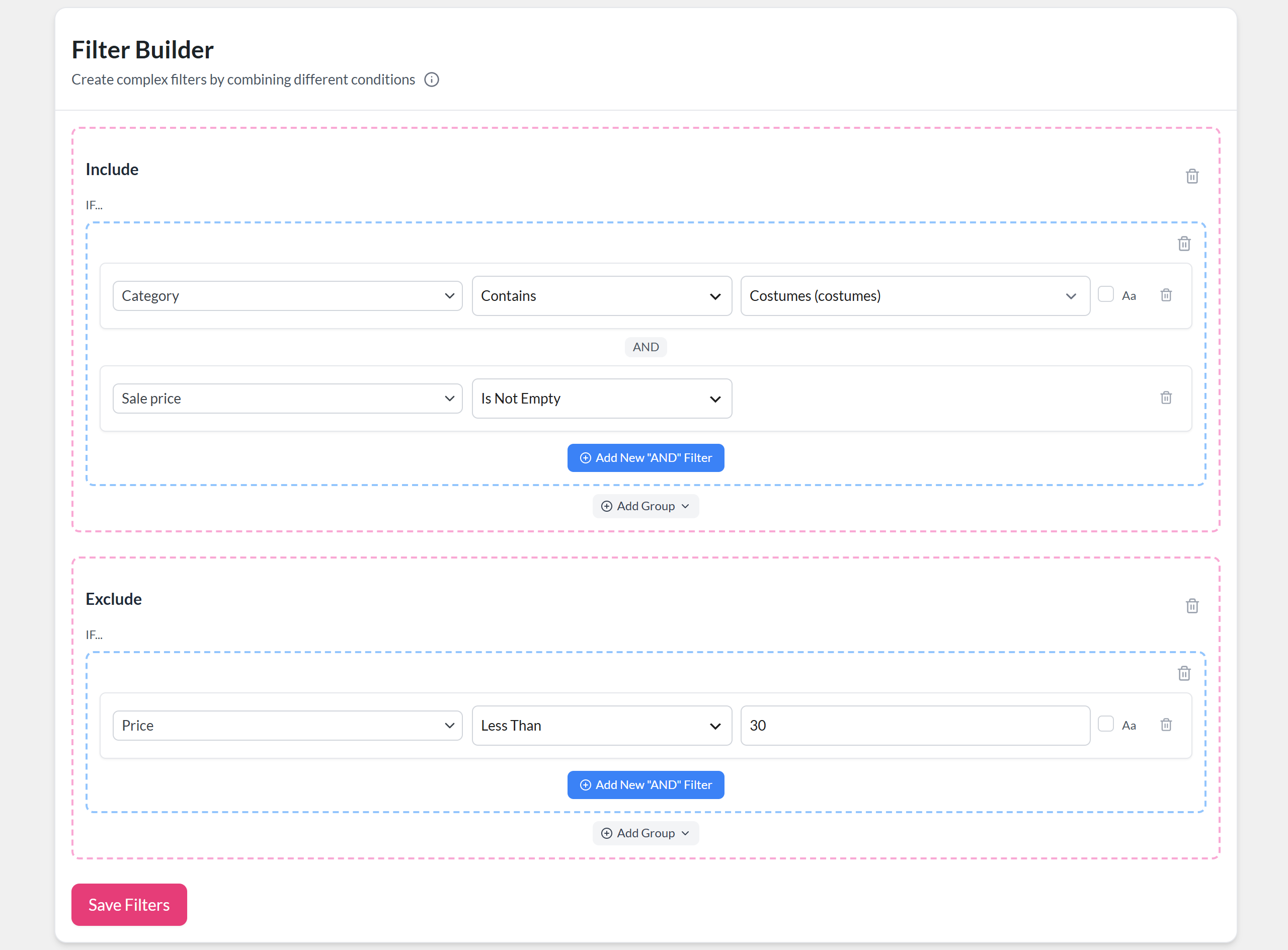
We walk through each step, plus how to join groups of conditions with AND or OR, in our Black Friday checklist. For more examples, read this document as well as this one.
Once your filters are in place, simply finish the product feed creation process and generate your product feed. Then, submit the feed to a sales channel!
You can generate multiple product feeds and distribute them to as many sales channels as you desire. Additionally, you can configure unique feed filters for each channel, improving product visibility and optimizing your Black Friday marketing efforts!
Do you want more information on product visibility? Then check out our article:
WooCommerce Product Visibility: How To Display Or Hide Products

Frequently Asked Questions About Black Friday
Let’s answer some common queries about Black Friday!
When is Black Friday 2026?
Black Friday 2026 falls on Friday, November 27, the day after Thanksgiving (Thursday, November 26). Small Business Saturday follows on November 28, and Cyber Monday is on Monday, November 30.
Why do Black Friday deals go live weeks in advance?
Many retailers start their Black Friday deals weeks in advance to build anticipation and extend the shopping window. This strategy helps attract early shoppers, allows for better inventory management, and spreads out traffic to avoid overwhelming their systems on the actual day. Launching deals early also lets you capture sales from customers who prefer shopping at their own pace instead of during the typical rush.
Does Black Friday apply to online sales?
Yes, Black Friday applies to online sales just as much as it does to in-store shopping. In fact, many retailers focus on their online offerings, often providing exclusive online deals and promotions. According to the NRF, more people shopped online than in stores over Thanksgiving weekend 2025, so it pays to run your Black Friday campaign online too.
How do you advertise a Black Friday sale?
Start teasing your deals a week or two early through email and social media, then add paid ads, like Google Shopping and social ads, as Black Friday gets closer. A product feed helps your sale prices show up across shopping channels, and a Google Shopping promotion can put your coupon code right on your listings.
Conclusion
Black Friday presents incredible opportunities for online store owners. However, to make the most of this profitable season, you must know how to maximize your sales effectively.
Fortunately, by using the strategies outlined in our Black Friday WooCommerce store guide, you’re well-prepared to approach the holiday shopping rush with confidence and success.
To recap, this guide helps you prepare for Black Friday success by exploring the following strategies:
- Start preparing early
- Identify your key sales dates
- Optimize your website
- Create a powerful Black Friday marketing campaign
- Set up tracking and analytics for e-commerce
- Streamline your operations with automation
Moreover, consider using product feeds to boost your reach, visibility, and sales across sales channels such as Google Shopping and Facebook. You can get started with the free AdTribes Product Feed Pro plugin today!
Do you have any questions about how to run your Black Friday campaign successfully? Feel free to reach out to us; we’d be happy to help!